

You're probably here because your roadmap has an AI feature that looks valuable, but the obvious path looks expensive. You don't have a giant labeled dataset. You don't want to train a model from scratch. And you need to know whether transfer learning is a smart shortcut or a technical debt trap.
That's the right question.
For most product teams, transfer learning is the practical middle ground between using a generic model as-is and building a custom model from zero. It's often the fastest route to a usable vision, language, or speech feature, but only when the source model and your task are closely related.
What Is Transfer Learning And Why It Matters for Your Roadmap
- Direct answer: Transfer learning means taking a model that was already trained on one task or domain and adapting it to a new, related task.
- Business benefit: It usually lets teams ship AI features faster because they start from existing learned representations instead of a blank model.
- Key action: Treat it as a product decision, not just a modeling trick. Ask whether your feature is close enough to an existing model's strengths.
If you're a CTO, founder, or product lead, the appeal is simple. You want the shortest path from idea to production without hiring a research lab or waiting for months of data collection. Transfer learning exists for exactly that kind of constraint.
The formal framing goes back to a widely cited 2009 survey by Sinno Jialin Pan and Qiang Yang, later summarized in a ScienceDirect overview of transfer learning sufficiency. The core idea is to use knowledge from a source domain or task to improve learning in a target domain or task, especially when traditional machine learning struggles because training and test data come from different distributions.
That matters on a roadmap because many AI product ideas start with limited labeled data. You may have a few hundred support tickets tagged by intent, a small archive of defect images, or a narrow set of compliance documents. Training from scratch on that kind of dataset usually isn't the best first move.
A better first question is this: can you adapt an existing model that already understands the basics of your domain? In language, that might mean starting from a pretrained transformer. In computer vision, it often means reusing a model that already recognizes general visual patterns. If you need a broader business primer before choosing where AI belongs in your stack, Wonderment Apps' guide to AI is a useful companion read. For teams evaluating modern model categories, this overview of what a large language model is helps clarify where transfer learning fits versus prompt-only approaches.
How Transfer Learning Actually Works
A simple way to understand transfer learning is to think about an experienced chef learning a new recipe. The chef doesn't relearn how to hold a knife, control heat, or balance salt and acid. Those fundamentals already exist. The chef only needs to adapt to the new dish.
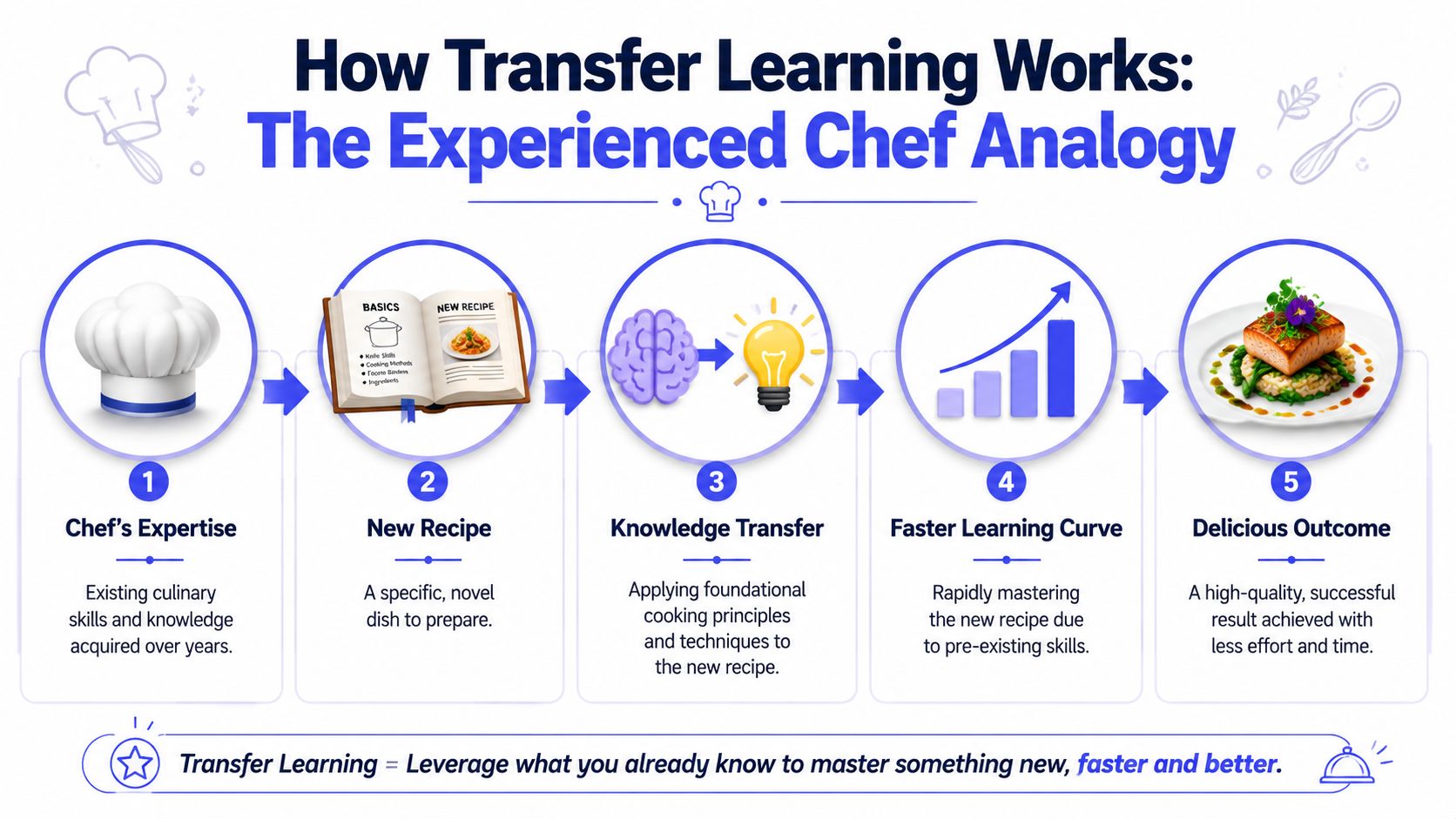
That's how modern deep learning teams use pretrained models. The model already learned useful lower-level patterns from earlier training. In images, those early layers often capture generic features like edges and textures, while later layers capture task-specific patterns, as explained in this overview of transfer learning fundamentals. Because of that split, teams often freeze most of the backbone and adapt only the final layers.
What gets reused
In practice, a pretrained model gives you three valuable assets:
- Learned representations: The model has already encoded broad structure from prior data.
- A tested architecture: You avoid designing and validating a network from scratch.
- A better starting point: Optimization usually begins from weights that already “understand” something relevant.
That's why transfer learning often works well in computer vision, natural language processing, speech, and sequence modeling. The base model already knows enough to give your team a head start.
Practical rule: If your new task shares low-level structure with the original training task, transfer learning is often worth trying first.
What your team actually changes
Most transfer learning projects look like this:
- Start with a pretrained base model from a framework or model hub.
- Replace the final task-specific layer so the outputs match your use case.
- Freeze early layers so their weights stay unchanged.
- Train the new top layers on your labeled data.
- Optionally unfreeze some upper layers later if the model needs a closer fit.
A computer vision example makes this concrete. Say your team wants to classify damaged versus undamaged product photos. A pretrained vision model already knows general visual structure. You don't need to teach it what edges, corners, and textures look like. You need to teach it what your damage patterns look like.
For teams that prefer a quick visual explanation, this video gives a useful walkthrough before you scope the implementation work.
Why this is cheaper than starting over
The savings come from not retraining the whole model blindly. You reuse what's already general and spend your effort on the parts that need task-specific adaptation. That usually means less data preparation, less compute pressure, and fewer training cycles before you get a baseline worth evaluating.
Choosing Your Strategy Feature Extraction vs Fine-Tuning
Most leaders don't need a lecture on transfer learning theory. They need a decision rule. In practice, your team will usually choose between feature extraction and fine-tuning.
A major reason transfer learning became a default deep learning workflow is that pretrained model reuse became easy to operationalize. Deep learning guides describe the standard pattern as freezing earlier layers, training new layers, and then optionally fine-tuning with a low learning rate, which is why teams can reduce dependence on large labeled datasets while still improving fit. Clarifai's transfer learning guide captures that shift well.
The fast option
Feature extraction means you keep the pretrained backbone mostly frozen and train only the new output head. This is the lower-risk option when your task is fairly close to the model's original strengths.
Use it when:
- You need speed: You want a strong baseline quickly.
- Your dataset is small: Full retraining would overfit easily.
- Your task is familiar: The source model likely already captures most relevant patterns.
The more flexible option
Fine-tuning means you unfreeze some of the upper layers and continue training them on your data. This gives the model more freedom to adapt, but it also creates more room to overfit or drift.
Use it when:
- Your task differs in meaningful ways: Generic features help, but the decision boundary is domain-specific.
- Your baseline is close but not good enough: Feature extraction gets you part of the way.
- You have enough engineering maturity: Training controls, validation discipline, and monitoring matter more here.
If your team is specifically looking at parameter-efficient adaptation in generative systems, Armox Labs has a practical guide to Lora for designers that helps non-research teams understand when lightweight adaptation is enough. For LLM-specific adaptation choices, this guide on fine-tuning an LLM is the more relevant internal follow-up.
Feature Extraction vs. Fine-Tuning
| Criterion | Feature Extraction | Fine-Tuning |
|---|---|---|
| Setup speed | Faster to implement | Slower, with more tuning work |
| Compute needs | Lower | Higher |
| Data requirement | Better fit for small labeled datasets | Usually benefits from more target data |
| Overfitting risk | Lower | Higher if handled carelessly |
| Task similarity needed | Works best when source and target are very close | Better when some adaptation is necessary |
| Potential upside | Strong baseline with limited effort | Better fit when baseline misses domain details |
| Team skill requirement | Moderate | Higher, especially around training diagnostics |
Don't choose fine-tuning because it sounds more advanced. Choose it because the frozen-model baseline fails in a way that adaptation can plausibly fix.
A common mistake is starting with full fine-tuning because the team assumes “more training” means “more accuracy.” That's often wrong. The more practical path is staged: first prove value with feature extraction, then unfreeze layers only if the validation evidence says you should.
Practical Use Cases Across Your Tech Stack
Transfer learning becomes much easier to evaluate when you map it to backlog items instead of abstract model categories.
Computer vision example
A fintech product team wants document verification for onboarding. They don't have the data or appetite to train an image model from zero. A practical approach is to start with a pretrained vision backbone, add a task-specific classification or detection head, and train on their own examples of valid documents, rejected captures, blur, glare, and common fraud patterns.
This is a good transfer learning candidate because the base model already understands general image structure. The company-specific work is in defining what counts as acceptable versus suspicious in that workflow.
The same logic applies in manufacturing and marketplace products. A quality-control team can adapt a general vision model to spot cosmetic defects. A commerce team can reuse image representations to classify catalog photos into narrower product categories.
NLP and LLM example
A SaaS company wants to route support tickets by intent, urgency, and product area. They may only have a modest set of historical labels, but a pretrained language model already understands syntax, semantics, and common linguistic structure. The adaptation work becomes much narrower: teach the model how this company talks about billing issues, outages, and access requests.
Another example is content moderation. A platform can start with a general text or multimodal model, then adapt it for its own policy categories and escalation logic. The key gain isn't magic. It's that the model starts with broad language understanding instead of random weights.
Sequence and operational data example
Transfer learning also shows up in logs, telemetry, and event sequences. If your team needs anomaly detection in operational logs, a pretrained sequence model may provide a useful starting point when your environment resembles the kinds of sequential patterns the model has seen before.
That said, leaders should remain skeptical. The closer your data is to a specialized internal system with unusual event structures, the less you should assume a pretrained model will transfer cleanly.
Relatedness is the entire bet. If the source model learned from data unlike yours, transfer learning can waste time instead of saving it.
When transfer learning hurts
This is the part that beginner content often glosses over. Transfer learning works on related tasks. If the relationship is weak, you can get negative transfer, where reused knowledge hurts performance. AWS's definition of transfer learning frames it as retraining a model on a related task, and that word “related” carries most of the risk.
Avoid a transfer learning-first strategy when:
- Your domain is highly specialized: The pretrained model was built on data too far from your target environment.
- Your labels reflect local business rules: The hard part is policy logic, not pattern recognition.
- Your data is mostly tabular and organization-specific: General pretrained deep models may offer less advantage than classical methods or custom feature engineering.
- Your failure cost is high: In regulated or safety-sensitive contexts, “close enough” transfer can be dangerous if the evaluation setup is weak.
A useful CTO question is not “Can we fine-tune a model for this?” It's “What exactly from the source training should carry over to our problem?” If your team can't answer that in plain English, the project probably needs a narrower scope or a different method.
A 5-Step Workflow for Your First Transfer Learning Project
The first project should be boring in the best way. Pick one feature with a clear outcome, a small but usable dataset, and a production path your team already understands.
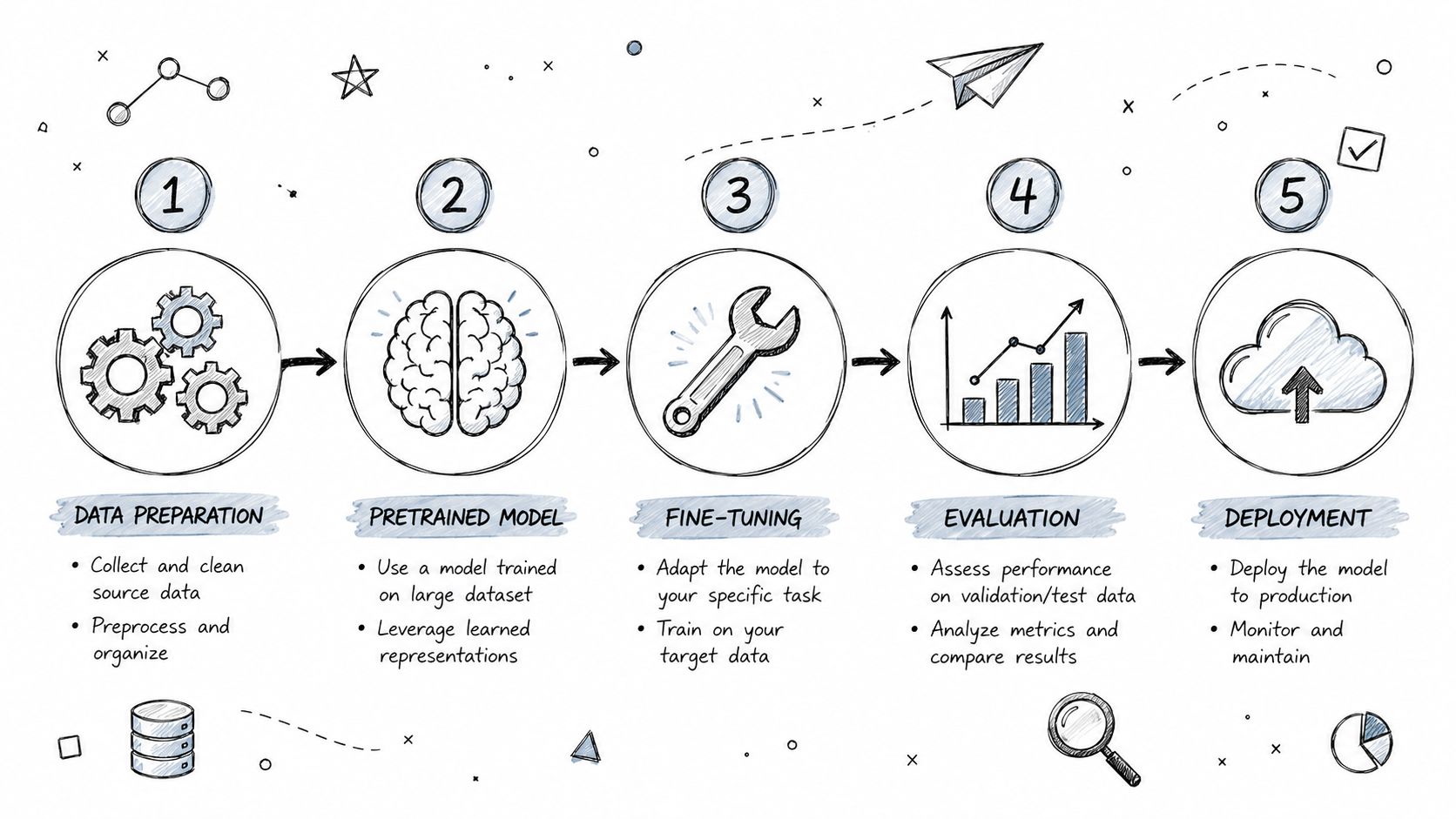
Step 1 Pick the model before you touch the training code
Start with candidate models from places your team already trusts, such as Hugging Face, TensorFlow Hub, PyTorch ecosystem repos, or vendor-supported model libraries. Don't optimize for novelty. Optimize for fit, documentation quality, and ease of deployment.
Create a short scorecard:
- Task fit: Was the model trained for something close to your problem?
- Input compatibility: Does it handle your text length, image size, or sequence format?
- Operational constraints: Can you serve it with your latency and infrastructure limits?
- Adaptation path: Can your team freeze, replace, and fine-tune the right layers without guesswork?
Step 2 Clean and shape the target dataset
Most transfer learning failures still come from data. Not model choice.
Your target dataset should reflect production reality, not a toy sample that flatters the model. For a support classifier, include ambiguous tickets and messy language. For image inspection, include bad lighting, poor framing, and edge cases. If your labels are inconsistent, transfer learning won't save you.
A lightweight checklist helps:
- Define labels tightly: Each class should have clear inclusion rules.
- Hold out a realistic validation set: Don't let near-duplicate examples leak across splits.
- Preserve hard examples: They reveal where transfer breaks.
- Augment carefully when useful: Especially for small image datasets.
Step 3 Start frozen, then earn the right to unfreeze
The safest implementation path is to freeze the base model, train the new head, and establish a baseline. If the model is close but not good enough, then consider unfreezing upper layers.
TensorFlow's transfer learning tutorial explicitly notes that fine-tuning should use a lower learning rate, and that small-dataset users often apply data augmentation to reduce overfitting. That advice sounds small, but it's operationally important. Teams skip it and then wonder why validation performance degrades as soon as they unfreeze layers.
Use a lower learning rate for fine-tuning than you'd use for training a fresh head. You're editing learned structure, not rebuilding it.
A representative workflow might look like this:
- Train the classifier head on frozen features.
- Check failure patterns, not just headline metrics.
- Unfreeze the top portion of the backbone only if needed.
- Fine-tune gently.
- Stop early if validation quality starts drifting.
Step 4 Evaluate for product fit, not lab vanity
Accuracy alone isn't enough. A model can look fine offline and still be wrong for the product.
Review at least four dimensions:
- Prediction quality: Is it right on the examples that matter commercially?
- Latency: Can it run inside your UX expectations?
- Inference cost: Is the serving profile acceptable at projected usage?
- Failure behavior: Does it fail safely, or does it produce high-confidence errors?
For MLOps planning, your deployment path should look familiar to your platform team. This guide on DevOps for machine learning is a good reference if your engineering org needs a cleaner bridge from notebook to production.
Step 5 Deploy small and monitor drift
The first launch should be narrow. Put the model behind a single product flow, human review step, or internal tool before expanding exposure.
Monitor:
- Input drift: Are production examples changing?
- Confidence patterns: Is the model suddenly more certain on low-quality inputs?
- Class balance shifts: Are certain categories appearing more often than before?
- Human overrides: Where do operators disagree with predictions?
That feedback loop matters more than squeezing out one more benchmark improvement before release.
Hiring Checklist Skills for a Transfer Learning Team
You don't need a huge AI org to run transfer learning well. You do need the right mix of practical skills. This work fails when a team knows models but not data, or knows training but not production.
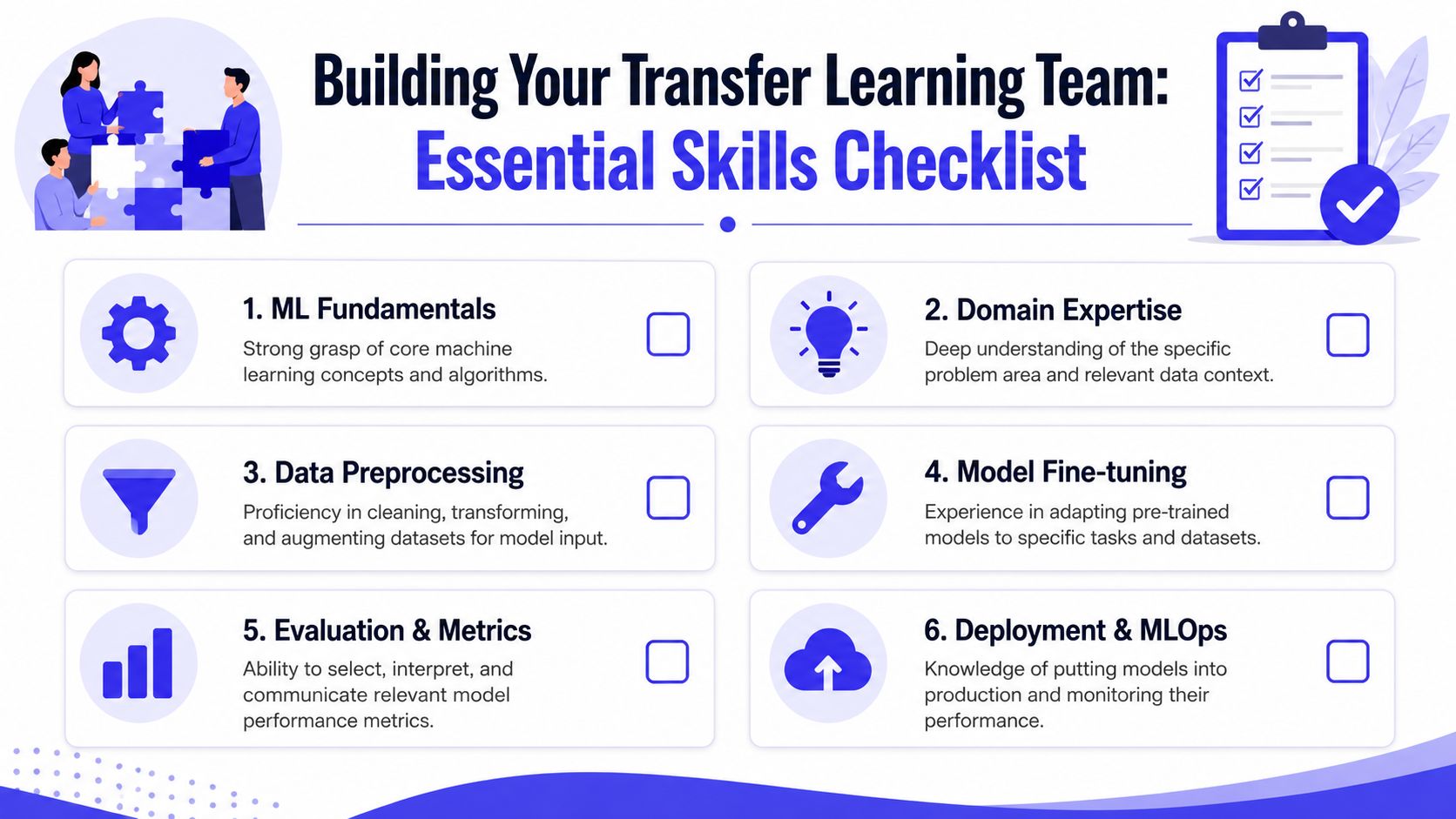
What to look for in candidates
Use this checklist when hiring an ML engineer or evaluating a consulting partner:
- Framework fluency: They should be comfortable in PyTorch or TensorFlow, and able to explain how they freeze layers, swap heads, and manage training runs.
- Model hub experience: They should know how to evaluate pretrained models from common repositories without treating every checkpoint as production-ready.
- Data judgment: Strong candidates talk about labeling rules, split quality, leakage risk, and augmentation choices before they talk about architecture.
- Fine-tuning discipline: They should understand when to keep the backbone frozen, when to unfreeze upper layers, and how to avoid overfitting during adaptation.
- Evaluation maturity: They should define task-specific metrics and review errors qualitatively, not just chase a single score.
- Deployment awareness: They should know how model packaging, serving constraints, monitoring, and rollback affect design choices.
A quick interview scorecard
A simple yes-or-no screen works well early in the process.
| Area | What good sounds like |
|---|---|
| Transfer learning judgment | Explains why a pretrained model is or isn't suitable for a given task |
| Training workflow | Describes frozen-head baseline before discussing full fine-tuning |
| Data quality | Talks about label noise, split design, and edge cases |
| Failure analysis | Gives concrete examples of diagnosing overfitting or domain mismatch |
| Production thinking | Mentions latency, monitoring, and retraining triggers |
Hire for adaptation judgment, not model hype. The strongest people usually talk about bad data, edge cases, and rollback plans very early.
Interview question to use
Ask this:
“Walk me through a project where you used a pretrained model. How did you choose it, what did you freeze or unfreeze, what went wrong, and how did you decide whether transfer learning was helping?”
A weak candidate gives you framework buzzwords. A strong one tells you where the source and target data aligned, where they didn't, what evaluation exposed, and why they changed strategy.
Your Next Steps to Accelerate AI Development
Transfer learning matters because it shortens the path from idea to working feature, but only when your team applies it selectively. The best candidates are features where the model can borrow broad knowledge from an adjacent task and your team can define success clearly.
Take these three steps:
- Pick one backlog item with obvious business value and limited labeled data. Support classification, image inspection, moderation, and document workflows are common starting points.
- Run a small pilot with a frozen-model baseline first. Don't begin with full fine-tuning unless you already know the simple approach falls short.
- Assess team readiness across model selection, data quality, evaluation, and deployment before you expand the project.
If your team gets those basics right, transfer learning can turn an expensive AI initiative into a manageable product delivery effort.
If you want to move from evaluation to execution, ThirstySprout can help you Start a Pilot with vetted AI engineers who've shipped transfer learning, LLM, and MLOps projects in production. If you're still comparing options, you can also See Sample Profiles to understand what strong transfer learning talent looks like before you hire.
Hire from the Top 1% Talent Network
Ready to accelerate your hiring or scale your company with our top-tier technical talent? Let's chat.