

You're probably seeing LLM everywhere right now. In product meetings. In hiring briefs. In vendor decks. In investor questions. And the annoying part is that many explainers answer the dictionary question without helping you make a business decision.
If you're a founder, CTO, or product lead, the useful question isn't only what does LLM mean. It's also: what can this technology do for my product, what will it cost in team complexity, and when do I need specialists versus a strong engineering generalist?
This guide gives you the working knowledge you need to scope an LLM project, avoid the common traps, and talk to engineers without getting lost in research jargon.
What an LLM Is and Is Not
A product lead asks for “an LLM feature,” and three different people hear three different things. Engineering hears a model API. Legal hears LL.M., the law degree. Finance hears a new line item with unclear upside. That confusion is small at first, but it quickly turns into vague hiring plans, fuzzy scope, and wasted build time.
LLM means large language model. It is software trained on a huge amount of text so it can predict and generate language in useful ways. In practice, that means it can answer questions, summarize documents, draft content, rewrite text, extract fields, and respond to instructions in natural language.
The easiest way to understand it is to compare it to an extremely fast autocomplete system that has learned patterns from a vast library of writing. It does not “read” your business the way a new employee studies a handbook and then applies judgment. It generates likely next words and phrases based on patterns it learned during training. That sounds narrow, but it is exactly why LLMs are so useful for product teams. A large share of business work is language work.
LLM does not always mean AI
In search results and everyday conversation, LLM can also mean Master of Laws, written as LL.M. Microsoft Azure's cloud dictionary explains that this ambiguity regularly causes confusion.
If you are writing specs, hiring plans, or board updates, spell out the term the first time.
- Large language model for AI
- Master of Laws for the legal degree
That tiny habit prevents avoidable confusion across product, legal, recruiting, and external partners.
What an LLM is good at
LLMs are strongest when the job involves language patterns rather than guaranteed truth, exact arithmetic, or deterministic business rules.
| Good fit | Poor fit |
|---|---|
| Summarizing support tickets | Acting as a guaranteed source of truth |
| Drafting outbound emails | Making policy decisions with no human review |
| Answering questions from approved documents | Doing precise calculations without checks |
| Classifying text into categories | Replacing your backend business logic |
A useful rule for startup teams is to treat an LLM as a powerful language engine, rather than a reasoning oracle.
That framing changes real decisions. If you view the model as a tool for transforming, ranking, summarizing, and drafting language, you can often ship with one engineer, an API, and clear guardrails. If you assume it can reason through edge cases like a senior operator, you will under-budget for review flows, observability, and product constraints. The first view leads to faster go-to-market. The second usually leads to surprise costs.
One more practical distinction helps. An LLM is a component, not a whole product. The product is the model plus your prompt design, your data access rules, your evaluation method, and the human or software checks around it. That is the difference between a demo that looks smart and a feature a team can trust enough to launch.
A Framework for Evaluating LLM Use Cases
Many teams start too wide. They say, “We need an AI strategy.” That's usually a sign the project is still mushy.
A better approach is to evaluate LLM work in six passes. Start narrow. Expand only after the first workflow is stable.
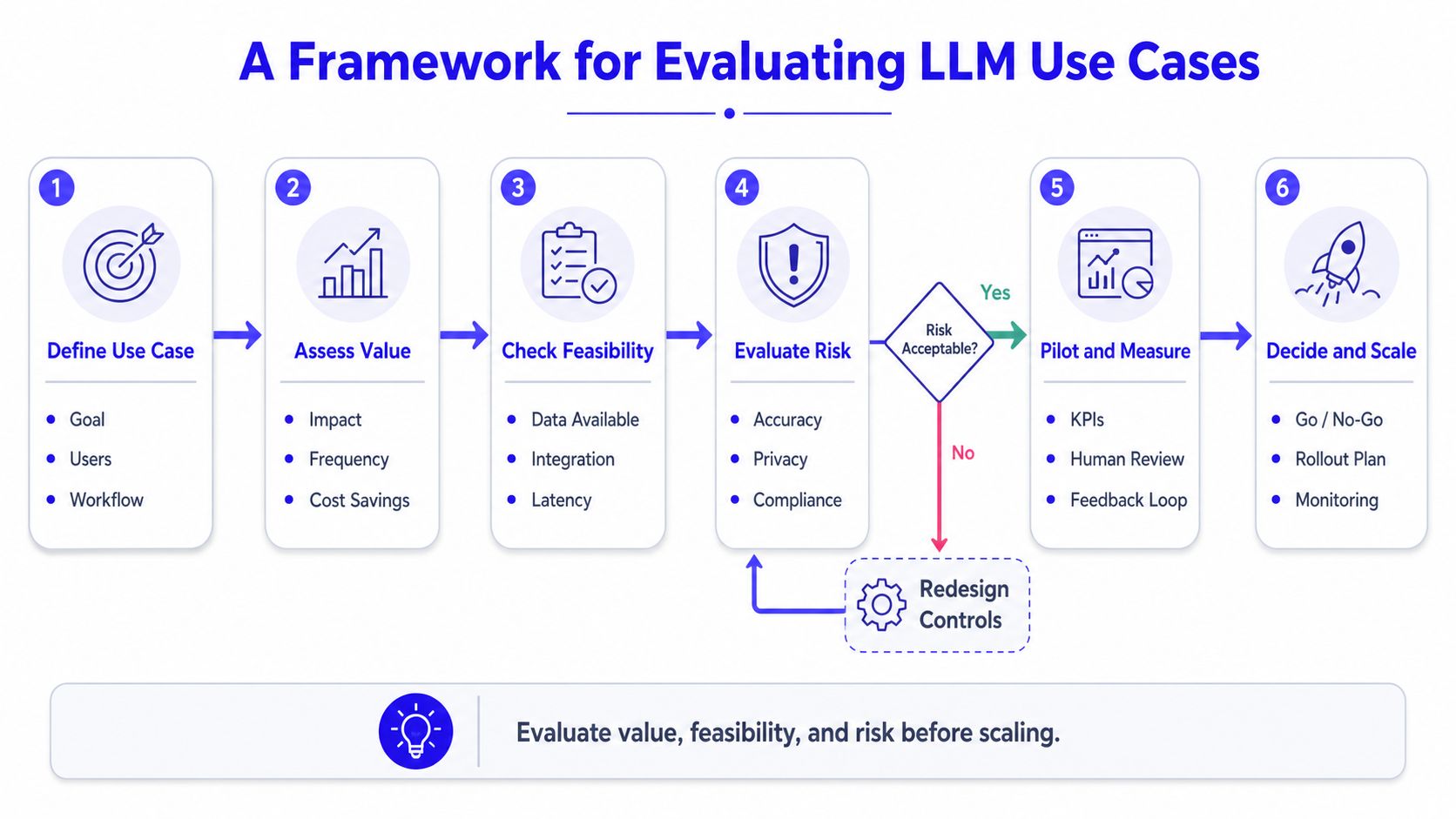
Step 1 and Step 2
Pick a language-heavy problem
Good first candidates include support deflection, internal knowledge search, sales call summaries, proposal drafting, and content generation from structured inputs.Define the failure cost
Ask what happens if the model is wrong. If the answer is “a customer gets mildly annoyed,” that's manageable. If the answer is “we give regulated advice or expose private data,” you need stronger controls before launch.
Step 3 and Step 4
Decide whether the model needs your private knowledge
If the use case depends on your docs, tickets, contracts, or product data, you likely need retrieval around the model. If the task is generic rewriting or summarization, a standard model may be enough.Choose build path before model path
Your real early choice often isn't “which model.” It's one of these:- API-first path for speed and low operational burden
- Hosted open model path when you need more control
- Fully self-managed path when privacy, customization, or cost structure justify the added complexity
Scope a pilot with one workflow and one owner
Don't launch “AI across the product.” Launch one tightly defined experience. Example: “Answer support questions from the help center, with citations, for internal agents only.”Set a clear ship-or-stop rule
Before building, agree on what success looks like. That could be faster agent handling, shorter drafting time, better first-response quality, or higher user completion in a workflow.- User asks a question
- The app searches the help center and internal runbooks
- The most relevant passages are sent into the prompt
- The LLM drafts an answer grounded in those passages
- The support agent reviews before sending
- Long prompts raise cost and latency
- Unstructured input lowers answer quality
- Large files usually need chunking, ranking, or retrieval before they reach the model
- Define one task: Name the single user job the model will support. Example: draft first-pass support replies from help center content.
- Choose the user: Decide whether the first user is internal staff or end customers. Internal pilots are usually safer.
- Set the trust boundary: Write down what data can and can't be sent to the model.
- Pick the knowledge source: Identify where approved content lives if retrieval is needed.
- Write the fallback path: Decide what happens when the model fails, times out, or gives a weak answer.
- Name the reviewer: Assign who checks output quality during the pilot.
- Capture failure examples: Save bad outputs in a shared log so the team can improve prompts and workflow.
- Decide build path: API, hosted open model, or self-managed stack.
- Assign engineering ownership: Usually one backend or platform lead, plus product.
- Define a stop rule: Agree on what would make you pause, revise, or expand.
- A strong backend or platform engineer who can integrate model calls, retrieval, logging, and guardrails
- A product lead who can narrow the workflow and define acceptable output quality
- A designer or UX-minded PM who can shape trust cues, edits, and fallback behavior
- You need custom retrieval and ranking beyond a simple document search layer
- You're evaluating open models, hosting choices, or privacy-constrained deployments
- You need stronger prompt systems, evaluation harnesses, and model monitoring
- Your product roadmap depends on AI features, not just one experiment
- Pick one workflow you can test with internal users first.
- Use the checklist above to define owner, data source, trust boundary, and fallback.
- Decide your staffing gap. Is this a backend-led pilot, or do you already need dedicated AI engineering support?
Step 5 and Step 6
If you can't explain the user task, data source, reviewer, and rollback plan in a few sentences, the use case isn't ready.
A startup leader can use this framework in one meeting. It forces the hard questions early. That's where budget, staffing, and delivery speed are won or lost.
How LLMs Work in the Real World
The easiest way to understand an LLM is to stop thinking about the model alone. In production, an LLM is usually one part of a workflow that includes prompts, application logic, data retrieval, and guardrails.
Here's a simple visual of that flow.
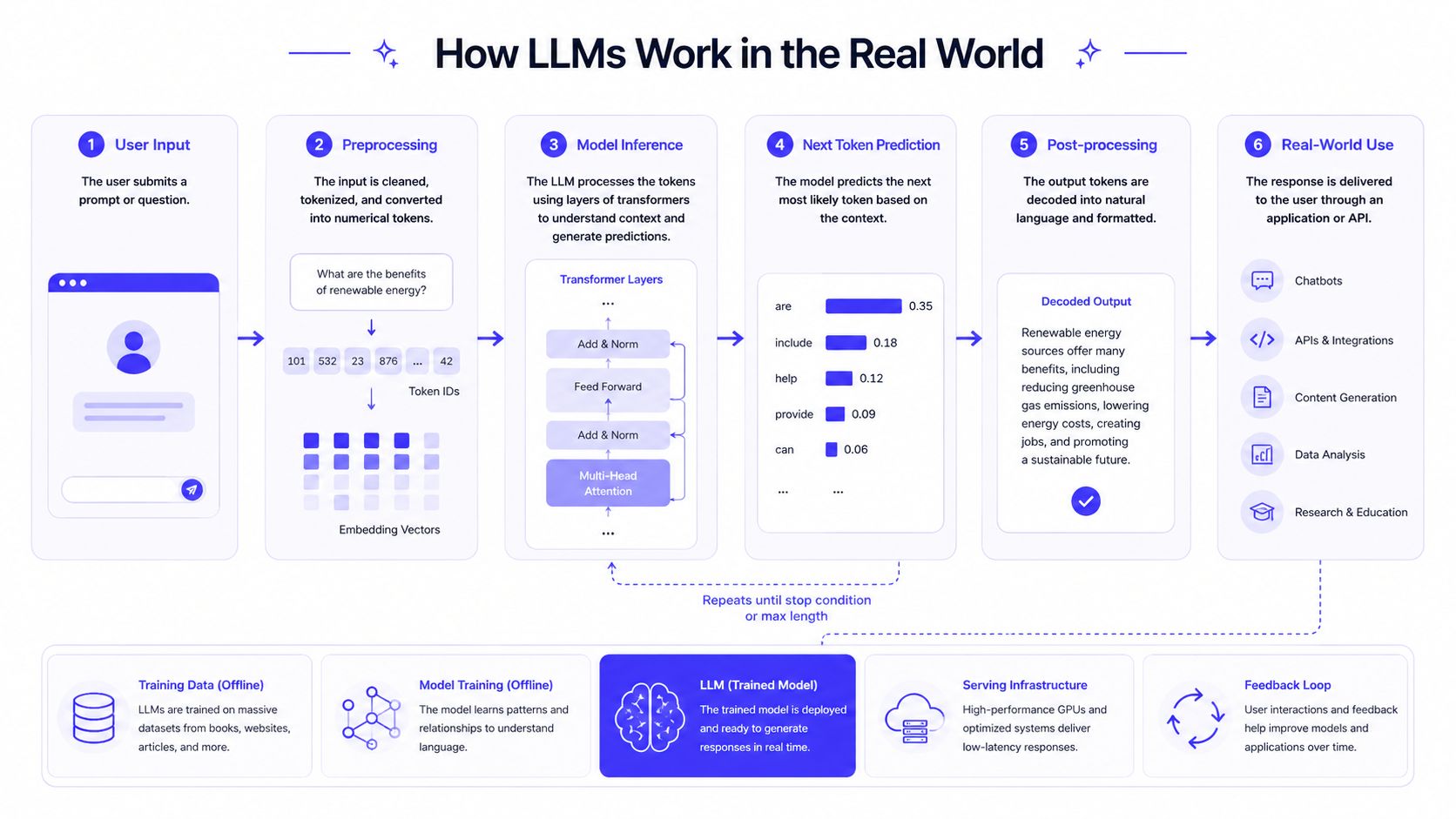
A core idea behind modern assistants is that a model is first pretrained on massive text corpora, then often aligned on higher-quality instruction data so it behaves more like an assistant, as described in the University of Arizona Library explanation of LLM training and alignment.
Example one support assistant with retrieval
A SaaS company wants faster answers for support agents. The raw model alone isn't enough because it doesn't know the latest product docs, plan limits, or edge-case workflows.
So the team builds a simple retrieval-augmented setup:
This is often a better first product than “fully autonomous support bot.” It keeps the human in the loop and reduces the risk of confident nonsense.
For teams building this kind of system, the engineering work often looks a lot like platform work plus AI workflow work. That's why strong DevOps for machine learning matters early. You need logging, versioning, rollout control, and monitoring, not just prompt tweaks.
Ground the model in your approved content when the answer must reflect your business, not the public internet.
A short walkthrough helps make the flow concrete.
Example two AI writing inside a product
Now take a different use case. A marketing platform wants users to create campaign copy faster. The system doesn't need deep proprietary knowledge. It needs to turn structured inputs into usable text.
The workflow is lighter:
| User gives | LLM returns |
|---|---|
| Product name | Draft headline options |
| Audience | Audience-specific messaging |
| Key benefit | Body copy variations |
| Tone selection | Tone-matched rewrites |
This product feels smart because the model handles the messy language generation step. Your application still owns the user experience, permissions, data flow, and QA path.
The important product lesson is this: users don't buy “an LLM.” They buy a faster task outcome. The model is only useful if the surrounding workflow makes the output dependable and easy to act on.
Inside the LLM Black Box
A product lead hears, “We can ship this in two weeks. We just need a better model.” That sounds plausible until the first prototype is slow, expensive, and inconsistent. The black box matters because these mechanics drive three startup questions fast. Who do you need to hire, what will this cost to run, and how quickly can you ship something customers trust?
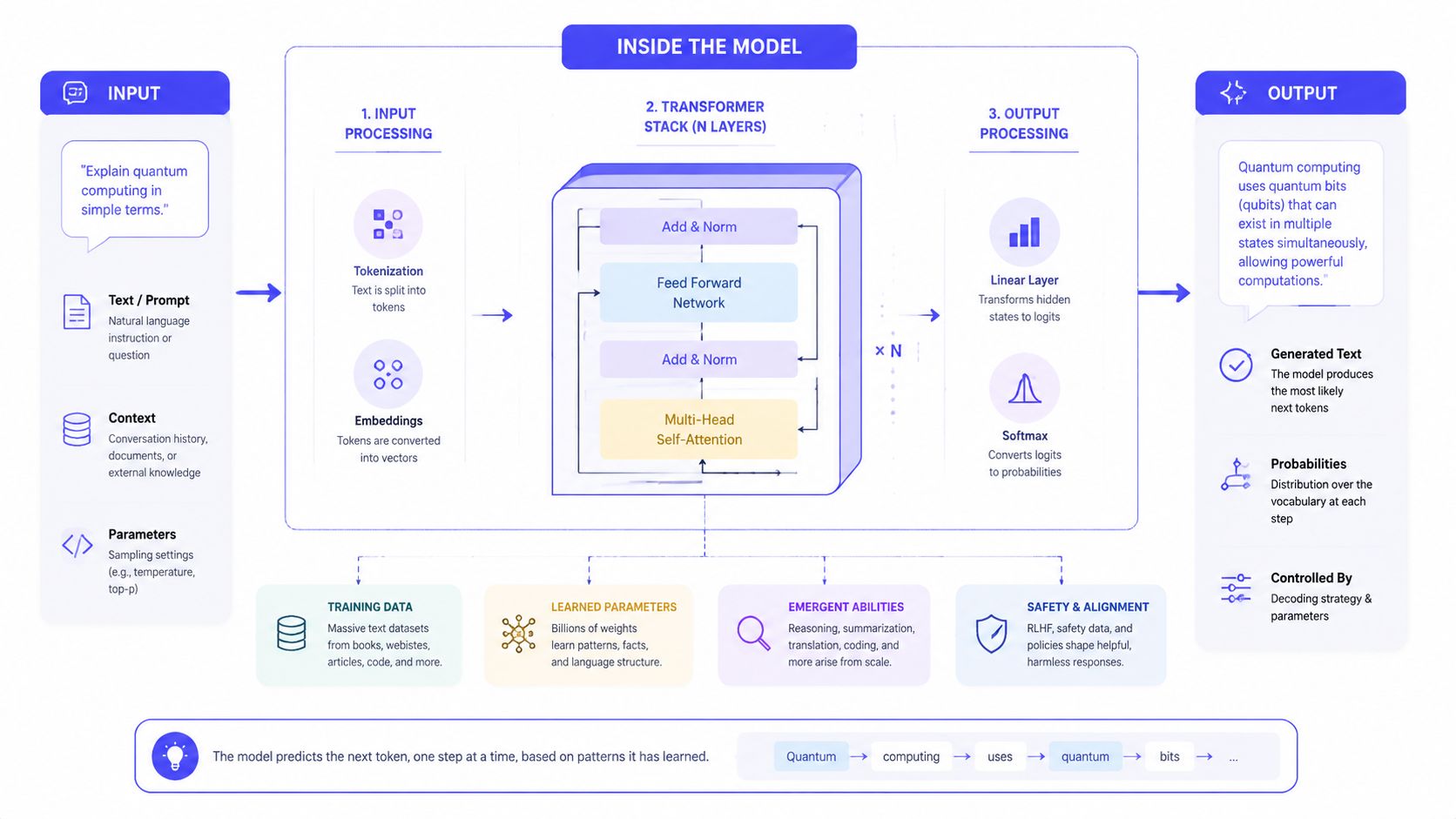
Tokens are the unit the model actually reads
LLMs do not read text as sentences with meaning attached the way a human does. They process tokens, small chunks of text that may be a whole word, part of a word, punctuation mark, or even spacing.
Tokens function like LEGO pieces for language. Your customer sees, “Please summarize this contract.” The model sees a stream of small parts and predicts what piece should come next based on the sequence so far.
That detail sounds technical, but it affects product design right away:
Teams often learn this the expensive way. They send an entire knowledge base, a full customer record, and a long system prompt into every request. The feature may still produce an answer, but response time goes up, costs rise, and the useful signal gets buried in noise.
Transformers help the model connect distant context
The transformer is the architecture that made modern LLMs practical at scale, as noted earlier in the article. Its job is context handling. Instead of only reacting to the last few words, it can weigh relationships across a much longer sequence.
A simple example makes this clearer. In a long support thread, the sentence “it failed again” only makes sense if you connect “it” to a device mentioned much earlier and “again” to a previous outage. Transformer models are much better at linking those distant clues than older language systems.
For a startup leader, the takeaway is straightforward. Good context handling is why an LLM can draft a useful support reply, rewrite content to match tone, or follow a multi-step instruction. It is also why prompt structure matters. Order, formatting, and retrieved context influence the result because the model is continuously weighing what parts of the input deserve attention.
Training and tuning shape how the model behaves at work
A base model gets broad language exposure during pretraining. That is general education. It learns patterns, associations, and structure from a huge volume of text.
Then comes instruction tuning and alignment. That is closer to job training. The model is shaped to answer in ways that are more helpful, safer, and easier to use in a chat or product workflow.
This distinction matters for build decisions. If your use case needs brand voice, policy compliance, or reliable formatting, you are usually choosing between stronger prompting, retrieval, lightweight fine-tuning, or workflow controls around the model. That is partly a model choice, but it is also an operations choice. Teams with clear review rules and AI governance best practices usually get to production faster than teams that treat model quality as a pure research problem.
Inference is where product experience, speed, and budget meet
Inference is the live moment when the model generates an answer from the input you send. It predicts the next token, then the next one, until it stops.
The practical mental model is advanced autocomplete with stronger context handling and better instruction following.
That is why the last mile of an AI feature is rarely “just call the API.” Inference is where users feel delay, where usage bills accumulate, and where sloppy output can break trust. A strong product usually pairs the model with retrieval, caching, output rules, and UX guardrails so the model does one job well instead of trying to do everything in a single prompt.
LLM Limitations and Business Risks
The fastest way to waste money on AI is to ignore where it breaks.
LLMs are powerful, but they can still produce wrong answers, biased outputs, unstable behavior across prompts, and rising infrastructure bills if your team treats them like ordinary software components.
Hallucinations become customer trust problems
An LLM can produce an answer that sounds polished and still be wrong. In a demo, that feels impressive. In production, it becomes a support problem, a compliance problem, or a credibility problem.
Mitigation is straightforward in principle. Use retrieval when answers must come from approved sources. Add human review where mistakes are expensive. Log outputs and watch failure patterns instead of assuming the model is “mostly fine.”
Cost shows up in more than one place
Training and inference are computationally expensive because LLMs are large transformer-based systems with huge parameter counts. For example, a 70B-parameter model uses about 140 GB just for float16 weights, before runtime overhead, as explained in ChristopherGS's introduction to large language models.
That one detail should shape how startup leaders think about architecture. Self-hosting can make sense in some cases, but it isn't the default “smart technical” move. It often shifts cost from API bills into infrastructure, reliability work, and specialized hiring.
Privacy and governance need an owner
If users paste customer records, financial data, or internal strategy into prompts, your team needs clear rules. This isn't only a legal issue. It's a product design issue.
Use redaction where possible. Limit which data can reach the model. Define retention and logging policies before rollout. For teams setting those controls, AI governance best practices should sit next to architecture decisions, not after them.
Bias and unpredictability require review loops
You won't prompt your way out of every edge case. Some outputs will still come back in ways you don't want. That's why review queues, feedback capture, and test sets matter.
A practical risk table helps frame this.
| Risk | What it looks like in a startup | First mitigation |
|---|---|---|
| Hallucination | Wrong answer shown to users | Ground with approved data |
| Privacy leak | Sensitive text sent to external model provider | Filter and restrict inputs |
| Cost drift | Prompt size and usage expand quietly | Set usage budgets and monitor |
| Bias | Uneven or harmful outputs | Review outputs and define red lines |
Your LLM Project Scoping Checklist
The first LLM project should be boring in the right ways. Clear owner. Clear workflow. Clear fallback. That's how you learn quickly without creating a hidden operations burden.
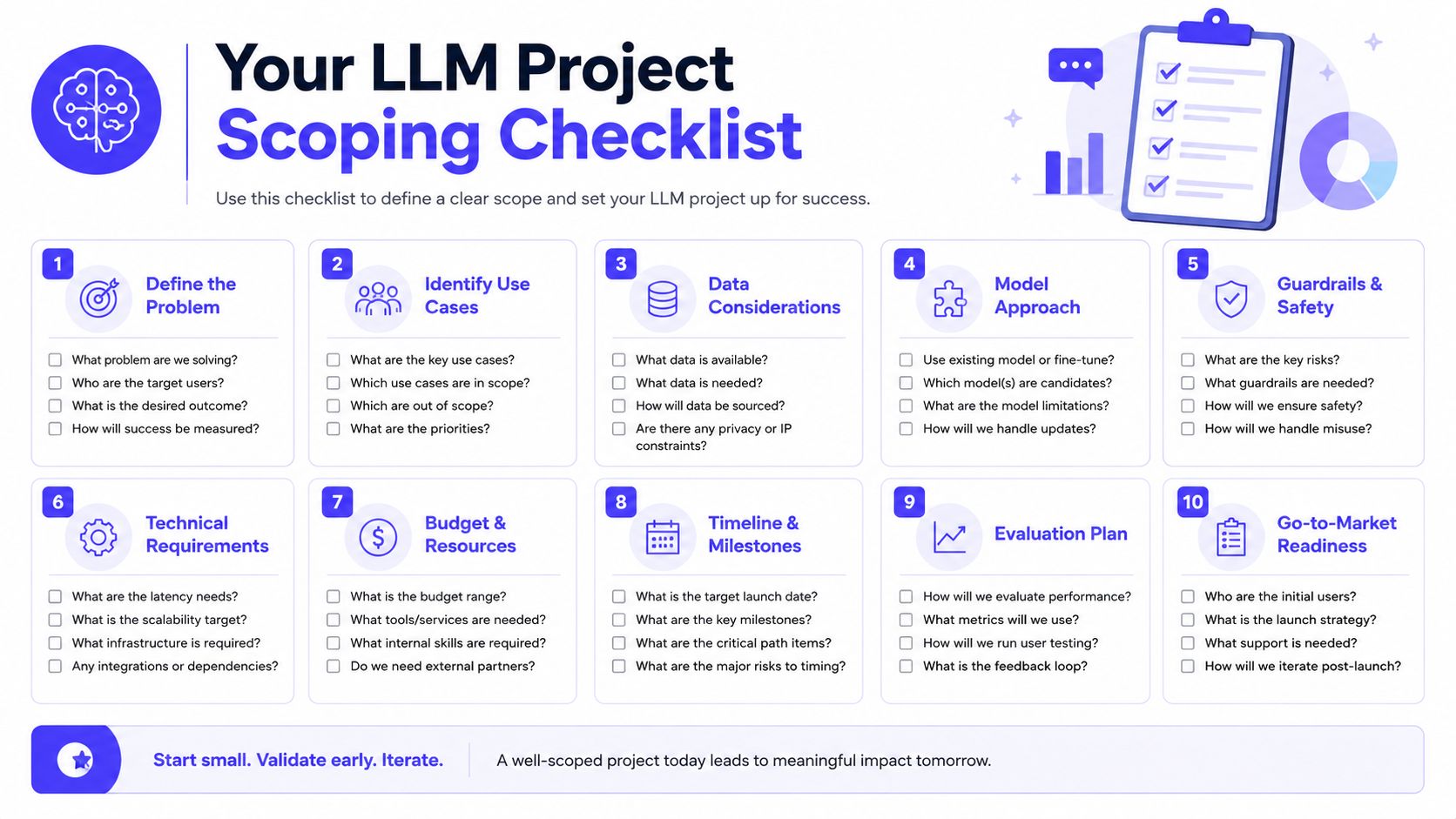
A checklist you can use this week
Operator note: If the pilot has no fallback path, it isn't a pilot. It's an uncontrolled release.
This checklist sounds simple because it should be. The hard part isn't understanding what does LLM mean. The hard part is keeping the project narrow enough that your team can ship and learn.
Building Your First AI Team
Early-stage teams often hire in the wrong order. They go looking for a PhD-level model researcher when they need someone who can wire a product workflow, manage APIs, structure retrieval, and ship instrumentation.
Who you usually need first
For many startups, the first LLM project can be built by:
You may need a dedicated ML specialist later. But many first projects fail before model science becomes the bottleneck. They fail because the workflow is vague, the data is messy, or nobody owns evaluation.
When specialist hiring makes sense
Bring in deeper AI talent when you hit one of these realities:
If you're hiring for that next phase, a useful starting point is this guide on how to hire AI engineers.
One practical option for teams that need execution help without building a full internal bench immediately is ThirstySprout, which matches companies with vetted AI engineers and ML talent for contract, fractional, or full-time work.
Three next steps
If you're turning LLM ideas into a real product, ThirstySprout can help you scope the work, pressure-test the architecture, and find senior AI engineers who've shipped production systems. Start a pilot or see sample profiles if you need execution help fast.
Hire from the Top 1% Talent Network
Ready to accelerate your hiring or scale your company with our top-tier technical talent? Let's chat.