

Your team is hiring remote AI engineers. Some will work full-time, some will join fractionally, and a few will need to be productive in days, not weeks. In that situation, visual studio vs visual studio code isn’t a preference debate. It’s an operating model decision.
Choose wrong, and you pay for it three ways. Onboarding drags. Cloud dev boxes get bloated. Senior engineers burn time fighting the tool instead of shipping models, APIs, and pipelines.
Choose right, and your environment becomes an accelerant. The right default reduces setup friction, lowers tooling cost, and keeps your stack coherent across Python, TypeScript, notebooks, containers, and CI.
The Bottom Line Visual Studio vs VS Code
- Default to VS Code for most remote AI and SaaS teams. It’s cross-platform, free, lightweight, and broadly adopted. It also supports a large extension ecosystem and modern cloud workflows, which matters more than monolithic IDE features for most AI product teams.
- Use Visual Studio selectively, not universally. It’s the right call when your core product depends on complex .NET/C#, Windows-first development, or deeper integrated debugging and enterprise tooling.
- Don’t standardize by habit. Standardize by team topology, codebase shape, and onboarding speed. Remote-first teams need low-friction setup more than they need every advanced IDE feature on day one.
- Treat this as a cost and velocity decision. License spend, machine requirements, and developer wait time all compound across a growing team.
This guide is for CTOs, VPs of Engineering, and Staff or Principal Engineers deciding what their team should use by default. Not as an abstract tooling argument, but as a policy decision that affects hiring speed, developer velocity, and total cost of ownership.
If your team is building AI products, internal copilots, MLOps workflows, or cloud-native SaaS, the default answer is usually straightforward. VS Code should be the standard. Visual Studio should be the exception for specific workloads that require it.
Practical rule: Standardize on the lightest tool that supports your production workflow without creating quality risk.
A Quick Decision Framework for Engineering Leaders
Use this as the fast rubric.
Choose VS Code when speed and flexibility matter most
Pick VS Code if most of these are true:
- Your stack is mixed. Python, TypeScript, notebooks, YAML, Docker, Terraform, and a bit of Go or Rust fit naturally into one editor.
- Your team is remote-first. Cross-platform support matters when engineers work on Windows, macOS, and Linux.
- You care about low-friction onboarding. A lightweight editor is easier to roll out across local machines, cloud workspaces, and contractor setups.
- You want one default for modern app work. Web apps, APIs, scripts, data tooling, and cloud-native development all sit comfortably here.
Choose Visual Studio when integrated depth matters more than agility
Pick Visual Studio if these are true:
- Your product is heavily tied to .NET and C#.
- Your team ships Windows desktop or other Microsoft-centric workloads.
- You need richer integrated debugging and enterprise IDE features out of the box.
- Your developers spend more time inside large solutions than hopping across polyglot services and cloud tooling.
Here’s the high-level comparison I’d use in an architecture review:
| Decision area | VS Code | Visual Studio |
|---|---|---|
| Default fit | Remote AI, SaaS, cloud, web, polyglot teams | Enterprise .NET and Windows-first teams |
| Platform model | Cross-platform | Primarily Windows-first |
| Cost posture | Free and open-source | Paid tiers for Professional and Enterprise, plus a free Community version with limits |
| Resource footprint | Lightweight | Heavier install and runtime overhead |
| Customization style | Extension-driven and modular | More integrated, fuller IDE experience |
| Best leadership reason to standardize | Faster onboarding and lower friction | Stronger deep IDE support for specific Microsoft-heavy environments |
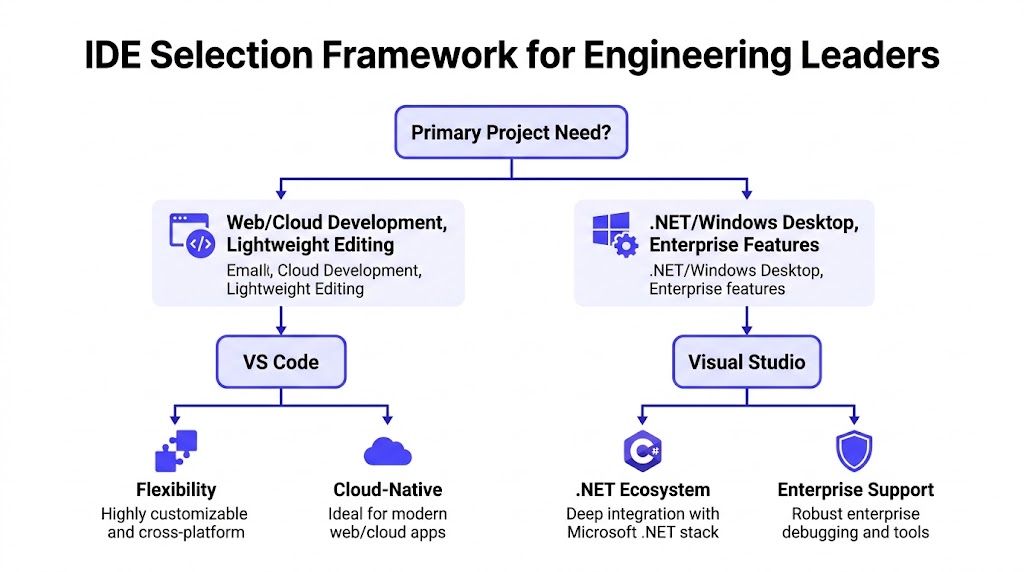
The market also tells you where developer preference has landed. VS Code holds 54.1% market share among code editors, while Visual Studio holds 27.24% share as the most searched IDE. VS Code launched in 2015 as a lightweight cross-platform editor, while Visual Studio dates to 1997 as a fuller IDE. VS Code is also free and open-source, with over 60,000 extensions, while Visual Studio’s paid editions range from $45 to $250 per user monthly according to this comparison of Visual Studio and Visual Studio Code.
My recommendation for most CTOs
If you’re deciding on a company default, do this:
- Set VS Code as the standard environment for application engineering, AI experimentation, and MLOps work.
- Allow Visual Studio as an approved exception for teams with proven .NET-heavy needs.
- Document the exception criteria so procurement, IT, and engineering managers aren’t debating this every quarter.
That policy gives you consistency without forcing a bad fit on specialist teams.
Real World Scenarios When to Use Each Tool
The fastest way to get this decision right is to tie it to actual team situations.
Scenario one onboarding a fractional AI engineer
A startup hires a fractional machine learning engineer to improve an internal retrieval system and clean up a model evaluation pipeline. The engineer needs Python, Jupyter, Docker, Git, and access to a shared cloud environment. They also need to contribute quickly, because the engagement is measured in weeks.
The right choice is VS Code, paired with a cloud development environment and a project-level extension recommendation file. That combination keeps setup simple and avoids the usual first-week tax of local dependency issues.
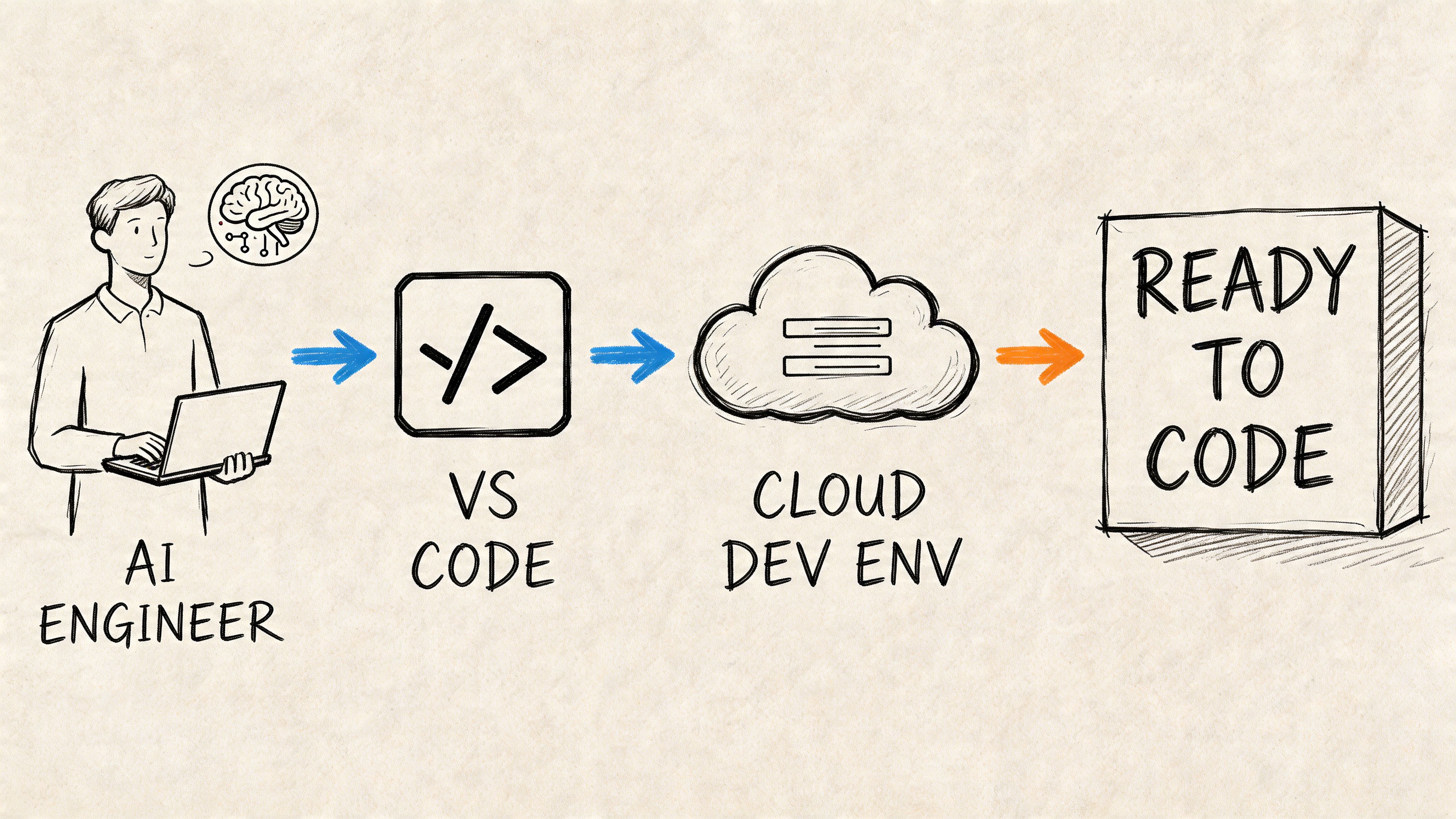
What matters here isn’t just the editor. It’s the operational shape of the editor. VS Code works well when the engineer needs to move across notebooks, model scripts, API endpoints, config files, and CI definitions without switching tools or provisioning a heavyweight local machine.
A practical team setup looks like this:
{"recommendations": ["ms-python.python","ms-toolsai.jupyter","ms-azuretools.vscode-docker","github.vscode-github-actions","eamodio.gitlens"]}That file won’t solve every environment issue, but it does remove ambiguity. New engineers open the repo, install the recommended extensions, and start from a known baseline.
Business impact: lower onboarding friction, fewer environment-specific support requests, and a cleaner path to first contribution. For a remote AI team, that matters more than having every advanced IDE feature pre-bundled.
A good default environment should feel boring. If onboarding requires a wiki, a setup call, and a rescue Slack thread, the tool choice is already costing you.
Scenario two maintaining an enterprise .NET and ML.NET system
Now take a different team. They maintain a large internal platform built around C#, .NET services, and Microsoft infrastructure. Parts of the system include machine learning components, but the core engineering burden sits in large solutions, enterprise test suites, and production debugging.
In this context, Visual Studio earns its keep.
The main reason isn’t fashion. It’s integrated depth. When developers are tracing through complex C# services, profiling application behavior, or working in a codebase that has grown for years inside the Microsoft stack, the fuller IDE often reduces risk. The heavier footprint becomes acceptable because the workflow itself is heavyweight.
A simple scorecard for these two scenarios
| Scenario | Better fit | Why |
|---|---|---|
| Fractional AI engineer joining a remote product team | VS Code | Faster setup, easier cloud use, better fit for polyglot work |
| Enterprise platform team on large C# solutions | Visual Studio | Stronger integrated experience for deep .NET work |
| Startup shipping AI features across API, frontend, and notebooks | VS Code | One tool for mixed workflows |
| Windows-first internal enterprise application team | Visual Studio | Better alignment with Microsoft-centric development patterns |
The mistake I see most often
Leaders pick one tool for symbolic reasons. They call Visual Studio “professional” or VS Code “modern” and stop there. That’s lazy decision-making.
The better question is simpler: Where does your team lose time today? If the answer is setup, cross-platform inconsistency, and cloud workflow friction, VS Code wins. If the answer is deep debugging inside large .NET systems, Visual Studio wins.
Core Differences Performance Ecosystems and Cost
Tooling debates usually collapse into personal preference. That’s a mistake. The meaningful differences sit in three places: resource footprint, extension model, and cost governance.
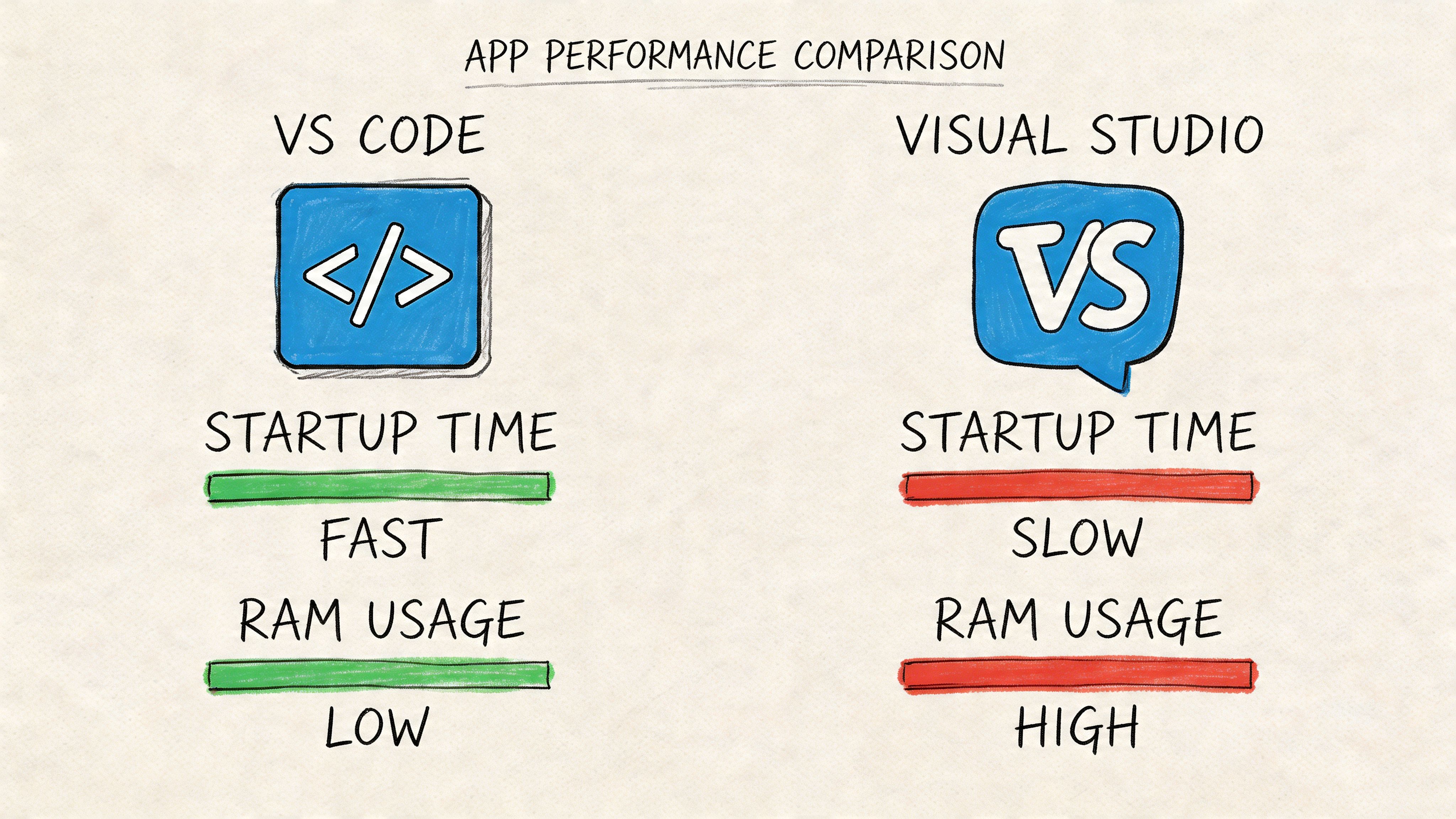
Performance and resource footprint
If your engineers work on powerful local workstations all day, tool overhead matters less. If they use cloud workspaces, shared virtual desktops, or lower-spec contractor machines, it matters a lot.
According to this NDepend comparison of Visual Studio and VS Code, Visual Studio requires 2.3 GB to 60 GB disk space and a minimum of 16 GB RAM for smooth operation. In contrast, VS Code has a disk footprint below 500 MB and runs efficiently on just 300 MB RAM, with near-instant startup times. The same source notes that on mid-tier cloud instances, VS Code loads Python ML scripts 5 to 10 times faster.
That difference changes how a remote team works. Engineers open and close editors constantly while switching branches, testing model scripts, editing CI files, or jumping into support issues. A lighter tool shortens those micro-delays all day.
Here’s the practical read:
- For cloud development boxes: VS Code is easier to justify as the default.
- For mixed AI and product engineering: lighter startup and lower RAM usage reduce background friction.
- For large .NET builds: Visual Studio may still be worth the overhead if deeper tooling prevents debugging mistakes.
Extension ecosystems and governance
VS Code’s strength is modularity. That’s also its risk.
A large extension marketplace means you can tailor the editor to Python, notebooks, containers, cloud deployments, and frontend work without changing your core tool. That’s exactly why modern teams like it. But without governance, teams drift into incompatible setups.
The right answer isn’t to avoid extensions. It’s to govern them like dependencies.
Use a small approved list. Review additions quarterly. Pin team recommendations in the repo. For Microsoft-heavy teams evaluating richer IDE capabilities, it also helps to review the ecosystem around Visual Studio extensions so you can compare integrated add-ons with the extension-first model in VS Code.
A sensible extension policy includes:
- Core stack extensions only: Python, Jupyter, Docker, Git, CI, linting, formatting.
- Named owners: someone on platform or developer experience approves changes.
- Repo-level recommendations: keep the setup close to the codebase.
- Security review: disable random marketplace sprawl.
Leadership call: standardization doesn’t mean “everyone gets the same editor with no exceptions.” It means every repo has a supported path, a controlled plugin list, and a documented fallback.
If your team is already shifting toward browser-based or containerized environments, this guide on developing in the cloud complements the editor decision well. The editor is only one part of the environment contract.
Licensing cost and total cost of ownership
VS Code is easier to approve because the pricing conversation is simple. It’s free and open-source.
Visual Studio introduces a different procurement path. Paid Professional and Enterprise editions can make sense for teams that truly use the advanced functionality, but they should be justified against actual engineering need, not brand familiarity.
The bigger point is that license cost is only part of total cost of ownership. You also need to account for:
| Cost factor | VS Code impact | Visual Studio impact |
|---|---|---|
| License spend | Minimal direct tool cost | Paid tiers for many teams |
| Hardware pressure | Lower | Higher |
| Remote setup effort | Lower for mixed cloud workflows | Higher in many remote-first scenarios |
| Policy complexity | Extension governance required | License and installation management required |
Later in the buying process, security and procurement teams often ask the wrong question: “Which tool is more powerful?” The right question is: Which standard minimizes waste across the actual way this team builds software?
For most remote AI organizations, that answer points to VS Code. For specialist .NET teams, it often points to Visual Studio.
Here’s a short walkthrough if you want a visual view of the trade-offs before writing your internal standard:
Choosing an IDE for Remote AI Teams and MLOps
If your team is remote-first and shipping AI products, I wouldn’t treat these tools as equals. VS Code is usually the better operating default.
That isn’t because Visual Studio is weak. It’s because remote AI work rewards fast setup, lighter environments, container friendliness, and easy movement across languages and toolchains. Most AI teams don’t live in one language or one runtime. They jump between Python, SQL, YAML, shell scripts, notebook files, and application code all week.
Why VS Code fits distributed AI work better
For remote-first AI and machine learning teams, the setup tax is real. Contractors, fractional engineers, and newly hired specialists often need to get productive across time zones without waiting on hand-held environment support.
This comparison focused on remote AI and ML teams states that 68% of ML developers prefer VS Code for native GitHub Codespaces support and a 20GB+ smaller footprint. The same source says VS Code reduces setup time for fractional AI talent by 80% and shows sub-100ms latency in containerized remote debugging for PyTorch and TensorFlow, compared with 500ms+ for Visual Studio.
Those numbers line up with what good platform teams already know. The remote AI workflow lives or dies on repeatability. A lightweight editor with better cloud and container ergonomics creates fewer blockers than a heavier IDE, even if the heavier IDE offers richer integrated features.
The collaboration question
Visual Studio still has a valid place in collaboration-heavy enterprise environments, especially where large Microsoft-centric systems benefit from its deeper tooling and team workflows.
But most remote AI teams need something different:
- Fast async onboarding
- Simple dev container support
- Cross-platform consistency
- Low-friction debugging in containerized services
- Easy movement between model code and application code
That’s why I’d recommend VS Code as the team default for MLOps, internal AI platforms, LLM application work, and data tooling.
Remote AI teams shouldn’t optimize for the richest single-machine experience. They should optimize for the fastest repeatable environment across many engineers and machines.
Where Visual Studio still wins
There are still cases where Visual Studio is the right exception:
- Large internal .NET systems where debugging depth matters more than startup overhead.
- Windows-first enterprise teams that already depend on mature Microsoft tooling.
- Long-lived monoliths or complex C# solutions where developers spend most of their time in one ecosystem.
That’s the key distinction. For modern AI product teams, the editor should support the workflow around the code, not just the code itself. Your CI, container setup, repo structure, and deployment model all matter.
If you’re tuning the broader system around release reliability and reproducibility, these MLOps best practices are the companion policy to your IDE standard. Editor choice won’t fix a weak delivery pipeline, but the wrong editor can make a strong pipeline harder to use.
Guidance for Migration and Team Onboarding
Once you’ve made the call, standardization should be boring, documented, and fast. Don’t let every team reinvent its own setup.
If you standardize on VS Code
Create a repo-level baseline. Keep it small. Essentials include settings, extension recommendations, formatting, and task shortcuts.
A representative .vscode/settings.json might look like this:
{"editor.formatOnSave": true,"files.trimTrailingWhitespace": true,"python.testing.pytestEnabled": true,"jupyter.askForKernelRestart": false,"editor.codeActionsOnSave": {"source.fixAll": "explicit"}}That won’t cover every stack, but it sets expectations. Formatting happens automatically. Basic hygiene is enforced. Python and notebook users don’t need to guess what’s supported.
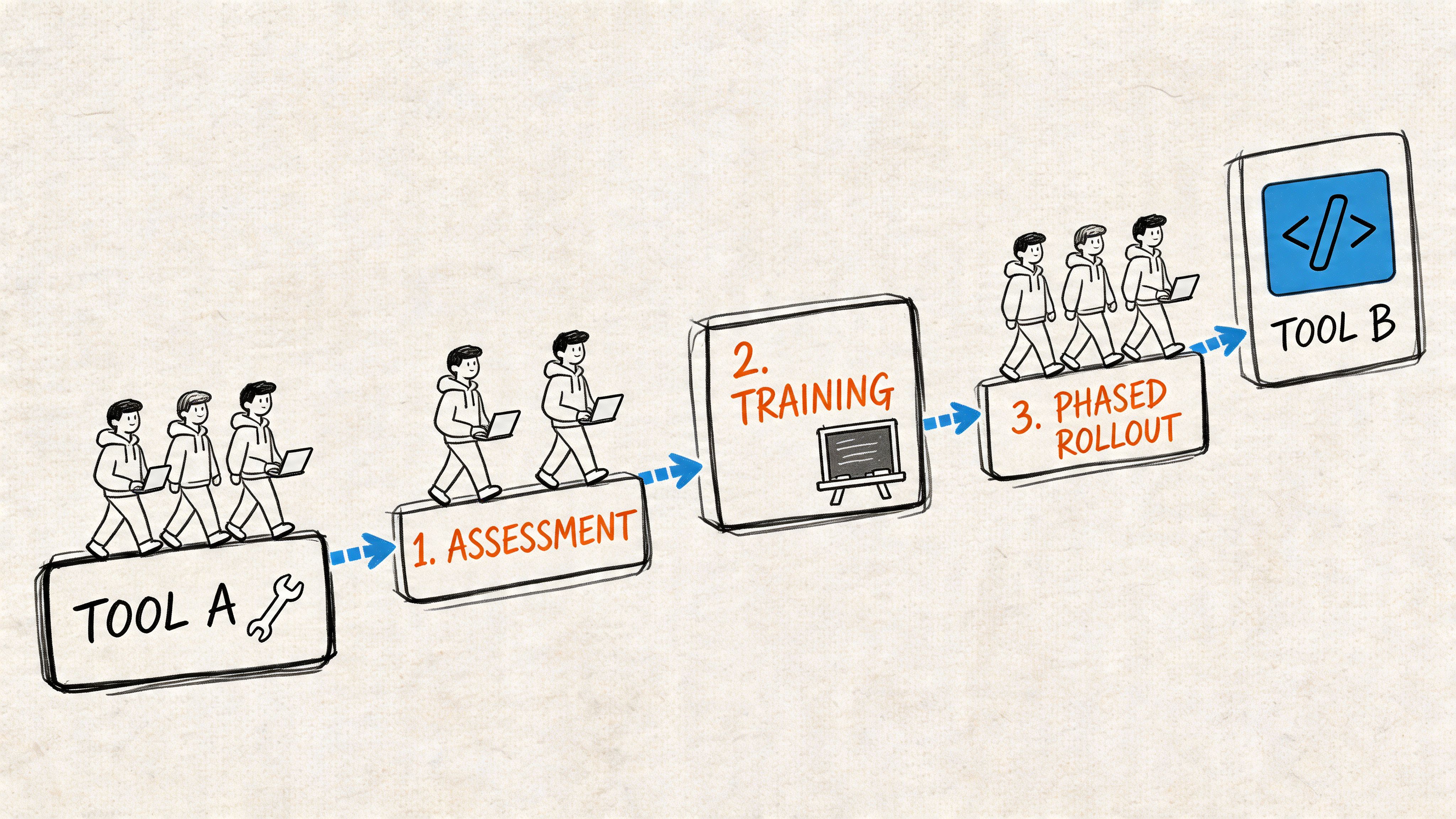
A practical rollout sequence:
- Pilot on one active repo. Don’t start with the hardest legacy system.
- Publish the supported extension list. Keep it short and opinionated.
- Add tasks and launch configs. Make common actions obvious.
- Measure onboarding friction qualitatively. Note where engineers still get stuck.
- Promote the template to other repos.
If you keep Visual Studio for approved teams
Use a project-level baseline there too. A .vsconfig file helps standardize workloads and reduce setup drift across developers. The goal is the same as with VS Code. Remove guesswork.
Your onboarding checklist should include:
- Required workloads installed
- Project opens successfully from a clean machine
- Debug profile works
- Tests run locally
- Linting or analyzers are enabled
- Access to repos, packages, and secrets is confirmed
A simple onboarding template
Here’s the checklist I’d hand to a new engineer on day one:
| Step | Done when |
|---|---|
| Clone repo or open cloud workspace | Project opens without manual fixes |
| Install approved toolchain | Required extensions or workloads are present |
| Run one local task | App, notebook, or test command succeeds |
| Validate debugging | Breakpoint hits in the supported path |
| Commit a tiny change | Branch, commit, and push flow works |
For teams tightening engineering consistency across repos, this guide on source code management is worth pairing with your environment rollout. Standard tools help, but disciplined repo hygiene is what keeps onboarding under control.
Downloadable Decision Checklist and What to Do Next
If you’re making a policy call this quarter, don’t overcomplicate it. Use a short checklist and force a decision.
Decision checklist
Score your team against these prompts:
- Primary stack: Is your core work Python, TypeScript, cloud configs, notebooks, and containers, or is it mainly C# and .NET?
- Team topology: Are most engineers remote, distributed, or fractional?
- Environment model: Do you rely on cloud workspaces, dev containers, or lower-spec machines?
- Debugging depth: Do engineers need a fuller integrated Microsoft IDE every day, or only for a subset of repos?
- Budget and procurement: Do paid IDE tiers solve a real workflow problem, or just reflect old defaults?
- Standardization effort: Can platform engineering support extension governance and repo-level templates?
You can turn that into a one-page PDF or Notion checklist for your engineering managers. The point isn’t perfect scoring. The point is consistent decision-making.
If most of your answers point to polyglot work, remote onboarding, and cloud environments, choose VS Code as the standard. If they point to large .NET systems and deep integrated debugging, approve Visual Studio for that slice of the org.
Three next steps
- Score one active team using the checklist above.
- Run a short pilot with the proposed default environment on a real repo.
- Publish a written standard with exception criteria, extension policy, and onboarding steps.
The best tooling standard is one your managers can explain, your engineers can follow, and your new hires can use on day one.
If you need senior engineers to help standardize your AI development environment, stand up MLOps workflows, or onboard remote specialists fast, ThirstySprout can help you start a pilot with vetted AI talent that’s already used to shipping in distributed teams.
Hire from the Top 1% Talent Network
Ready to accelerate your hiring or scale your company with our top-tier technical talent? Let's chat.