

TL;DR
- What it is: Source Code Management (SCM), or version control, is the system engineering teams use to track every change to their codebase. For AI and SaaS startups, it's the foundation for development speed and product stability.
- Why it matters: SCM enables parallel development, provides a complete audit history, ensures disaster recovery, and creates a central hub for collaboration, directly impacting your time-to-market.
- Which system to use: Use a Distributed Version Control System (DVCS) like Git. It allows engineers to work asynchronously and experiment safely, which is critical for remote-first AI teams.
- Recommended workflow: Adopt GitHub Flow. Its simple, branch-based model aligns perfectly with a continuous deployment culture, letting you ship features quickly and safely.
- Next Steps: Conduct a security audit of your main repositories, standardize your team on a single branching strategy, and enforce it with branch protection rules.
Who This Guide Is For
- CTO / Head of Engineering: You need to establish scalable, secure development practices to support a growing team.
- Founder / Product Lead: You're responsible for shipping features quickly without compromising stability and need to understand the operational backbone.
- Staff Engineer / Tech Lead: You're tasked with implementing or refining the team's SCM process and CI/CD pipeline.
At its core, Source Code Management (SCM), which you’ll often hear called Version Control, is how engineering teams track and manage every single change made to their software code. For any fast-growing AI or SaaS startup, a solid SCM strategy isn't just a nice-to-have; it's the operational backbone for development speed and product stability.
Think of it as a meticulously detailed, time-stamped history book for your entire codebase.
What Is Source Code Management?
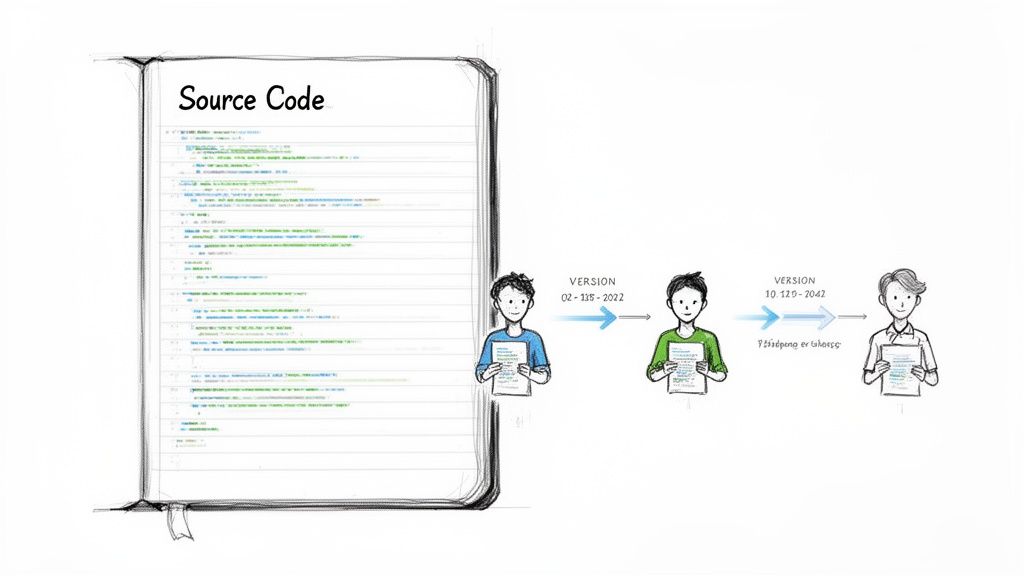
Alt text: A drawing of a 'Source Code' book and three people managing different versions over time, illustrating source code management.
Without SCM, two developers editing the same file could accidentally overwrite each other's work, losing hours of progress. SCM solves this by creating a structured way to handle changes, letting multiple developers work on the same codebase simultaneously without conflict.
The system keeps a perfect history of every change. This means you can instantly rewind to any previous version, a lifesaver for debugging. Your team can pinpoint the exact moment a bug was introduced and see the specific change that caused it.
As a CTO or Head of Engineering, you will see the impact of a strong SCM process almost immediately. It directly boosts team efficiency, slashes development risks, and lays the groundwork for all modern practices, from automated testing to continuous deployment.
Core Benefits for AI and SaaS Teams
An effective SCM strategy brings tangible business advantages critical for fast-moving AI and software teams.
- Parallel Development: SCM allows multiple engineers to work on different features at the same time in isolated spaces called "branches." This dramatically speeds up your development cycle, as one developer's experimental work won't break another's stable code.
- Traceability and History: Every change is logged with the "who, what, when, and why." This complete historical record is priceless for code reviews, security audits, and understanding how your product evolved.
- Disaster Recovery: Your entire codebase history is stored, usually in a remote location, acting as your ultimate backup. If a laptop dies or a catastrophic error is pushed, you can quickly restore a stable version.
- Collaboration Hub: Modern SCM platforms like GitHub and GitLab are now the central hub for team discussions, code reviews, and project management, keeping everyone aligned, especially in distributed teams.
Practical Example: SCM Decision Framework
Choosing the right setup from the start prevents major migration headaches later. Use this table to align your SCM model with your team's stage and business goals.
| Team Stage | Recommended SCM Model | Typical Hosting | Key Business Impact |
|---|---|---|---|
| Seed Stage (2–10 Engineers) | Distributed (Git) | Cloud-hosted (e.g., GitHub, GitLab) | Maximum speed and low overhead. Empowers rapid prototyping and iteration. |
| Series A (10–40 Engineers) | Distributed (Git) with formal branching | Cloud-hosted (Team/Enterprise Plan) | Balances speed with structure. Introduces formal code reviews and quality gates. |
| Growth Stage (40+ Engineers) | Distributed (Git) with advanced workflows | Cloud or Self-hosted | Focuses on scalability, security, and compliance. Supports multiple teams and complex release cycles. |
Key Takeaway: Source Code Management is a core discipline for building reliable software at scale. As your team and product grow, a disciplined SCM process keeps development stable, secure, and efficient. It goes hand-in-hand with good principles of software design and is non-negotiable for any serious engineering organization.
Why Distributed SCM Is Essential for AI Teams
The switch from centralized to Distributed Version Control Systems (DVCS) was a game-changer for modern software teams, especially in AI and ML. For any remote-first company, it's the bedrock of fast, collaborative work.
A traditional, centralized system is like a library with one master copy of a book. To make a change, you must check it out, creating a bottleneck. If the central server goes down, work stops for everyone.
A distributed system gives every developer their own complete, local copy of the library, including the entire project history. This simple difference enables asynchronous workflows, as engineers can commit changes and experiment entirely offline. They only need to connect to the main repository to share progress or pull updates.
A distributed model trusts your engineers with a complete, independent copy of the codebase. This autonomy is critical for the rapid experimentation required in AI development, allowing for parallel work without creating chaos.
Driving Innovation Through Branching and Merging
The real magic of DVCS is how it handles branching. Creating a new branch—an independent line of development—is incredibly fast and easy. This encourages a workflow where your team creates separate branches for everything, from a new feature to a quick bug fix.
This approach is practically tailor-made for AI teams:
- Safe Experimentation: An ML engineer can spin up a branch to test a new hyperparameter or model architecture. If the experiment fails, they just delete the branch, and the main codebase remains pristine.
- Parallel Development: Multiple engineers can tackle different problems at once without interference. One person can fine-tune a language model while a colleague optimizes a data pipeline on another branch.
- Simplified Code Reviews: When a feature is ready, the developer opens a pull request. This neatly packages all changes for team review before merging, creating a formal, traceable process for keeping code quality high. For more, see our guide on MLOps best practices.
The industry has clearly voted with its feet. Distributed systems are now standard, with Git alone projected to command 92.43% of the market share in 2025. Its flexible branching and offline capabilities support the fast-paced, collaborative workflows of modern ML pipelines. You can learn more from the full industry report.
Implementing Practical Branching Workflows
Having a solid SCM tool is one thing; execution is everything. Without a clear workflow, even the best tools can lead to chaos. A branching workflow is a standardized process that dictates how your team creates, manages, and merges features, minimizing confusion and creating a clear path from idea to production.
The architecture of modern version control systems enabled these flexible workflows. The move away from older, centralized systems gave every developer a full copy of the codebase, which is what enables today's branching strategies.
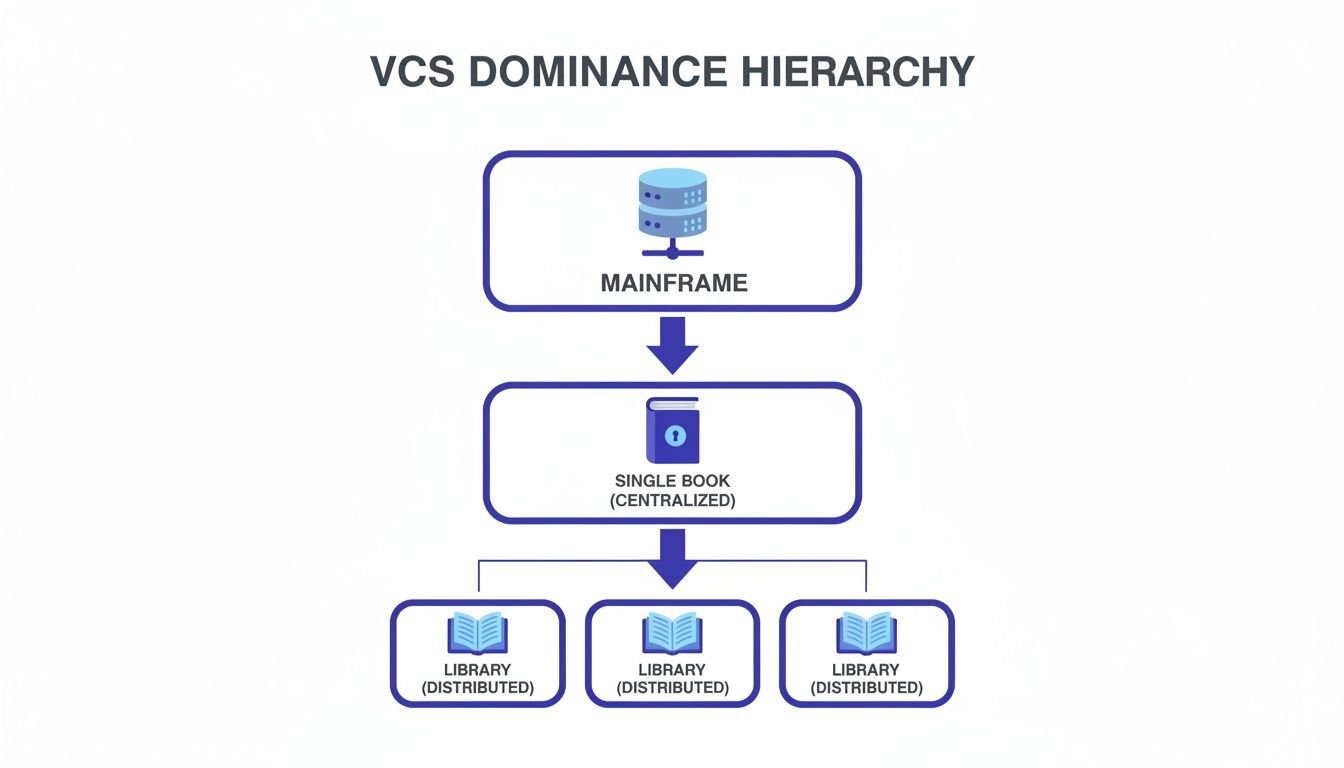
Alt text: Hierarchy of VCS (Version Control Systems) illustrating the evolution from mainframe to centralized and finally to modern distributed architectures.
This evolution was crucial. It shifted the paradigm from a single point of failure to a distributed network, fundamentally changing how developers collaborate.
The GitHub Flow Model
For most startups and product-focused teams, GitHub Flow is the gold standard. It's simple, lightweight, and built on one principle: your main branch must always be deployable.
The process is straightforward:
- Create a descriptive branch off
main(e.g.,feature/new-rag-pipeline). - Add your commits and push them frequently to the remote server.
- Open a pull request (PR) when you're ready for feedback.
- Review and discuss the code, letting automated checks run.
- Deploy for final testing from the branch to a staging environment.
- Merge into
mainonce the PR is approved, triggering deployment to production.
The beauty of this model is its simplicity. It's easy for new engineers to learn and is a perfect match for CI/CD automation.
When to use GitHub Flow: This is our default recommendation for most AI and SaaS teams. Its simplicity promotes rapid iteration and aligns perfectly with a continuous deployment culture.
The GitFlow Model
On the other end of the spectrum is GitFlow, a more structured workflow designed for projects with scheduled, versioned releases.
GitFlow is built around two permanent branches (main for official releases and develop for integration) and three temporary branches (for features, releases, and hotfixes).
While this provides a robust framework for managing multiple versions, it comes with significant overhead. The added complexity can slow a team down, a trade-off most fast-moving companies can't afford.
When to use GitFlow: Consider GitFlow only if you must support multiple product versions in production or have a rigid, date-driven release cycle. For most modern cloud applications, it's overkill.
Connecting SCM to Your CI/CD Pipeline
The real magic happens when you connect your SCM to a Continuous Integration and Continuous Delivery (CI/CD) pipeline. This automated workflow springs to life the moment a developer commits code. A simple git push becomes the trigger for building, testing, and deploying your application, turning disciplined coding habits into tangible business results.
This connection elevates your SCM from a passive library into an active, intelligent partner. It’s the engine that powers faster feature releases and upholds quality standards through relentless, automated checks.
An Architecture for Automated Deployment
The link between your source code and a live deployment is a chain reaction that starts with a single push to the repository.
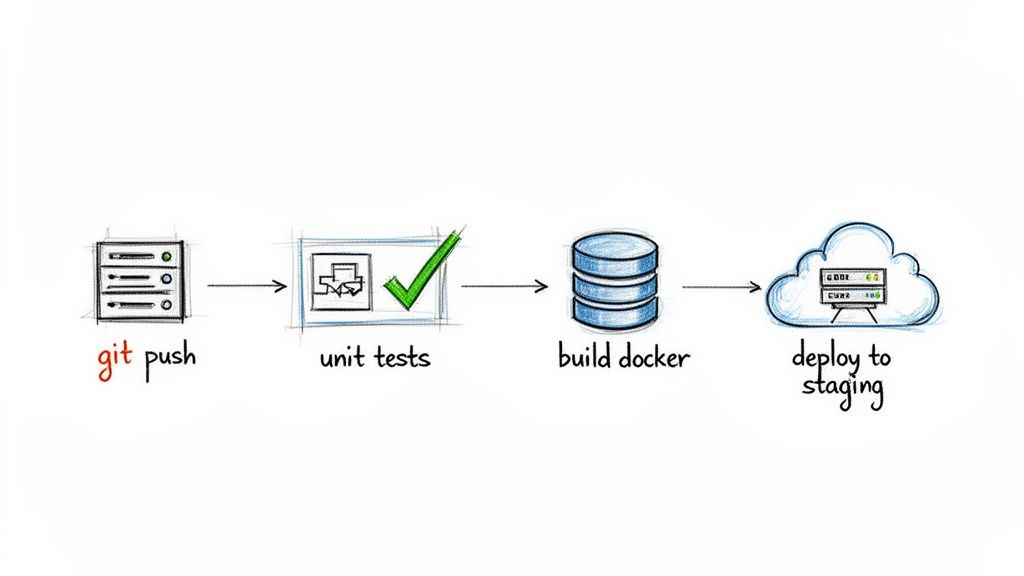
Alt text: A hand-drawn diagram illustrating a CI/CD pipeline, showing git push, unit tests, build Docker, and deploy to staging steps.
Here's how it plays out in a real-world scenario:
- The Trigger: A developer opens a pull request to merge a feature branch into
main. - Continuous Integration (CI): Your SCM platform pings a CI server like GitHub Actions or Jenkins, which runs a full suite of automated tests. If they pass, the pipeline builds a Docker container—a package with all code and dependencies.
- Continuous Delivery (CD): The new container is automatically deployed to a staging server that mimics production for final QA checks.
- Merge & Go Live: After the pull request is approved and merged, the same pipeline can deploy the validated code straight to production.
For engineers looking to master these automated workflows, a credential like the Microsoft DevOps Solutions certification offers a structured path.
Practical Example: GitHub Actions Workflow Snippet
Here is a simple YAML configuration file (.github/workflows/main.yml) that creates a basic CI pipeline using GitHub Actions. It tells GitHub to run a process every time code is pushed to the main branch.
# .github/workflows/main.ymlname: CI/CD Pipeline# 1. Trigger: Run this workflow on a push to the main branchon:push:branches: [ main ]jobs:build-and-test:runs-on: ubuntu-latest # Use a standard Linux environmentsteps:# 2. Check out the repository's code- name: Checkout codeuses: actions/checkout@v3# 3. Set up Python environment- name: Set up Pythonuses: actions/setup-python@v4with:python-version: '3.10'# 4. Install dependencies- name: Install dependenciesrun: |python -m pip install --upgrade pippip install -r requirements.txt# 5. Run unit tests with pytest- name: Run unit testsrun: |pytestWhat this shows: This script automates the first critical step of integration, ensuring every commit to
mainis automatically tested. It provides a safety net that catches bugs early and serves as the cornerstone of a reliable delivery process. See how this fits into a larger framework in our guide to automating regression testing.
Securing Your Source Code
As your team scales, source code security becomes a core business function. It's not just about tracking changes; it's about guarding your company's most valuable intellectual property. A source code breach can derail your product and shatter customer trust.
Getting SCM security right also builds the audit trail you'll need for compliance certifications like SOC 2 or ISO 27001.
Managing Access and Protecting Branches
Your first line of defense is controlling who can do what. Role-Based Access Control (RBAC) is non-negotiable.
Define clear roles with minimum necessary permissions:
- Read: For auditors or stakeholders who need to see code but not touch it.
- Write: For most developers, allowing them to push to feature branches.
- Maintain: For team leads, letting them manage settings and merge pull requests.
- Admin: For a very small group, allowing full control, including deleting repos.
Beyond roles, branch protection rules enforce quality. These rules make it impossible to push directly to critical branches like main, forcing every change through a proper review.
Here’s a rule that should be carved in stone: Require at least one pull request review before merging. It’s the single most effective way to catch bugs, share knowledge, and stop bad code from reaching production.
Integrating Automated Security Scanning
Automated security tools act as a crucial safety net. Integrated into your SCM workflow, they scan code on every commit or pull request, giving developers instant feedback.
- Static Application Security Testing (SAST): These tools scan your source code for common vulnerability patterns, like SQL injection risks, before the code is even run.
- Secret Scanning: Tools like the built-in scanners in GitHub and GitLab hunt for accidentally committed API keys, passwords, and other credentials.
This proactive scanning, or shifting security "left," finds and fixes problems early in the development cycle when it's cheaper and faster. This is vital as the global Version Control Systems (VCS) market, projected to reach $1.48 billion by 2030, expands into regulated industries. Learn more from the complete industry analysis.
Practical Example: SCM Security Audit Checklist
As a leader, periodically run through this audit of your SCM security. Use this checklist to quickly assess your posture.
- Access Control: Is Role-Based Access Control (RBAC) configured for all active repositories?
- Branch Protection: Is the
mainbranch locked, requiring pull request reviews and passing status checks before any merge? - Secret Management: Are API keys and other credentials stored outside the repository in a tool like HashiCorp Vault or AWS Secrets Manager?
- Automated Scanning: Do you have a SAST tool running automatically on every pull request?
- Dependency Audits: Is there a process to regularly scan for and update vulnerable third-party libraries?
- Offboarding Process: When someone leaves, is their SCM access revoked immediately?
What to Do Next: Your SCM Action Plan
Theory only gets you so far. Here are three straightforward actions you can take this week to sharpen your team’s SCM process, directly improving your shipping speed, security, and scalability.
1. Run a 60-Minute SCM Health Check
Before you can improve, you need an honest picture of where you stand. Use the security checklist above as a guide for a quick, high-value review of your most critical repositories.
Ask tough questions. Are branch protection rules actually enforced everywhere? How are we really handling secrets? This isn't about pointing fingers; it's about spotting small cracks before they become major breaches.
2. Standardize Your Branching Strategy
If every engineer has their own way of branching and merging, you don’t have a strategy—you have chaos. That inconsistency creates friction and will slow you down as you scale.
For most AI and SaaS teams, GitHub Flow is a fantastic choice. It’s simple, encourages frequent releases, and fits perfectly with a modern CI/CD pipeline.
Your Immediate Action: Draft a one-page document that spells out your chosen branching strategy. Include branch naming conventions and your expectations for a good pull request. Put this on your internal wiki and make it a mandatory read for every new hire.
3. Implement Stronger Authentication
To significantly strengthen security and protect against unauthorized access, implement robust authentication methods. Ensure your team uses Multi Factor Authentication (MFA) on your SCM platform. Make it a mandatory policy for all users with write access or higher.
Ready to Accelerate?
The fastest way to adopt best practices is to bring in people who have already mastered them. Instead of learning every lesson the hard way, you can level up your entire team by hiring experts who have built and scaled secure SCM workflows before. They bring both the technical skills and the discipline to make these practices stick.
If you’re ready to build a world-class engineering team that ships faster and more securely, your next step is clear.
Start a Pilot with ThirstySprout
Answering Your SCM Questions
Here are straight answers to the most common questions we hear from founders and team leads about source code management.
What's the Difference Between Git and GitHub?
Think of it this way: Git is the engine, and GitHub is the car built around it.
Git is the actual version control software running on your developers' computers. It's the open-source tool that tracks changes, creates branches, and manages the history of your codebase.
GitHub is a web-based service that hosts your Git repositories. It adds critical collaboration features like pull requests, code reviews, issue tracking, and CI/CD pipelines. You could also use similar platforms like GitLab or Bitbucket.
You use Git for the local mechanics of version control and a platform like GitHub to host the code and collaborate as a team.
When Should We Migrate to a New SCM Tool?
Only consider a migration when your current tool is causing more headaches than it's solving. Common triggers include:
- Moving from legacy systems: Migrating from older, centralized tools like SVN to a distributed system like Git to enable modern, remote-friendly workflows.
- Needing better platform features: Switching from one modern platform to another (e.g., Bitbucket to GitHub) to access a more robust CI/CD ecosystem or advanced security tools.
- Stricter security and compliance: Moving to a self-hosted solution for complete data control or to a platform with specific audit logs required for compliance.
How Do We Handle Large Files in Git?
Git was designed for text-based source code and struggles with large binary files like ML datasets or 3D models. Committing these directly will bloat your repository and make it incredibly slow.
The standard solution is Git LFS (Large File Storage). It's a Git extension that replaces large files with tiny text pointers in your repository. The actual files are uploaded to separate, dedicated storage.
For terabyte-scale datasets used in machine learning, teams often turn to specialized tools like DVC (Data Version Control) or store the data in cloud storage (like Amazon S3) and reference its location from the code.
Ready to build an engineering team that has already mastered these best practices? ThirstySprout connects you with vetted, senior AI and MLOps engineers who can implement and scale your SCM strategy from day one.
Start a Pilot
Hire from the Top 1% Talent Network
Ready to accelerate your hiring or scale your company with our top-tier technical talent? Let's chat.