

The worst SSR advice is to treat it like a universal upgrade. It isn't. Server side rendering is a targeted rendering strategy, and it only pays off when you know which pages need HTML on first response, which pages can wait, and which pages will turn your team into hydration firefighters if you force them onto the server.
Here's the mental model I trust in production. The server runs your component code, sends back finished HTML, and the browser can show meaningful content before the app's JavaScript finishes loading. That changes both the user experience and the cost model, so you should choose SSR route by route, not as a blanket default.
What Server Side Rendering Means
Server side rendering means the server builds the page's HTML before the browser sees it. MDN defines SSR by that contrast, the server generates HTML and sends it to the client instead of the browser assembling the page with JavaScript.
The plain-English version
If client-side rendering is like shipping furniture in flat packs and asking the buyer to assemble it, SSR is shipping the chair already built. The browser still has work to do later, because hydration reconnects the HTML to JavaScript behavior, but the user does not stare at a blank shell while the app boots. That early usable HTML is why SSR can improve perceived speed on content-heavy pages.
Practical rule: use SSR when the first paint needs to be meaningful, not when you merely want to sound modern.
A useful contrast is static site generation. Build-time rendering produces the page once at publish time, while request-time SSR renders for each request. The practical difference is freshness and cache strategy. If the content can stay stable, SSG is usually the cheaper and simpler choice. If the page depends on request-time data or personalization, SSR starts to make sense.
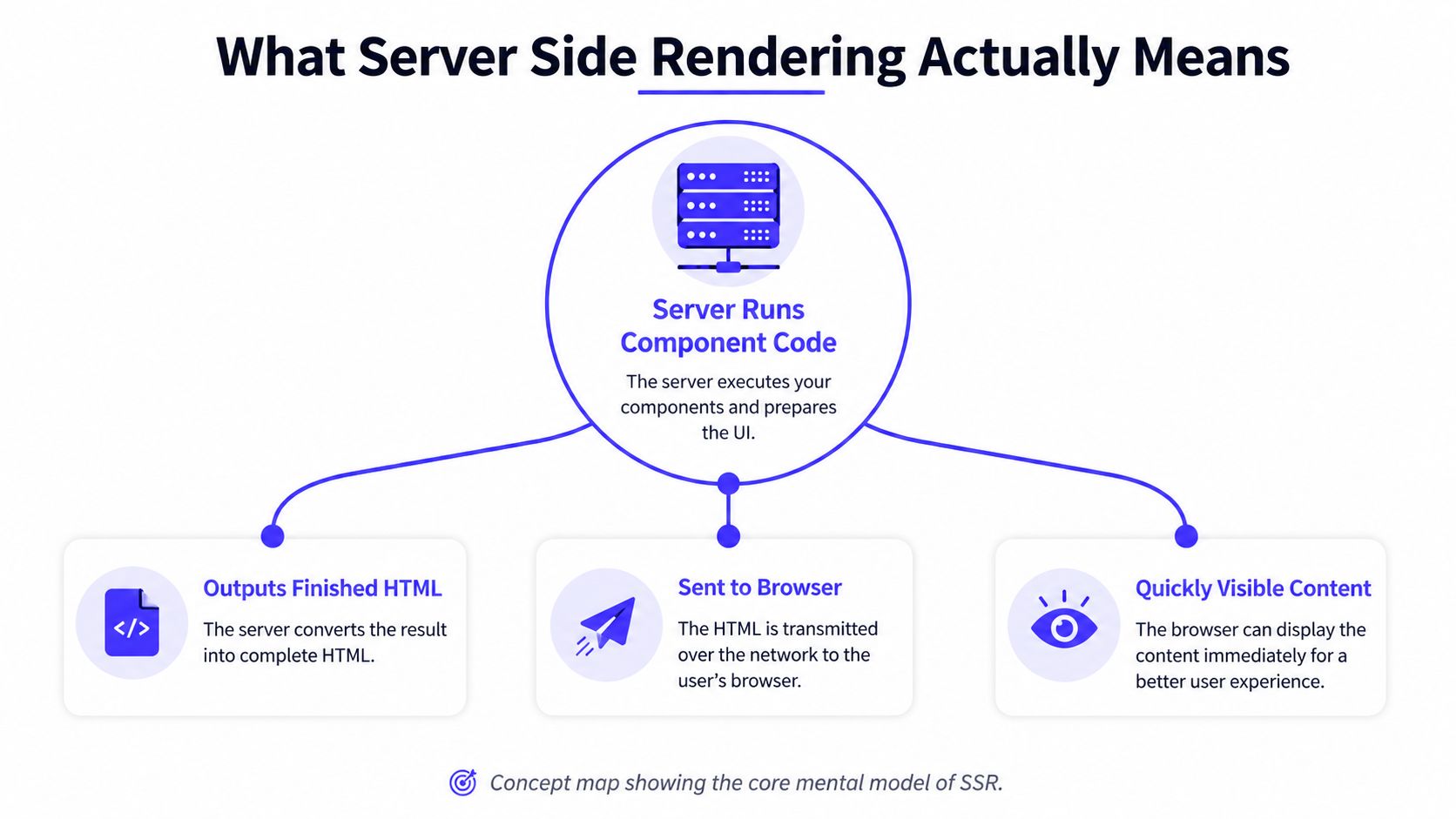
What this shows is the core mental model of SSR. The server is not just hosting files, it is executing view logic and returning the result as HTML that the browser can display quickly.
For a tighter product-oriented explanation of how SSR affects discoverability and page setup, see this guide on React.js and SEO.
The Rendering Lifecycle and Hydration
SSR is only half the job. The server can send useful HTML fast, but the page is still not interactive until the browser hydrates it and wires events back to the rendered markup. If teams stop thinking at the HTML response, they miss the part that causes most of the pain.
A standard SSR flow has six stages, browser request, server receives it, server fetches data, server renders HTML, server returns HTML, and the browser hydrates the page so JavaScript events work again.
What each step changes
The first byte matters because it shows how quickly the server started responding. The HTML generation step matters because it moves visible content earlier in the critical path. Hydration matters because a page that looks ready but ignores clicks is broken, not fast.
React-based SSR renders the component tree to HTML on the server, then hydration reconnects the DOM to the component tree in the browser (Patterns.dev SSR overview). That sequencing is why SSR can make content visible sooner than client-side rendering, where the browser waits for JavaScript execution before meaningful content appears. It also explains why hydration mismatches happen, the server and browser produced different markup or state, and the app tries to stitch them together anyway.
A page that paints early but hydrates late can still feel slow. Measure the gap between those events, not just the first screenful.
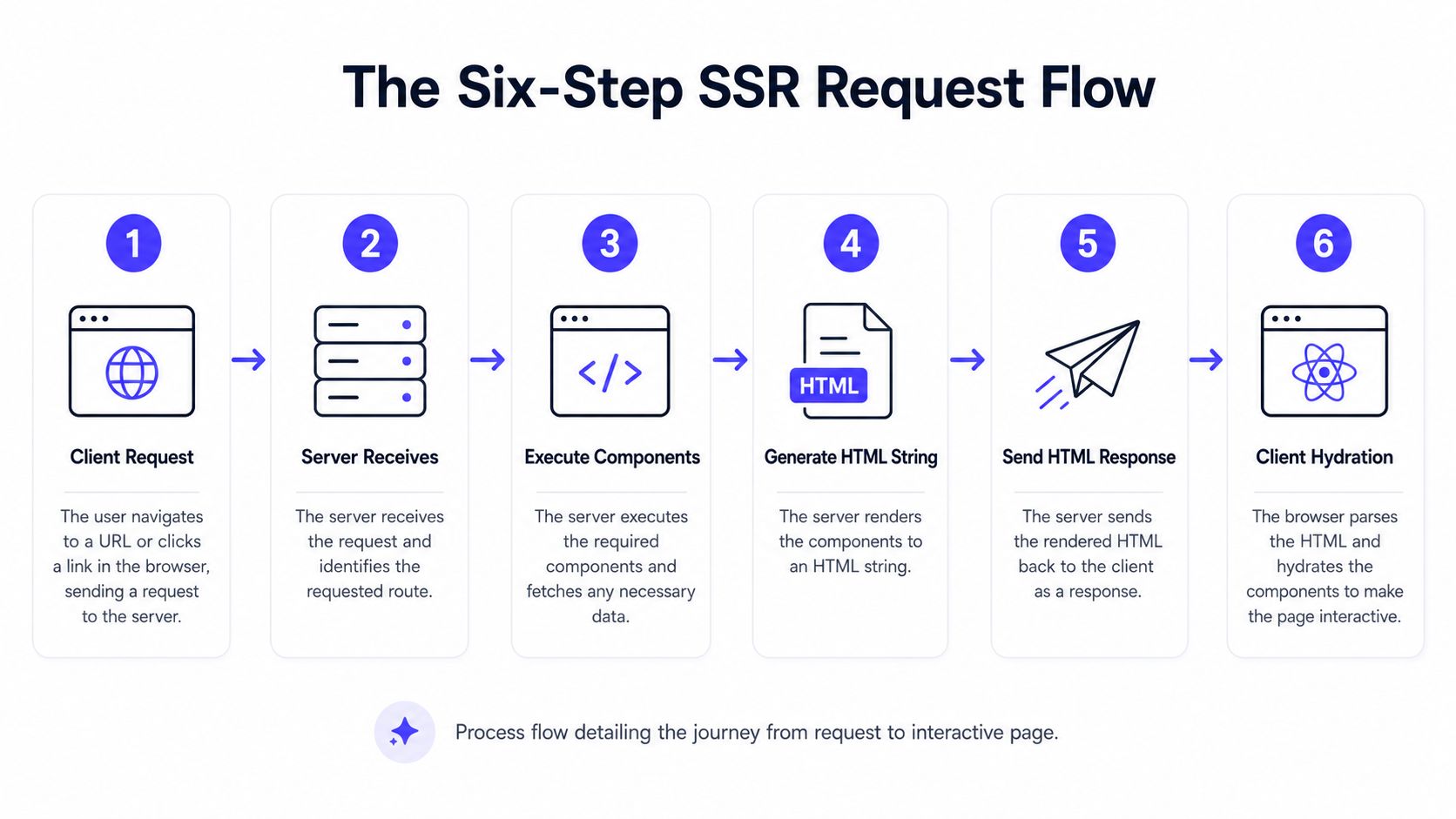
This flow makes the trade obvious. SSR shortens the path to usable HTML, then hydration decides when the page becomes interactive.
The moment streamed SSR enters the picture, the order changes again. You can send critical HTML first and defer less important pieces, which lets the browser show something useful earlier without waiting for the entire tree to finish server work. That pattern is better than forcing the whole page through one blocking render.
SSR, CSR, and SSG Compared
The choice is route by route. A homepage, a pricing page, a dashboard, and a help article do not belong in the same rendering bucket, and teams burn time when they pretend they do.
| Mode | Renders on | Freshness | Best fit | Main risk |
|---|---|---|---|---|
| SSR | Server on each request | High | Personalized pages, SEO-sensitive pages, request-time data | Higher server load and more hydration complexity |
| CSR | Browser after JS loads | High after boot | Authenticated dashboards, highly interactive apps | Slow first meaningful paint and weak crawlability |
| SSG | Build time | Low until rebuilds | Marketing pages, docs, stable content | Stale content unless rebuilds are automated |
What wins where
SSR belongs on pages that need request-specific HTML. If the response depends on cookies, geo, auth state, inventory, or anything else that changes per visit, server rendering is the cleanest fit. CSR belongs on applications that can tolerate a slower first paint because the heavy lifting happens after boot. SSG is the simplest option for content that rarely changes and should be cheap to serve.
The operational mistake is treating SSR like a free performance upgrade. It shifts work from the browser to the server, so every uncached request pays compute, memory, and latency costs. That matters as soon as traffic rises or pages start to vary by user, region, or experiment. If you need to keep the server bill under control, use caching early and deliberately, and start with a practical guide to caching in Node.js.
If the page does not need fresh HTML on every request, do not spend per-request compute on it.
CSR is still the right call for some products. Admin tools, internal apps, and highly interactive interfaces often benefit from a browser-first model because the app behaves the same after the initial load, and the server does less work on each visit. SSG fits the opposite case. Marketing pages, docs, landing pages, and other stable content can be built once and delivered with very little ongoing cost.
The best teams stop arguing about SSR versus CSR as a philosophy and start classifying routes by behavior. Ask three questions. Does this page need request-time data. Does the user need fast interactivity before the full app loads. Does the content change often enough to justify server work or rebuilds. Those questions make the trade-off obvious, and they keep you from forcing one rendering mode onto every page just because it is the default in your framework.
Performance Gains and Server Cost Trade-offs
SSR pays off when the page has to show meaningful content before the app finishes booting. That is why the strongest gains show up on routes with real content, request-time personalization, or search visibility requirements. A 2024 comparative analysis of CSR versus SSR found SSR reduced Time to Interactive by 62.3% and Largest Contentful Paint by 58.7% on average, with significant differences across metrics at p ≤ 0.05. The same paper reported concrete test results where the largest dataset averaged 68,644 ms for CSR versus 31,369 ms for SSR, and another case showed 14,716 ms versus 4,520 ms.
Where the gains come from
Those results come from a shorter critical path. The server sends usable HTML first, so the browser can display content before it finishes downloading and executing the rest of the app. That matters most on pages with large state, heavy data dependencies, or content that users need to read immediately. Simple pages with little variation do not benefit as much, which is why teams waste time if they apply SSR everywhere by default.
Streaming makes the performance story better without changing the basic trade-off. A 2025 streaming SSR study found streaming SSR was 32% faster for Time to First Byte and 40% faster for Total Blocking Time on average, while CPU usage increased by only 2% and server load by only 2%. That is the pattern you want if you care about perceived speed and do not want to inflate infrastructure costs.
The server bill is still real. Request-time rendering means the server works on every uncached hit, so caching, edge placement, and data-fetch efficiency become part of the performance plan, not afterthoughts. The Next.js SSR docs call out the request-time model clearly, and the operational lesson is blunt, if the page is expensive to render repeatedly, cache it before traffic turns SSR into a cost problem.
Use caching in Node.js early for pages that do not need a fresh HTML response on every request. That keeps SSR for the routes where the user sees the difference.
Practical rule: use SSR for pages where latency is visible to users and to search bots, then protect it with caching before traffic makes the page expensive.
The core question is not whether SSR is faster in isolation. It is which routes deserve request-time HTML, which framework gives your team the least painful hydration model, and how much you are willing to pay at request time for the gain.
How Next.js, Remix, and Nuxt Implement SSR
Framework choice changes how painful SSR feels in practice. Next.js makes request-time SSR straightforward with server code that runs on every request, Remix leans into server loaders and nested routes, and Nuxt supports SSR plus hybrid route rules for mixing rendered modes. None of them remove the trade-offs. They just move the complexity around.
What each stack nudges you toward
Next.js is the most explicit about request-time page generation. That's a good fit if your team already thinks in pages, routing, and server data functions. Remix is better when you want the route tree to own data loading and you like a server-first mental model. Nuxt is attractive for teams that want SSR with more hybrid control across routes.
If you're trying to detect what stack a site uses, this AI Website Detector guide is a useful reference because it shows how visible framework choices become in the runtime and markup.
For hydration, the opinionated advice is simple. Keep client components small, keep server-rendered markup stable, and don't push browser-only logic into the first render unless you enjoy mismatch bugs. Teams that spread interactive state across too many components usually discover that the render model is less of a problem than their component boundaries.
A quick comparison of team fit helps:
- Next.js: best when your team wants the clearest path from route to HTML and can enforce caching discipline.
- Remix: best when loaders and nested routing fit your product structure, especially for data-heavy pages.
- Nuxt: best when you want SSR plus flexible hybrid rendering without rebuilding the entire routing model.
Metrics and Benchmarking for Real User Impact
If you don't measure the right things, SSR becomes a religion instead of an engineering decision. The dashboard metrics that matter are Time to First Byte (TTFB), First Contentful Paint (FCP), Largest Contentful Paint (LCP), Time to Interactive (TTI), and Interaction to Next Paint (INP). The first four tell you whether the page appears fast and becomes usable fast, while INP tells you whether hydration or post-load scripting is making the interface feel sticky.
A minimal benchmark loop
Start with a repeatable lab test, then confirm it in real user monitoring. Use one route, one device profile, one throttling profile, and one code branch. Measure before and after, not just once, but in a repeatable run that you can compare later.
- Measure TTFB first. It tells you whether SSR is returning HTML quickly.
- Measure LCP and TTI next. If those don't improve, your server work may not be paying off.
- Check INP after hydration. That's where too much client-side behavior shows up.
- Compare lab and field data. Lab wins can disappear in production if caching or traffic shape changes.
For a useful lens on connecting performance to product pages and conversion intent, this founder's guide to SaaS web design is a decent companion read because it keeps the page experience tied to actual business outcomes.
Benchmark the route users actually hit, not the prettiest demo page in your app.
If you're already running recurring perf checks, this pairs well with continuous performance testing. SSR regressions usually show up as hydration drift, cache misses, or slower server response under load, and regular checks catch those before they become production folklore.
Decision Checklist for Startups and Enterprise Teams
The cleanest SSR decision fits on one screen. Ask four questions, then stop arguing in abstract terms. If the answer is yes to most of them, SSR belongs in the design. If not, you're probably forcing the wrong rendering model onto the route.
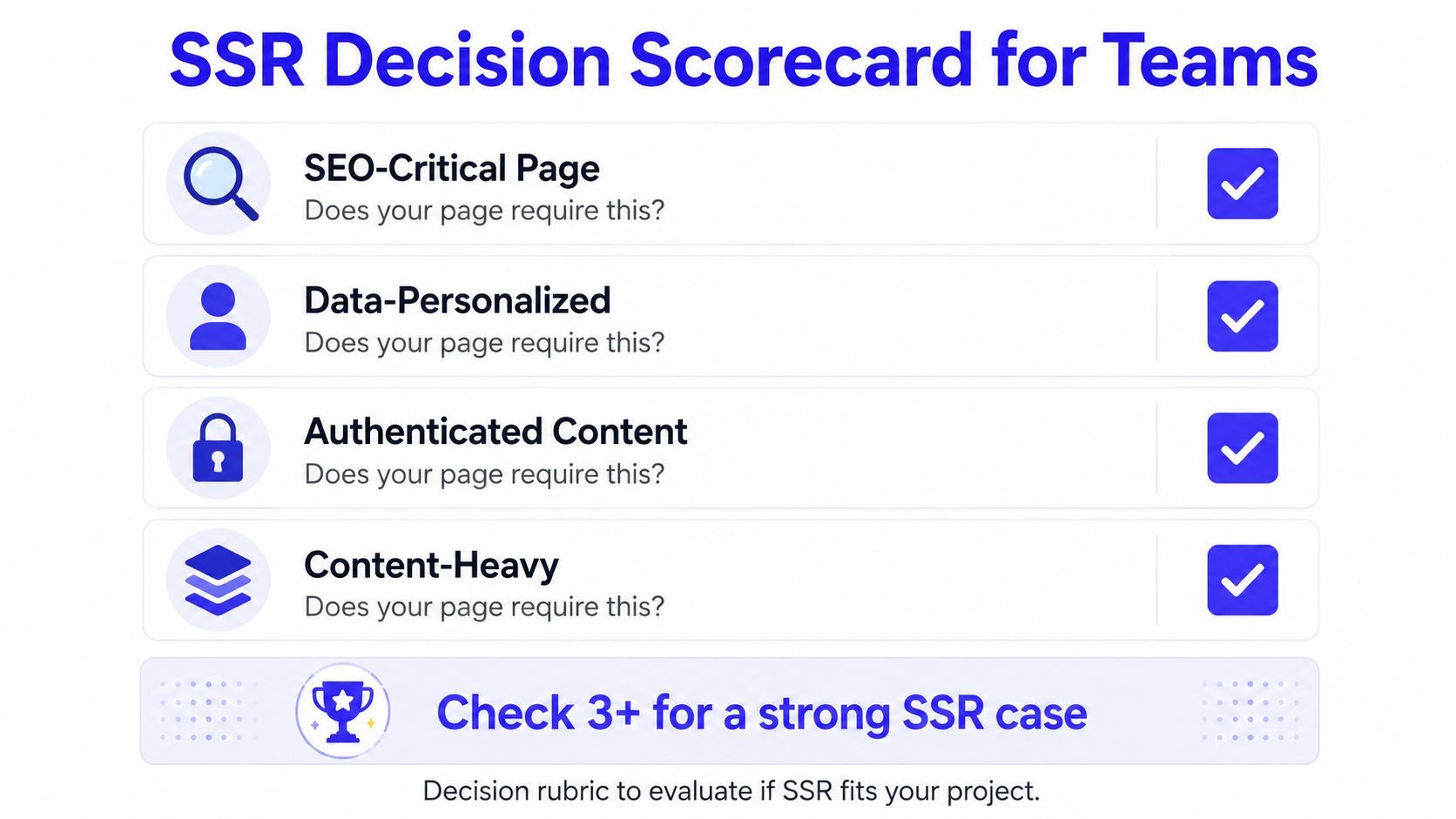
What this scorecard shows is the routing logic I'd use in review. It's simple on purpose.
The four questions
- SEO-critical page. If search visibility matters, SSR or SSG deserves a serious look.
- Data-personalized page. If HTML must reflect the request, SSR is a strong candidate.
- Authenticated content. If the content changes per user and doesn't need indexing, CSR is often cleaner.
- Content-heavy page. If the page is large and the first meaningful paint matters, SSR or streaming SSR is worth testing.
A startup landing page usually wants SSG first, then selective SSR for pages that need fresh request-time data. An enterprise dashboard usually wants CSR for the interactive app shell, with SSR reserved for shared, indexable views like public reports or marketing-facing detail pages. That split keeps the team from dragging server rendering into every route just because it feels more advanced.
The decision rule is this, if the page benefits from being visible before JavaScript finishes, SSR is useful. If the page benefits more from rich client-side interaction after the first load, CSR is simpler. If the page is stable and public, SSG is usually the cheapest path.
Migration Steps and Common Anti-Patterns
Teams waste weeks when they migrate everything at once. Don't do that. Start with route inventory, then pick one framework path, then render public pages first, and only after that move into interactive or authenticated surfaces.
A rollout plan that won't explode
- Audit routes by business value. Mark pages as public, personalized, authenticated, or highly interactive.
- Pick one framework pattern. Don't mix SSR idioms across the app unless you already have strong ownership boundaries.
- Move public pages first. Marketing, docs, and product pages are easier to stabilize than dashboards.
- Hydrate dashboards last. Interactive surfaces expose mismatch bugs fastest.
- Lock in caching early. SSR without caching turns into expensive request-time rendering very quickly.
The recurring mistakes are predictable. Teams skip caching, ignore edge placement, treat hydration warnings as noise, or assume every route should be SSR because some routes need it. That's how SSR turns from a performance tactic into a source of unreliable deploys.
The simplest pre-implementation checklist is short. Confirm the route needs request-time HTML, confirm the server can render it consistently, confirm caching exists before launch, and confirm you have a way to measure TTFB, LCP, TTI, and INP in production. If any of those are missing, you're not ready to call the migration done.
If your team is deciding whether SSR belongs in the architecture, or you need engineers who've already shipped it without drowning in hydration bugs, talk to ThirstySprout. We help teams scope the right rendering model, fill the gaps in the stack, and move from evaluation to a working pilot without burning weeks on guesswork.
Hire from the Top 1% Talent Network
Ready to accelerate your hiring or scale your company with our top-tier technical talent? Let's chat.