

Your team ships a polished React app. The product is fast in local testing, the UI feels modern, and the launch goes smoothly. Then the SEO report lands. Key pages aren't indexed, snippets look generic, and the pages you expected to rank barely show up.
That situation is common because React JS and SEO is not a framework debate. It's an architectural decision. If you treat rendering, metadata, and crawl verification as afterthoughts, Google sees less than users do. If you design for search from the start, React works well.
This guide is for CTOs, engineering leads, and founders who need a practical path. The focus is simple: choose the right rendering model, verify what Googlebot receives, and avoid expensive rework later.
Why Your React App is Invisible to Google
A familiar pattern goes like this. The marketing site, docs hub, or feature page is built in React. It looks great in the browser. But when a crawler requests the URL, the server sends little more than a shell and JavaScript.
That is the historic SEO problem with default React. React uses client-side rendering by default, which means crawlers often receive an empty HTML shell first and have to execute JavaScript before meaningful content appears. Without mitigation, key elements like headings and body copy aren't present in the initial DOM response, which can delay indexing or prevent content-heavy pages from ranking at all, as explained in Googlebot-focused React SEO guidance.
What the crawler sees first
Imagine a restaurant with no menu in the window. A person can walk in and ask questions. A search crawler doesn't do that well. It wants the essentials up front.
If the initial HTML doesn't include the page title, main heading, body content, and canonical signals, you create unnecessary risk. Sometimes Google will render the JavaScript later. Sometimes it won't process the page the way you expect. Either way, you've added latency and uncertainty to indexing.
Practical rule: If a page needs to rank, its core content should exist in the first HTML response.
Why this isn't really a React problem
React itself isn't the issue. The issue is choosing the wrong rendering model for the page's job.
A logged-in AI dashboard can stay client-heavy because it doesn't need to rank. A pricing page, documentation page, solutions page, or public profile page has a different requirement. Those pages need content available immediately to bots. That's why modern React SEO has converged on server-side rendering (SSR) or static site generation (SSG) instead of pure client-side rendering for indexable pages.
A quick triage helps:
- Public acquisition pages: These need crawlable HTML on first response.
- Docs and knowledge content: These usually benefit from static generation and strong metadata discipline.
- Authenticated product surfaces: These can stay client-rendered if search visibility isn't the goal.
If you're diagnosing a broader visibility issue, this expert guide for Google search problems is useful because it frames React rendering as one part of a larger indexing and discoverability workflow.
The business impact
This isn't only about rankings. It's also about cost and execution risk.
When SEO-critical pages depend on browser-side rendering, teams often compensate later with patches, crawler workarounds, or rushed framework migrations. That's expensive. It also creates tension between growth and product engineering because the same page now has to satisfy both user experience and search requirements after launch instead of before it.
The Solution Framework Choosing Your Rendering Strategy
Relying on a single rendering strategy is often impractical. Instead, the right one is needed per route.
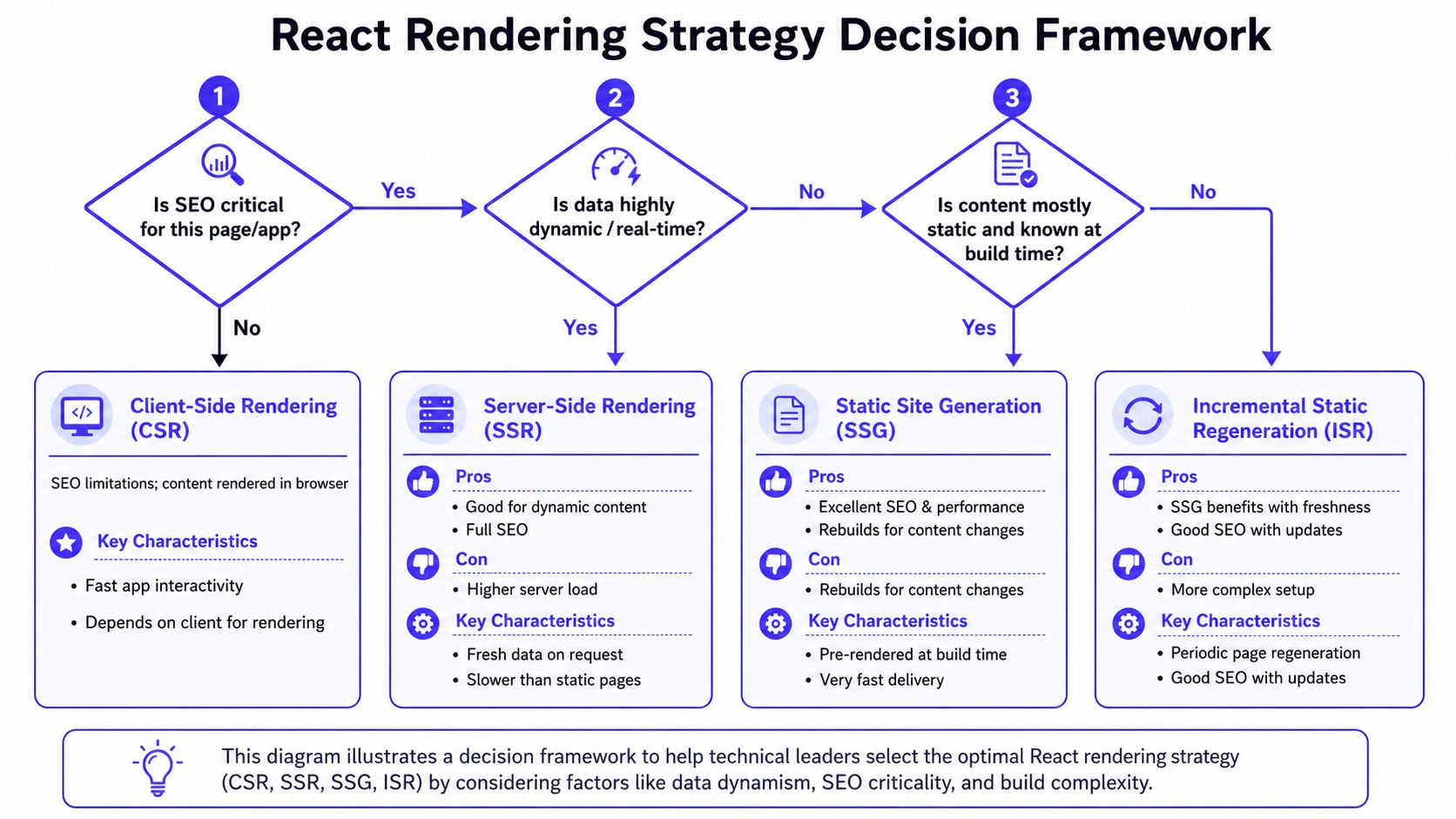
A CTO decision table
| Strategy | Best fit | Time-to-value | Performance profile | Infra cost | Data freshness |
|---|---|---|---|---|---|
| CSR | Logged-in apps, dashboards, internal tools | Fast if you already run a SPA | Risky for SEO-critical pages | Lower server complexity | Real-time on client |
| SSR | Dynamic public pages | Medium | Good SEO, but server work per request | Higher runtime cost | Fresh on every request |
| SSG | Docs, landing pages, blogs | Strong for predictable content | Excellent when content is stable | Lower runtime cost, more build planning | Fresh after rebuild |
| ISR | Content that changes often but not constantly | Medium | Similar benefits to static delivery with controlled refresh | Moderate | Fresher than SSG without full rebuilds |
| Dynamic rendering / snapshots | Legacy React SPA needing bot-compatible HTML | Fastest rescue path for some older stacks | Useful as a bridge, not my first choice for greenfield | Added operational moving parts | Depends on snapshot refresh |
What usually works
For most high-growth SaaS teams, the practical answer is hybrid:
- SSG for marketing pages and docs
- SSR for public pages with changing data
- CSR for authenticated product flows
- Dynamic rendering only when you're constrained by a legacy SPA
That hybrid approach matters even more for AI products. Some routes need indexing. Others contain real-time, user-specific outputs that don't belong in search at all.
What usually fails
Pure CSR across every route is the common mistake. It tends to combine poor crawlability with weak performance.
There is a measurable reason for that. In pure React apps without dynamic route splitting, CSR causes a 60-70% reduction in initial bundle efficiency, which hurts metrics tied to search visibility. Using React.lazy() and Suspense for route-based code splitting improves that by loading only the JavaScript needed for the current route, according to this React SEO performance analysis.
If the first page load requires too much JavaScript before content appears, both crawlers and users pay the price.
A simple decision tree
Use this sequence when choosing:
Does this page need to rank?
If no, CSR is often fine.Does the content change on every request?
If yes, SSR is usually the better fit.Is the content mostly known ahead of time?
If yes, use SSG.Does it change regularly but not in real time?
ISR is often the most balanced option.
One implementation detail is essential across all of them. Avoid hash-based routing. Use clean URLs through the history API so crawlers get stable, indexable paths.
Example 1 SSR with Next.js for a Dynamic Page
A common use case is a public page that lists AI engineer profiles pulled from an API. The content changes often enough that prebuilding it isn't ideal, but the page still needs to rank and display complete HTML to search engines.
In that case, SSR is the right trade-off.
A representative pattern
// pages/ai-engineers.tsximport Head from 'next/head';export async function getServerSideProps() {const res = await fetch('https://api.example.com/engineer-profiles');const profiles = await res.json();return {props: { profiles },};}export default function AIEngineersPage({ profiles }) {return (<><Head><title>Available AI Engineers</title><metaname="description"content="Browse available AI engineers with experience across LLMs, MLOps, and data systems."/><link rel="canonical" href="https://example.com/ai-engineers" /></Head><main><h1>Available AI Engineers</h1><ul>{profiles.map((profile) => (<li key={profile.id}><h2>{profile.name}</h2><p>{profile.summary}</p><p>{profile.primarySkill}</p></li>))}</ul></main></>);}Why this works for SEO
With getServerSideProps, the server fetches data before the response goes out. That means the initial HTML already contains the page title, heading, and profile content. A bot doesn't need to wait for the browser to execute client-side fetching logic before seeing the substance of the page.
That's the core business value of SSR on public dynamic pages. You reduce indexing uncertainty without giving up freshness.
Where teams overuse SSR
SSR is not free. Every request adds server work. Under load, that can raise operational cost and increase response variability if your data layer is slow.
Use SSR where freshness justifies it:
- Good fit: Public listings, program pages, changing inventory, location pages
- Weak fit: Static docs, evergreen landing pages, legal content
If you're building a broader web platform around Next.js, this walkthrough on building production-grade Next.js PWAs is useful because it highlights adjacent production concerns beyond SEO, including app behavior and deployment discipline.
SSR is best for pages that are both public and change often. If only one of those is true, another strategy is usually cheaper.
Example 2 Auditing What Googlebot Actually Sees
Most React SEO guides stop too early. They tell you to adopt Next.js, add meta tags, or install a rendering layer. They don't give you a repeatable way to verify the result.
That gap matters. Data cited in a React SEO audit guide shows that 40% of React sites have silent ranking killers due to generic titles or missing metadata that only appear after JavaScript execution, and 70% of audits miss them because teams inspect the browser view instead of raw HTML in this practical analysis of React SEO audits.
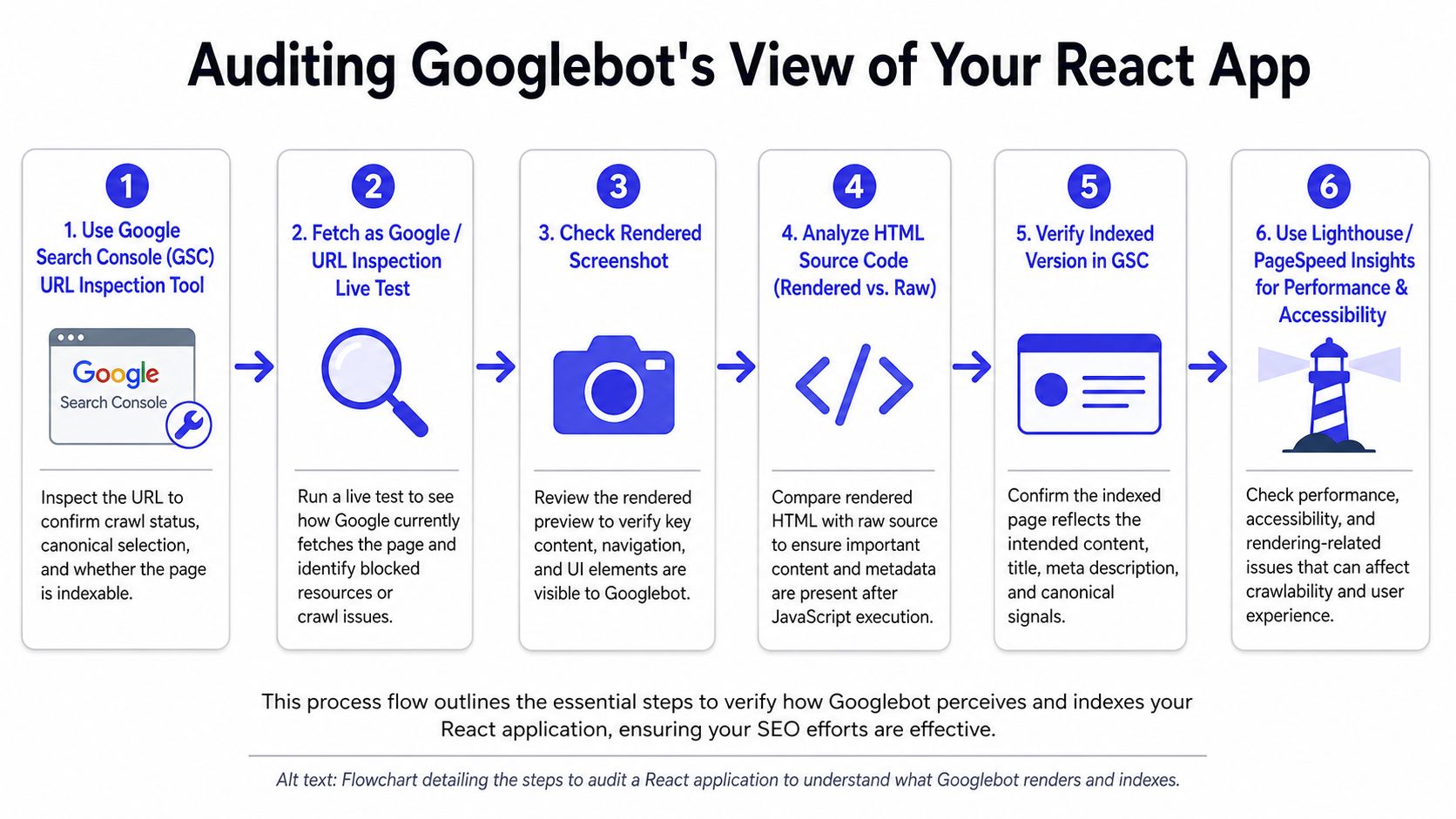
A tool-agnostic audit workflow
Start before deployment. Then repeat after release.
Request the raw HTML
Usecurlwith a Googlebot user agent and inspect the response body. You're checking whether the title, meta description, canonical tag, H1, and meaningful body content are present without relying on browser rendering.Compare raw HTML to browser-rendered HTML
Open the page normally, inspect the DOM, and compare. If critical metadata appears only after client execution, that's a warning sign.Validate structured data
Check whether your JSON-LD is present in the raw response when it needs to be indexable.Run a Google-facing test
Use Google's testing tools to confirm what rendering and rich result parsers can detect.Confirm indexability in Search Console
Use URL inspection after deployment to verify the indexed version and rendered output.
A command you can use today
curl -A "Googlebot" -L https://example.com/your-pageWhat you're looking for in the response:
- Unique title tag
- Meta description that matches the page
- Canonical URL
- Visible H1 and substantive body copy
- Structured data when applicable
What to inspect every time
| Element | Good sign | Warning sign |
|---|---|---|
| Title | Route-specific and descriptive | Same generic title on many pages |
| Description | Concise route-level summary | Empty or app-wide default |
| Canonical | Matches intended public URL | Missing or conflicting |
| Main content | Present in raw HTML | Missing until hydration |
| JSON-LD | Visible when needed | Injected too late or missing |
A short video walkthrough helps teams standardize this process before release:
Make this part of release hygiene
If your team already runs performance gates, fold SEO verification into the same workflow. Continuous checks catch regressions earlier than manual QA. A useful companion process is this guide to continuous performance testing, especially for teams shipping frequent UI and bundle changes.
Raw HTML is the truth source for SEO audits. The browser view is not enough.
Deep Dive Comparing React SEO Frameworks
Framework choice affects speed, hiring, maintenance, and how easily you can support mixed rendering across the product.
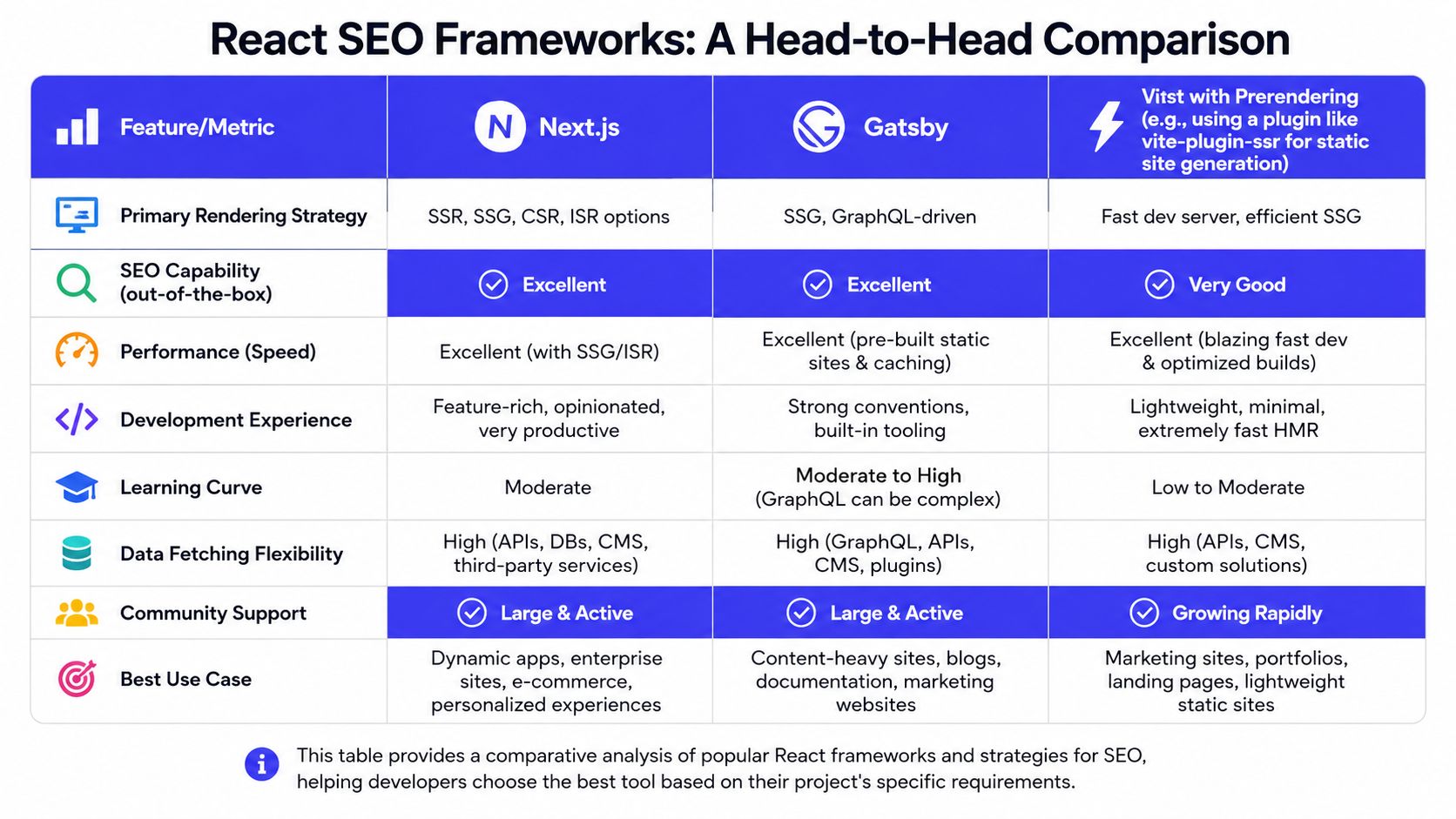
A practical scorecard
| Feature | Next.js | Gatsby | Vite with prerendering or SSR plugin |
|---|---|---|---|
| Primary rendering options | SSR, SSG, ISR, CSR | Strong static-first model | Flexible, but more assembly required |
| SEO capability out of the box | Strong | Strong for content sites | Depends on plugin choices and team discipline |
| Performance tuning path | Mature | Strong for static delivery | Good, but less opinionated |
| Development experience | Broad ecosystem, common hiring pool | Familiar for content-heavy teams | Fast local dev, more architecture decisions |
| Hybrid rendering suitability | Very strong | More opinionated around static content | Possible, but usually more manual |
| Best use case | SaaS with mixed route needs | Content-heavy sites | Custom stacks and teams comfortable composing tools |
Where Next.js wins
If you need one framework to support marketing pages, docs, public SEO routes, and a dynamic app shell, Next.js is usually the strongest default. It lets one team support SSG, SSR, and incremental regeneration without stitching together multiple rendering systems.
That matters because hybrid delivery is now common in AI products. Data cited in analysis of React SEO for AI SaaS says 85% of developers default to SSR for SEO-critical routes, while 60% of high-growth AI SaaS apps rely on dynamic user-specific data that SSR cannot pre-render efficiently. The missing pattern is hybrid rendering, where static content gets indexable HTML and dynamic AI outputs stay client-side, as discussed in this hybrid rendering analysis for React apps.
Where Gatsby still makes sense
Gatsby is still a credible option for content-centric sites. If the site is mostly editorial, documentation-heavy, or marketing-focused, Gatsby's static-first posture can be a good fit.
The trade-off is flexibility. When the same codebase also needs dynamic, authenticated, real-time surfaces, teams often outgrow a pure static mindset.
Where Vite-based stacks fit
Vite is attractive when you already have a custom React stack or want a lightweight developer experience. But for SEO, it asks more from your team. You need to be explicit about prerendering, metadata injection, route behavior, and audit tooling.
That's not wrong. It just shifts complexity from the framework to your architecture.
The hiring and governance angle
For a CTO, this isn't only technical. It's operational.
- Next.js is easier to standardize across a growing team.
- Gatsby works well when content architecture leads product architecture.
- Vite plus plugins is strongest when your team can own more custom decisions.
The wrong framework doesn't always fail immediately. More often, it creates friction six months later when growth, content, and product requirements diverge.
The Essential SEO Checklist for Any React App
Rendering alone won't save rankings. You also need clean metadata, crawlable URLs, stable performance, and a release gate that catches regressions.

Technical basics
Use this as a production checklist for React JS and SEO work.
- Choose the right rendering model: SSR or SSG for indexable routes. Keep CSR for product surfaces that don't need to rank.
- Avoid hash routing: Use clean URLs that crawlers can interpret reliably.
- Support legacy SPAs carefully: If you're stuck on a pure SPA, bot detection plus snapshot middleware can provide full static HTML to crawlers, as described in this React SPA crawlability approach.
- Maintain sitemaps and canonicals: Keep canonical intent consistent across app responses and any bot snapshots.
Metadata and on-page requirements
Meta tags should be route-specific, not global defaults.
The practical React pattern is to use react-helmet-async with HelmetProvider so each route can set its own titles, descriptions, canonicals, and social tags, as outlined in this React Helmet implementation guide. Meta descriptions should stay within 150–160 characters, and titles and canonicals should remain consistent between the app and any bot-facing snapshot, based on this React SEO implementation reference.
A minimal example looks like this:
import { Helmet, HelmetProvider } from 'react-helmet-async';function ProductPage() {return (<><Helmet><title>AI Engineer Profiles</title><metaname="description"content="Review AI engineer profiles across LLMs, MLOps, and data platforms."/><link rel="canonical" href="https://example.com/ai-engineers" /></Helmet><main>{/* route content */}</main></>);}Performance gates
Performance is part of SEO, not a separate concern.
For competitive rankings, React applications need to meet Google's Core Web Vitals targets: LCP under 2.5 seconds, CLS under 0.1, and INP under 200 milliseconds, according to this React SEO Core Web Vitals guide.
A release checklist should include:
- Bundle discipline: Split routes and lazy load below-the-fold components.
- Hydration review: Watch for large bundles delaying visible content.
- Caching strategy: Improve repeated access paths with thoughtful server and application caching. This guide to caching in Node.js is a useful complement when SSR routes start to add runtime pressure.
- Structured data checks: Validate JSON-LD before deploy, not after traffic drops.
Release gate: If the route doesn't expose meaningful HTML, unique metadata, and acceptable Core Web Vitals, it isn't ready.
A compact final pass
Before shipping any SEO-critical route, confirm:
| Check | Pass condition |
|---|---|
| Rendering | Meaningful content appears in initial HTML |
| Metadata | Unique title, description, canonical |
| URL design | Clean route, no hash fragment |
| Structured data | Present and valid when applicable |
| Performance | Meets your agreed thresholds |
| Verification | Raw HTML and Google-facing tests agree |
What To Do Next Secure Your Rankings
If you're responsible for product architecture, the next week matters more than the next quarter. You don't need a large migration to reduce risk. You need one focused pass across the pages that matter most.
Start with one route
Pick the highest-value public page in your stack. That might be pricing, docs, feature pages, location pages, or profile pages. Audit what Googlebot sees. If the raw HTML is thin, fix that first.
This is also a good time to review adjacent frontend changes that could affect rendering behavior. If your team is planning upgrades, this summary of key React 19 updates is worth reading so performance and rendering choices don't drift from the SEO plan.
Choose a route-level architecture
Don't try to standardize the entire app under one rendering mode. Separate public acquisition surfaces from dynamic product surfaces and decide per route.
A simple operating model works well:
- Marketing, docs, and content pages: static or incrementally regenerated
- Public dynamic pages: server-rendered
- Authenticated AI workflows: client-rendered unless there's a strong reason otherwise
If SEO is part of a broader acquisition strategy, this overview of B2B digital marketing systems is a useful reminder that indexing, performance, content structure, and conversion all need to line up.
Put proof into your release process
The missing step for many development groups is verification. Add raw HTML inspection, metadata checks, and Google-facing validation to your deployment checklist. That creates proof, not hope.
The strongest React SEO programs usually do three things consistently:
- Audit one important route this week
- Assign rendering strategy per route, not per app
- Add automated or repeatable pre-release verification
That sequence keeps scope tight and impact visible.
If you need senior engineers who can implement hybrid React rendering, fix crawlability issues, and ship SEO-safe AI product experiences without slowing your roadmap, ThirstySprout can help. You can Start a Pilot or See Sample Profiles to scope the work with vetted AI and platform engineers who understand both architecture and delivery.
Hire from the Top 1% Talent Network
Ready to accelerate your hiring or scale your company with our top-tier technical talent? Let's chat.