

TL;DR
- For single-server apps: Start with a simple in-memory cache (
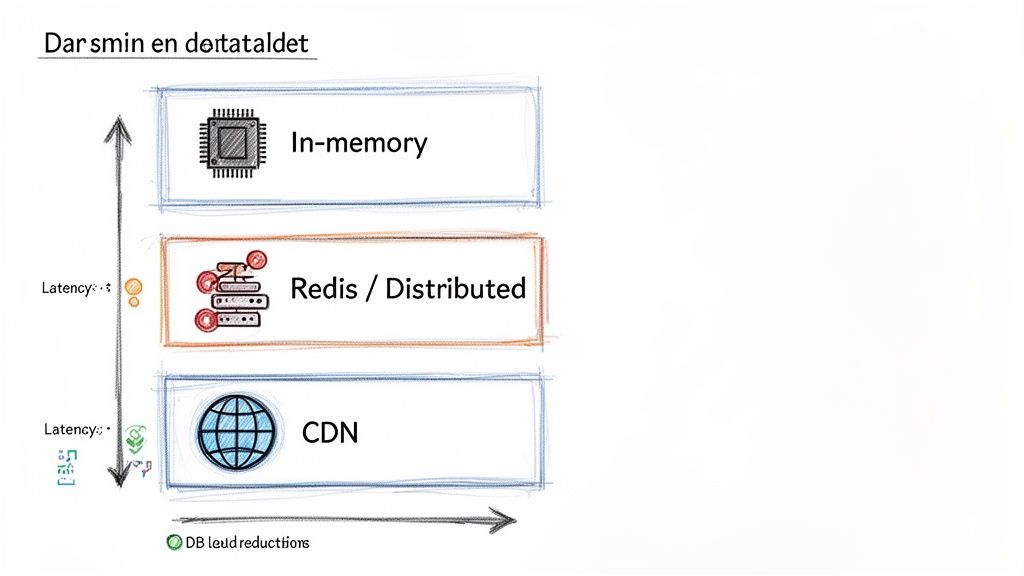
node-cache) to reduce database load for repetitive queries. Expect a 90%+ latency reduction on subsequent hits. - For multi-server, scalable apps: Use a distributed cache like Redis for shared data (e.g., user sessions, product catalogs). This ensures data consistency across all instances.
- Most common pattern: Implement the "Cache-Aside" (lazy loading) pattern. Your app checks the cache first; on a miss, it queries the database and then populates the cache.
- Key metrics: Monitor your cache hit ratio and latency. A healthy ratio (often >90%) directly correlates to lower infrastructure costs and better user experience.
- Biggest risk: Cache stampedes. When a popular item expires, multiple requests hit the database at once. Use a locking mechanism to prevent this.
Who this is for
- CTOs & Heads of Engineering: Making architectural decisions to improve application performance, scalability, and reduce infrastructure costs.
- Senior Developers & Architects: Tasked with implementing a caching strategy that is both effective and resilient.
- Founders & Product Leads: Scoping the effort and understanding the business impact of latency reduction on user engagement.
Quick Framework: Your Caching Decision Tree
Use this step-by-step process to choose the right caching strategy for your Node.js application.
- Identify the Bottleneck: Use an Application Performance Monitoring (APM) tool like Datadog or New Relic to find your slowest endpoints. Are they slow database queries, repetitive computations, or high-latency third-party API calls?
- Is the data specific to one server instance and not critical if lost on restart? → Use In-Memory Cache.
- Does the data need to be shared and consistent across multiple server instances? → Use a Distributed Cache (Redis).
- Is it static content (images, JS, CSS) or a public, non-changing API response? → Use a Content Delivery Network (CDN).
- Is your system read-heavy and can tolerate a slight delay on the first data request? → Use Cache-Aside (Lazy Loading). This is the most common starting point.
- Is data consistency critical (e.g., inventory, financial data)? → Use Write-Through.
- Is your system write-heavy and needs the lowest possible write latency? → Use Write-Back, but be aware of the data loss risk.
- Can the data be slightly stale? → Use Time-To-Live (TTL). Simple and effective.
- Must the data be fresh immediately after a change? → Use Event-Driven Invalidation (e.g., clear cache on a database update event).
- Implement & Monitor: Add the caching logic, establish a baseline performance metric, and then measure the improvement. Continuously monitor cache hit ratio and latency in production.
- The app requests data from the cache.
- Cache Hit: Data is found and returned instantly.
- Cache Miss: Data is not found. The app queries the database, saves the result to the cache, and then returns it.
- Pro: Simple to implement and resilient. If the cache fails, the app can fall back to the database.
- Con: The first request for a piece of data is always slow (a cache miss). There's also a risk of data becoming stale if the database is updated by another process.
- Best For: Read-heavy workloads where data doesn't change constantly (e.g., product catalogs, user profiles).
- Your app writes data to the cache.
- The cache then immediately writes that data to the database.
- The operation is only considered complete after both writes succeed.
- Pro: Guarantees data in the cache is never stale.
- Con: Higher latency on write operations because you are writing to two systems sequentially.
- Best For: Applications where data consistency is critical (e.g., inventory management, financial systems). The trade-offs here are similar to those in API design, which we explore in our guide comparing GraphQL vs REST.
- Your app writes data directly to the cache, which is very fast.
- The cache acknowledges the write immediately.
- Later, the cache asynchronously writes the data to the database in the background.
- Pro: Extremely low write latency.
- Con: Significant risk of data loss if the cache server fails before the data is persisted to the database. More complex to implement correctly.
- Best For: Write-heavy applications where some data loss is acceptable in a failure scenario (e.g., logging, analytics event tracking).
- Identified and benchmarked top 3 performance bottlenecks (slow queries, API calls).
- Selected the appropriate cache type (In-Memory vs. Distributed vs. CDN).
- Chose a caching pattern (e.g., Cache-Aside) that matches your data consistency requirements.
- Defined a clear cache invalidation strategy (TTL or event-based).
- Implemented a graceful fallback mechanism (if the cache fails, query the database directly).
- Secured the connection to your distributed cache (e.g., using TLS with Redis).
- Implemented protection against cache stampedes (locking) for high-traffic items.
- Ensured cache keys are specific and consistently named to avoid collisions.
- Set up monitoring for key cache metrics: hit ratio, latency, memory/CPU usage.
- Configured alerts for significant drops in hit ratio or spikes in latency.
- Documented the caching strategy and key TTL values for the team.
- Identify Your Biggest Bottleneck: Use an APM tool to find the slowest part of your application. Don’t guess; use data.
- Implement a Pilot: Choose one endpoint and implement a simple in-memory or Redis cache using the Cache-Aside pattern. Measure the before-and-after performance improvement.
- Scale Your Strategy: Once you've proven the value, roll out your caching strategy to other parts of your application, guided by your monitoring data.
- Redis Official Documentation. Redis.
- Stackify. "The Top 5 Node.js Performance Measurement Metrics." how these performance metrics stack up.
- New Relic. Application Performance Monitoring. New Relic.
- Datadog. Cloud Monitoring as a Service. Datadog.
Alt text: Diagram illustrating caching layers: in-memory, Redis/distributed, and CDN, showing decreasing latency and increasing DB load reductions.
Practical Example 1: In-Memory Cache for an Expensive API Query
A common bottleneck is an API endpoint that performs a complex database aggregation. Without a cache, every request hammers the database, slowing down the user experience.
The Scenario: An e-commerce dashboard needs to display "top-selling products of the day." This query is heavy, but the results only need to be updated every 10 minutes.
Before Caching (The Slow Way): The endpoint takes 800ms to respond on every single request.
// This function simulates a slow database aggregationasync function getTopProductsFromDB() {console.log('Running heavy aggregation query on the database...');await new Promise(resolve => setTimeout(resolve, 800)); // Simulate 800ms DB latencyreturn [{ id: 'prod_123', name: 'Super Widget', sales: 150 }];}// In your route handler...app.get('/dashboard/top-products', async (req, res) => {const products = await getTopProductsFromDB();res.json(products);});After Caching (The Fast Way): Using the node-cache library, the first request takes 800ms, but all subsequent requests within the 10-minute Time-To-Live (TTL) take less than 10ms.
import NodeCache from 'node-cache';// Cache items for 10 minutes (600 seconds)const dashboardCache = new NodeCache({ stdTTL: 600 });const CACHE_KEY = 'top-products';// In your route handler...app.get('/dashboard/top-products', async (req, res) => {if (dashboardCache.has(CACHE_KEY)) {console.log('Serving from cache!');return res.json(dashboardCache.get(CACHE_KEY));}const products = await getTopProductsFromDB();dashboardCache.set(CACHE_KEY, products);res.json(products);});Business Impact: This simple change reduces server load and infrastructure costs. For the user, the dashboard feels instantaneous, improving engagement. This is a classic example of how a small code change can have a significant performance return, with benchmarks often showing a 95-99% reduction in latency for cached responses. For more details, see this analysis on how caching impacts Node.js performance.
Practical Example 2: Distributed Cache (Redis) for User Sessions
When you scale your application across multiple servers, an in-memory cache creates data silos. A user's session stored on Server A isn't available if their next request hits Server B. A distributed cache like Redis solves this by providing a central, shared data store.
The Scenario: A growing SaaS platform needs to manage user sessions across a load-balanced cluster of Node.js servers. Storing sessions in the primary database is causing performance degradation.
Configuration Snippet (Connecting to Redis): Here is a production-ready configuration for connecting to a Redis instance using the ioredis library. You would typically store credentials in environment variables.
import Redis from 'ioredis';// Load configuration from environment variables for productionconst redisClient = new Redis({port: process.env.REDIS_PORT || 6379,host: process.env.REDIS_HOST || '127.0.0.1',username: process.env.REDIS_USER, // optionalpassword: process.env.REDIS_PASSWORD,db: 0, // default database// Add TLS for secure connections in production// tls: {}});redisClient.on('connect', () => {console.log('Connected to Redis successfully!');});redisClient.on('error', (err) => {console.error('Redis connection error:', err);});export default redisClient;Business Impact: By moving session management to Redis, you decouple user state from individual application servers. This allows for seamless horizontal scaling, improves system resilience (if one app server fails, the user's session is safe), and reduces the query load on your primary database. When building out microservices, knowing how to create an API that leverages a distributed cache is a core competency.
Deep Dive: Caching Patterns and Their Trade-Offs
Choosing a caching layer is the first step. The next is deciding how your application interacts with it. This is governed by caching patterns, each with distinct trade-offs in performance, consistency, and complexity.
Alt text: Node.js caching process flow diagram illustrating request, data caching check, database fetch, and response.
A simple check can route traffic away from the database, delivering a much faster response.
Cache-Aside (Lazy Loading)
This is the most common pattern. Your application logic is responsible for managing the cache.
Write-Through Caching
This pattern prioritizes data consistency between the cache and the database.
Write-Back (Write-Behind) Caching
This pattern prioritizes extremely fast write operations.
Caching Pattern Comparison Table
Checklist: Production-Ready Caching
Use this checklist to ensure your caching implementation is robust, monitored, and resilient.
Strategy & Design
Implementation & Resilience
Monitoring & Maintenance
What to Do Next
Need to accelerate your application's performance with a production-grade caching architecture? At ThirstySprout, we connect you with senior AI and backend engineers with deep expertise in building scalable systems.
References
Hire from the Top 1% Talent Network
Ready to accelerate your hiring or scale your company with our top-tier technical talent? Let's chat.