

You're probably making this decision while hiring your first data scientist, standing up a forecasting function, or trying to stop notebook chaos before it starts. That's the right time to decide.
My advice is simple. Standardize on RStudio. Don't let a new team debate RGui vs RStudio as if they're equivalent options for professional work. They aren't. One is a basic interface to run R. The other is the working environment most serious R teams expect, know how to use, and can build process around.
If you pick RGui for a modern data team, you create friction on day one. Hiring gets harder. Reproducibility becomes a manual discipline instead of a built-in habit. Basic workflow tasks spill across separate tools. That's avoidable.
| Decision area | RGui | RStudio | CTO recommendation |
|---|---|---|---|
| Team productivity | Basic interface and manual workflow | Integrated IDE with editor, console, plots, environment, debugging, and package tooling | Choose RStudio |
| Hiring pool | Feels dated to most professional R users | Matches what most professional R users expect | Choose RStudio |
| Reproducibility | Manual process with more room for inconsistency | Better support for project-based and reproducible workflows | Choose RStudio |
| Collaboration | Weak for shared team conventions | Stronger fit for Git, projects, and report-driven workflows | Choose RStudio |
| Enterprise readiness | Fine for lightweight local work | Better fit for modern multi-language and persistent workspace workflows | Choose RStudio |
| Best use case | Intro teaching, quick one-off local commands | Professional analytics, ML, data products, and team science | Use RGui only as a niche exception |
The Verdict RGui vs RStudio in 60 Seconds
Your first two data scientists join next month. Six months later, you want shared projects, faster onboarding, cleaner handoffs, and code that survives employee turnover. Standardize on RStudio.
For a business team, this is not a close call. RStudio has long been the default professional environment for R users, and Posit cites millions of users across industries on its platform: Posit platform overview. That matters because standard tools reduce ramp time, widen your hiring pool, and make team conventions easier to enforce.
RGui is a niche tool. Keep it for basic teaching, quick local checks, or a single user who wants the bare minimum interface and nothing else.
Do not anchor on startup speed or simplicity. Anchor on delivery speed. In practice, teams working in a full IDE spend less time stitching together editors, plots, package workflows, project files, and debugging across separate windows. That saves analyst hours and lowers review friction.
Use this rule:
- If the work will be shared, reviewed, reused, or deployed, choose RStudio.
- If the work is solo, short-lived, and disposable, RGui is acceptable.
Hiring is the tie-breaker if you still need one. Candidates with current R experience usually expect an IDE-centered workflow, not a minimal front end. Standardizing on RStudio lets new hires contribute faster and helps you build reproducible, enterprise-grade habits from the start.
Bottom line: If the work affects product decisions, reporting, forecasting, experimentation, or machine learning, make RStudio the team standard.
A Decision Framework for Engineering Leaders
You're staffing a new data team, setting delivery expectations, and deciding what should be standard on day one. Treat RGui vs RStudio as a management decision about speed, hiring, and reproducibility.
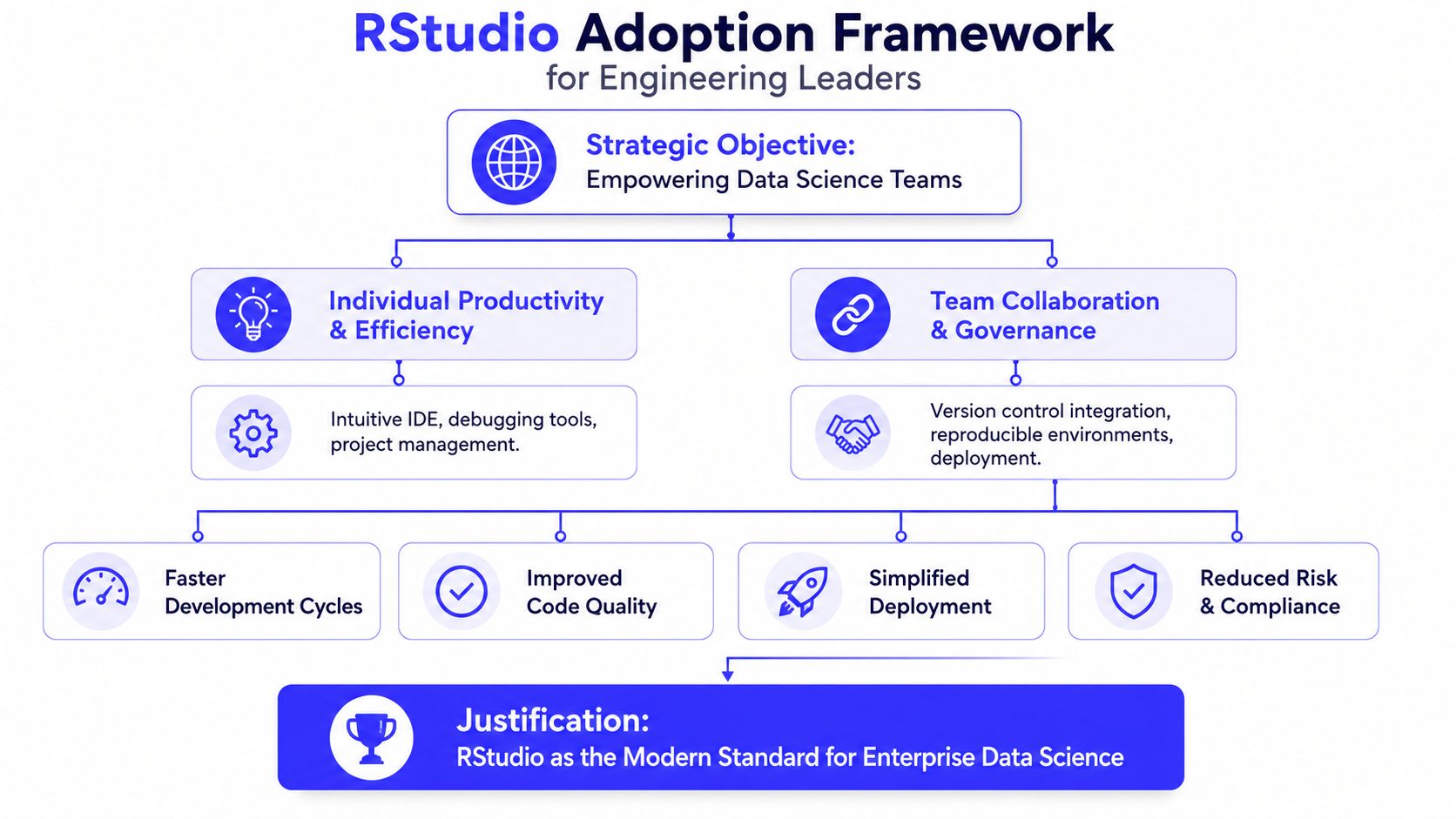
Use this if-then rule
Choose RStudio if the team will do any of the following:
- Share code across analysts or engineers. Team work needs a common environment and repeatable habits.
- Maintain work after the original author leaves. Models, reports, data prep scripts, and experiments should not depend on one person's local setup.
- Hire from the broader R talent market. Experienced R candidates usually expect an IDE-based workflow, not a minimal front end.
- Support review, audit, or deployment. Customer-facing analytics and regulated work benefit from a tool that reinforces structure.
Choose RGui only if all of these are true:
- One person owns the work.
- The work is short-lived.
- Nobody will review or inherit it.
- The output will not become a report, app, model pipeline, or team asset.
That use case exists. It is narrow.
A practical leadership scorecard
| Question | If your answer is yes | Better choice |
|---|---|---|
| Will this code outlive one analyst? | You need maintainability | RStudio |
| Will work be reviewed in Git or handed across functions? | You need consistent team habits | RStudio |
| Will you hire people with recent R experience? | You want faster onboarding | RStudio |
| Is this only for basic teaching or quick local tests? | Simplicity may outweigh team workflow needs | RGui |
| Do you expect reporting, apps, experimentation, or ML work? | You need an IDE built for ongoing development | RStudio |
Practical rule: If the work has business value beyond a single user and a single session, standardize on RStudio.
What leaders are really standardizing
The core choice is operational discipline. You are deciding how projects get created, how work is reviewed, how package and file workflows stay consistent, and how quickly a new hire becomes productive.
This is the same category of decision as choosing between heavyweight and lightweight engineering tools for a growing team, similar to the tradeoffs in Visual Studio vs VS Code for engineering teams. The environment sets the default behavior. Default behavior becomes team culture. Team culture shows up later as either fast delivery and clean handoffs, or slow onboarding and fragile scripts.
Developer Experience A Tale of Two Interfaces
Monday morning, your first R hire opens a pricing model, traces a bug, checks a plot, installs a package, and prepares code for review. The tool either keeps that work in one place or forces constant context switching. That difference shows up in output, onboarding speed, and how quickly a new team starts shipping reliable work.
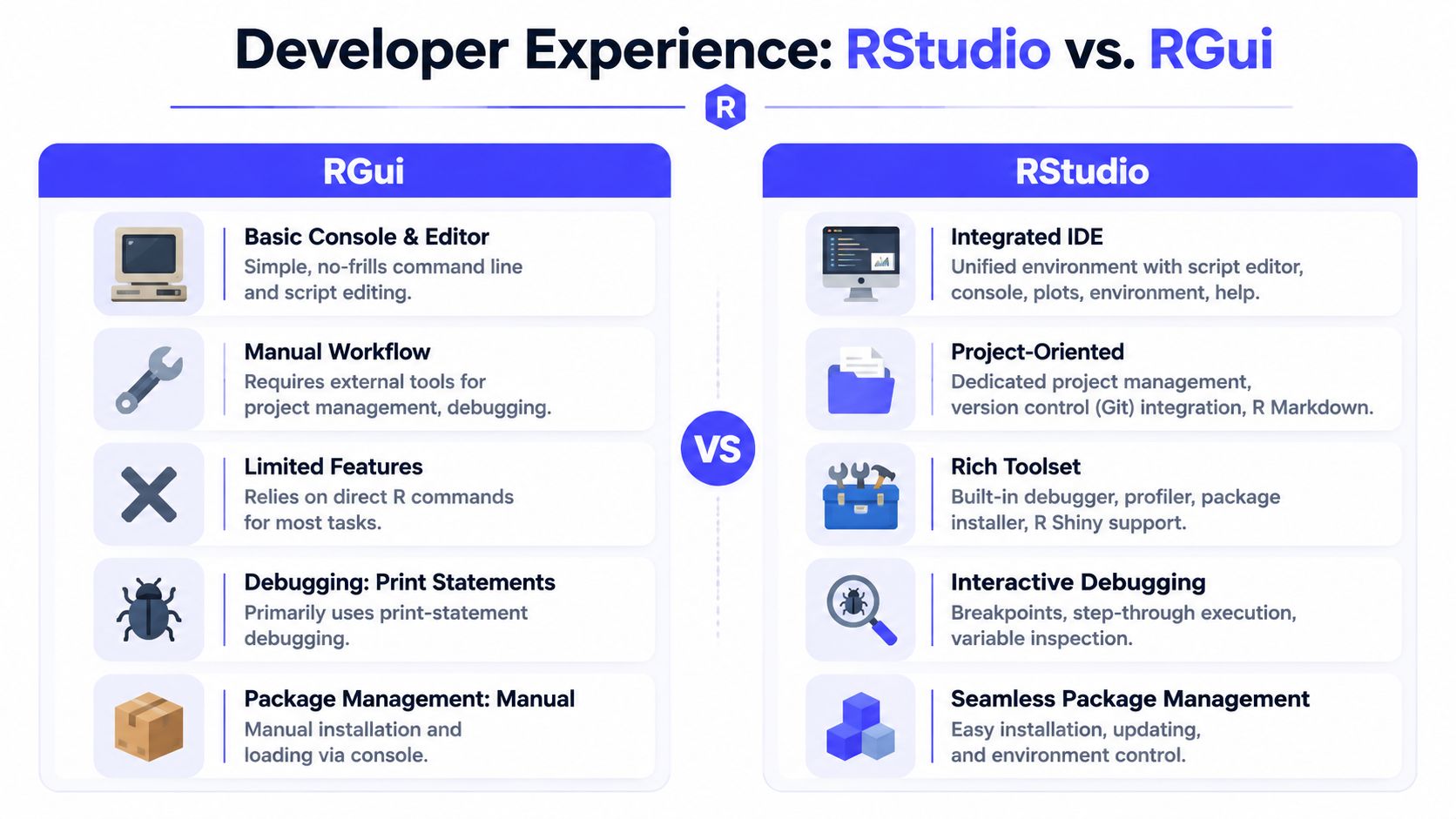
What the developer actually feels
RGui runs R code. For a company building a data team, that is not a high enough standard.
Developers need to edit scripts, inspect objects, read errors, view plots, search files, and check documentation without breaking concentration. RGui handles these tasks as separate actions. RStudio keeps them in a single working environment. That leads to fewer interruptions and shorter debug cycles.
A concise walkthrough helps:
The business value of a better interface
This is a management decision, not a preference debate.
Every extra click, lost object, or broken editing flow costs time. Junior hires slow down because they lack guardrails. Senior hires get frustrated because the tool keeps wasting attention on mechanics instead of analysis. If you want a team that writes reusable code and reviews work cleanly, the interface matters.
A recent R community discussion on IDEs for R describes RStudio as the stronger choice for coding because it includes features such as syntax highlighting, linting, and autocomplete that make package and script development faster. The same discussion characterizes RGui as a minimal interface that becomes awkward once work shifts from simple commands to heavier analysis and repeated iteration.
In practical terms, RStudio improves the parts of work leaders pay for:
- Editing quality: Better code assistance helps developers catch errors before they become review comments or production issues.
- Debugging speed: Visible objects, plots, and console output shorten the path from failure to fix.
- Hiring and onboarding: New R hires are far more likely to know RStudio already, which reduces setup friction and training time.
- Retention: Strong developers expect an IDE built for active development, not a bare command shell with a thin GUI layer.
Mini-case on a common task
Take a common release-week task. A new hire needs to validate a pricing model change, confirm that outputs match expectations, and hand the work to a reviewer.
In RGui, that person often jumps between script windows, console history, file folders, and memory. In RStudio, the script, environment, plots, files, and help stay visible together. Reviews move faster because the workflow is easier to follow, and defects are easier to reproduce.
The leadership lesson is straightforward. Standardizing on RGui optimizes for basic execution. Standardizing on RStudio optimizes for developer flow, hiring fit, and repeatable delivery. The same pattern shows up in other engineering tool decisions, including how teams choose between heavyweight and lightweight development environments.
If the team will write production-facing analyses, shared packages, internal apps, or audited reports, choose RStudio. If someone only needs to run a few local commands alone, RGui is acceptable.
From Solo Scripts to Team Science
A single analyst can tolerate a messy setup. A team cannot.
Once work moves from ad hoc scripts to shared deliverables, your development environment starts shaping operating risk. CTOs should judge RGui vs RStudio on one question: can a new hire pick up active work, reproduce it, and ship changes without chasing the original author for context?
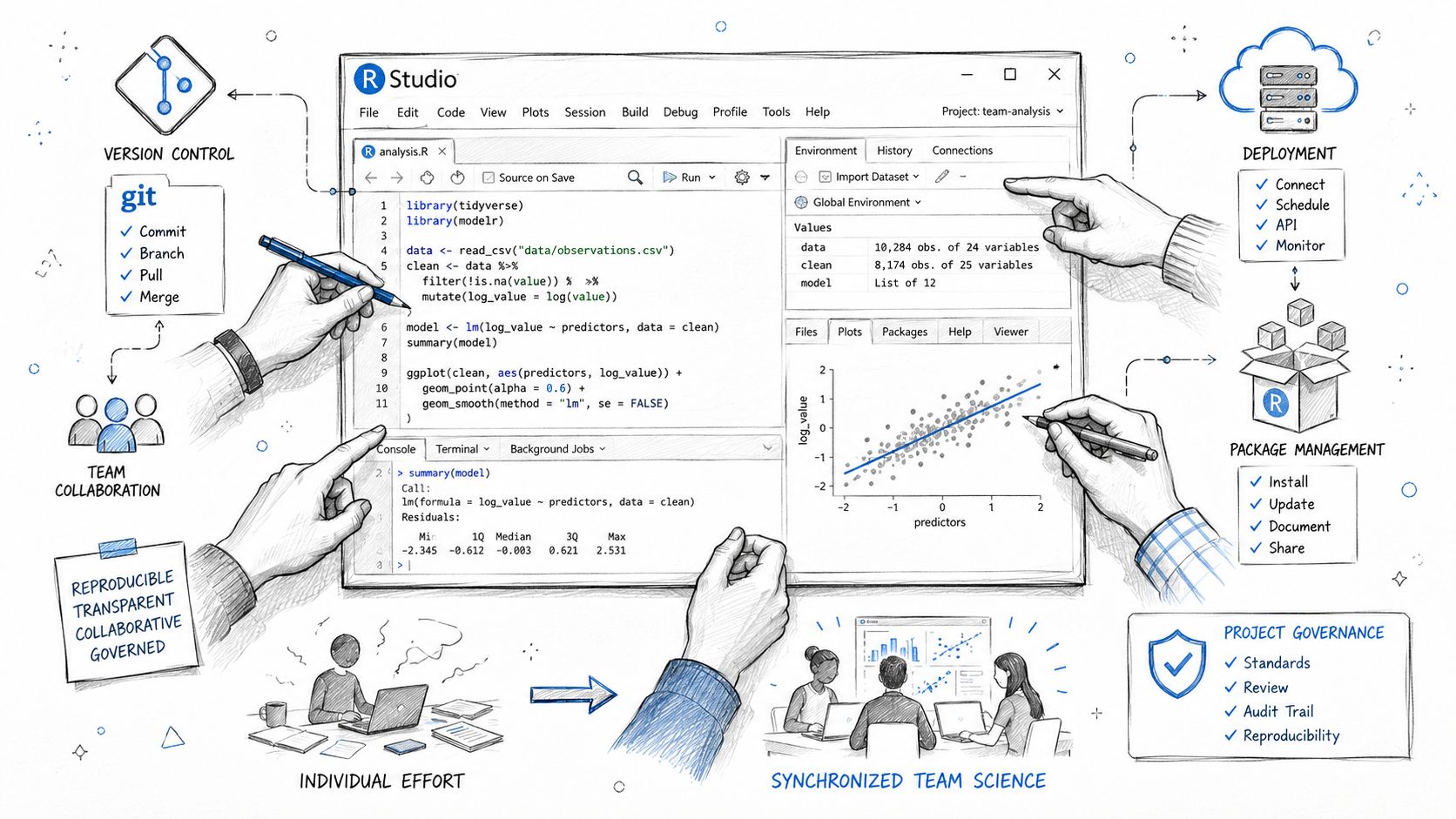
Why project structure changes team outcomes
Teams lose time in the handoff. Not in the model.
RGui makes it easy to stay in a personal workflow built around local files, remembered paths, and manual sequencing. That works for one person. It breaks under review, turnover, and parallel work. RStudio pushes analysts toward projects, notebooks, report outputs, and source-controlled folders. That habit matters because it turns work from personal property into team assets.
The business payoff is concrete:
- Reviews are faster because code, outputs, and supporting files live in one place.
- Onboarding is shorter because new hires can open a project instead of reconstructing one.
- Bus factor drops because fewer decisions stay trapped in one analyst's memory.
- Rework falls because analysts spend less time fixing path issues and missing context.
That is the line between a script someone ran and an analysis your company can maintain.
Reproducibility is a management standard
If your R team supports pricing, experimentation, forecasting, compliance, or executive reporting, reproducibility is a management issue, not a personal preference.
RStudio makes repeatable work easier through project-based organization, literate reporting, and a workflow that keeps code, outputs, and documentation close together. RGui can support the same outcome, but only if you impose more process discipline and accept more variance across developers. That is a poor standardization choice for a growing team.
Use a simple leadership test. Hand the work to a second analyst and ask for the same result by end of day. If they need a call, a chat thread, or undocumented setup steps, the team has a process problem.
That discipline also carries into published analysis. Teams that care about reusable reporting usually care about presentation quality too, which connects directly to data visualization best practices for product and data teams.
Mini-case on handoff risk
A fintech company has one senior analyst build a fraud scoring workflow in R. Six weeks later, that analyst goes on leave during a model review cycle. If the work sits in loose scripts with local assumptions, the replacement burns days tracing file paths, package versions, and output logic.
Put that same work in an RStudio project with clear report artifacts and version control, and the handoff becomes operational instead of forensic. That is the difference leaders should care about.
If your team will stay small, work alone, and run short-lived scripts, RGui is acceptable. If you plan to hire, review code, share ownership, or tie analysis into delivery pipelines, standardize on RStudio and connect it to your DevOps automation essential guide.
Enterprise Readiness Performance and DevOps
Some leaders still assume RGui is the “safer” choice because it looks lighter. That's the wrong conclusion.
The UBC Library introduction to RStudio directly addresses this myth: RStudio is not unstable or RAM-heavy by design. Package compatibility issues often get blamed on the IDE. The same source notes that RStudio executes commands in the background, while RGui runs them natively, which can make RStudio more stable for large datasets.
What matters in enterprise settings
For a company team, performance isn't just about how fast the window opens. It's about iteration speed, recoverability, and integration with broader workflows.
RStudio fits better when your team needs:
- Workspace persistence: Useful when developers return to long-running analysis states instead of rebuilding context from scratch.
- Multi-language work: RStudio supports both R and Python in professional workflows, which is valuable when teams don't want language silos.
- Operational consistency: Better alignment with standard dev practices around version control, review, and deployment.
According to a comparative RStudio walkthrough on YouTube, RStudio 2026.06.0 supports multi-language integration and workspace persistence that can reload a 45-minute simulation workspace instantly rather than recomputing it. That kind of capability matters in production-adjacent analytics and ML pipelines.
DevOps fit is the hidden differentiator
Once your team moves from analysis to repeatable delivery, tooling decisions start to overlap with platform strategy. You need predictable environments, reviewable code paths, and cleaner automation handoffs.
If your engineering org is tightening release and workflow discipline, this DevOps automation essential guide is a useful companion read. The core idea applies here too. Standardized tools reduce manual steps, and manual steps are where quality drifts.
Teams that already mix ecosystems should also think beyond R in isolation. The same environment governance questions show up in Anaconda vs Python for team workflows. The winning pattern is the same. Pick the setup that makes reproducible work easier for the team, not just familiar for one contributor.
Two Practical Tooling Scenarios
Scenario one. The startup's first data hire
A Series A SaaS company hires its first senior data scientist to build retention reporting and experiment analysis. The founder asks whether the team should keep things simple and use RGui.
That's the wrong simplification.
The right simplification is to standardize on RStudio immediately, then give the hire a default project template, Git repository, and package management expectation. That avoids a common early-stage mistake where one smart person moves fast in a personal style that no one else can maintain.
A good first-week operating rule looks like this:
- Create every new analysis as an RStudio Project
- Commit code through Git, not email or shared folders
- Put narrative reporting in a reproducible document, not a slide deck assembled by hand
- Document package choices at the project level
That's enough to set a quality floor.
Scenario two. The interview question that exposes maturity
Use this in hiring:
Describe your process for starting a new, reproducible analysis project that another teammate might need to rerun or extend.
A weak answer sounds like this: “I create a script, save some outputs, and send files when I'm done.”
A good answer mentions RStudio Projects, folder structure, source files, and Git.
A great answer goes further. The candidate describes package isolation, a standard project skeleton, and a report artifact that ties code to narrative. They usually also explain how they make results reviewable by teammates.
A simple interview scorecard
| Candidate signal | What it suggests |
|---|---|
| Talks only about running scripts | Individual contributor mindset, low process maturity |
| Mentions projects and Git | Modern workflow awareness |
| Mentions package management and handoff practices | Strong team-oriented engineering habits |
| Mentions reproducible reporting | Better fit for analytics in regulated or cross-functional environments |
If your team is also weighing language choices for analytics and ML, this take on R vs Python for AI projects is worth reviewing. The point isn't to force one language for every use case. It's to make sure whichever language you choose has a professional workflow around it.
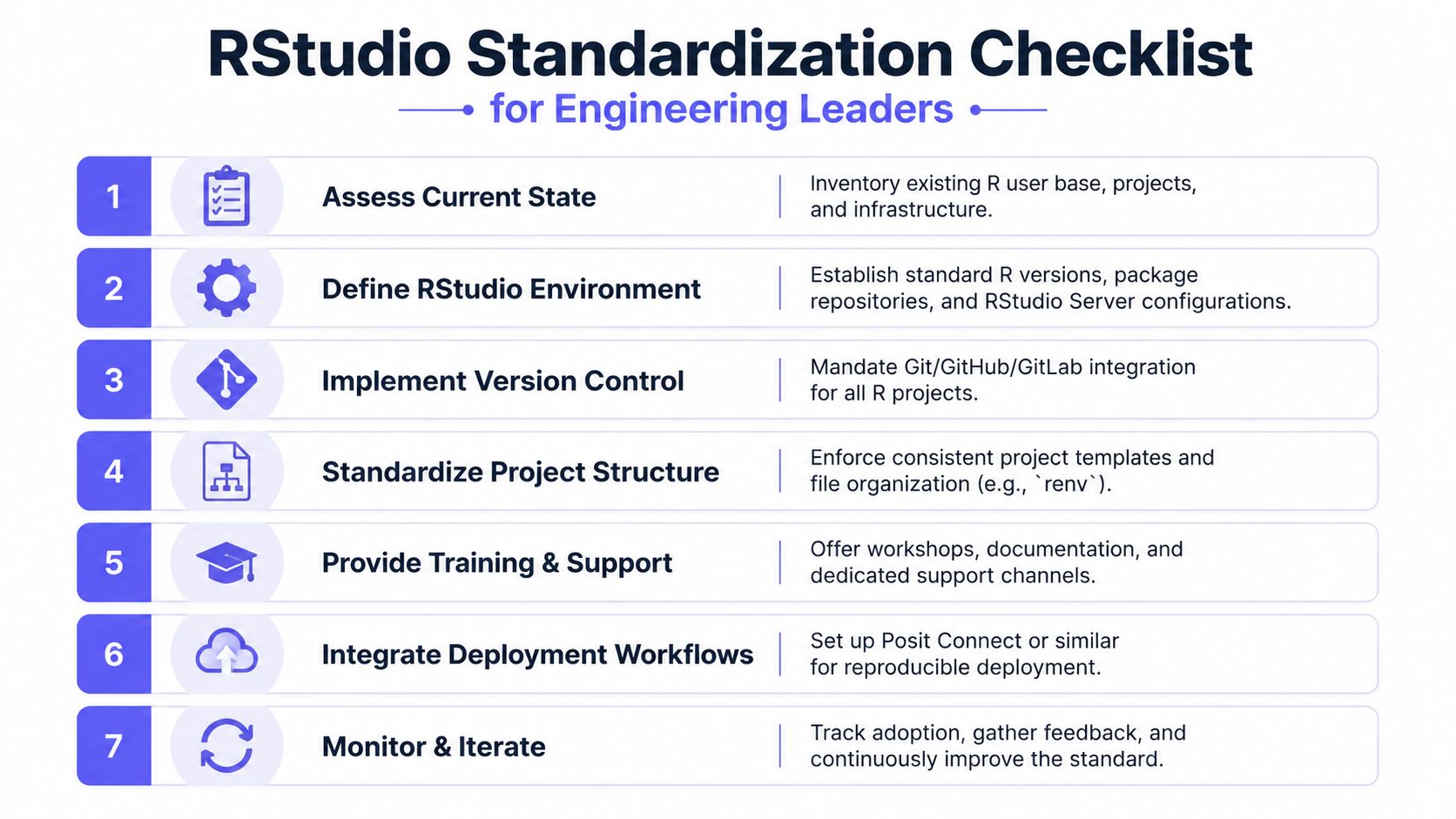
Your RStudio Standardization Checklist
This is the part to copy into your onboarding doc.
Install in the right order
For proper setup, users must first install the R engine from CRAN, then install RStudio Desktop, which is available for free under an individual user license from rstudio.com, as shown in this installation walkthrough.
If your team gets this backwards, people waste time diagnosing a non-problem.
Team checklist you can use today
- Assess current state: List who uses R today, what projects exist, and which ones need support beyond a single owner.
- Set a standard install: Document the approved R version and the approved RStudio edition for the team.
- Create a project template: Include folders for data inputs, scripts, outputs, and documentation.
- Mandate project-based work: Every new analysis should start as an RStudio Project.
- Integrate version control: Require Git from the start, even for internal analytics.
- Define package management: Pick a team approach and document it clearly.
- Document reporting expectations: Decide when analyses must produce a reproducible report artifact rather than ad hoc screenshots or manual exports.
Don't let each hire invent their own workflow. Standardization is what turns talented individuals into a reliable team.
A lightweight onboarding template
Use this for every new R hire in week one:
| Task | Owner | Done when |
|---|---|---|
| Install R | New hire | R runs locally |
| Install RStudio Desktop | New hire | IDE opens and connects to R |
| Clone starter repo | New hire | Project opens successfully |
| Create first project from template | Hiring manager or tech lead | Structure matches team standard |
| Make first commit | New hire | Git workflow confirmed |
| Run a reproducible report | New hire | Teammate can rerun it |
That's enough to prevent most early tool chaos.
If you're building a new data or AI team and want senior people who already work with clean, reproducible engineering habits, ThirstySprout can help. We match startups and enterprises with vetted AI, ML, data, and MLOps talent who can operate inside modern workflows from day one. Start a Pilot or See Sample Profiles to scope the team you need.
Hire from the Top 1% Talent Network
Ready to accelerate your hiring or scale your company with our top-tier technical talent? Let's chat.