

TL;DR: Your QA Quick Start
- QA vs. Testing: Quality Assurance (QA) is a proactive process to prevent defects by improving how software is built. Software Testing is a reactive activity to find defects in the code. Don't confuse them.
- Start with a Framework: Your QA strategy depends on your company's stage. Startups can rely on developer-led testing, but growth-stage companies need specialized, automated approaches to manage risk.
- "Shift Left" with Automation: Integrate automated tests directly into your CI/CD pipeline. Use "Quality Gates" to block buggy code from reaching production. This catches issues earlier, making them cheaper and faster to fix.
- Measure Business Impact: Track metrics like Defect Escape Rate (bugs found by users) and Mean Time to Resolution (MTTR). These KPIs translate QA efforts into tangible business value.
- Actionable Next Step: Use our 90-day checklist below to assess your current state, implement foundational automation, and start scaling a modern quality process.
Who This Guide Is For
This guide is for technical leaders who need to build or refine their software quality strategy within the next quarter.
- CTO / Head of Engineering: You need to reduce bugs, increase deployment speed, and prove the ROI of your quality efforts.
- Founder / Product Lead: You're scoping the budget and team needed to ship reliable software without slowing down innovation.
- Senior Engineer / Team Lead: You're responsible for implementing the day-to-day practices that ensure your team builds high-quality code.
If you're tired of reactive bug-fixing and want to build a proactive system that prevents defects, this guide provides the framework and practical examples you need.
The QA Governance Framework: A Quick Answer
Your first move is to pick an operating model that fits your company's current stage. A one-size-fits-all approach to QA doesn't work. This decision tree lays out how to think about your strategy.
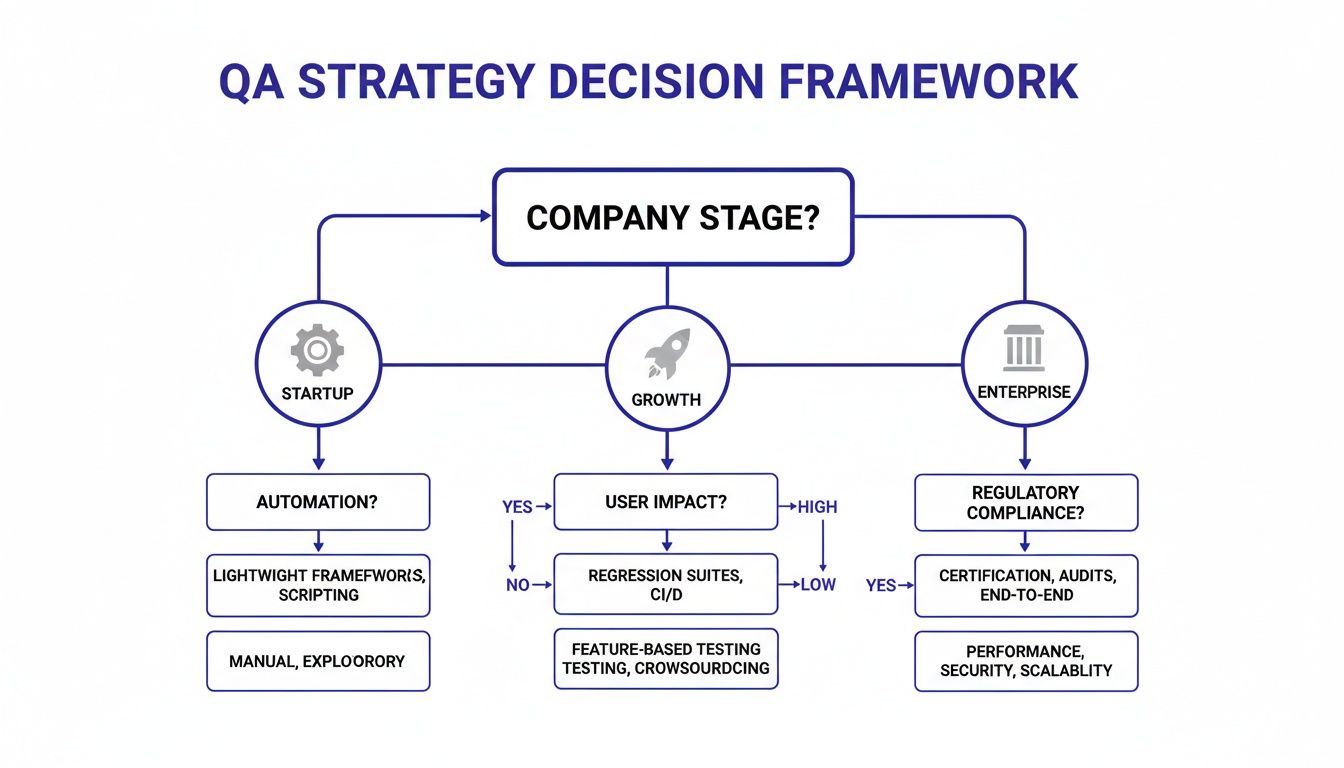
Alt text: A QA strategy decision framework flowchart detailing testing approaches based on company stage and requirements.
As you can see, an early-stage startup thrives with developer-led testing. But as a company scales, complexity and risk grow, demanding more structured and specialized approaches.
A crucial part of this framework is getting clear on the difference between the overall process (QA) and the activity (testing). They are not the same thing.
Quality Assurance is a proactive process designed to prevent defects. Software Testing is a reactive activity designed to find defects.
This distinction isn't just academic; it has a real impact on how you allocate your budget and team. QA is about refining the entire software development lifecycle (SDLC) to build quality in. Testing is about validating that a specific piece of the product works as expected. One builds confidence in your process; the other verifies your output.
QA vs. Testing: Practical Examples
People use "Quality Assurance" and "Software Testing" interchangeably, but they are fundamentally different. Getting this right is the first step toward building a quality assurance for software testing program that actually works.
Imagine an architect designing a skyscraper's fire safety system. They think about building codes, fire-rated materials, and clear evacuation paths before construction starts. That's Quality Assurance. The inspector who shows up after the building is complete to push the alarm button and check the sprinklers? That's Testing.
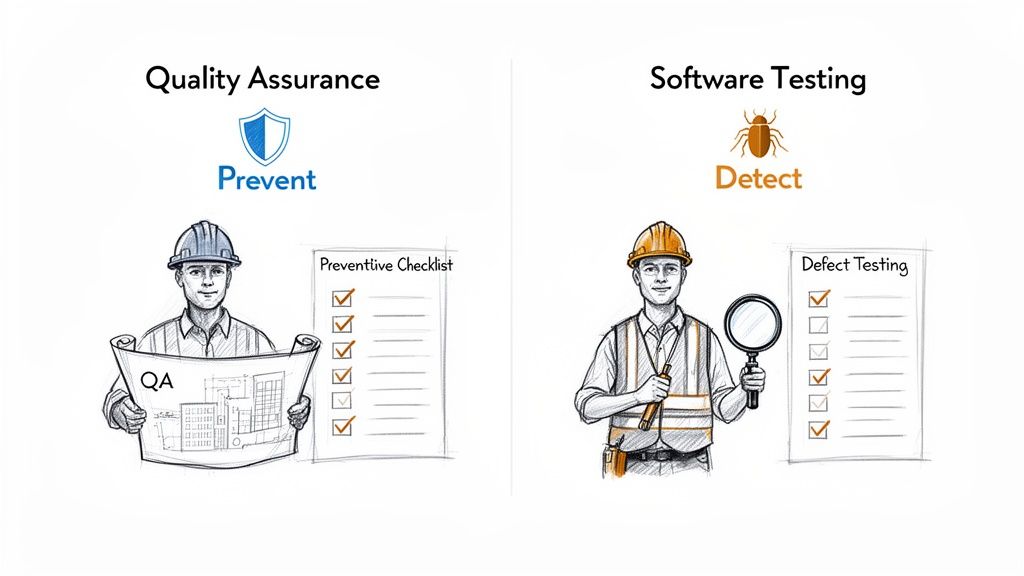
Alt text: An image comparing Quality Assurance (prevent) with Software Testing (detect) using construction worker analogies.
One is about designing a safe process from the ground up (prevention), while the other checks the final product for flaws (detection).
Example 1: BDD Gherkin Snippet for a Login Feature
Behavior-Driven Development (BDD) uses plain-language specifications to align product, engineering, and QA teams on what a feature should do. This Gherkin snippet acts as both documentation and an executable test case.
Feature: User AuthenticationScenario: Successful login with valid credentialsGiven I am on the login pageWhen I enter "testuser@example.com" in the email fieldAnd I enter "ValidPassword123" in the password fieldAnd I click the "Log In" buttonThen I should be redirected to the dashboard pageAnd I should see a welcome message "Welcome, testuser!"This ensures everyone agrees on the goal and directly translates into an automated test. For more details on API validation, see our guide on effective RESTful API testing.
Example 2: A Practical Test Coverage Scorecard
You can't improve what you don't measure. A Test Coverage Scorecard gives you an at-a-glance snapshot of your testing health and connects your efforts directly to business risk. It helps you decide where to focus your team's time.
| Feature/Module | Unit Test Coverage | Integration Test Coverage | Business Risk | Coverage Status |
|---|---|---|---|---|
| User Authentication | 95% | 80% | High | ✅ Excellent |
| Product Search | 88% | 75% | Medium | ✅ Good |
| Payment Gateway | 98% | 90% | Critical | ✅ Excellent |
| Admin Dashboard | 70% | 50% | Low | ⚠️ Needs Improvement |
This scorecard makes it easy to spot gaps and prioritize work based on impact.
Deep Dive: QA Methodologies and Trade-Offs
Effective QA isn’t just running more tests; it’s choosing the right methodologies and test types at the right time. This builds confidence without slowing development. Two key methodologies are Test-Driven Development (TDD) and Behavior-Driven Development (BDD).
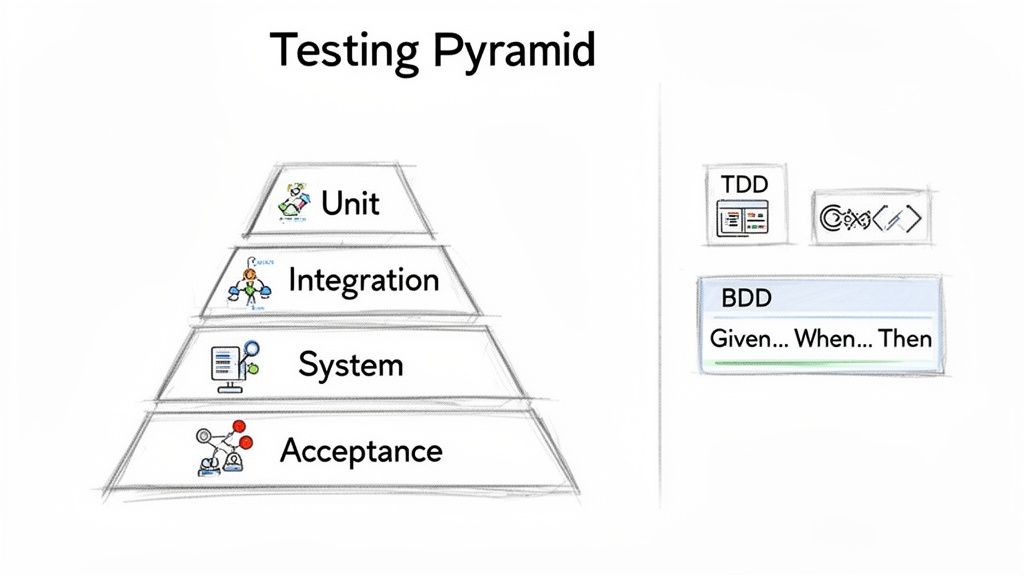
Alt text: A diagram illustrating the software testing pyramid with layers for unit, integration, system, and acceptance tests, plus TDD and BDD examples.
Test-Driven Development (TDD) is a discipline for engineers. It follows a "Red-Green-Refactor" cycle: write a failing test (Red), write code to make it pass (Green), then clean up the code (Refactor). TDD forces developers to clarify requirements before coding and produces a comprehensive suite of unit tests.
Behavior-Driven Development (BDD) focuses on team collaboration. It uses plain-language sentences to describe software behavior from a user's viewpoint, creating a shared language for product managers, developers, and QA engineers.
Trade-off: Use TDD to ensure the code is built correctly on a technical level. Use BDD to ensure you're building the correct thing from a business perspective. TDD is developer-centric and technical; BDD is team-centric and business-focused.
The Software Testing Pyramid: Pitfalls and Alternatives
The "Testing Pyramid" is a time-tested model for building an efficient test suite: a wide base of fast unit tests, a smaller layer of integration tests, and a tiny peak of slow end-to-end tests.
- Pitfall: Many teams create an "Ice-Cream Cone" anti-pattern, with too many slow, brittle end-to-end tests and not enough fast unit tests. This makes the test suite slow, expensive, and unreliable.
- Alternative: For complex microservices, some teams adopt a "Testing Trophy" or "Honeycomb" model, which emphasizes more integration tests over unit tests. The argument is that the interactions between services are where the real risk lies.
- Our Recommendation: Start with the pyramid. It provides the best balance of speed, cost, and confidence for most applications.
Beyond functional checks, non-functional testing (performance, load, security) is vital. A performance test ensures your e-commerce site doesn't crash during a Black Friday sale, directly preventing lost revenue and brand damage.
Mini-Case Study: Shifting Security Left
With the average cost of a data breach hitting millions, shifting security left is non-negotiable. Recent research on software testing trends shows 84% of DevOps teams now embed automated security tools in their pipelines.
Fintech Startup Slashes Critical Vulnerabilities
A Series B fintech was struggling with security vulnerabilities found right before releases, causing last-minute delays.
Action Taken: They integrated automated security scanning tools directly into their GitHub Actions workflow.
- SAST (Static Application Security Testing): A tool automatically scanned source code for vulnerabilities on every new pull request.
- DAST (Dynamic Application Security Testing): Another tool ran against the live application in staging after each deployment.
- Quality Gate: The pipeline automatically failed if any "High" or "Critical" vulnerabilities were found.
Business Impact: By catching flaws before they were merged, the startup cut critical bugs reaching production by 40% in three months. This improved security and made their release schedule more predictable.
Your 90-Day QA Implementation Checklist
This 90-day roadmap breaks down how to build a modern quality assurance for software testing program into manageable phases. It’s designed to build momentum and deliver results fast.
[ ] Download the 90-Day QA Implementation Checklist (PDF)
Phase 1: Assess and Plan (Days 1–30)
Your first month is about discovery. You can't fix a problem you don't understand.
- Map Your Current Process: Document how code gets from a developer's machine to production. Identify pain points and bottlenecks.
- Define "Quality": Agree with leadership on 1-2 primary goals (e.g., fewer critical bugs, faster deployments).
- Pick Initial Metrics: Choose 2-3 simple KPIs to track. Defect Escape Rate and Mean Time to Resolution (MTTR) are excellent starting points.
- Standardize Bug Triage: Get Product and Engineering to agree on clear definitions for defect severity and priority.
- Inventory Your Tools: List current testing, monitoring, and deployment tools to identify gaps.
Phase 2: Implement and Integrate (Days 31–60)
This month is for building the foundational pieces of your new quality process. Start small and score an early win.
- Build Your Staging Environment: Ensure you have a stable, production-like environment for testing.
- Automate One Critical Path: Pick one critical user flow (e.g., login or checkout) and write your first automated end-to-end tests. For more on this, see our guide on automating regression testing.
- Integrate into CI/CD: Plug your new tests into your pipeline to run automatically on every code commit.
- Establish a Quality Gate: Implement a rule: if these critical tests fail, the build stops.
- Train the Team: Run a workshop to walk engineers through the new process, tools, and metrics.
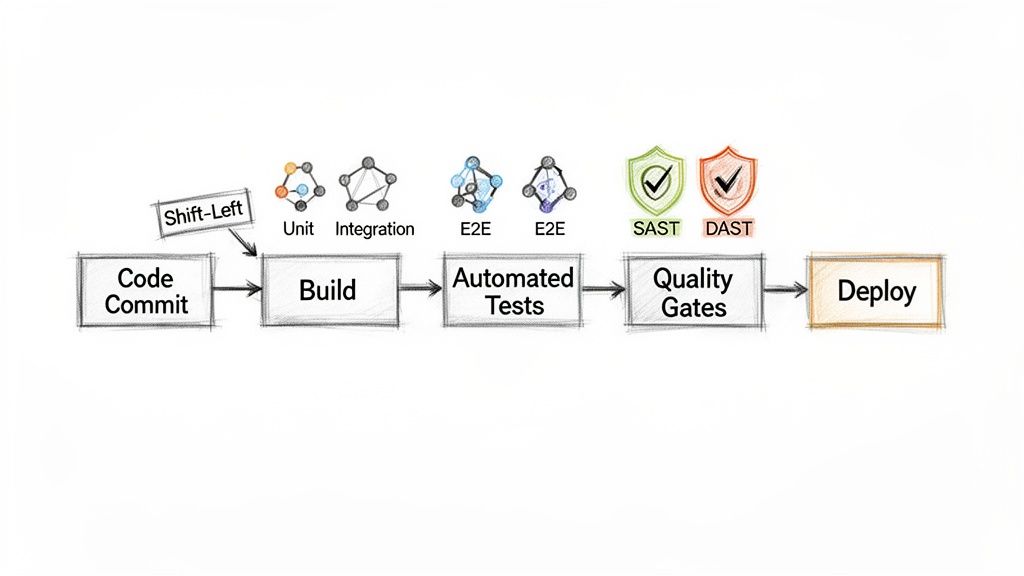
Alt text: Flowchart showing a software development pipeline with code commit, build, various tests, quality gates, and deploy.
Phase 3: Optimize and Scale (Days 61–90)
The final 30 days are about proving value and expanding your efforts.
- Analyze Your KPIs: Review your metrics. Is the Defect Escape Rate dropping? Is MTTR improving? Share the data.
- Expand Test Coverage: Use data to identify the next most risky part of the application and automate tests for it.
- Report Business Impact: Create a simple report tying your work back to business goals (e.g., "Reduced critical bugs by 15% this month").
- Gather Feedback: Ask developers and product managers for input to make continuous improvements.
What To Do Next
- Scope Your Needs: Use the 90-day checklist to identify the most critical quality gap in your current process.
- Define a Pilot Project: Choose one high-impact area (like automating tests for your checkout flow) to prove the value of a modern QA approach.
- Book a Scoping Call: We can help you find pre-vetted senior QA automation engineers to lead your pilot, often in under 2 weeks.
Ready to build a world-class remote AI team? At ThirstySprout, we connect you with pre-vetted senior AI and ML experts who can start delivering value in days, not months. Start your talent pilot today.
References & Further Reading
- Software Quality Assurance Testing - A deeper dive for technical leaders.
- What Is Quality Assurance in Software Development - A foundational overview.
- Quality of Hire Metrics - How to measure and improve the talent you bring on board.
- Research on Software Testing Trends - Primary data on industry trends from Testlio.
Hire from the Top 1% Talent Network
Ready to accelerate your hiring or scale your company with our top-tier technical talent? Let's chat.