

You're a few weeks from launch. The demo works, the team is tired, and everyone wants to ship. But the key question isn't whether the AI feature works in staging. It's whether it will stay reliable when real users hit it with messy inputs, bursty traffic, and edge cases you didn't see in testing.
That's where a production readiness checklist earns its keep. An AI system failing in production isn't just a bad deploy. It can trigger silent data corruption, runaway inference spend, broken customer workflows, or brand damage from hallucinated output. For teams managing release pressure, TekRecruiter's production management guide is a useful reminder that production discipline is operational, not cosmetic.
This guide is for CTOs, engineering leads, and founders launching a serious AI or ML feature without a huge platform team behind them. It combines core software readiness with AI-specific checks that usually get skipped until after the first painful incident.
TL;DR
Launch week usually fails on the gaps between teams. The app passes QA, the model looks good in evals, and nobody has owned what happens if latency spikes, costs jump, or the model starts returning bad output under real traffic.
Use this checklist as a go or no-go review with named owners, clear thresholds, and rollback authority.
- Treat production readiness as a release gate with explicit sign-off from engineering, product, and whoever owns data and ML operations.
- Cover software and ML failure modes together. That means uptime, alerting, rollback, security, and on-call ownership, plus prompt regression, model output quality checks, inference spend controls, and fallback behavior when the model or vendor fails.
- Set launch thresholds before release. Define acceptable latency, error rate, availability, output quality, and cost per request. If a metric matters in production, assign an owner now.
- Test for the startup reality, not the enterprise fantasy. Assume a small team, limited platform support, one cloud bill, and a launch that still needs to survive messy inputs, burst traffic, and partial outages.
- Make observability specific to AI workloads. Track model, prompt, retrieval, latency, failure rate, and cost in one view. Teams comparing AI observability platforms for production launches should favor tools that help on-call engineers isolate whether the issue is the app, the model, the vector store, or the provider.
- Prove that rollback works under pressure. A documented rollback that nobody has exercised is paperwork, not risk reduction.
- Capacity planning should include degraded modes. Verify the system can handle peak traffic, provider throttling, and at least one infrastructure failure without taking down the customer workflow.
- Put a budget guardrail on day one. AI incidents are not always outages. Sometimes the first production failure is a cloud bill that triples because retries, long prompts, or a prompt-chain bug slipped through.
Who this is for
You'll get the most value from this if you're in one of these situations:
- CTO or VP Engineering: You need a clear go or no-go standard before exposing an AI feature to customers.
- Staff Engineer or Head of Platform: You're the person everyone looks at when monitoring, rollback, and incident ownership are fuzzy.
- Founder or Product Lead: You need to launch fast, but you can't afford a public failure or an ugly cloud bill.
- Talent or procurement lead: You're evaluating whether an internal team or external vendor is ready to support production.
The working framework
Production readiness is the systematic process of making sure software is reliable, observable, and operable before deployment, typically across monitoring, incident response, security compliance, performance validation, and documentation, with a formal Production Readiness Review acting as the checkpoint, as outlined by DX's production readiness overview.
For AI systems, I'd use a simple rule. If you can't answer who owns the model, how you detect bad outputs, how you roll back, what happens during dependency failure, and how you cap spend, you're not ready.
Practical rule: Treat production readiness as an operating standard. If observability, rollback strategy, or incident ownership is missing, launch should stop.
1. Automated Monitoring and Alerting Infrastructure
Launch week failure mode: the API stays green while the AI feature is already degrading. Users see slower answers, weaker retrieval, or empty responses, and the only alert you get is a vague latency spike. That happens when teams monitor the application shell but skip the model path, retrieval path, and vendor dependencies underneath it.
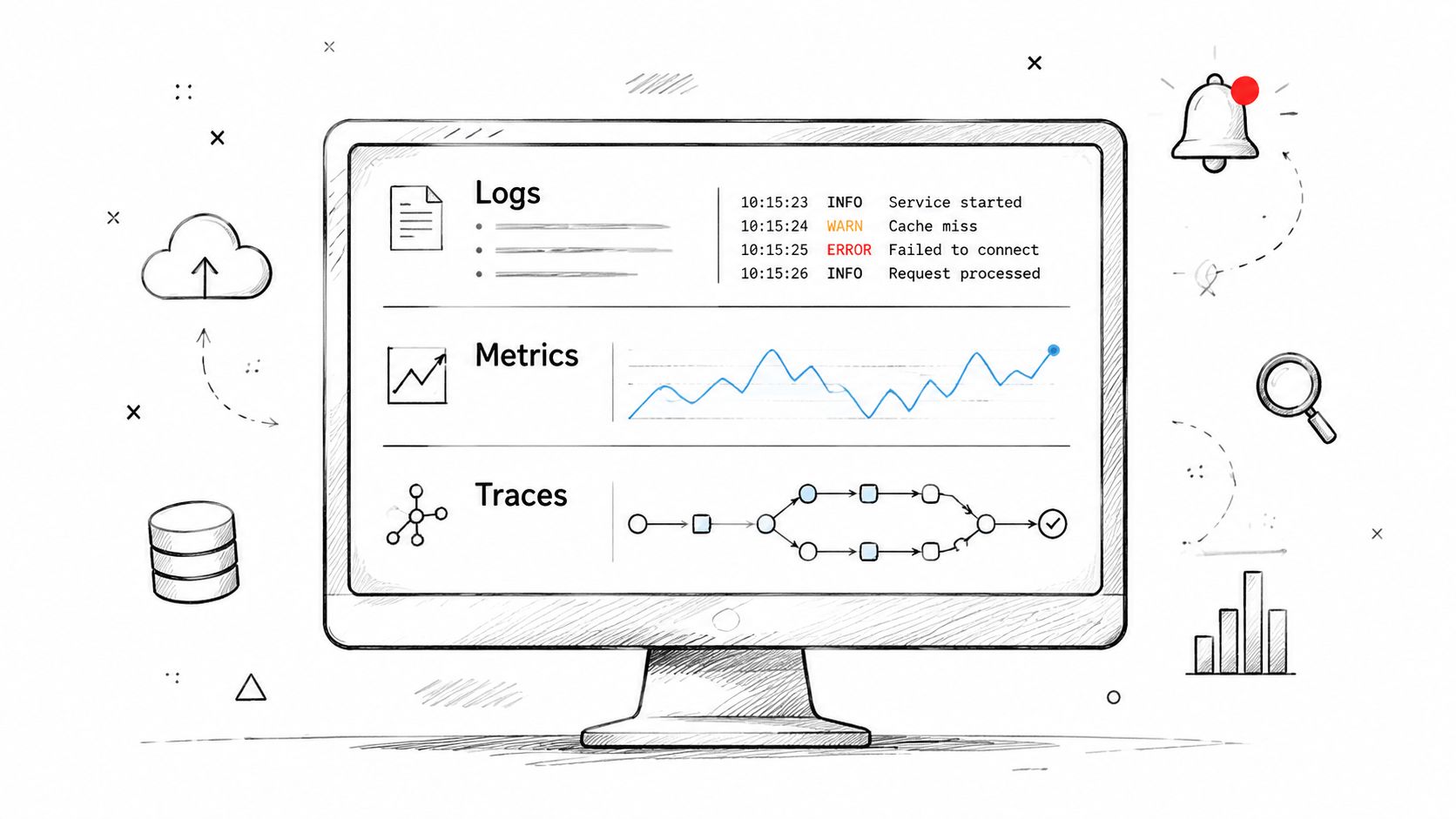
For a startup shipping its first RAG support assistant, the goal is not a perfect observability platform. The goal is fast fault isolation with a setup your team is capable of running. Datadog plus structured Python logs is often enough. Prometheus and Grafana can also work well if your engineers already know how to operate them. The trade-off is simple. Buy speed with a managed stack, or spend more engineering time wiring and maintaining open-source tools.
Instrument the request as a chain, not as one black box. Capture the user request, retrieval call, reranker result, prompt assembly, model invocation, output validation, and final response separately. If answer quality drops, the on-call engineer should be able to tell whether the issue started with low-quality document fetches, a slow provider, a prompt bug, or a bad model release.
What to track:
- Request tracing: Correlation IDs that connect frontend request, retrieval call, model invocation, and response.
- Stage latency: Retrieval latency, reranker latency, model latency, and total time to first token or final response.
- Failure modes: Provider timeouts, malformed prompts, empty context windows, validation failures, and fallback activation.
- AI-specific health: Output quality signals, prompt or model version, token usage, per-request cost, and policy or safety flags.
- Alert routing: Alerts tied to service level objectives, with ownership mapped to platform, ML, or product engineering.
Ownership matters as much as instrumentation. Someone should own API availability. Someone should own retrieval quality. Someone should own model behavior and vendor reliability. In a scale-up without a dedicated ML platform team, that often means splitting ownership across one backend lead, one applied ML engineer, and the feature team manager. If no alert has an owner, it will sit in Slack while customers keep hitting refresh.
Dashboards should reflect how decisions get made. Engineers need a reliability view with error rate, stage latency, timeout sources, and fallback frequency. Product and finance leads need a separate view for traffic, success rate, token spend, and cost per workflow. Mixing all of that into one screen usually gives you a dashboard nobody uses.
You also need a small set of pre-launch checks. Run the system under normal traffic, burst traffic, and bad-input conditions. Verify that alerts fire for the problems that matter, not just CPU spikes. Teams that already do continuous performance testing for production systems usually catch these gaps earlier because they test the whole request path, not just the happy path.
If you're building this layer now, AI observability platforms can help you compare whether you need a dedicated stack or just better instrumentation in your existing tooling.
Here's a useful walkthrough if your team wants to align on observability concepts before launch:
2. Data Pipeline Validation and Integrity Checks
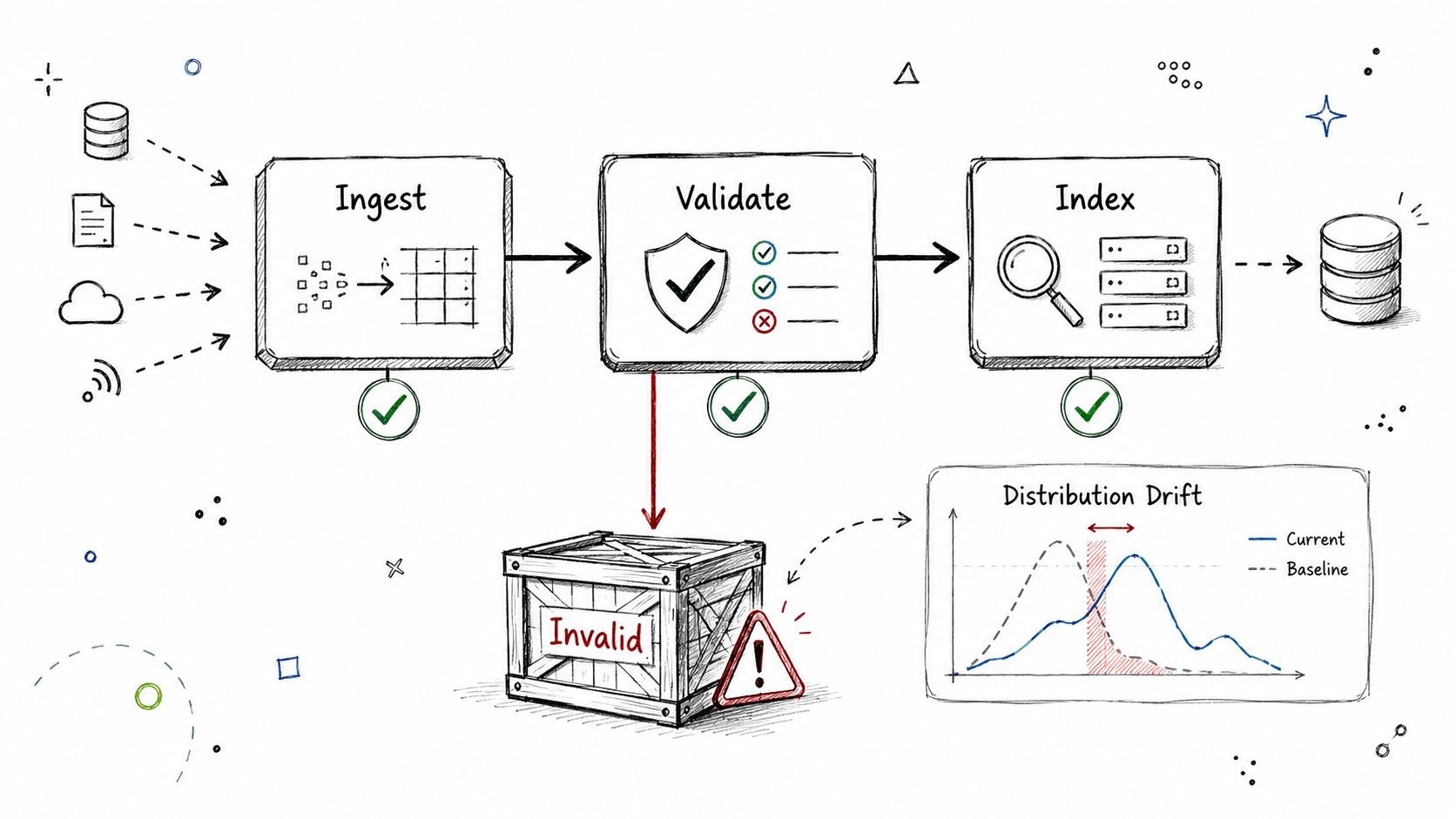
Most AI failures don't begin at inference. They begin upstream, when bad data enters a pipeline and everything downstream treats it as truth.
A common startup example is RAG ingestion. The crawler runs, chunks get generated, embeddings are written, and nobody notices that metadata keys changed or document IDs started duplicating. The app still returns answers. They're just wrong in a way that's hard to detect.
What good validation looks like
Use explicit gates before data reaches training, indexing, or inference. Great Expectations, Soda SQL, dbt tests, or a custom Airflow check are all fine. The tool matters less than the ownership and the block condition.
A solid mini-case is a RAG ingestion flow where dbt tests verify that each chunk has non-empty metadata and a unique ID before it lands in Pinecone or Weaviate. Another is a fine-tuning dataset pipeline that quarantines examples containing likely PII instead of letting them flow straight into training.
Bad production incidents often look like model issues first. In practice, they're often data contract failures wearing a model-shaped mask.
Start small. Check nulls, duplicates, schema drift, and field ranges. Then add AI-specific checks such as malformed prompt templates, broken labels, or content that should never enter retrieval.
- Ownership first: Every critical field needs an owner, not just a validation rule.
- Fail closed for training data: If a batch looks suspicious, quarantine it.
- Sample the weird rows: Synthetic or rule-based spot checks catch issues aggregate checks miss.
For LLM-heavy systems, I like a cheap secondary pass on a sample batch. It can be a heuristic classifier, a lightweight model, or a rules engine. The point isn't perfection. The point is catching obviously bad data before it poisons a production index or retraining run.
3. Graceful Degradation and Fallback Strategies
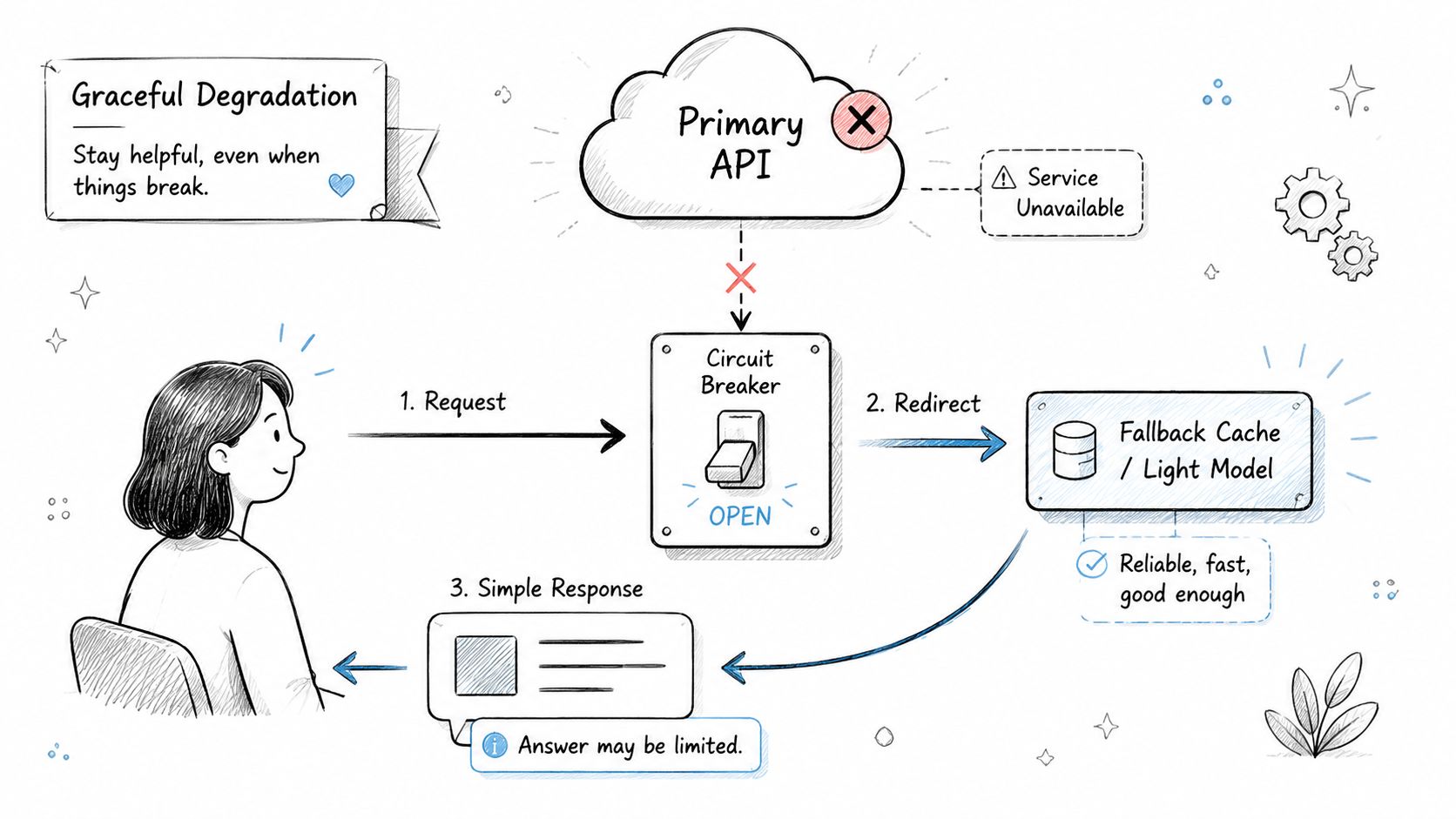
If your AI feature depends on an LLM API, vector database, reranker, and embeddings service, you don't have one system. You have a chain of failure points.
The right question isn't whether something will fail. It's what the user sees when it does. A production readiness checklist should force a clear answer for each dependency.
Fallbacks that actually help
In e-commerce search, a sensible pattern is semantic search first, then lexical fallback. If the vector store times out, switch to BM25. If the reranker is slow, skip reranking and return the base result set. Users still get results, and your incident stays manageable.
For a support copilot, use a cached answer path for the most common intents. If the LLM provider is down, return a clearly labeled fallback answer from Redis or your FAQ service instead of a blank screen.
The trade-off is quality. A fallback often lowers answer relevance or removes personalization. That's still better than pretending the system is healthy while requests pile up and customer workflows break.
- Map every dependency: LLM provider, vector store, embedding service, model server, billing service, feature flag platform.
- Define the user experience: Retry, degrade, disable, or queue.
- Test in staging: Force a dependency to return failures and watch the actual user path.
The best fallback is usually the simplest one users can understand. Don't build a clever degraded mode that fails in more confusing ways.
Feature flags help here. If an experimental AI path starts failing, you should be able to disable it without a redeploy. That's especially important for startups where the same team owns product, platform, and incident response.
4. Load Testing and Capacity Planning for AI Workloads
Your launch can look stable in staging and still fail in production the first time a real customer pastes a 4,000-word document, triggers retrieval across multiple indexes, and hits the same GPU pool as everyone else. AI capacity breaks on different axes than a standard web app. Requests per second is only one of them.
What matters is the shape of the work. Prompt length changes token count. Retrieval depth changes database load. Concurrency changes queue time. Cold starts and autoscaling delays can turn a small traffic spike into a latency incident, which is why teams should tie capacity testing to their broader incident response process for production systems, not treat it as a one-time pre-launch exercise.
Test the bottleneck you will actually hit
For a startup shipping its first AI feature, the practical launch gate is simple. Prove the system can handle expected peak traffic, keep a safety buffer above that peak, and stay within your latency and cost targets if one component is degraded or unavailable. That component might be a node, a model replica, a vector shard, or an upstream model API.
Software and ML readiness must converge. Platform teams care about throughput, saturation, and failover. ML teams care about token volume, model latency, context windows, and retrieval fan-out. If those checks happen separately, nobody owns the full failure mode.
A support RAG example makes this concrete. Simulate concurrent sessions with realistic prompt sizes, follow-up turns, and document retrieval depth. Measure p50 and p95 latency, queue growth, timeout rate, GPU or CPU utilization, cache hit rate, and cost per answered ticket. Then assign owners. Platform owns scaling behavior and queue health. ML owns prompt and retrieval efficiency. Product owns the acceptable user-facing latency and whether the feature should cap context length for lower-tier plans.
The trade-off is usually cost versus headroom. Overprovision and the feature launches safely but burns cash before revenue catches up. Underprovision and you pay for it during launch week in user-visible failures, emergency tuning, and distracted engineering time.
For fine-tuning or batch inference systems, test a different shape. Flood the job queue, watch autoscaling response time, and confirm backpressure works. A cluster that accepts every job and thrashes itself is less useful than one that slows intake, preserves interactive traffic, and gives operators clear signals about what to shed first.
If your AI feature touches sensitive user data, capacity tests should also account for the operational overhead of logging controls, data isolation, and cloud security breach response planning. Security controls change performance characteristics, and teams often discover that too late.
- Use realistic traffic patterns: bursts, long prompts, multi-turn chats, retries, and background jobs
- Measure unit economics during the test: cost per request, per conversation, or per completed workflow
- Track saturation points: GPU memory, model server concurrency, vector database QPS, queue depth, and third-party rate limits
- Define ownership for each threshold: SRE or platform for infrastructure, ML for inference efficiency, product for experience trade-offs
- Set load-shedding rules before launch: cap context length, limit retrieval depth, queue batch work, or disable expensive features by flag
One more rule helps small teams. Re-run these tests after any material change to prompts, models, chunking strategy, retrieval settings, or traffic mix. In AI systems, capacity drifts even when the UI does not.
5. Model Versioning and Rollback Procedures
Friday afternoon deploys create a specific kind of AI incident. The endpoint stays up, dashboards stay green enough, and nobody notices the actual problem until support tickets pile up and product asks why answer quality dropped for enterprise accounts only.
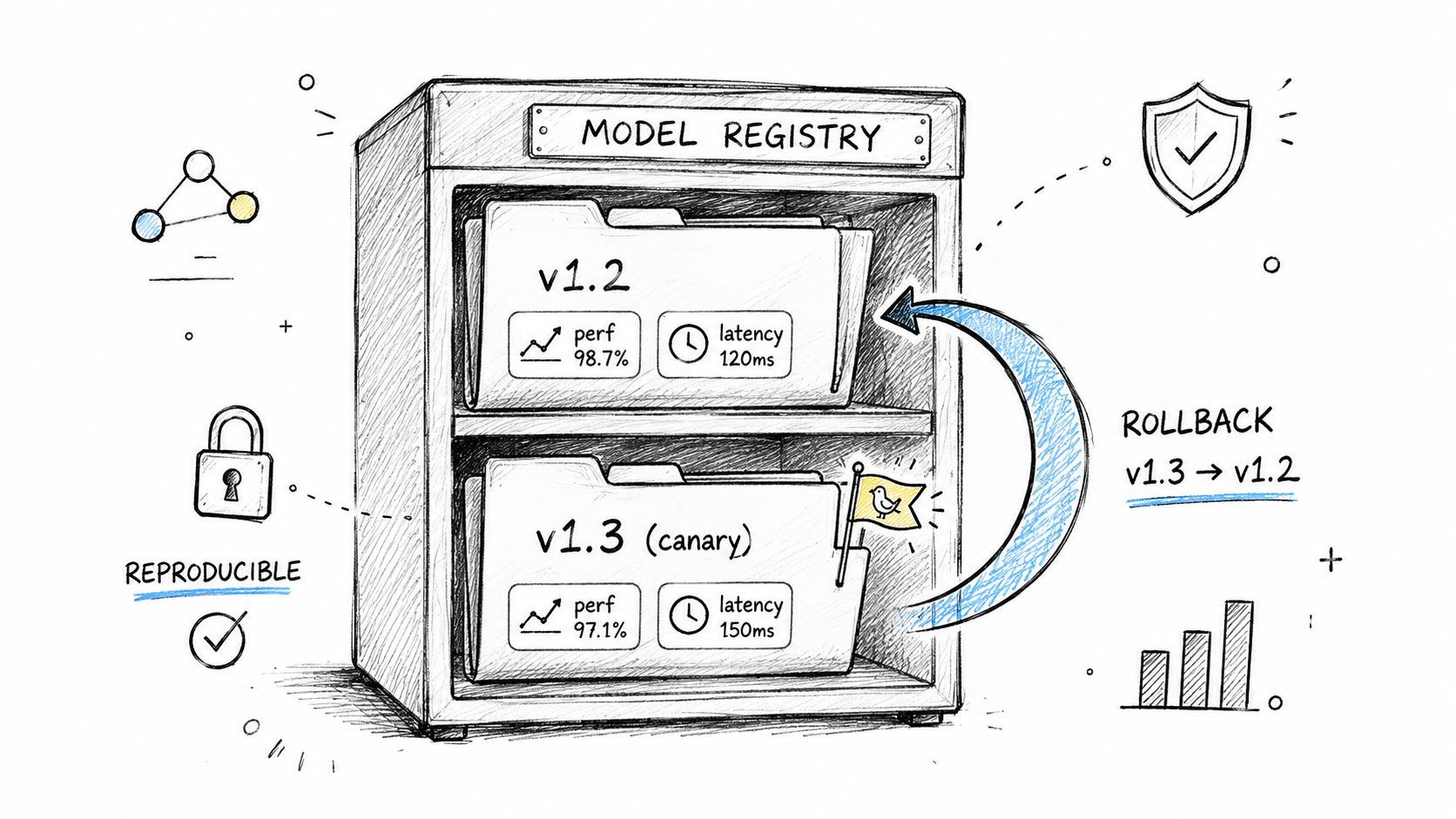
That is why versioning has to cover the full inference package, not just the model file. For a startup or scale-up shipping its first serious AI feature, the failure mode is usually partial drift. A prompt changed, retrieval settings changed, a preprocessing step changed, and the team cannot reconstruct which combination caused the regression. Treat model weights, prompts, preprocessing code, feature flags, retrieval parameters, safety rules, and evaluation set references as one release unit with one version ID.
Roll back the release unit, not a single artifact
A workable standard is simple. Every production deployment should point to a known-good bundle, a reproducible build, and a tested rollback command. If you need to reassemble artifacts by hand during an incident, recovery time will stretch past your target and the business impact will keep growing.
For ML systems, that bundle often includes the model registry entry, tokenizer version, embedding model, prompt template, retrieval configuration, serving image, and deployment manifest. For LLM features, prompt versioning is usually where teams get burned. A small template edit can change latency, output shape, refusal behavior, and tool usage without any code diff in the application layer.
Ownership matters here because small teams do not have spare platform capacity. ML owns artifact lineage and eval approval. Platform or SRE owns deployment mechanics and rollback speed. Product signs off on user-facing trade-offs, such as reverting to a weaker but cheaper model or temporarily disabling a high-cost reasoning path.
- Version the whole release unit: model, prompt, preprocessing, retrieval settings, safety policies, and evaluation references
- Store immutable artifacts: keep a known-good image, manifest, and config package ready for redeploy
- Use progressive rollout: send a small traffic slice first, then expand only after quality, latency, and cost checks pass
- Define rollback triggers in advance: quality regression, latency increase, safety failures, cost spikes, or third-party dependency errors
- Assign operators clearly: who approves rollout, who executes rollback, and who communicates status
Test rollback the way you test failover. Run it on a schedule. Time it. Confirm the team can execute it from the runbook, not from memory. If you need a template, this incident response plan for engineering teams is a useful reference for defining decision points and owner handoffs under pressure.
One trade-off is worth stating plainly. Full reproducibility adds process overhead, and early-stage teams resist it because shipping speed matters. That is a fair concern. The practical compromise is to require strict versioning for anything that can change model output or unit cost, while keeping less sensitive application changes on the normal release path.
If the AI feature handles customer content, rollback planning also needs to account for logs, cached prompts, and restored indexes after an incident. That overlaps with cloud security breach response planning because recovery is not complete if you can redeploy the old model but cannot contain or audit what the bad release exposed.
A rollback plan is only real if a new engineer can run it at 2 a.m. and get production back to a known-good state fast.
6. Security, Privacy, and Compliance Hardening
Security reviews often happen too late for AI features. Teams focus on quality first, then discover they've indexed sensitive text, exposed prompt logs broadly, or created a prompt injection path that wasn't considered in app security review.
That gap is wider in AI because standard software controls don't fully cover model behavior. You need the usual access control, encryption, and secrets management, but you also need model-specific protections.
AI-specific checks teams miss
OpsLevel highlights several checks that belong in AI production readiness now: backup and versioning for models or prompt templates with restoration procedures, automated evaluation for performance, safety, bias, and hallucination, prompt and response validation with regression tests, and compliance checks against regulations such as the EU AI Act and CPRA in OpsLevel's production readiness deep dive.
A practical example is a SaaS RAG system that redacts likely PII before indexing and keeps prompt and response logs in a separate, tightly controlled store. Another is an API product that applies rate limits, role-based access control, and prompt injection checks before requests hit the model backend.
Security for AI products starts before inference. If unsafe or sensitive content can enter training, retrieval, or logging, you've already lost control of the system.
A few hard rules help:
- Separate secrets from code: Use a secrets manager, not scattered environment variables and local scripts.
- Constrain access: Limit who can read prompt logs, model artifacts, and vector indexes.
- Review retention: Don't keep sensitive prompts forever by default.
This is one area where startups should resist the urge to “clean it up later.” Cleanup after launch is always slower, and users don't care that your team was moving fast.
7. Automated Testing Suite and CI/CD Integration
Friday afternoon deploys fail in a predictable way. The API contract still passes, the health check stays green, and the feature ships. Then the first real customer prompt hits a changed template, the model returns malformed JSON, and a downstream job starts dropping work. Teams that are launching their first serious AI feature run into this because they test the app and inspect a few model outputs by hand, but they do not gate releases on repeatable checks across both layers.
Production readiness here means one delivery pipeline for application code, prompts, model configs, and evaluation assets. Linting, unit tests, integration tests, schema validation, security scans, and deployment automation belong in the same path to production. If releases still depend on manual SSH steps or a shell script that only one engineer trusts, the process is fragile.
Start with the failures that would hurt users or wake up the team.
For a RAG product, test each stage separately and then together. Unit test chunking logic, metadata filters, and retrieval guards. Integration test vector search plus reranking with a fixed corpus. End-to-end test answer generation against a versioned eval set that includes normal queries, edge cases, and known bad inputs. For a prompt-based workflow, add contract tests that fail if the model stops returning valid JSON or required fields.
The ML-specific checks matter because standard software tests will miss the expensive regressions. A build can pass while answer quality drops, refusal behavior changes, or prompt injection defenses weaken. Teams need automated evaluations for the behaviors they care about in production, such as factuality for a support assistant, citation use for RAG, and safe tool calling for an agent. The gate does not need to be perfect. It needs to catch the obvious bad release before customers do.
A simple startup-friendly split works well:
- On every pull request: linting, unit tests, prompt or schema regression tests, mocked integrations, and lightweight safety checks
- On merge to main: integration tests with real services in a controlled environment, migration checks, and smoke evals on a small fixed dataset
- Before staging or production promotion: fuller model evaluation, latency checks, and a manual review only for cases where the automated signal is still noisy
Version the test datasets and prompt fixtures with the same discipline as code. If the eval set changes, reviewers should see that in the diff. If a release candidate passes against one dataset but production is judged against another, the pipeline is giving false confidence.
Ownership needs to be explicit. Platform or backend owns CI reliability and deployment automation. The ML engineer or applied scientist owns eval design and model-specific regression thresholds. The product engineer who consumes model output owns schema contracts and failure handling. Small teams can split this across fewer people, but they still need named owners.
There is a trade-off. Full model evaluations cost money and slow builds, especially if they call paid APIs or GPU-backed services. Pay that cost where it changes the decision. Fast checks should run on every change. Expensive checks should run on promotion gates, nightly builds, or before a large rollout. That keeps cycle time reasonable without treating quality as a best-effort exercise.
8. Incident Response Plan and On-Call Runbooks
It's 2:13 a.m. Latency has doubled, retries are climbing, and support has already posted in Slack that customers are seeing inconsistent answers. The team now needs two things fast. A clear incident owner and a runbook that starts with the first five minutes, not a wiki full of background context.
AI incidents are messier than standard API outages because the failure can sit in several places at once. The app may be healthy while the model provider is rate-limiting. The retrieval layer may be returning stale context while infrastructure metrics still look normal. A safety filter change can degrade output quality without triggering a 500. For a startup or scale-up shipping its first serious AI feature, that means the incident plan has to cover both software failure modes and ML-specific degradation.
A production-ready setup needs named ownership for each class of incident. Backend or platform usually owns service availability, deploy rollback, and traffic controls. The ML owner handles model regressions, prompt changes, eval drift, and provider-specific behavior changes. The product or feature owner decides when degraded output is still acceptable for customers and when the feature should be disabled. Small teams can assign multiple roles to one person, but they still need the role definitions written down before launch.
What incident response means in practice is a useful framing for technical teams because it emphasizes coordination, containment, and recovery instead of generic uptime language.
Write the runbook for the first responder
The first screen should answer four questions immediately: what broke, who owns it, what customers are affected, and what safe actions are allowed without extra approval. Put dashboard links, feature flags, rollback commands, provider status pages, and recent deploy history at the top. Do not make the on-call engineer scroll through architecture notes to find the kill switch.
For AI systems, runbooks should cover at least these common cases:
- Provider degradation: switch to a smaller backup model, reduce concurrency, tighten timeouts, or disable expensive secondary calls
- Retrieval or vector search failure: bypass retrieval for low-risk flows, serve a cached answer path, or fail closed for high-risk use cases
- Model quality regression: pin traffic back to the previous prompt, model version, or routing policy
- Cost spike during incident conditions: cap retries, disable long-context requests, and turn off background enrichment jobs
- Safety or policy failure: block the affected workflow, preserve logs needed for review, and route sensitive traffic to a stricter fallback path
That last point matters more in AI than in standard SaaS. Some incidents are not outages. They are correctness, safety, or compliance events. The service can stay up while producing output that creates legal, financial, or trust problems. Your incident process has to treat those as production incidents, with severity levels and escalation paths, not as bugs to sort out next sprint.
Cloud security breach response planning is still relevant here for one reason. It reinforces predefined decision paths, communication ownership, and evidence preservation. Those habits transfer well when an AI feature exposes private data, returns unsafe content, or behaves unpredictably after a model or prompt change.
Keep each runbook concrete:
- Put actions first: commands, toggles, dashboards, and rollback steps
- State blast radius: which customers, features, or downstream systems are affected
- Define escalation rules: when on-call can mitigate alone and when leadership, security, or legal must be paged
- Record cost trade-offs: for example, whether the fallback model is cheaper but lower quality, or safer but slower
- Rehearse quarterly: dry runs catch stale links, missing permissions, and steps nobody can complete under pressure
One practical standard works well. If a team cannot show incident ownership, a tested rollback path, and a runbook for the top failure modes, the launch should wait. That bar is high enough to prevent avoidable chaos and still realistic for companies without a dedicated SRE or platform org.
Runbooks are compressed operational memory. During an incident, that is what keeps a bad hour from turning into a bad launch.
9. Cost Monitoring and Budget Controls
AI systems can look stable while burning money at an unhealthy rate. That's why cost needs first-class production instrumentation, not a finance report after the fact.
The common startup failure mode is simple. Usage grows, context windows expand, prompts bloat, retries increase, and nobody notices until the monthly bill lands. By then, the product team has already made commitments based on economics that don't hold.
Cost visibility at the request level
Track token or inference usage by endpoint, customer, and feature. For a B2B copilot, this often surfaces a few accounts or workflows driving a disproportionate share of spend. Once you can see that pattern, you have options. Change limits, move them to a cheaper model path, or package the feature differently.
A second mini-case is the load-test scenario nobody budgets for. A realistic stress test can unintentionally create expensive external API traffic. Put hard environment guards in place so test traffic can't generate production-scale spend.
If engineers can't see cost next to latency and error rate, they'll optimize the wrong thing.
The monitoring model from Galileo is useful here because it treats cost as one of the core health dimensions alongside accuracy, latency, and compliance. That's the right mindset for any AI feature with third-party model dependencies.
A few practical controls work well:
- Set soft alerts early: Warn before costs become incidents.
- Use hard caps selectively: Non-critical endpoints can degrade or queue when usage spikes.
- Review per-feature economics: A feature that works technically may still be unfit for broad rollout.
10. FinOps and Chargeback Strategies
Cost monitoring tells you what happened. FinOps tells you who owns it and what behavior your pricing and internal incentives encourage.
That matters in AI because usage patterns vary wildly. One team may use a model occasionally for low-risk automation. Another may build a customer-facing workflow that hits the model path constantly. If those costs blend together, nobody learns where the economics are healthy and where they're not.
Align incentives before spend becomes political
Start with showback. Give teams and product owners clear usage views without immediately charging them back. That makes the conversation operational instead of adversarial.
A practical startup example is tiered AI access. Free plans use a cheaper model and tighter quotas. Higher-value customers get stronger service expectations, more generous limits, or reserved model capacity if your commercial model supports that. Another is tagging shared infrastructure so platform, product, and finance can review where model serving or vector search costs are accumulating.
This doesn't require a huge FinOps team. It requires tagging discipline, shared dashboards, and a recurring review where engineering and product look at the same numbers and make explicit trade-offs.
- Automate tags: Requests, experiments, and deployments should carry cost identity.
- Review anomalies together: Finance alone won't know whether a spike is healthy growth or a broken prompt loop.
- Tie pricing to reality: If a feature has expensive usage patterns, your packaging needs to reflect that.
Production Readiness: 10-Point Comparison
| Item | Implementation Complexity 🔄 | Resource & Operational Requirements ⚡ | Expected Outcomes ⭐ / Impact 📊 | Ideal Use Cases 💡 | Key Advantages ⭐ |
|---|---|---|---|---|---|
| Automated Monitoring and Alerting Infrastructure | High, multiple instrumentation layers, iterative tuning 🔄 | Moderate–High, observability stack, storage, MLOps/platform engineers ⚡ | ⭐⭐⭐⭐ Faster MTTR, real-time anomaly detection, SLO visibility 📊 | Production RAG systems, customer-facing AI, high-SLA features 💡 | Centralized logs/tracing; actionable alerts for on-call teams ⭐ |
| Data Pipeline Validation and Integrity Checks | Medium–High, rules + drift detection; needs domain input 🔄 | Moderate, validation tools, data engineers, metadata/catalog integrations ⚡ | ⭐⭐⭐ Prevent GIGO, early detection of schema/drift issues, fewer downstream incidents 📊 | ETL, feature stores, retraining pipelines, RAG ingestion 💡 | Automatic quarantine/rollback of bad batches; clear data ownership ⭐ |
| Graceful Degradation and Fallback Strategies | Medium, additional code paths and testing 🔄 | Low–Moderate, caching, lightweight models, feature flags ⚡ | ⭐⭐⭐ Maintain usable UX during outages; reduce emergency deploys 📊 | Systems reliant on third-party LLMs/vector DBs, high-availability features 💡 | Preserves user trust; enables load shedding and quick mitigation ⭐ |
| Load Testing and Capacity Planning for AI Workloads | Medium–High, realistic synthetic traffic + analysis 🔄 | High, staging infra mirroring prod, cost for load generation ⚡ | ⭐⭐⭐⭐ Identify bottlenecks, validate autoscaling, forecast costs 📊 | Launches, anticipated traffic spikes, high-concurrency inference services 💡 | Avoids crashes at scale; informed infra vs managed API decisions ⭐ |
| Model Versioning and Rollback Procedures | Medium, registry + automated rollback workflows 🔄 | Moderate, model registry, CI/CD, A/B testing infra ⚡ | ⭐⭐⭐ Fast safe rollbacks, reproducibility, controlled experiments 📊 | Frequent model deploys, fine-tuning workflows, canary releases 💡 | Quick revert on regressions; compare performance across versions ⭐ |
| Security, Privacy, and Compliance Hardening | High, encryption, PII handling, audits, ongoing updates 🔄 | High, security engineers, audits, secrets management, compliance costs ⚡ | ⭐⭐⭐⭐ Reduced breach risk; compliance for enterprise deals (GDPR/HIPAA/SOC2) 📊 | Regulated domains (healthcare, finance), enterprise SaaS handling PII 💡 | Strong data protection, auditability, lower legal/liability risk ⭐ |
| Automated Testing Suite and CI/CD Integration | Medium, ML-specific tests add brittleness and maintenance 🔄 | Moderate, CI infra, test datasets, mocks for ML APIs ⚡ | ⭐⭐⭐ Fewer regressions, faster merges, safer refactors 📊 | Continuous delivery, model/code changes, prompt engineering workflows 💡 | Automated quality gates; reproducible test baselines ⭐ |
| Incident Response Plan and On-Call Runbooks | Low–Medium, documentation + drills; maintain freshness 🔄 | Low–Moderate, runbook authorship, on-call rotations, dashboards ⚡ | ⭐⭐⭐ Reduced MTTR, consistent triage, better post-mortems 📊 | Production operations, on-call teams, incident-prone integrations 💡 | Enables junior responders; standardizes communication and escalation ⭐ |
| Cost Monitoring and Budget Controls | Medium, billing integrations and realtime attribution 🔄 | Moderate, cloud/billing integrations, dashboards, alerting ⚡ | ⭐⭐⭐ Prevent cost blowouts, actionable spend alerts, forecast accuracy 📊 | High API/token spend products, cost-sensitive features, C-suite reporting 💡 | Real-time spend visibility; enforce soft/hard limits to protect budget ⭐ |
| FinOps and Chargeback Strategies | Medium–High, organizational process + tooling changes 🔄 | Moderate, automated tagging, finance involvement, recurring reviews ⚡ | ⭐⭐⭐ Accountability for spend; informed product/price trade-offs 📊 | Multi-team orgs, enterprise billing, chargeback/showback needs 💡 | Aligns incentives across teams; enables tiered pricing and reserved capacity ⭐ |
From Checklist to Reality Your Next 3 Steps
A production-ready system isn't a one-time achievement. It's a repeatable operating habit. The teams that ship well aren't the ones with perfect systems. They're the ones that can see failure early, contain it quickly, and keep learning as the product changes.
The reason this production readiness checklist matters is that AI systems fail in more dimensions than traditional software. You still need the basics. Monitoring, security, performance testing, rollback, incident ownership. But you also need model evaluation, prompt regression coverage, cost visibility, and data controls that account for how AI behaves in production.
The practical path is straightforward.
First, score your current system. Share this checklist with engineering and product, then mark each area red, yellow, or green. Don't overcomplicate the exercise. If monitoring exists but nobody trusts the dashboards, that's yellow. If rollback depends on one engineer who remembers the process, that's red. If prompts are versioned, tested, and reversible, that's green.
Second, prioritize the biggest risks instead of trying to solve everything at once. In most first launches, the most impactful gaps are observability, incident response, security, and cost controls. Those are the areas that turn a manageable issue into a customer-facing outage or a budget surprise. Fix the top two or three gaps in the next sprint and hold the launch line if one of the critical items is still weak.
Third, make sure the team matches the system you're launching. Production AI work usually needs a mix of application engineering, platform thinking, MLOps, and security judgment. Startups rarely have all of that in-house at the exact moment they need it. If there's a clear gap, fill it before the feature becomes business-critical.
ThirstySprout can help you do that with vetted remote specialists who've shipped real AI systems. You can start with one MLOps or platform engineer to close a specific readiness gap, or stand up a fuller team if the launch is larger and riskier. The point isn't staffing for the sake of it. The point is reducing launch risk fast, with people who know what production AI looks like.
If you use this checklist well, it becomes more than a launch artifact. It becomes your operating standard for every model, prompt, retrieval pipeline, and customer-facing AI feature that comes next.
If you're close to launch and need senior help with MLOps, AI platform engineering, observability, or AI security, ThirstySprout can help you hire vetted remote experts quickly. Start a Pilot, see sample profiles, or build a complete AI team that can take your system from promising demo to dependable production.
Hire from the Top 1% Talent Network
Ready to accelerate your hiring or scale your company with our top-tier technical talent? Let's chat.