

Your team has an AI feature that looks ready. The demo works. Functional tests pass. The API returns valid JSON, the prompt chain completes, and the dashboard says green.
Then production traffic hits. Response times stretch, retries pile up, one upstream model provider slows down, and support starts seeing the same complaint in different words: “It worked in staging.”
That's where non functional testing earns its keep. For AI products, the failure mode usually isn't “the endpoint is down.” It's slower, messier, and more expensive. The system still answers, but too slowly. It still classifies, but on stale data. It still generates, but with unstable output quality under concurrency. Those are product risks, not just QA issues.
Why Non-Functional Testing Matters for AI Products
TL;DR
- Functional tests tell you whether a feature works. Non functional testing tells you whether it will keep working under real usage.
- AI systems introduce extra production risk because behavior depends on models, prompts, data freshness, external providers, and infrastructure.
- Catching these problems early is cheaper than cleaning them up after launch. IBM's research has shown that defects found late in the lifecycle can cost up to 100x more to fix than defects found early, a point referenced in SFIA's non-functional testing skill definition.
This matters most if you're a CTO, Head of Engineering, product lead, or MLOps owner preparing to launch an AI capability into customer-facing workflows. It also matters if your team is under pressure to ship quickly and is tempted to postpone testing that doesn't map neatly to a single user story.
What breaks after AI launch
AI products fail in ways ordinary feature checks won't catch.
A support copilot might pass functional review because it can answer known questions in staging. In production, it starts timing out when retrieval gets slower, returns inconsistent answers when context windows vary, or burns through infrastructure budget because token-heavy prompts were never tested under realistic concurrency.
A fraud model can produce valid predictions in pre-release testing and still become dangerous after launch. If the incoming data shape changes, the model doesn't crash. It just makes worse decisions, its degradation going unnoticed. That's a non-functional problem because the issue is reliability under changing operating conditions.
Practical rule: If the product depends on real-time inference, external APIs, or changing data, assume production will reveal issues that functional tests missed.
Why CTOs should treat this as risk control
Non functional testing is about protecting the business, not satisfying a QA checklist.
Three outcomes usually matter most:
- User trust: Slow answers, flaky retries, and inconsistent behavior feel broken even if the feature is technically “up.”
- Cost control: Poorly tested AI systems often over-consume compute because batching, caching, timeout behavior, and fallback logic weren't validated under realistic load.
- Brand and compliance exposure: Security and availability failures become leadership problems fast, especially when the product handles sensitive data or automates important decisions.
The practical shift is simple. Stop treating non functional testing as a late-stage hardening phase. Treat it as a launch gate for anything important enough to affect revenue, customer retention, or operational risk.
Understanding Non-Functional Testing Types and KPIs
Non functional testing becomes useful when you stop speaking in adjectives and start speaking in targets. “Fast,” “secure,” and “stable” are not requirements. They're wishes.
The job is to convert business expectations into measurable acceptance criteria. As Aegis Softtech's explanation of non-functional testing notes, this work is about quantifying quality attributes such as response time, throughput, error rate, resource utilization, availability, usability, and security posture.
Start with the business question
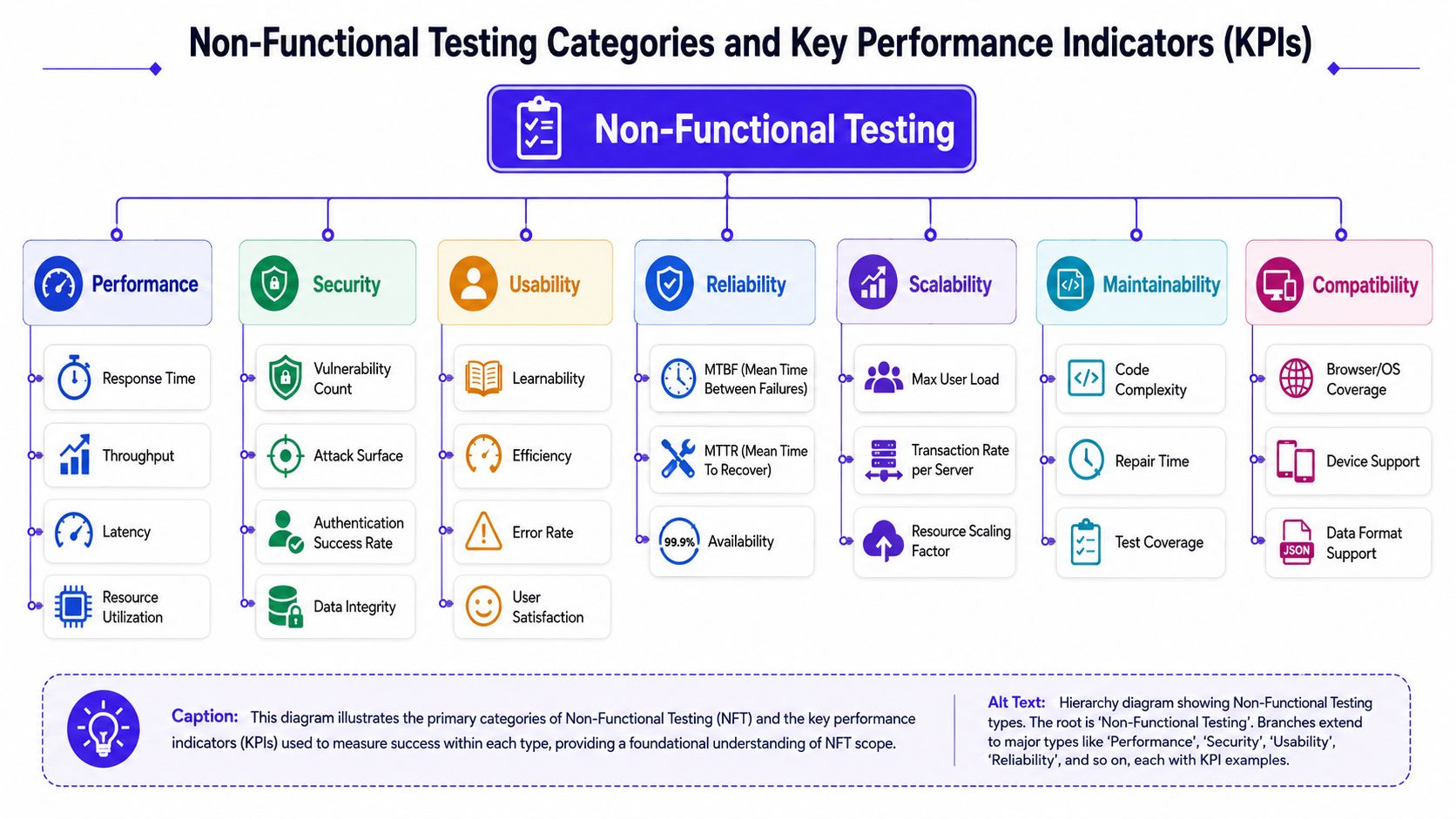
Instead of asking, “Which tests should we run?”, ask, “What business failure are we trying to prevent?”
That framing usually leads to the right test family.
| Testing Type | Core Question Answered | Example KPIs |
|---|---|---|
| Performance | Can the system respond quickly enough under expected demand? | Response time, throughput, latency, resource utilization |
| Security | Can attackers or misuse paths compromise data or service behavior? | Vulnerability count, authentication success rate, data integrity signals |
| Reliability | Will the system keep operating and recover cleanly when things go wrong? | Availability, mean time between failures, mean time to recover |
| Usability | Can users complete critical workflows without confusion or friction? | Task completion, error rate, user satisfaction |
| Scalability | Can the system handle growth without degrading badly? | Max user load, transaction rate per server, scaling behavior |
| Maintainability | Can engineers diagnose, fix, and safely change the system? | Repair time, code complexity, test coverage |
| Compatibility | Does the product work across target environments and dependencies? | Browser or OS coverage, device support, data format support |
Four categories most teams should care about first
For most launches, four categories matter immediately.
Performance
This answers the simplest product question. Does the system feel fast enough to use?
For AI workloads, performance goes beyond request duration. You also care about token generation rate, queue depth, cold starts, retrieval latency, batch processing time, and infrastructure saturation. A chatbot that answers accurately in staging can still fail in production if latency spikes when multiple requests compete for the same GPU or model endpoint.
Security
This asks whether the system can protect data, identities, and downstream actions.
In AI products, security testing also needs to cover prompt injection exposure, unsafe tool execution paths, insecure retrieval, and leakage through logs or traces. A model that answers correctly but can be manipulated into exposing internal instructions is not production ready.
A passing demo is not a security signal. It only proves that the happy path works.
Reliability and availability
This is the question operations teams care about when something upstream fails. What happens when a dependency slows down, returns malformed output, or disappears entirely?
Good reliability testing covers retries, circuit breakers, timeouts, fallback behavior, state recovery, and alerting. If your product relies on vector search, a model provider, and a post-processing service, test the chain as a chain. Don't assume each component being healthy in isolation means the user journey is resilient.
Usability
Usability often gets ignored in technical launch reviews, but it matters more in AI than many teams expect.
A product can be accurate and still fail because users don't understand confidence, don't know when to trust the output, or can't recover from a bad result. For AI assistants, usability testing should include ambiguous prompts, missing context, and low-confidence outputs, not just ideal scripted flows.
A good KPI is specific enough to fail
Non functional testing works when a result can clearly pass or fail. For example, a team might define an expectation such as a peak-load response-time target for most requests, an uptime objective, or a disaster-recovery expectation, then test directly against it rather than relying on subjective judgments. That discipline keeps release decisions grounded in evidence instead of optimism.
Non-Functional Testing for AI and ML Systems
Traditional software either follows the coded path or it doesn't. AI systems are different. They can produce a valid-looking answer while drifting away from acceptable behavior.
That's why AI non functional testing has to cover more than speed and uptime. It has to account for probabilistic behavior, changing inputs, model decay, and vendor dependence.
Recent operating pressure makes this harder to ignore. The average cost of a data breach reached USD 4.88 million in 2024, and 42% of enterprise-scale organizations have actively deployed AI, according to the 2024 IBM Global AI Adoption Index coverage. More AI in production means more systems exposed to latency, security, observability, and reliability failures that standard test suites weren't designed to catch.
What makes AI systems different
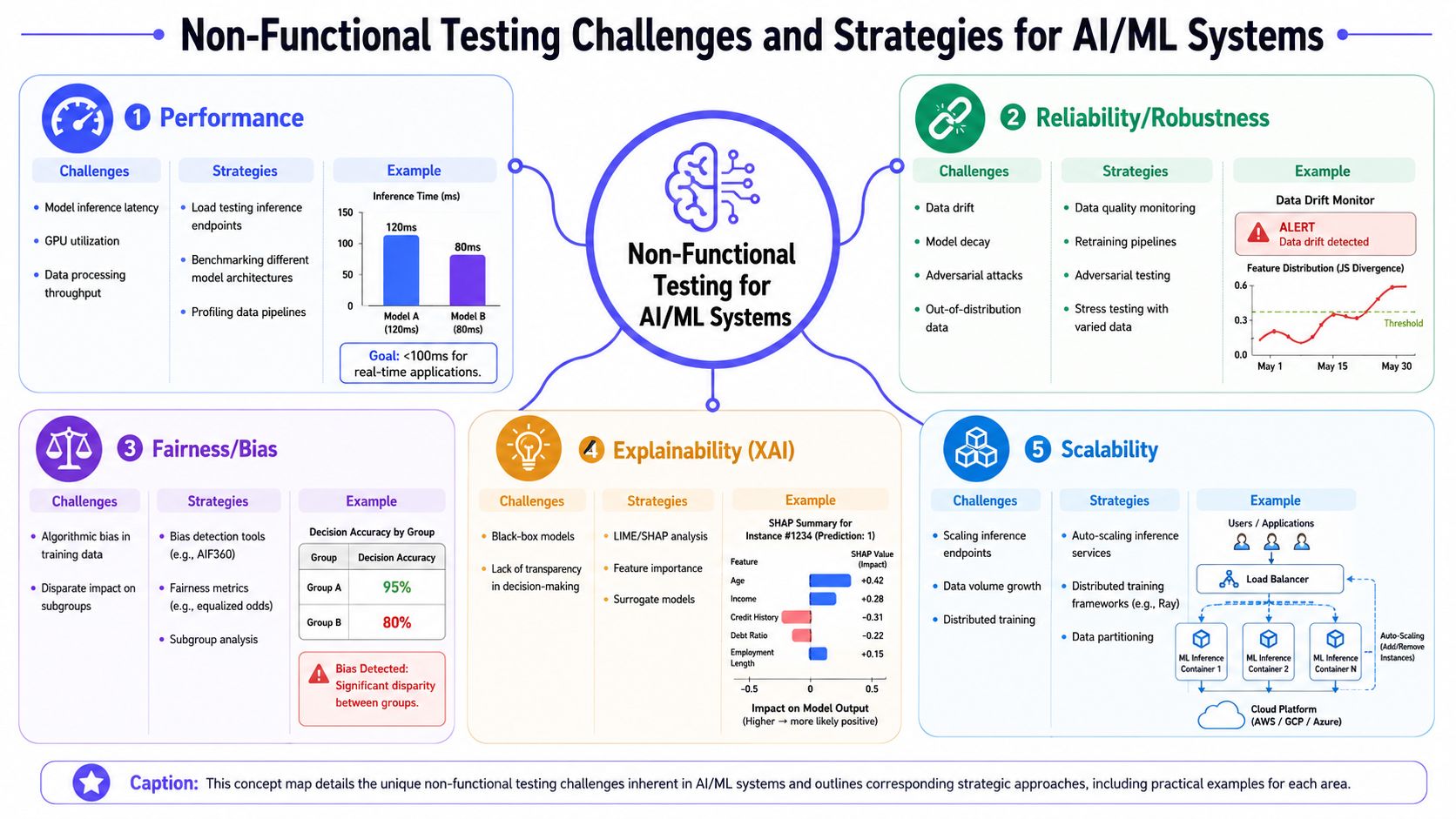
A normal CRUD application usually fails loudly. A broken query throws an error. A missing dependency crashes a job.
An AI system often fails subtly:
- The model still responds, but latency becomes unacceptable under concurrency
- The predictions still look plausible, but input data has drifted away from training conditions
- The LLM still answers, but prompt variability changes output quality from one request to the next
- The pipeline still runs, but retrieval quality drops because indexes are stale or malformed
That's the core difference. In AI, “working” and “safe to ship” are not the same thing.
Example one, recommendation engine drift
Take a recommendation engine for an ecommerce app. In pre-release testing, it produces sensible suggestions from recent catalog and clickstream data. After launch, merchandising changes product taxonomy, customer behavior shifts, and a new class of items enters the catalog.
The service still returns recommendations. Nothing crashes. But click quality falls, irrelevant products appear more often, and the team notices only after complaints or revenue softness. This is a classic non-functional issue. The model's function still exists. The system quality degraded in production conditions.
What works:
- Monitoring input feature distributions
- Comparing live scoring patterns against baseline behavior
- Running shadow tests on new model versions before cutover
- Defining fallback behavior when confidence or input quality drops
What doesn't:
- Treating offline validation as enough
- Looking only at API uptime
- Assuming retraining on a schedule solves drift automatically
Example two, LLM support assistant under load
A support assistant may look strong in staging with curated prompts and a warm cache. In production, real users ask long, messy, multi-part questions. Retrieval latency jumps, context assembly becomes inconsistent, and one model provider introduces variable response times.
The endpoint still returns answers. But users now wait too long, receive partial tool results, or get inconsistent wording that makes support teams distrust the tool.
Useful test areas for this kind of system include:
- Inference latency testing: Measure end-to-end time, not just model invocation
- Prompt variability testing: Run semantically similar prompts to see whether outputs remain stable enough for the use case
- Dependency resilience testing: Simulate slow vector search, partial tool failures, or degraded upstream model performance
- Output envelope testing: Check that length, format, citations, and safety controls stay within acceptable bounds under load
For teams looking for grounded practical AI testing examples, alpha and beta style testing patterns are useful because they expose real-user ambiguity before full rollout.
The hardest AI production bugs often aren't bugs in the strict sense. They're unstable behaviors at the boundary between data, model, infrastructure, and user input.
The metrics that matter most in AI operations
For AI and ML systems, a few non-functional measures matter more than the rest:
| Area | What to watch | Why it matters |
|---|---|---|
| Latency | End-to-end response time, queue time, model inference time | Users judge the product by waiting time, not by model elegance |
| Throughput | Predictions or requests processed per unit of time | Determines whether the system can absorb real demand |
| Reliability | Error handling, fallback success, recovery behavior | Prevents upstream instability from becoming a product incident |
| Drift and staleness | Changes in input patterns, scoring behavior, retrieval freshness | Catches silent degradation before users do |
| Security posture | Prompt injection exposure, access control, logging hygiene | Reduces the chance that AI features create new attack paths |
Designing a Practical Non-Functional Testing Strategy
Teams often don't fail because they skipped every non functional test. They fail because they tried to do too much, too late, with no ranking of risk.
That's why prioritization matters more than coverage. Nearshore IT's write-up on non-functional testing gets this part right: non-functional testing is resource-intensive, and the practical answer is risk-based testing. Customer-facing apps should emphasize performance. Sensitive-data systems should emphasize security. Complex workflows should emphasize usability.
Use a simple risk-first rubric
Start with three questions:
- What failure would hurt the business fastest
- What failure is hardest to detect without deliberate testing
- What failure is most expensive to fix after launch
If a test type ranks high on all three, it goes into the first release gate.
Here's a compact decision matrix:
| Product context | First priority | Second priority | Third priority |
|---|---|---|---|
| Customer-facing AI assistant | Performance | Reliability | Usability |
| Fintech workflow with sensitive data | Security | Reliability | Performance |
| Internal analytics or forecasting tool | Reliability | Maintainability | Performance |
| AI feature embedded in a dense workflow | Usability | Reliability | Security |
A practical way to choose the first three tests
If users wait for answers, test speed first
Customer-facing AI products live or die on responsiveness. If the product feels slow, users won't care that the model was accurate in staging. Run load tests against the actual user path, including retrieval, inference, and post-processing.
If you handle sensitive data, test abuse paths before polish
For products that touch financial, identity, or regulated information, security testing should happen before UX refinements. Look for weak access controls, unsafe prompt handling, data leakage in logs, and broken tenancy boundaries.
If the workflow is complex, test human error and recovery
When users must interpret model output and take action, usability becomes operational risk. Can users tell when the model is uncertain? Can they correct a bad result? Can they recover without opening a support ticket?
A useful companion read for mobile and product teams is this guide to app QA best practices, especially if your AI capability sits inside a broader app experience rather than a standalone API.
Decision shortcut: Pick the two tests tied to user harm and the one tied to operational cost. That usually gives you the highest-signal launch gate.
What works and what usually wastes effort
What works is choosing a minimum high-signal set of checks and writing explicit pass criteria.
What usually wastes effort is building a giant quality program before you know your real failure modes. Teams often overinvest in tool stacks and underinvest in scenario design. A mediocre test plan run consistently in a production-like environment is more valuable than an ambitious testing strategy nobody maintains.
Automating and Integrating Tests into CI/CD
The old model treated non functional testing as a separate phase near release. That approach breaks down for AI systems because models, prompts, dependencies, and infrastructure change too often.
A better model is to run the right tests continuously. Shift obvious checks left, run realistic tests in ephemeral or staging environments, and block deployment when launch-critical thresholds fail.
What should run where
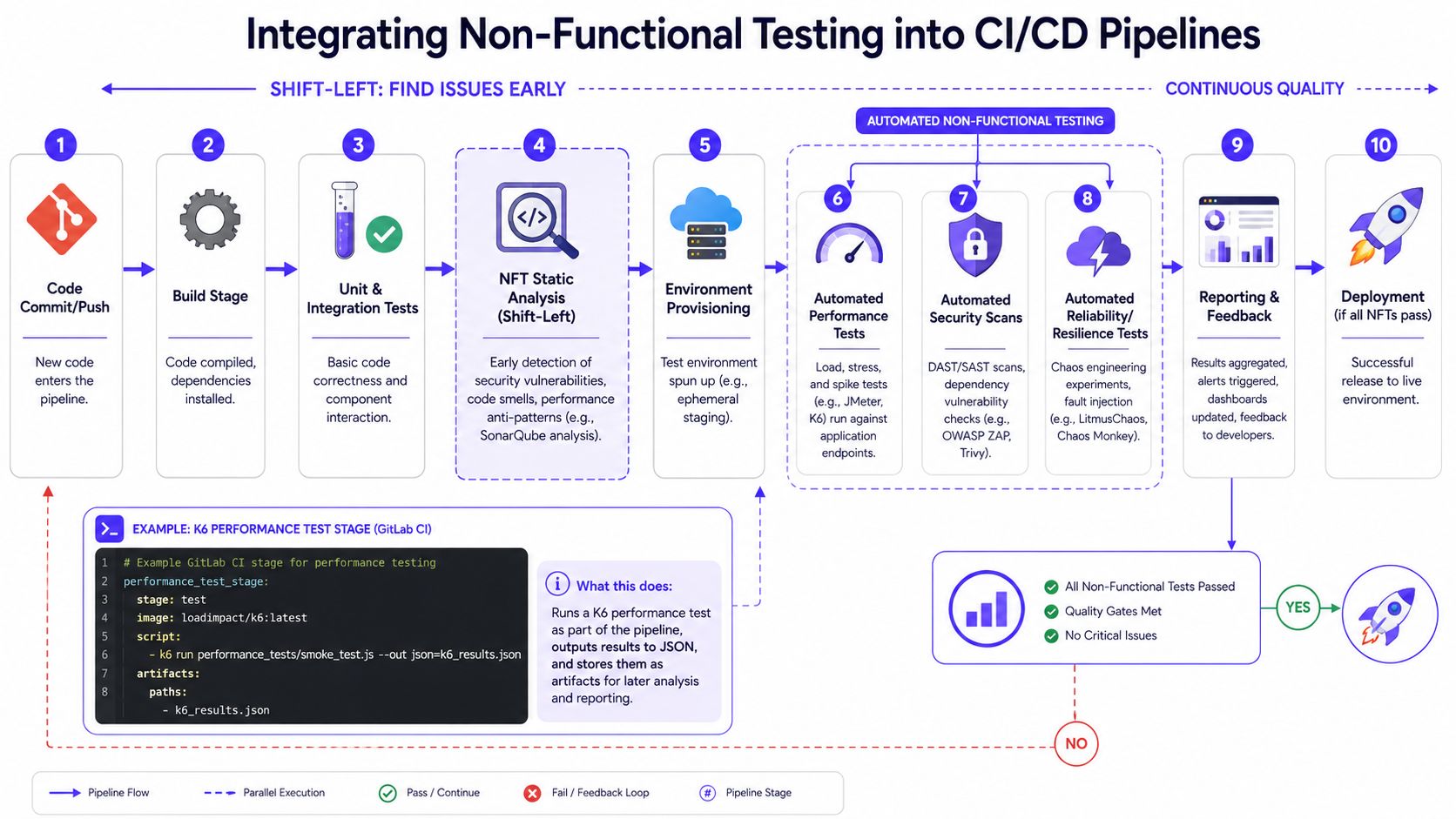
You don't need every test on every commit. You do need a layered pipeline.
- At commit time: Run static analysis, dependency checks, linting for unsafe patterns, and lightweight config validation.
- At build or merge time: Run smoke-level performance checks, contract tests for model I/O, and security scanning on artifacts and containers.
- In staging or ephemeral environments: Run load, resilience, and end-to-end scenario tests with production-like dependencies.
- Post-deploy: Monitor live latency, error budgets, drift signals, and rollback triggers.
For teams building AI delivery workflows and automation around them, outside specialists like Ekipa AI consulting can be useful when internal platform bandwidth is tight.
A small example with k6
A practical first step is to add a smoke performance gate for a critical inference endpoint. The purpose isn't to simulate every launch condition. It's to catch obvious regressions before they merge.
# Example GitLab CI stage for performance testingperformance_test_stage:stage: testscript:- k6 run performance_tests/smoke_test.jsartifacts:paths:- k6_results.jsonAnd a simple smoke_test.js might look like this:
import http from 'k6/http';import { check } from 'k6';export default function () {const res = http.post('https://staging.example.ai/infer', JSON.stringify({input: "Summarize this support ticket"}), {headers: { 'Content-Type': 'application/json' }});check(res, {'status is 200': (r) => r.status === 200,'response has output': (r) => r.body.includes('summary')});}This is intentionally small. It won't replace a real load test, but it will catch broken deploys, malformed payload handling, and obvious response regressions.
Tooling choices that map cleanly to jobs
A lot of test automation fails because teams buy tools before defining the job.
| Need | Common tools | Best used for |
|---|---|---|
| API and load testing | k6, JMeter, Gatling | Response behavior under concurrent traffic |
| Security scanning | OWASP ZAP, Trivy, Snyk | Web exposure, dependency risk, image scanning |
| Code and quality analysis | SonarQube | Static issues and maintainability checks |
| Resilience testing | LitmusChaos, Chaos Monkey style tooling | Dependency and infrastructure failure scenarios |
| Observability | Prometheus, Grafana, OpenTelemetry | Verifying behavior during and after tests |
If you want a deeper operational view of how to make this continuous rather than episodic, this guide to continuous performance testing is a good model for pipeline design.
Non-Functional Testing Checklist and Runbook Template
Teams ship more safely when they turn testing into a repeatable operating habit. A checklist prevents the usual mistakes. A runbook prevents the usual confusion during execution.
The checklist below works best as a release gate for any important AI or ML capability. It's also a useful template for sprint planning because it forces the team to assign owners and capture evidence, not just intentions.
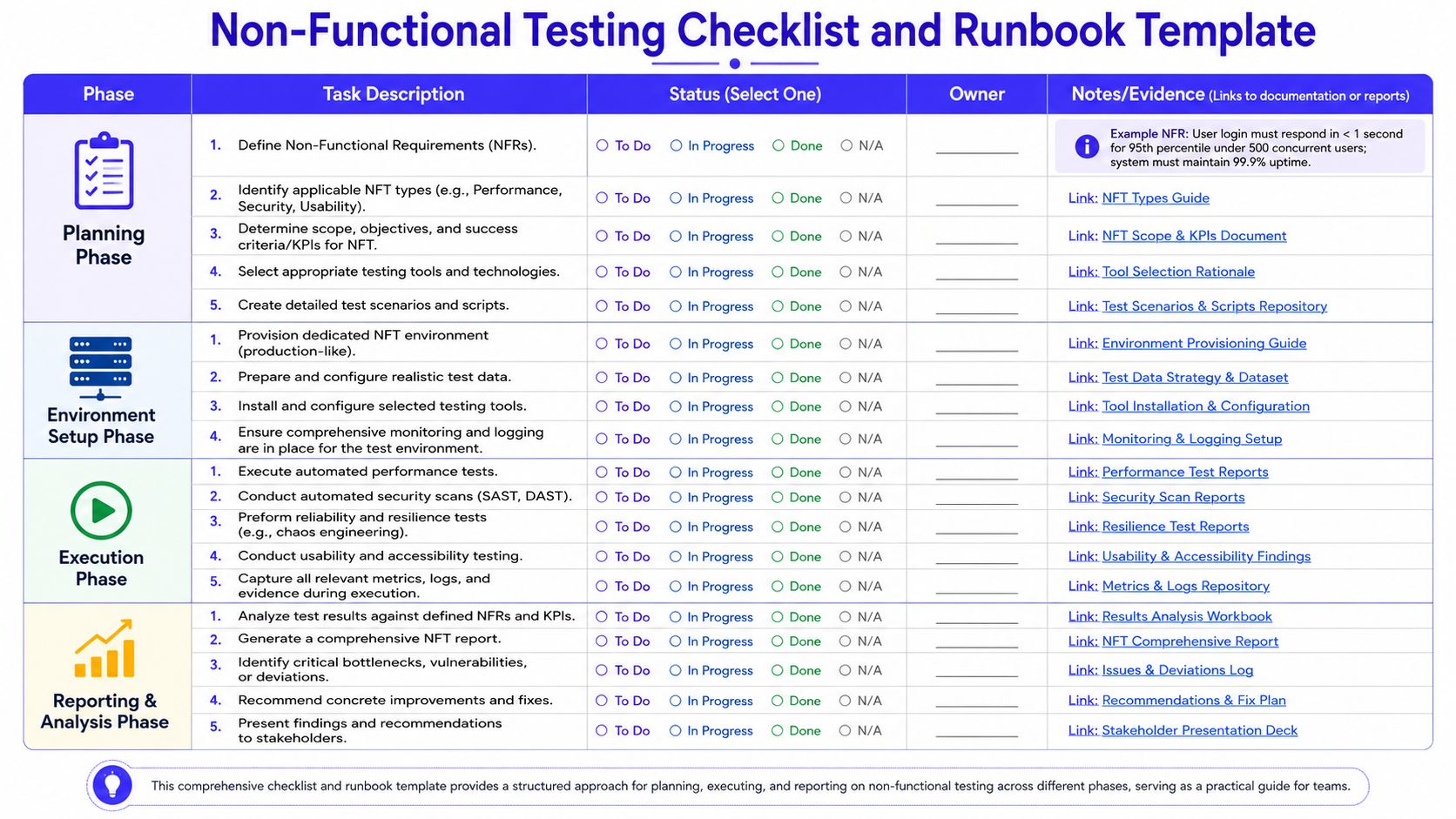
Launch checklist
| Phase | Task Description | Status | Owner | Notes or Evidence |
|---|---|---|---|---|
| Planning | Define non-functional requirements | To Do / In Progress / Done / N/A | Example NFR: User login must respond in less than 1 second for the 95th percentile under 500 concurrent users. System must maintain 99.9% uptime. | |
| Planning | Identify applicable NFT types | To Do / In Progress / Done / N/A | Performance, security, usability, reliability | |
| Planning | Determine scope, objectives, and success criteria | To Do / In Progress / Done / N/A | Include clear pass or fail thresholds | |
| Planning | Select testing tools and technologies | To Do / In Progress / Done / N/A | k6, OWASP ZAP, Grafana, tracing stack | |
| Planning | Create test scenarios and scripts | To Do / In Progress / Done / N/A | Include bad inputs, dependency failure, and fallback paths | |
| Environment Setup | Provision production-like NFT environment | To Do / In Progress / Done / N/A | Match auth, network, model access, and observability | |
| Environment Setup | Prepare realistic test data | To Do / In Progress / Done / N/A | Include edge cases and malformed inputs | |
| Environment Setup | Install and configure tools | To Do / In Progress / Done / N/A | Verify artifact storage for results | |
| Environment Setup | Enable monitoring and logging | To Do / In Progress / Done / N/A | Dashboards and alerts ready before tests start | |
| Execution | Execute automated performance tests | To Do / In Progress / Done / N/A | Capture latency, throughput, saturation | |
| Execution | Conduct automated security scans | To Do / In Progress / Done / N/A | Include application and dependency coverage | |
| Execution | Perform reliability and resilience tests | To Do / In Progress / Done / N/A | Test timeouts, retries, fallback behavior | |
| Execution | Conduct usability and accessibility testing | To Do / In Progress / Done / N/A | Include low-confidence output handling | |
| Execution | Capture metrics, logs, and evidence | To Do / In Progress / Done / N/A | Store screenshots, traces, reports | |
| Reporting and Analysis | Analyze results against NFRs and KPIs | To Do / In Progress / Done / N/A | Record pass, fail, and conditional risks | |
| Reporting and Analysis | Generate NFT report | To Do / In Progress / Done / N/A | Keep it short and decision-oriented | |
| Reporting and Analysis | Identify bottlenecks and deviations | To Do / In Progress / Done / N/A | Prioritize by launch impact | |
| Reporting and Analysis | Recommend fixes | To Do / In Progress / Done / N/A | Include owner and release decision | |
| Reporting and Analysis | Present findings to stakeholders | To Do / In Progress / Done / N/A | Final go or no-go input |
Mini runbook for an AI inference load test
Before you run a test, define the rollback trigger. Otherwise the team will argue about evidence while the service degrades.
Use this as a simple runbook structure:
- Service under test: Customer-facing inference API for support summarization
- Primary risk: Slow responses during concurrent usage degrade support workflows
- Scenario: Sustained mixed request load with realistic prompt sizes and retrieval enabled
- Success criteria: Response quality remains acceptable, latency stays within agreed thresholds, and fallback logic works when one dependency slows down
- Observability required: Application metrics, queue depth, trace spans, provider latency, token usage, error logs
- Rollback trigger: Sustained degradation beyond agreed thresholds or repeated fallback failure
- Decision owner: Engineering lead with product and operations sign-off
If your team is also tightening regression discipline around model-serving changes, this guide to automating regression testing is a useful companion process.
What to Do Next: Implementing Governance and SLAs
The biggest mistake is treating non functional testing as a one-time release exercise. It's a capability. Once you ship AI into production, the operating environment keeps changing even when your code doesn't.
Start with three moves:
- Run a focused risk review. Identify the top business failure for your AI product. Slow responses, unsafe outputs, data leakage, silent drift, or weak fallback behavior.
- Define initial service objectives. Pick one critical service and write explicit targets for speed, availability, and recovery behavior that the team can test and monitor.
- Automate one gate in CI/CD. Don't wait for a perfect framework. Add a performance smoke test, security scan, or reliability check to the path that every release already uses.
Governance matters because someone must own the thresholds, waivers, and release decisions. Typically, engineering owns execution, product owns user-impact trade-offs, and platform or MLOps owns observability and enforcement. If that ownership is fuzzy, the tests become advisory instead of operational.
For AI teams building this muscle, strong platform discipline helps. A practical starting point is to align your testing work with broader MLOps best practices so launch gates, monitoring, rollback, and retraining don't live in separate silos.
If you need senior engineers who've already shipped production AI systems, ThirstySprout can help you build that capability fast. We match startups and enterprises with vetted AI, ML, data, and MLOps talent who can design test strategy, harden CI/CD, and de-risk launches before they become production incidents. Start a Pilot if you need immediate execution support, or See Sample Profiles if you're comparing hiring options first.
Hire from the Top 1% Talent Network
Ready to accelerate your hiring or scale your company with our top-tier technical talent? Let's chat.