

Your data science team chose a sensible training stack, shipped a promising model, and moved on to the next experiment. A few years later, the endpoint is still running, input distributions have changed, nobody can reproduce the training dataset, and a rollback depends on someone remembering which artifact reached production.
That's the practical problem behind MLOps engineering on AWS. The hard part isn't launching another training job. It's building a system that can prove what changed, detect when model behavior is degrading, control infrastructure spend, and reverse a release without improvisation.
Why MLOps on AWS Looks Different in 2026
The center of gravity has moved from model training to operational reliability. In the 2024 State of Production ML survey, AWS represented 54% of cloud-user responses, ahead of Azure at 21% and Google Cloud Platform at 16%. The same survey found that 69% of deployment workflows used continuous integration and continuous delivery, while monitoring was the leading challenge for 45% of respondents. The survey data points to a straightforward conclusion: production MLOps is mostly an automation and observability problem.
AWS has a strong starting position because SageMaker, Bedrock, EMR, Glue, EKS, CloudWatch, and the wider infrastructure-as-code ecosystem can support different operating models. SageMaker launched at AWS re:Invent in 2017. AWS later reported that, by SageMaker's fifth anniversary, tens of thousands of customers had used it to create millions of models, train models with billions of parameters, and produce hundreds of billions of monthly predictions. AWS's anniversary account makes the business point clearly: this is a production platform, not only a laboratory service.
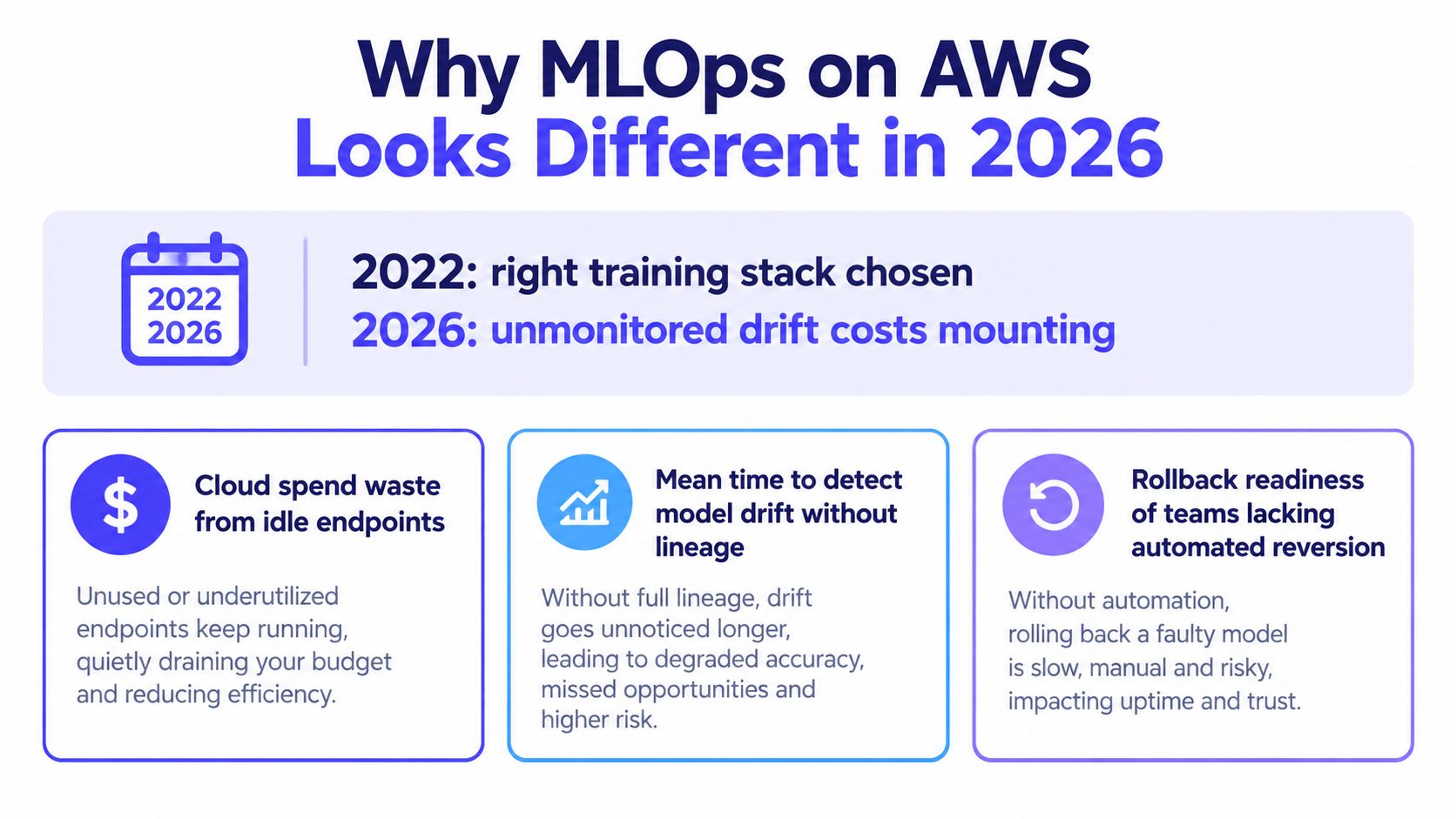
AWS also refreshed SageMaker with a next-generation release on December 3, 2024, so the platform remains actively maintained. That doesn't mean every team should adopt every managed service. My default is narrower: establish a slim, modular baseline, then add account isolation, orchestration, GPU platforms, and governance controls when traffic, risk, or team size justifies their recurring cost.
Practical rule: Pick the simplest architecture that gives you reproducible artifacts, controlled releases, and useful production signals. Training-service choice comes after those requirements.
For hiring managers, the same distinction matters in interviews. A candidate who can name SageMaker services isn't necessarily able to operate them safely. A practical nexus IT group interview guide can help you test whether an engineer understands deployment, monitoring, and failure handling rather than only model development.
The Reference AWS MLOps Architecture
A useful reference architecture has layers, but it shouldn't become a collection of permanently running services without an owner. Start by deciding which controls are mandatory for your workload, then implement each layer with reusable AWS Cloud Development Kit, Terraform, or CloudFormation modules.
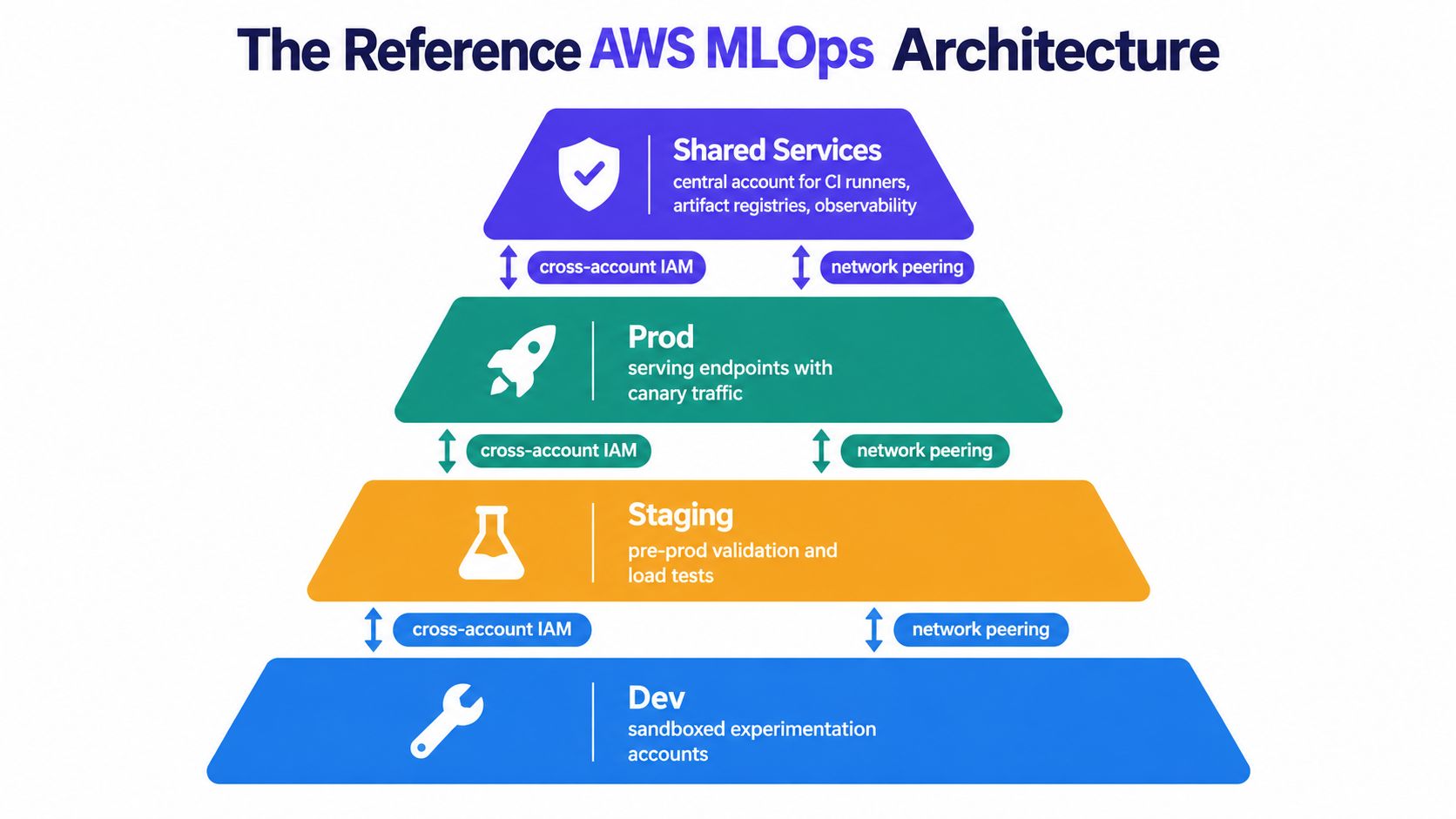
Build isolation around risk
For a regulated or high-risk system, use separate accounts for experimentation, development, test, production, governance, and shared data services. AWS guidance recommends isolated accounts because teams can standardize controls, reduce cross-environment risk, and provision secure SageMaker Studio environments through Service Catalog. AWS Prescriptive Guidance also recommends defining the workflow, choosing infrastructure as code, versioning code and datasets, adding CI/CD, implementing monitoring, and enforcing governance throughout the lifecycle.
A smaller team may begin with fewer accounts, but it should still isolate production permissions and data access. The main operational trap is cross-account IAM. Define roles centrally, test trust policies in a disposable environment, and avoid giving notebooks broad permissions just because access is inconvenient.
Keep data and training reproducible
Use Amazon S3 for immutable dataset snapshots, Glue Data Catalog for discoverability, and Lake Formation when you need fine-grained data permissions. SageMaker Feature Store can serve standardized features, while a DynamoDB-backed custom store may be more appropriate for a narrower feature-serving requirement.
SageMaker Studio supports experimentation, while SageMaker Training Jobs handle managed training. EKS is a better fit when you need portable containers, custom schedulers, or a shared platform for several frameworks. Keep notebook environments inside a custom virtual private cloud, disable public internet access where appropriate, use private endpoints, and encrypt data with customer-managed keys.
Separate registration from serving
Register model artifacts with SageMaker Model Registry or a controlled internal registry. The registry entry should hold the model version, code revision, dataset identifier, evaluation results, owner, and approval status.
For delivery, CodePipeline and CodeBuild can manage AWS-native automation, while EventBridge can react to repository changes, completed processing jobs, or new data arriving in S3. Inference can sit behind API Gateway, an Application Load Balancer, SageMaker endpoints, ECS, or EKS. Observability can combine CloudWatch with Prometheus and Grafana, particularly when EKS workloads need infrastructure-level metrics.
The architecture is easier to operate when every layer is a module with explicit inputs and outputs. For a leadership-level overview of controls and ownership, MLOps best practices for engineering leaders is a useful complementary resource. You can also compare the operating patterns in ThirstySprout's MLOps best practices guide.
CI/CD for Models, Data, and Code
A model release has at least three dependencies: software code, training data, and the model artifact. Versioning only the first creates a pipeline that can deploy something nobody can later reproduce.
SageMaker Pipelines provides native workflow orchestration for processing, training, evaluation, fine-tuning, and deployment. SageMaker projects can provision CI/CD resources through built-in or custom templates, including data processing, feature extraction, training, testing, registration, and inference deployment. The SageMaker MLOps overview and project-template documentation describe those building blocks.
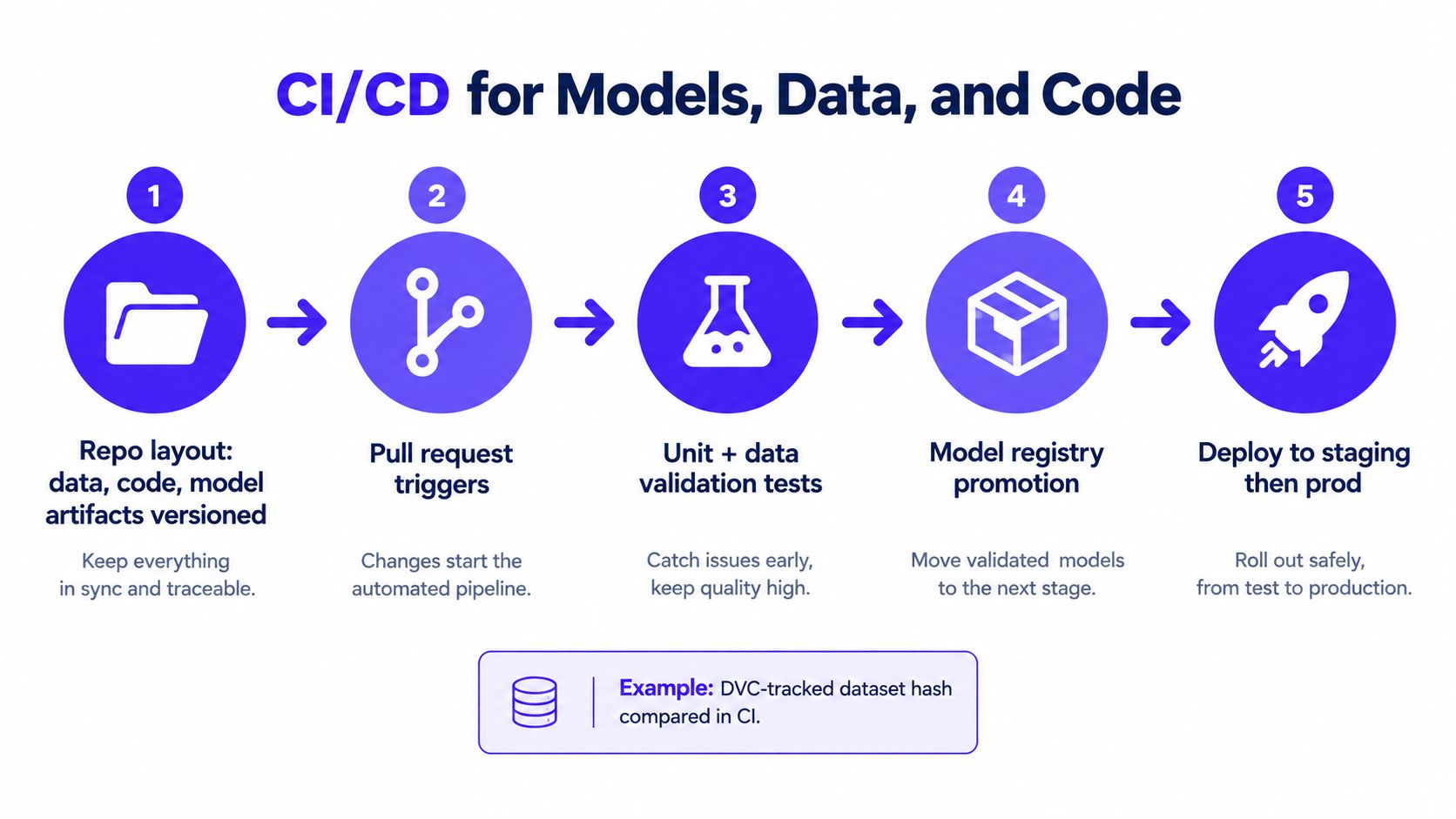
A release path that leaves evidence
A representative repository might contain:
- Training code: feature transforms, training entry points, evaluation logic, and tests.
- Pipeline definitions: SageMaker Pipeline steps, parameters, and quality thresholds.
- Infrastructure code: CDK or Terraform modules for buckets, roles, endpoints, alarms, and networking.
- Dataset pointer: a manifest or DVC-tracked reference to the exact snapshot used for training.
A commit triggers CodePipeline. CodeBuild lints the repository, runs unit tests, validates schemas, builds the pipeline definition, and publishes a versioned container if the workload needs one. SageMaker Processing then transforms features, the Training Job produces an artifact, and an evaluation step checks quality and operational constraints.
Register the result with tags such as:
- Git revision: the commit that produced the pipeline.
- Dataset version: the immutable snapshot or dataset hash.
- Build identifier: the CI execution that created the artifact.
A manual approval gate can stop staging promotion when a human must review fairness, security, or business impact. Production promotion should then use a blue/green, canary, shadow, or A/B approach when quality thresholds matter.
Triggering retraining responsibly
EventBridge can react to new data in S3 and start a pipeline, but freshness alone shouldn't guarantee retraining. Add schema checks, minimum data-quality conditions, and an evaluation gate. Otherwise, an incomplete or malformed delivery can create a new model version that is technically automated but operationally unsafe.
CodePipeline is convenient when permissions, artifacts, and deployment controls already live in AWS. GitHub Actions can offer a better developer experience when teams already use GitHub heavily or need a more portable control plane. The trade-off is not “managed versus open source.” It's AWS integration versus developer workflow, with security and auditability required in either case.
For scheduling and infrastructure automation decisions, this overview of top AWS scheduling and IaC tools is a useful adjacent reference.
Choosing Where Models Run
The cheapest inference architecture is the one that matches the traffic pattern. A managed endpoint can reduce operational work, but an always-ready capacity model can cost more than the business value of a low-volume prediction service.
| Runtime | Cold Start | GPU Efficiency | Ops Overhead | Best For |
|---|---|---|---|---|
| SageMaker real-time endpoint | Low when warm | Good for dedicated workloads | Low | Stable latency and managed deployment |
| SageMaker Serverless Inference | Higher and variable | Limited fit for GPU-heavy models | Low | Spiky, lightweight traffic |
| SageMaker multi-model endpoint | Depends on model loading | Useful when models share capacity | Medium | Many smaller models with compatible requirements |
| EC2 with Deep Learning AMIs | Depends on your service design | High control | High | Custom serving and cost-sensitive steady workloads |
| ECS Fargate | Depends on task startup | Suited to CPU inference | Medium | Lightweight containers and simple APIs |
| EKS | Depends on cluster and pod capacity | Strong control and bin-packing potential | High | GPU-heavy, multi-framework platforms |
Use a decision path rather than a service preference:
- If latency must stay predictable and traffic is steady, begin with a SageMaker real-time endpoint.
- If traffic is intermittent and the model is lightweight, test Serverless Inference.
- If several small models can share compatible resources, consider a multi-model endpoint.
- If you need custom containers or CPU-only serving, compare ECS and EC2.
- If GPU scheduling, framework diversity, or shared platform economics dominate, evaluate EKS.
For spiky workloads under approximately 25 concurrent requests, SageMaker Serverless can be a sensible starting point, but validate cold-start behavior against the product's latency requirement. The threshold is a design heuristic, not a guarantee.
Dedicated SageMaker capacity buys simplicity. EKS buys control. You shouldn't pay for EKS control until the workload needs it.
Use machine learning model deployment tools to broaden the comparison before committing to a serving standard. In practice, I'd deploy one representative model first, measure latency and utilization, and only then generalize the runtime choice.
Monitoring, Drift, and Automated Rollback
A deployed model isn't production-ready because it returns predictions. It's ready when the team can detect bad inputs, rising latency, infrastructure pressure, and deteriorating quality, then respond with a known procedure.
Track four metric families
Traffic metrics show demand and payload behavior. Track request rate, payload size, rejected requests, and queue depth.
Data metrics reveal schema violations and distribution changes. Compare feature distributions with a reference dataset, and monitor missing values, categorical changes, and unexpected ranges.
Model metrics cover prediction distributions, ground-truth quality when labels arrive, and error rates. SageMaker Model Monitor and Clarify can support model and data checks, but they still need meaningful baselines and alert ownership.
Infrastructure metrics explain whether the serving layer is healthy. AWS guidance calls out samples-per-second-per-GPU, loss-convergence rate, gradient-synchronization latency, cost per trained sample, model execution latency, and execution success or failure rates as useful operational indicators. AWS's EKS observability guidance recommends exposing metrics, scraping them with Prometheus, and using them for autoscaling and rebalancing decisions.
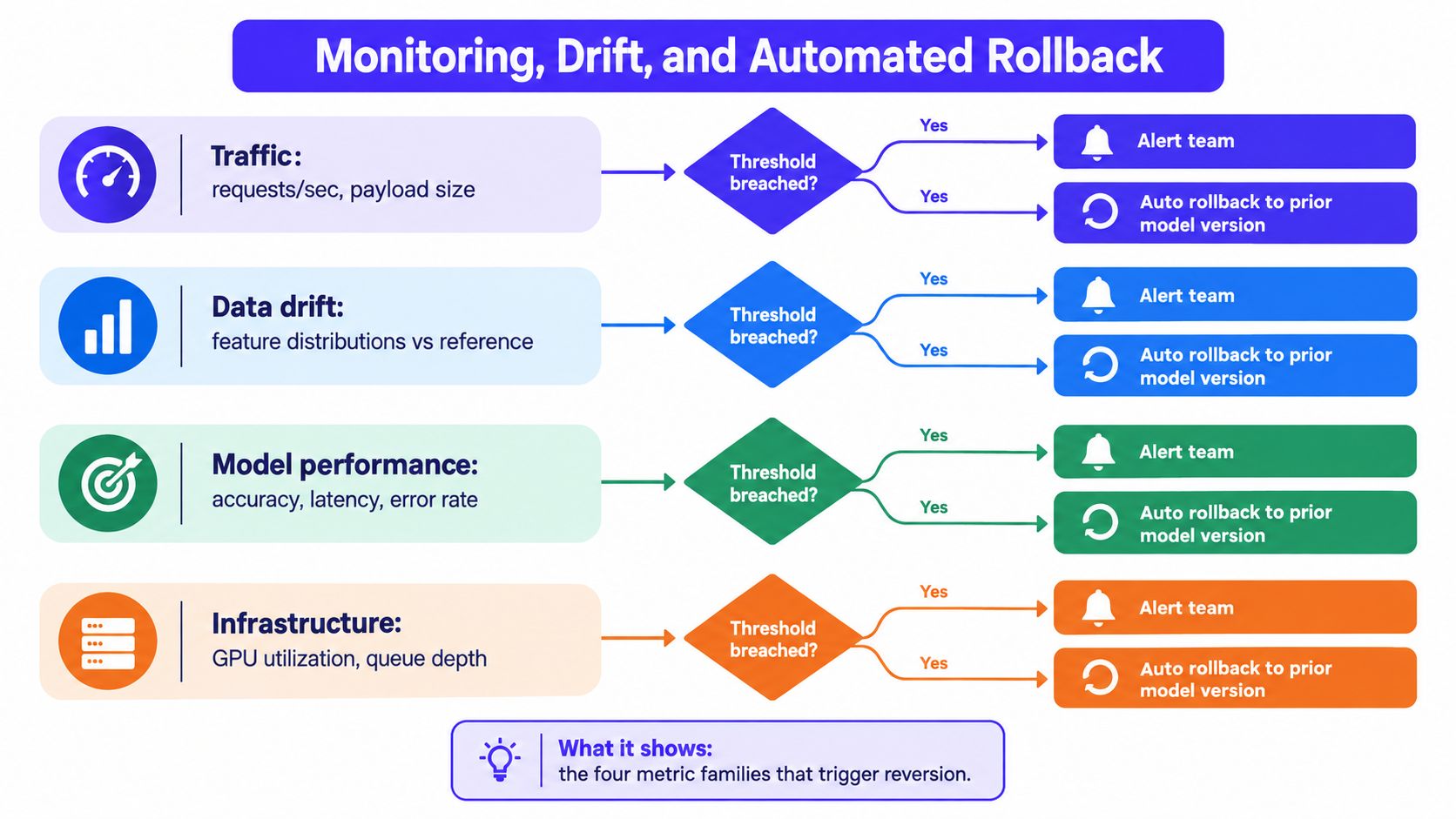
Turn signals into action
CloudWatch alarms can notify operators and influence autoscaling policies. Prometheus and Grafana provide a stronger fit for EKS-level visibility, especially when teams need GPU utilization, pod scheduling, and queue metrics in one operational view.
A rollback chain can look like this:
- Model Monitor detects drift, schema failure, or quality degradation.
- EventBridge receives the event.
- Lambda validates the event and identifies the prior approved model.
- CodePipeline deploys that version through the approved serving path.
- CloudWatch confirms recovery and records the release outcome.
Keep snapshots of every training dataset and encode version metadata in S3 prefixes. Without lineage, an alert may tell you that behavior changed but not which data or code produced the current artifact. A broader platform comparison belongs in a dedicated AI observability platforms guide.
The Cost Reality Most AWS MLOps Guides Skip
More managed services don't automatically produce better MLOps. They reduce some engineering effort while creating a recurring infrastructure surface that somebody must monitor, secure, and pay for.
The clearest published figure in the supplied AWS material is an estimated USD 374.57 per month in us-east-1 for a sample MLOps Workload Orchestrator deployment. The AWS solution estimate is useful as a baseline, but it doesn't represent the full cost of training, monitoring, storage, data transfer, endpoint capacity, or governance.
That distinction matters. A multi-account landing zone can improve separation and auditability, while also adding accounts, roles, policies, networking, logs, and operational ownership. Studio domains, registries, pipelines, alarms, artifact stores, and idle endpoints can remain active after a project loses priority.
A slim default for smaller portfolios
For a team with only a few production models, start with:
- One controlled AWS account: Separate production permissions and data access even if you don't yet need a full landing zone.
- On-demand Studio usage: Shut down interactive resources when nobody is working.
- A single reproducible pipeline: Use SageMaker Pipelines or Step Functions, not several overlapping orchestrators.
- Lightweight inference: Consider Lambda, Fargate, or a carefully sized SageMaker option for CPU-oriented workloads.
- Explicit cost alarms: Tag training, endpoint, storage, and monitoring resources by model and owner.
Move toward shared services and stronger multi-account governance when the operational risk or model portfolio makes that complexity worthwhile. The right question isn't whether a service is managed. It's whether its reduced toil offsets its always-on cost for your workload.
A 90-Day Rollout Plan and Next Steps
A practical rollout should produce one reliable production path before it attempts to become an internal platform.
Days 1 to 30
Create a development account or controlled development boundary with infrastructure as code. Configure SageMaker Studio, store datasets in versioned S3 locations, and ship one model through a basic SageMaker Pipeline with a Model Registry entry.
Days 31 to 60
Add CodePipeline and CodeBuild or an equivalent CI system. Introduce automated data validation, retraining triggers from approved data events, and CloudWatch monitoring for the primary endpoint. If EKS is already in use, add Prometheus metrics for infrastructure and model-serving behavior.
Days 61 to 90
Separate development, staging, and production when the release risk warrants it. Add blue/green or canary promotion, drift detection, and a tested rollback path to the previous approved model version.
Use this staffing rule as a starting point:
- Small portfolio: One platform-leaning MLOps engineer can often cover the foundation while partnering with data scientists and platform engineering.
- Growing portfolio: A small platform team becomes easier to justify when many models share deployment, governance, and observability needs.
- Migration period: Fractional specialists can bridge the gap while a team moves from notebooks and manual releases to reproducible pipelines.
Your immediate checklist is short:
- Audit current SageMaker, endpoint, storage, logging, and orchestration spend.
- Run a focused infrastructure-as-code spike for one representative model.
- Book a multi-account landing-zone review before production access spreads across ad hoc environments.
Use the first model as a design test. If the pipeline can't reproduce its artifact, explain its cost, expose its health, and roll back safely, adding more services won't fix the foundation.
ThirstySprout can connect you with senior MLOps and AI engineers for full-time, contract, or fractional work across SageMaker, model deployment, monitoring, and cloud platform design. Visit ThirstySprout to start a pilot, or review your hiring gap before committing to a larger AWS MLOps platform build.
Hire from the Top 1% Talent Network
Ready to accelerate your hiring or scale your company with our top-tier technical talent? Let's chat.