

You’re probably dealing with a screen that looks simple on the surface and messy underneath. A prompt box, a results panel, a few filters, maybe a confidence badge. Then engineering asks the deeper questions. What happens when the model returns nothing useful? How does the UI behave when a response streams in parts? What if a data dependency fails, or the answer needs human review before it’s shown?
That’s where high fidelity wireframes earn their keep.
In AI products, the interface isn’t just decoration around a backend. It’s the operating layer between users, model behavior, business rules, and data constraints. If that layer stays vague until development, teams burn time in Slack threads, rebuild front-end states mid-sprint, and discover edge cases after the API work is already underway.
For a startup CTO, the question isn’t whether high fidelity wireframes look polished. The question is whether they reduce ambiguity at the point where ambiguity becomes expensive.
What Are High Fidelity Wireframes
High fidelity wireframes are detailed interface blueprints that show what a product should look like and how it should behave before code is written. They usually include real copy, precise spacing, final or near-final UI components, brand colors, typography, actual images, and specific interaction cues.
They sit between rough exploration and implementation.
A low-fidelity sketch says, “the search bar goes here.” A high fidelity wireframe says, “this is the exact search bar, with this label, this empty state, this helper text, this disabled state, and this spacing relative to the filter drawer.”
That difference matters because development teams don’t build ideas. They build decisions.
What they are and what they are not
High fidelity wireframes are often confused with final UI or coded product screens. They are neither.
Think of them like an architectural blueprint. A blueprint can show precise dimensions, materials, and layout logic without being the finished building. In the same way, high fidelity wireframes show the intended product with enough realism to validate the interface, review flows, and support handoff, without requiring engineering to build it first.
They are also not quick sketches. If you need a broad exploration of several concepts, you’re still in low fidelity territory.
For teams that need a refresher on the broader role of UX design wireframes, it helps to think of fidelity as a progression from fast structure, to precise communication, to interactive simulation.
What goes into a strong hi-fi wireframe
A useful hi-fi wireframe usually includes:
- Real content: Final or near-final labels, headings, error messages, and data examples.
- Precise layout: Clear spacing, alignment, hierarchy, and grid behavior.
- Brand expression: Typography, color, icon style, and component treatment.
- State logic: Loading, empty, success, error, disabled, and permission-based variations.
- Interaction hints: Notes on dropdown behavior, modal logic, hover states, and transitions.
Practical rule: If engineering still has to guess what a screen means, it isn’t high fidelity yet.
For AI products, this level of detail becomes even more valuable because the UI often has to carry uncertainty. A model can be slow, wrong, partial, or variable. A strong wireframe makes those states visible before they become front-end bugs or product debt.
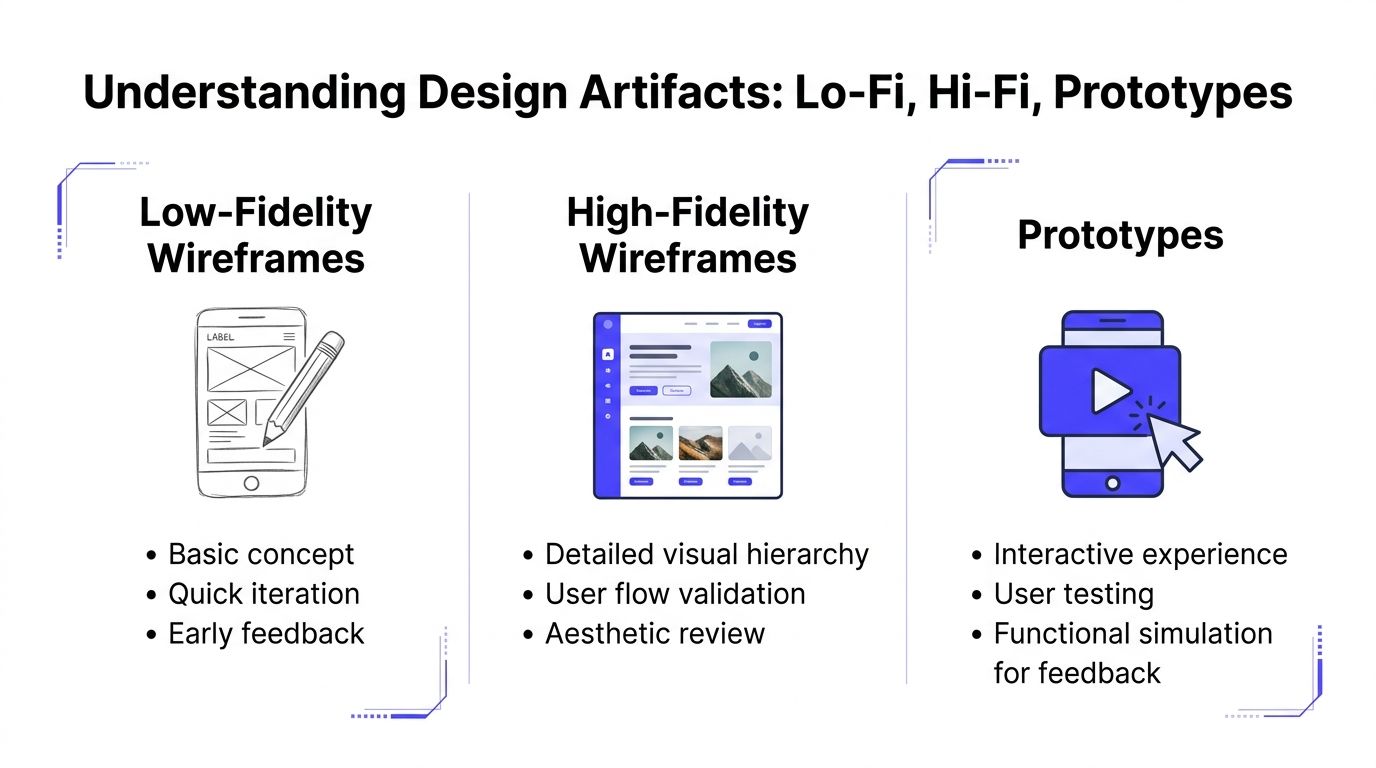
Low-Fidelity vs High-Fidelity vs Prototypes
Teams often blur these artifacts together, and that causes planning mistakes. The most common one is building a polished screen too early, then discovering the workflow is still wrong. The second is the opposite: staying too abstract for too long, then asking engineering to interpret gray boxes into production behavior.
The practical difference
Low fidelity wireframes are for thinking. High fidelity wireframes are for aligning. Prototypes are for experiencing.
According to Miro’s breakdown of wireframe fidelity, high-fidelity wireframes use real grids such as a 12-column grid for web or an 8-point system for mobile, along with precise typography and branding, and typically take 4-8 hours per screen. Low-fidelity versions are quick 15-30 minute explorations for logic testing. Miro also notes that hi-fi detail helps stakeholders who can’t engage well with gray boxes and is best when uncertainty is low, as described in Miro’s guide to low-fidelity vs high-fidelity wireframes.
Fidelity level comparison
| Fidelity Level | Primary Goal | Effort / Time | Best For |
|---|---|---|---|
| Low-fidelity wireframes | Explore structure and flow | Quick, often minutes per screen | Early concepts, logic testing, rough stakeholder discussion |
| High-fidelity wireframes | Define detailed UI and reduce ambiguity | Higher effort, often hours per screen | Handoff, executive review, usability review with realistic content |
| Prototypes | Simulate interaction and task flow | Varies based on interaction depth | User testing, demos, validating motion and step-by-step behavior |
When each one is the right choice
Use low fidelity when the team is still answering structural questions:
- Workflow uncertainty: You don’t yet know the right order of steps.
- Feature scoping: Product and engineering are still deciding what belongs in the first release.
- Fast debate: You want discussion around logic, not visual polish.
Use high fidelity wireframes when the product direction is stable enough that precision is advantageous:
- Developer handoff: Front-end and backend teams need exact screen requirements.
- Stakeholder alignment: Leadership needs to see the intended experience clearly.
- AI behavior mapping: You need to show fallback states, confidence messaging, and result formatting.
Use a prototype when clicks, transitions, and timing affect the outcome:
- Usability sessions: You need to observe whether users can complete a task.
- Workflow validation: The sequence matters as much as the layout.
- Interaction-heavy products: Filters, drilldowns, multi-step setup, or conversational flows need movement to make sense.
A static high fidelity wireframe can answer “what should exist on this screen?” A prototype answers “what does it feel like to move through this task?”
The mistake to avoid
A lot of teams jump from low fidelity straight into code and try to resolve detail during sprint execution. That can work for a narrow CRUD feature. It tends to break down in AI products, because the unresolved details are usually not cosmetic. They affect API contracts, data formatting, moderation logic, and edge-state behavior.
If your engineers are asking questions like “what should this card show when the model confidence is weak?” you don’t need a prettier sketch. You need a higher-fidelity artifact.
The Business Case for High-Fidelity Wireframes in AI Startups
A startup ships an AI feature that looks simple in the sprint plan: input, generate, review, save. Two weeks into implementation, engineering is blocked on questions the UI never answered. What appears when retrieval fails? Which response is shown first if the model returns multiple candidates? Who can override a low-confidence result, and what gets logged when they do?
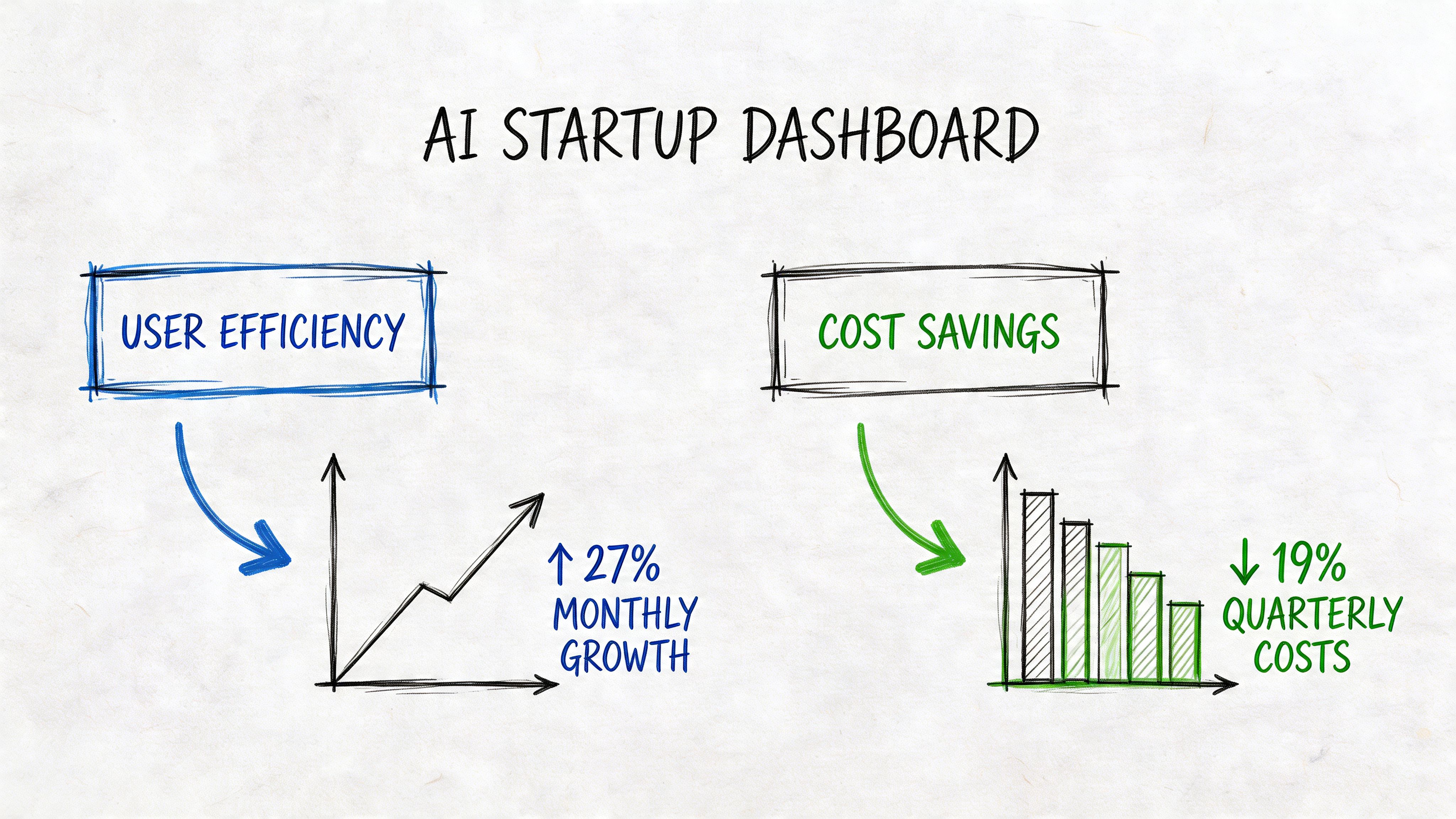
That is where high-fidelity wireframes earn their budget. In AI products, the interface is tied to model behavior, data availability, permissions, latency, and human review rules. If those decisions stay implicit, teams do not just risk visual inconsistency. They risk building the wrong contracts between product, frontend, backend, and ML systems.
For a CTO, the business case is straightforward. A detailed wireframe is often the cheapest place to resolve expensive ambiguity. It forces the team to specify what the product should do before engineers commit to API shapes, event tracking, fallback logic, and QA scenarios.
Where the return shows up
The return rarely comes from prettier screens. It comes from fewer avoidable build errors and faster decision-making.
- Engineering clarity: Teams can define exact states for confidence levels, loading, partial failure, permission constraints, and human escalation before implementation starts.
- Scope control: Product questions surface in design review instead of appearing mid-sprint as blockers, change requests, or hidden acceptance criteria.
- Stakeholder confidence: Founders, investors, and early customers can react to a realistic product flow, not an abstract diagram that hides operational complexity.
This matters more in AI startups because the expensive mistakes are usually upstream. A vague wireframe can lead to the wrong backend assumptions, which then affect schema design, prompt orchestration, caching, moderation, audit trails, and support workflows. By the time the problem shows up in staging, fixing the screen is the easy part.
I have seen teams save weeks by resolving one screen at high fidelity. The screen itself was not complex. The dependencies behind it were.
Why AI products get more value from fidelity than standard SaaS
In a standard SaaS workflow, many states are predictable. In an AI workflow, the product has to account for uncertainty. Results can be wrong, incomplete, delayed, uncited, or unsafe to auto-apply. Users need cues about confidence, freshness, source quality, and what happens next.
High-fidelity wireframes make those decisions visible early. They let the team examine questions that generic UX guidance often skips: how the model hands off to a human, how a retrieval miss appears in the interface, how structured output maps to editable fields, and how trust is maintained when the system is only partially confident.
That is also why teams benefit from studying strong Human-Centred Design examples. The best examples show how clarity, trust, and control are designed into the workflow before code hardens the wrong behavior. Startups that need extra product judgment at this stage often bring in a UX design consultant for AI product decisions to pressure-test assumptions before those assumptions become engineering work.
A short walkthrough can help align non-design stakeholders on what “good” looks like in practice:
The CTO lens
The decision usually comes down to cost of delay versus cost of definition. High-fidelity wireframes take more design time up front. They can feel slow when a team wants to get into code quickly.
But for AI-facing features, that extra time often prevents a more expensive version of slowness. Engineers stop to resolve undefined states. QA finds edge cases late. Product rewrites acceptance criteria after seeing live model behavior. Support inherits confusing workflows that were never fully specified.
If a feature depends on model confidence, fallback paths, human review, or multiple data sources, precision in wireframes is usually a cheaper investment than precision through rework.
Practical Examples for Modern Product Teams
The value of high fidelity wireframes becomes obvious when the product has hidden complexity. AI products have plenty of that.
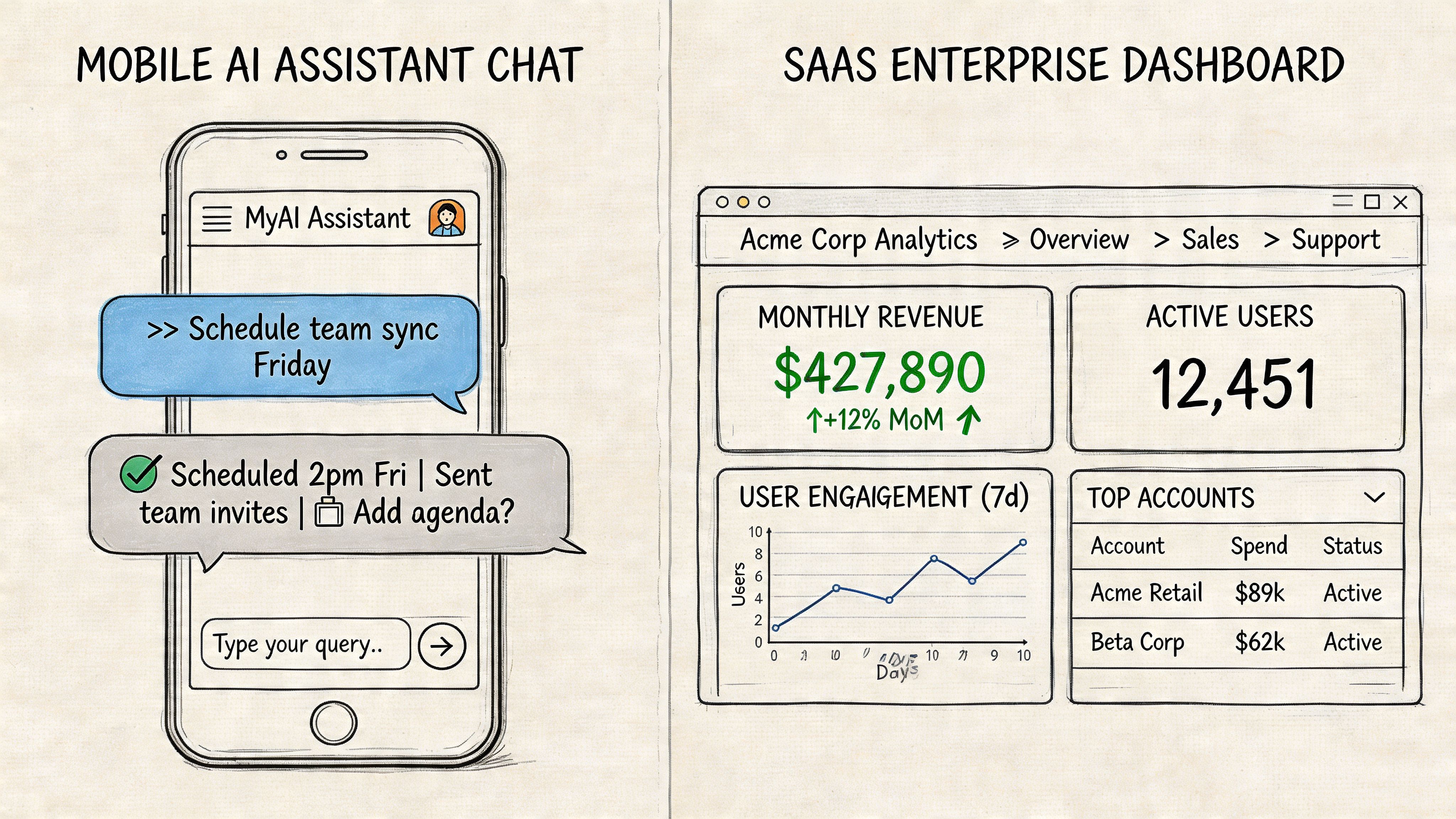
Example one with an AI analytics dashboard
A product team is building an operations dashboard that combines usage metrics, anomaly flags, and model-generated recommendations. On the surface, it looks like a standard analytics screen. Underneath, each panel depends on different services, refresh timing, and confidence logic.
The early low-fi version covered the main layout. Left nav, top filters, cards, charts, recommendations panel. That was enough to align on broad structure, but it left critical questions unanswered.
Once the team moved to high fidelity wireframes, several issues surfaced immediately:
- The recommendation panel needed ranking logic: Should the highest-confidence suggestion appear first, or the highest business impact?
- Chart states needed definition: What should users see if one data source loads but another fails?
- Action labels needed precision: “Review” and “Apply” looked interchangeable until the copy and button hierarchy were shown in context.
- Trust cues were missing: The product needed visible timestamps, confidence language, and source references for generated insights.
None of those problems were visual polish problems. They were product and engineering problems revealed through a precise design artifact.
The most useful hi-fi screen is often the one that triggers uncomfortable implementation questions before sprint planning.
Example two with a B2B SaaS feature launch
A SaaS team is adding an AI-assisted workflow to an existing admin product. The feature helps account managers generate summary notes after client calls. The initial assumption is simple: transcript in, summary out.
The first design pass looked clean but generic. Once the team built high fidelity wireframes with real copy, they saw friction in the actual user flow. Managers didn’t just need a summary. They needed a way to edit it, flag sensitive details, and decide whether it should sync into the CRM.
That led to a better screen sequence:
- Review draft summary
- Edit and approve fields
- Choose sync destination
- Confirm audit note
This kind of refinement is exactly where a specialist can help. If your team needs sharper product flows before build, an experienced UX design consultant can often spot missing states and handoff gaps faster than a team debating them in tickets.
What changed after hi-fi work
In both examples, the win wasn’t that the screens looked better. The win was that the product became more buildable.
A strong high fidelity wireframe helped the teams:
| Before hi-fi | After hi-fi |
|---|---|
| Vague component intent | Clear UI purpose and action hierarchy |
| Missing edge states | Defined loading, error, and empty behavior |
| Open engineering interpretation | Tighter implementation guidance |
| Abstract stakeholder feedback | Specific product decisions |
That’s the practical test. If your wireframes make engineering questions narrower and stakeholder feedback sharper, they’re doing the job.
Optimizing the Design-to-Engineering Handoff
A high fidelity wireframe only pays off if engineering can use it without chasing the designer for missing context. Handoff is where a polished file either becomes an implementation advantage or expensive theater.
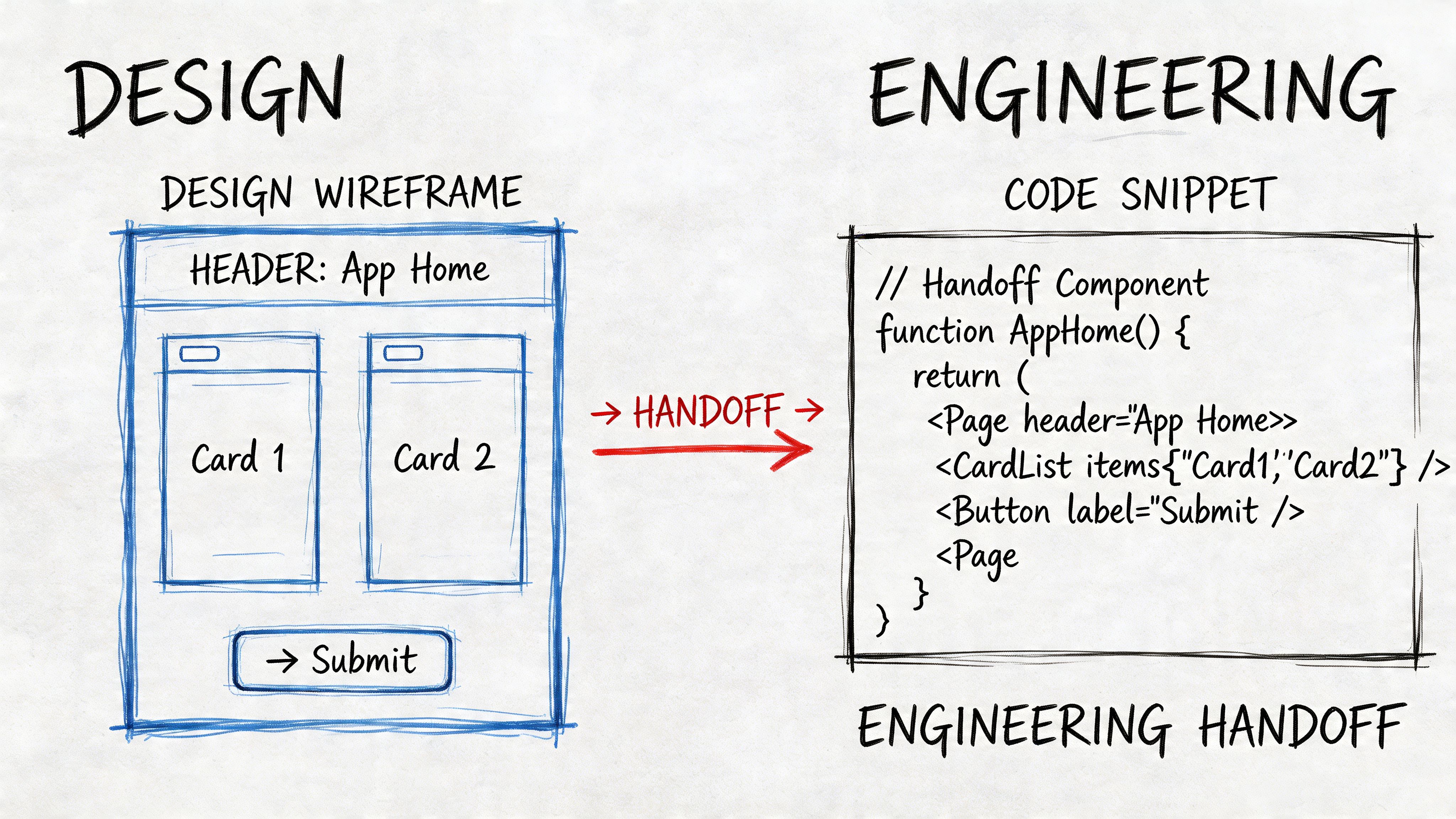
Moqups makes the core constraint clear: high-fidelity wireframes are time-consuming to produce and difficult to modify, so teams should only move to hi-fi after the underlying layout and architecture are locked in, as explained in Moqups’ guide to high-fidelity wireframes. That makes handoff discipline even more important. If the artifact is expensive to create, it should remove as much implementation ambiguity as possible.
What to include in the Figma file
A handoff-ready file needs more than pretty screens.
Use a consistent structure that includes:
- Named frames: Screen names should match product language and ticket naming.
- Component references: Buttons, inputs, tags, tables, and modals should point to reusable components where possible.
- State variants: Hover, active, disabled, loading, empty, success, and error states should sit beside the main screen.
- Behavior notes: Add short annotations for dropdown rules, validation logic, truncation, and permissions.
- Content intent: If copy is provisional, mark what is fixed versus what depends on backend response.
For AI features, add explicit notes for output variability. If a response can be long, cite sources, fail moderation, or require human approval, that should appear in the design file as visible states.
A practical handoff flow
A simple workflow works better than a heavy one.
Lock the approved frame set
Create a dedicated handoff page in Figma. Don’t make engineers hunt through explorations and discarded versions.Attach implementation notes
Add concise callouts on spacing, interactions, and business rules. Designers often over-explain visual choices and under-explain logic.Map design to delivery tickets
Each major screen or flow should link to a development ticket. If your process is messy, this guide to project management for software engineering is a useful reference for tightening execution across design and build.Run a design-engineering review
One live review can remove days of async confusion. Walk through states, not just happy-path screens.Record decisions
Save the handoff summary in the ticket or project doc. If assumptions change mid-sprint, update the source of truth.
Build test: If a new engineer joins the sprint and can understand the screen without a meeting, the handoff is probably in good shape.
A lightweight Jira ticket template
Here’s a practical format that works well:
| Field | What to include |
|---|---|
| Summary | User-facing outcome, not just component name |
| Design link | Direct Figma frame, not the whole file |
| States | Loading, empty, error, disabled, permissions |
| Backend dependencies | API fields, fallback conditions, model outputs |
| Acceptance notes | Specific behavior to confirm in QA |
The best handoffs reduce interpretation, not conversation. Engineers should still ask smart questions. They just shouldn’t have to reverse-engineer the product from the wireframe.
Advanced Considerations for Remote AI Teams
Remote-first teams often assume high fidelity wireframes solve misalignment by themselves. They don’t. They solve part of it.
In distributed AI teams, the failure mode is rarely “we had no design.” It’s usually “everyone interpreted the same design differently.” One engineer reads a polished frame as final behavior. Another sees it as directional. A PM assumes the model can support a UI pattern that the backend team hasn’t agreed to yet.
According to Alpha Efficiency’s discussion of remote collaboration challenges, standard hi-fi wireframe practices can fail for remote-first AI product teams, remote teams often experience higher rates of misinterpretation in design-to-dev handoffs, and over-investing early in pixel-perfect designs can conflict with the speed demands of AI startups where MVPs must ship in days, not weeks, as described in their high-fidelity wireframe article.
Where remote teams get tripped up
The biggest problems usually show up in these areas:
- Version ambiguity: Engineers build from an outdated frame because multiple “final” pages exist.
- Async feedback gaps: Important decisions live in comments, not in the approved artifact.
- AI edge cases: The wireframe shows the ideal response, but not weak output, latency, refusal, or fallback behavior.
- Time-zone lag: A simple clarification can take a full day when design and engineering overlap only briefly.
What actually works
Remote AI teams need protocol, not just fidelity.
A workable setup looks like this:
- Single source of truth: One handoff page in Figma, clearly dated and labeled.
- Decision log: A short running note that records what changed and why.
- Walkthrough videos: A five-minute Loom often clarifies intent better than ten comment threads.
- State-first reviews: Review loading, error, and ambiguous model-output states before discussing polish.
- Explicit assumptions: Mark where the UI depends on model behavior that isn’t finalized yet.
If your organization is still tightening distributed execution overall, stronger operating habits for managing remote teams effectively will improve design handoff as much as any tool choice.
In remote AI work, a pixel-perfect screen can create false confidence. If the team hasn’t aligned on system behavior, the polish may hide risk instead of reducing it.
A contrarian but useful stance
Not every AI MVP needs high fidelity wireframes across the whole product. That’s often the wrong investment.
Use them selectively for the parts of the experience that carry the most ambiguity or the highest downstream cost. In many early-stage AI products, that means onboarding, result presentation, approvals, fallback states, and trust cues. Leave lower-risk internal flows in mid-fidelity until the product learns more from usage.
That approach respects both speed and clarity.
High-Fidelity Wireframe Creation Checklist
A good checklist keeps teams from reaching for high fidelity too early, or handing it off too late. Use this as a working audit before your next sprint.
Before you start
- Validate the core flow first: Confirm the main task flow in low or mid fidelity before adding polish.
- Lock the product assumptions: Make sure product, design, and engineering agree on the screen’s purpose, backend dependencies, and decision points.
- Choose the risky screens: Don’t make every screen high fidelity by default. Prioritize areas where ambiguity will create build churn.
- Define real content sources: Use realistic labels, messages, and data examples. Placeholder text hides layout and trust problems.
- Clarify AI behavior boundaries: Note what happens when the model is slow, uncertain, empty, or blocked.
During creation
- Use a consistent grid: Align spacing, layout, and hierarchy so developers can read intent clearly.
- Show all critical states: Include loading, empty, error, success, disabled, and permission-based variants.
- Write interface copy carefully: Labels and helper text shape user understanding and implementation logic.
- Annotate interaction rules: Document form validation, selection behavior, pagination, truncation, and modal conditions.
- Design for realistic output: If AI responses vary in length or format, reflect that in the screen, not just in a note.
Review lens: If the wireframe only works when everything goes right, it isn’t ready for handoff.
For handoff
- Create a clean handoff page: Separate approved screens from explorations and discarded drafts.
- Name frames clearly: Use product language that maps to user flows and tickets.
- Link every screen to work items: Engineering shouldn’t have to guess which design belongs to which ticket.
- Document edge-state behavior: Especially for AI flows, state handling matters as much as the default screen.
- Confirm accessibility basics: Check contrast intent, keyboard flow assumptions, focus order, labels, and alt text guidance where relevant.
- Run a live review before build: A short walkthrough catches hidden assumptions fast.
Quick readiness scorecard
| Question | Yes or No |
|---|---|
| Is the underlying layout stable enough for hi-fi work? | |
| Does the wireframe use realistic content and data? | |
| Are all key user and system states visible? | |
| Can engineering build from it without guessing intent? | |
| Are AI-specific edge cases documented? |
If you get several “No” answers, stay in mid fidelity a bit longer. That’s usually cheaper than polishing the wrong thing.
Key Tools and Best Practices for 2026
A CTO approves a polished AI feature, engineering starts the build, and two weeks later the team is arguing about streaming states, confidence messaging, and what should happen when the model returns nothing useful. The problem usually is not effort. It is that the design file looked finished but did not describe the product as a system.
That is the bar for high-fidelity wireframes in 2026. The right tools need to support visual design, yes, but also model-driven states, API-dependent behavior, and handoff clarity across product, engineering, and QA.
A practical stack that holds up under build pressure
Figma is still the default source of truth for many teams because design, product, and engineering can review the same file at the same time. For AI products, that shared context matters. Teams need to discuss response states, error handling, loading behavior, and trust cues in the same place as the screen design.
Other tools still earn their place, depending on the team and the problem:
- Adobe XD: Viable for teams already committed to Adobe workflows, though less common in cross-functional startup environments.
- Sketch: Still serviceable for teams with a mature Mac-based setup and established libraries.
- Axure RP: Useful when flows depend on conditional logic, role-based behavior, or multi-step interactions that a static frame cannot explain well.
- Balsamiq: Better suited to early exploration than true hi-fi work, but still useful when a team needs to test structure before investing in detail.
- Storybook: Strong for documenting live component behavior once design patterns are agreed and engineering starts implementation.
- Jira: Helpful when tickets, acceptance criteria, and design references are tightly connected.
Tool choice should follow operating reality. A five-person AI startup does not need an elaborate design stack. It does need one place where approved screens, annotations, and state logic stay current.
Best practices that matter more than the tool
The strongest teams use high-fidelity wireframes as build documents. That changes how the file is created.
Build around states, not just screens
AI interfaces fail in edge cases long before they fail in the happy path. A useful wireframe set shows the default view, but it also covers streamed responses, retries, low-confidence output, blocked content, missing citations, permission issues, and human-review checkpoints.
For a conventional SaaS dashboard, one polished screen may be enough to align the team. For an AI workspace, one polished screen often hides the expensive part of implementation.
Use components that map to real product behavior
Reusable components reduce visual drift, but the bigger benefit is operational clarity. If your product has answer cards, citation drawers, confidence labels, feedback controls, or warning banners, define them once with clear rules for when each variant appears.
That gives engineering a stable target. It also exposes backend questions earlier, such as which confidence signal is available, whether citations are optional, or how partial output is represented in the payload.
Show data conditions that affect the interface
AI products are tightly coupled to data quality and backend orchestration. The wireframe should reflect that. If a retrieval layer returns sparse results, if latency changes the interaction pattern, or if the model can answer only after a background job completes, the design needs to show those conditions on-screen.
Generic UX advice often falls short regarding AI products. In these products, the UI is not a thin layer on top of logic. It is the surface area of model behavior, system confidence, and workflow risk.
Make accessibility part of the design spec
Accessibility still belongs in hi-fi work, especially when AI flows introduce dynamic content. Focus order, keyboard movement, status announcements, readable hierarchy, and clear labeling all matter more when content updates asynchronously or appears in sections over time.
A clean-looking wireframe is not enough. The team needs to know how the interface behaves for real users.
Keep implementation cost visible
Detailed wireframes can create false confidence if nobody tests them against delivery constraints. Dense tables, heavy charting, highly dynamic layouts, and custom interaction patterns all increase frontend complexity. In AI products, they can also increase backend cost if the design encourages excessive generation, repeated queries, or expensive recomputation.
Good hi-fi work helps the team decide what to build now, what to simplify, and what to postpone.
A strong AI wireframe does more than show intent. It exposes where model behavior, data flow, and interface expectations can break the product.
A practical standard for 2026
For many teams, this setup works well:
| Layer | Recommended role |
|---|---|
| Figma | Design source of truth and cross-functional review |
| Component library | Shared patterns for states, inputs, outputs, and trust cues |
| Storybook | Front-end reference for implemented components |
| Jira | Ticketing, acceptance criteria, and design-to-build mapping |
| Async walkthroughs | Recorded context for distributed reviews and handoff |
The teams that get value from high-fidelity wireframes treat them as decision tools. They use them to reduce ambiguity before code is written, especially in AI products where backend behavior and interface design are closely connected.
If you’re building an AI product and need senior designers, AI PMs, or engineers who can work through the messy gap between model behavior and usable product flows, ThirstySprout can help you assemble a remote team that ships with less ambiguity. You can start a pilot, scope the right roles, or review sample profiles for specialists who’ve already built production AI products.
Hire from the Top 1% Talent Network
Ready to accelerate your hiring or scale your company with our top-tier technical talent? Let's chat.