

Most advice about pattern design is too narrow. It treats patterns as a visual layer you apply after the core engineering work is done.
That's backwards.
If you're building AI products, pattern design is a systems discipline. It shapes how users trust outputs, how teams reuse components, how interfaces stay consistent under roadmap pressure, and how backend services avoid turning into expensive one-off exceptions. The same logic that makes a textile repeat feel coherent also makes a prompt workflow, feature pipeline, or model serving interface easier to operate.
For engineering leaders, the payoff is practical. Better patterns usually mean faster implementation, lower review overhead, fewer edge-case decisions, and less product drift. They also matter for discoverability. If your AI product presents itself inconsistently across search surfaces and generated summaries, your work on AI search visibility gets harder because users and systems don't get a stable signal about what your product does.
Why Pattern Design Is a Hard Skill for Engineering Leaders
TL;DR
- Pattern design is not a soft skill. It's a way to make AI systems predictable, testable, and easier to scale.
- Repetition is foundational. In design, repeated elements create rhythm and unity. In engineering, repeated structures create operational clarity.
- Bad patterns cost real time. Teams lose speed when every screen, endpoint, or pipeline stage behaves differently.
- Good leaders hire for pattern thinking. Strong engineers don't just ship features. They create structures other people can extend safely.
CTOs, founders, and Staff Engineers usually feel this problem before they name it. The team ships an LLM feature fast. Then the next feature takes longer, because nothing matches the first one. Prompt templates vary. Feedback controls vary. Retrieval traces vary. Logging fields vary. Every change becomes a negotiation.
That's a pattern problem.
The strongest engineering organizations don't treat consistency as aesthetic polish. They treat it as infrastructure. Kubernetes object specs, CI/CD stage templates, React design systems, and model registry contracts all work because someone imposed a repeatable logic on the chaos.
Practical rule: If two similar AI workflows need different explanations, different controls, and different operational playbooks, you probably haven't designed a pattern. You've collected exceptions.
Pattern thinking matters most when you're under pressure to ship. Speed without pattern discipline creates debt that spreads across UX, backend services, observability, and compliance review. Speed with pattern discipline creates compounding advantage. One clean pattern becomes the next five features.
The 7 Core Principles of Pattern Design Explained
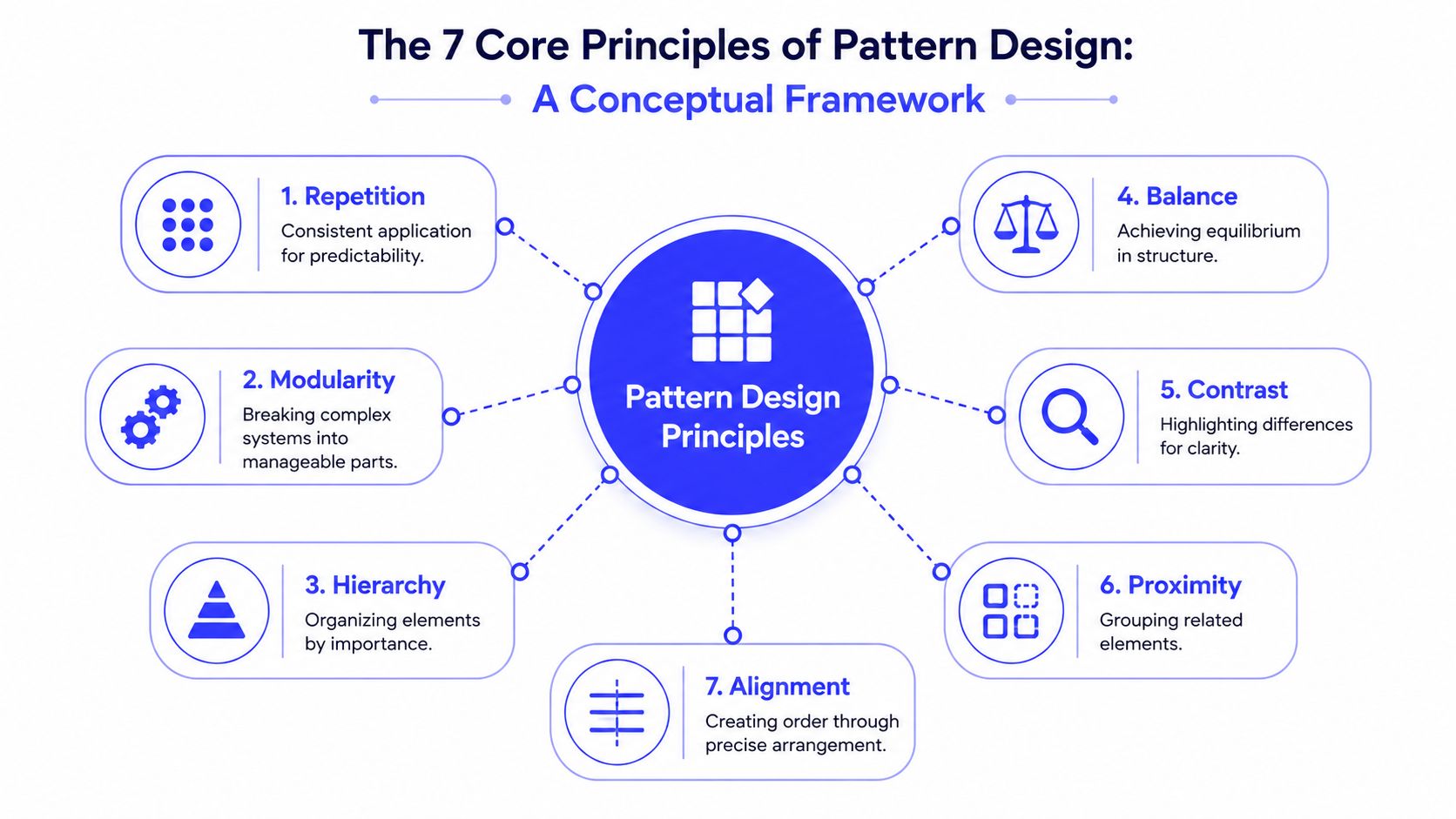
Pattern design starts with a simple idea: repeated structure creates order. In art and architecture, that order becomes rhythm, movement, and cohesion. In products and systems, it becomes predictability.
According to LibreTexts on rhythm and pattern, the foundational principle of pattern design is repetition, where a line, shape, color, or texture is used repeatedly to create visual rhythm and unify a composition. Without this core mechanism, pattern design cannot achieve its intended effects of creating visual order and establishing a predictable experience.
Repetition and rhythm
Repetition is the engine. Rhythm is the effect.
In practical terms, repetition means using the same core element more than once. In a visual design, that might be a color, line, shape, or texture. In a system, it might be a standard API response, a fixed prompt wrapper, or a shared interaction pattern for source citations.
Rhythm is what users and operators feel after that repetition is in place. They start to predict what comes next. That lowers friction.
Modularity and hierarchy
A pattern becomes useful when it can be reused in pieces. That's modularity.
A module should hold together under repetition. It should also make sense when composed with other modules. In product work, think of a reusable “AI answer card” with a title, answer, evidence, action buttons, and feedback controls. In backend work, think of a pipeline stage that always accepts structured input, emits validated output, and logs to a standard schema.
Hierarchy decides what matters most. It gives users and developers an order of attention. That can mean primary actions over secondary actions in a UI, or stable interfaces over implementation detail in a service boundary.
A good companion read is ThirstySprout's piece on principles of software design, because software architecture succeeds for the same reason visual patterning does. It reduces surprise.
Balance and contrast
Balance is distribution. Contrast is difference.
Balance stops one part of a design from dominating everything else. In a dashboard, that means the answer shouldn't drown out the evidence panel or feedback controls. In an ML workflow, it means the architecture can't optimize only for model quality while ignoring traceability, cost controls, or rollback paths.
Contrast is how you signal change, exception, or emphasis. A warning state should look meaningfully different from a normal state. A human-reviewed answer should not look identical to an unreviewed model output. Without contrast, the pattern exists, but it hides the important distinctions.
A mature pattern doesn't eliminate differences. It standardizes the base and makes exceptions legible.
Proximity and alignment
Proximity groups related elements. Alignment makes the grouping readable.
These are often underestimated because they feel basic. They're not. They're the difference between a system that can be scanned and one that has to be decoded every time. In UI, source chips belong near the claim they support. In backend systems, related configs, schemas, and observability hooks should live together operationally, not be scattered across repos and dashboards.
Alignment is the final discipline. It creates order through precise arrangement. If one service returns timestamps in one format and another returns a different one, you've broken alignment. If one AI feature places feedback below the answer and another hides it in a side panel, you've broken alignment there too.
The best patterns feel obvious after they're built. That's the point.
Translating Principles to Production AI Systems
The gap in most pattern design discussions is translation. They explain visual principles well enough, but stop before production reality. That's a miss for AI teams.
In AI products, inconsistency isn't just annoying. According to this pattern preparation reference, inconsistent UI patterns in AI dashboards increase user cognitive load by 34% and reduce task completion rates. That matters because LLM interfaces already ask users to judge uncertainty, evidence, and model behavior.
What the principles mean in production
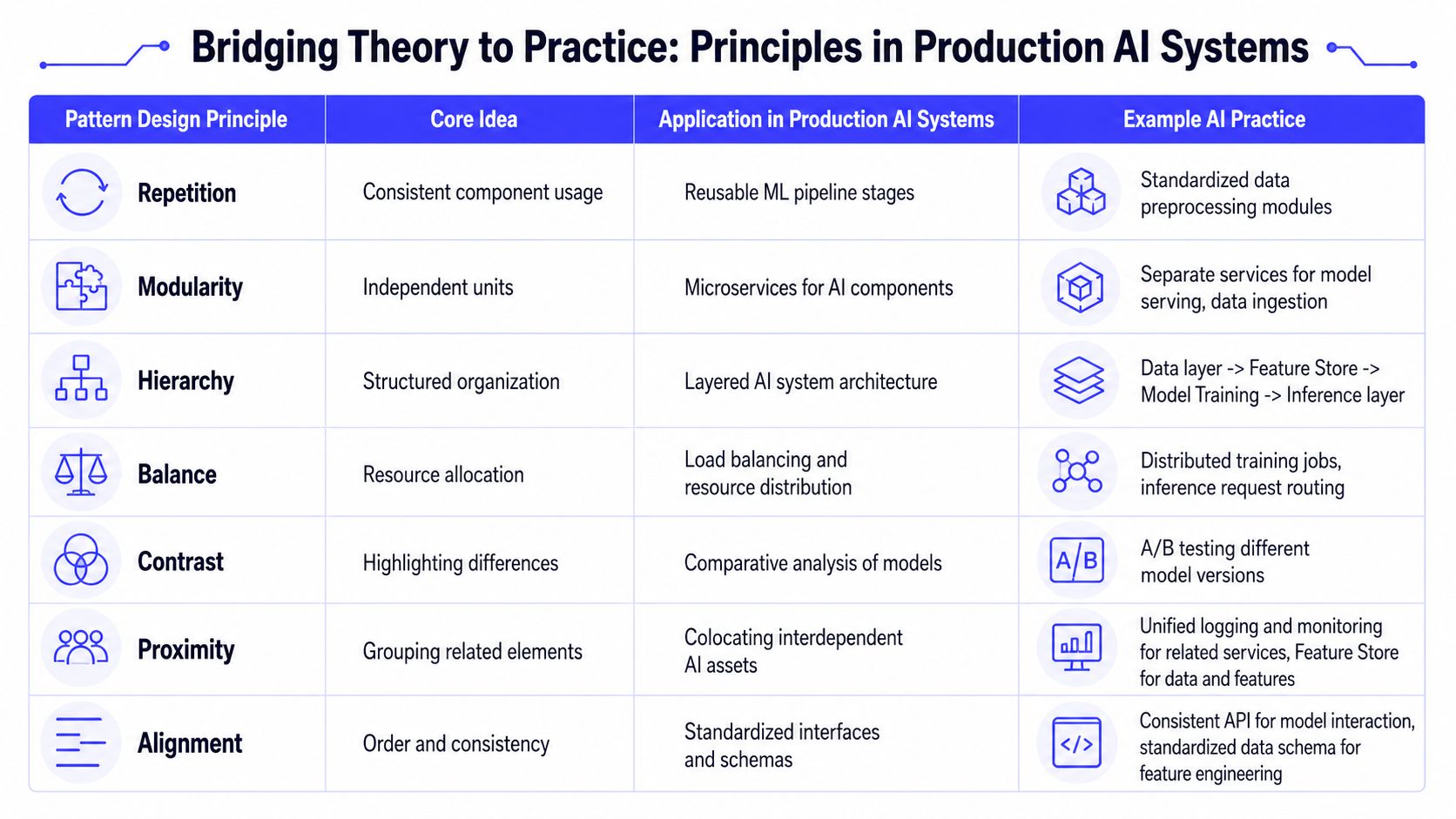
Here's the useful translation.
| Principle | In product and engineering practice |
|---|---|
| Repetition | Reuse the same interaction and service contracts for similar AI tasks |
| Modularity | Break retrieval, ranking, generation, moderation, and logging into replaceable units |
| Hierarchy | Decide which layer owns policy, which owns orchestration, and which owns presentation |
| Balance | Trade off latency, quality, cost, and observability instead of optimizing only one |
| Contrast | Clearly distinguish draft vs approved, cited vs uncited, generated vs retrieved |
| Proximity | Keep related evidence, controls, metrics, and logs close to the workflow they serve |
| Alignment | Standardize schemas, component APIs, event names, and operator runbooks |
That's why patterns aren't decorative. They're operational.
Example one with a backend ML pipeline
Take a feature pipeline in Airflow, Dagster, or Kubeflow. Teams often build one DAG for churn scoring, another for fraud detection, and a third for recommendations. Each has slightly different naming, retry handling, validation, and artifact storage.
It works until on-call starts.
A pattern-driven approach creates a reusable module for ingestion, feature validation, model scoring, evaluation logging, and publishing. The modules repeat. The hierarchy stays clear. Exceptions are explicit rather than hidden. That improves speed because engineers spend less time relearning the pipeline they inherited.
For teams tightening governance around prompts, logs, and model inputs, security patterns matter too. A solid companion reference is this Markdown Converters data security guide, especially when your AI workflows move user content across multiple services and temporary processing layers.
Later, when the team codifies those patterns in deployment, testing, and monitoring, the work starts to look a lot like established MLOps best practices.
Here's a representative config pattern for a reusable stage contract:
stage:name: retrievalinput_schema: query_v1output_schema: retrieved_context_v1retries: 2logging:trace_id: requiredprompt_version: requiredretrieval_index: requiredquality_checks:- schema_validation- empty_context_guardThe point isn't the YAML. The point is the repeated structure.
Example two with an AI dashboard
Now look at a customer support copilot. If one panel uses confidence labels, another uses source badges, and a third hides retrieval evidence entirely, users have to rebuild trust from screen to screen.
This short walkthrough is useful when you want to visualize how pattern consistency affects system design choices:
A better dashboard pattern does three things consistently:
- Shows provenance: Every answer exposes the basis for the output.
- Preserves action order: Review, accept, edit, and escalate appear in the same place every time.
- Logs comparable events: The same user actions emit the same telemetry fields across features.
That consistency reduces interpretation cost for both users and operators.
Example in Action A Reusable UX Pattern for RAG Systems
Retrieval-augmented generation products fail most often at the trust layer. Not because the model is unusable, but because the interface doesn't teach the user how to evaluate it.
A strong RAG experience needs a repeatable unit. In pattern design language, that unit is the motif or module. As noted in this pattern design overview on repeating motifs, successful repeating patterns start with a single module that fits into itself when duplicated. The same source also notes common mechanical repeats such as half-drop and brick repeats, which create staggered visual effects.
That concept maps cleanly to AI product design. Your motif is not a flower or tile. It's the answer block.
The answer block motif
A reusable RAG answer block usually includes:
- Primary response: The generated answer in plain language.
- Evidence band: Source titles, snippets, or retrieval references placed close to each claim.
- Action row: Copy, refine, regenerate, and escalate.
- Feedback hook: A compact way to mark useful, incorrect, or incomplete output.
- State label: Draft, reviewed, or policy-restricted.
When that module repeats across search, support, and internal knowledge workflows, users learn the system faster. They don't have to rediscover where citations live or how to challenge a weak answer.
If you want a practical product lens on this problem, this guide to designing AI interfaces for Expo is worth reviewing for teams working through interaction patterns in AI-first products.
A mini-case from product practice
Suppose you're building an internal support assistant for account managers.
Version one puts source links in a collapsible side panel, feedback under a kebab menu, and escalation in a footer drawer. The team thought this looked clean. In practice, people miss the evidence, ignore feedback, and ask Slack whether the answer can be trusted.
Version two uses the same answer motif every time:
- Answer first.
- Source snippets directly beneath relevant claims.
- Edit and escalate actions in a fixed row.
- Feedback in the same visual slot for every response.
That pattern doesn't make the model smarter. It makes the product more understandable.
Why this works
The module creates rhythm. The repeated order creates hierarchy. The close placement of answer and evidence uses proximity. The stable action row gives alignment. Small visual differences between safe and uncertain states provide contrast.
One useful design trick is to vary the module without breaking it. A “half-drop” equivalent in UI might mean offsetting secondary details, like follow-up suggestions or debug traces, so power users can access them without disrupting the base motif for everyone else. That preserves consistency while still supporting advanced workflows.
The Anti-Pattern Pitfall When Good Intentions Go Wrong
Patterns become dangerous when teams treat them as doctrine. The goal isn't to apply more patterns. The goal is to apply the right amount of structure for the job.
The clearest failure mode in AI products is pattern fatigue. Repetition usually builds trust, but too much visible sameness has the opposite effect. According to this 2025 research discussion on AI-generated visual repetition, users start to perceive AI-generated visual patterns as “low-effort” or “synthetic” after 3–5 repeated motifs, causing a 22% drop in perceived credibility.
Where anti-patterns show up
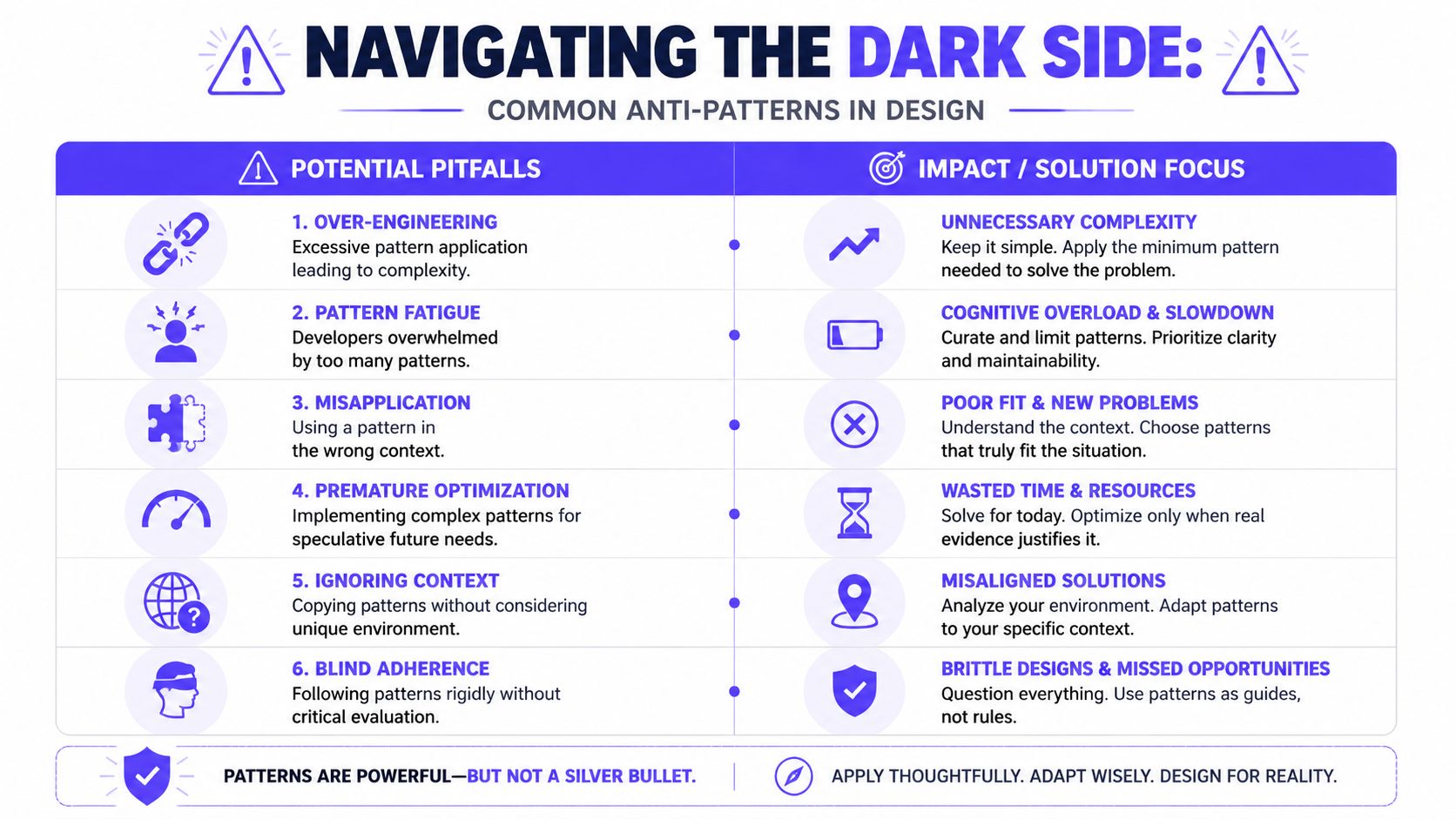
In practice, I see six recurring mistakes.
- Over-engineering: Teams create a grand pattern library before they understand the workflow.
- Misapplication: A pattern that works for structured support answers gets forced onto exploratory research tasks.
- Premature optimization: Engineers design for a future scale or feature set that doesn't exist yet.
- Blind adherence: Teams keep a pattern even after it clearly blocks usability or operator speed.
- Ignoring context: Designers copy a consumer chat UI into a regulated enterprise workflow.
- Pattern fatigue: Repeated cards, repeated thumbnails, or repeated answer frames make the product feel automated in the wrong way.
What good judgment looks like
A strong pattern has a stable spine and flexible edges.
For example, a compliance review tool may need a rigid answer structure because auditors care about evidence and approval steps. A brainstorming copilot may need looser scaffolding because users want idea flow, not formality. Same product family, different pattern fit.
Warning sign: If your team says “we wanted consistency” to justify a workflow that users now avoid, consistency has become an excuse.
The backend has its own anti-pattern version. Teams often abstract too early. They create one “universal” model service that handles batch scoring, streaming chat, embeddings, moderation, and experiments. On paper, it's elegant. In production, it becomes a bottleneck because every use case fights over one interface.
The better move is narrower. Share the patterns that reduce operational burden, like logging contracts, schema validation, deployment hooks, and rollback rules. Don't force unlike workloads into the same shape just because reuse sounds efficient.
Hiring for Pattern Thinking An Interview Scorecard for AI Engineers
Most interview loops still overweight syntax, frameworks, and puzzle-solving. Those matter, but they won't tell you whether someone can build systems other people can extend safely.
Pattern thinking is closer to what expert garment makers do than most software teams admit. As noted in this patternmaking principles reference, garment patternmaking rests on three fundamentals: dart manipulation for relocating fit, adding fullness for volume, and contouring for fitting curves. Mastery separates a novice from someone who can create a correct 3D replica of a design. The engineering parallel is direct. Strong engineers adapt structure without breaking fit.
What to test for
Use questions that reveal how a candidate handles reuse, abstraction, and constraints.
For a broader hiring kit, this set of AI engineer interview questions is a useful complement.
| Skill | Look For | Sample Question | Score (1-5) |
|---|---|---|---|
| Pattern recognition | Spots repeated problems across products or services | “Tell me about two different AI features that shared the same underlying workflow. What pattern did you extract?” | 1-5 |
| Abstraction judgment | Knows what to standardize and what to leave local | “Describe a reusable component you built. What did you intentionally keep out of it?” | 1-5 |
| System fit | Adapts patterns to domain constraints | “How would you design a common interaction pattern for both support automation and research copilots?” | 1-5 |
| Interface consistency | Values stable contracts and predictable behavior | “What signals tell you an API or UI family has drifted too far?” | 1-5 |
| Operational thinking | Connects design choices to maintenance and on-call burden | “Walk through a backend ML pattern that reduced debugging time for your team.” | 1-5 |
| Trade-off clarity | Talks openly about when patterns hurt | “Tell me about a time you removed a shared abstraction because it was causing more damage than value.” | 1-5 |
How to score answers
Don't reward polished language alone. Reward structure.
A high-signal answer usually includes:
- Concrete boundary choices: The candidate explains what was standardized and why.
- A failure mode: They can name where the pattern broke down.
- An evolution path: They describe how the pattern changed as the product matured.
- Cross-functional awareness: They connect engineering choices to user trust, QA, compliance, or support operations.
Candidates who think in patterns usually sound calmer. They talk about systems as sets of repeatable decisions, not isolated heroic fixes.
Your Pattern Design Audit Checklist and Next Steps
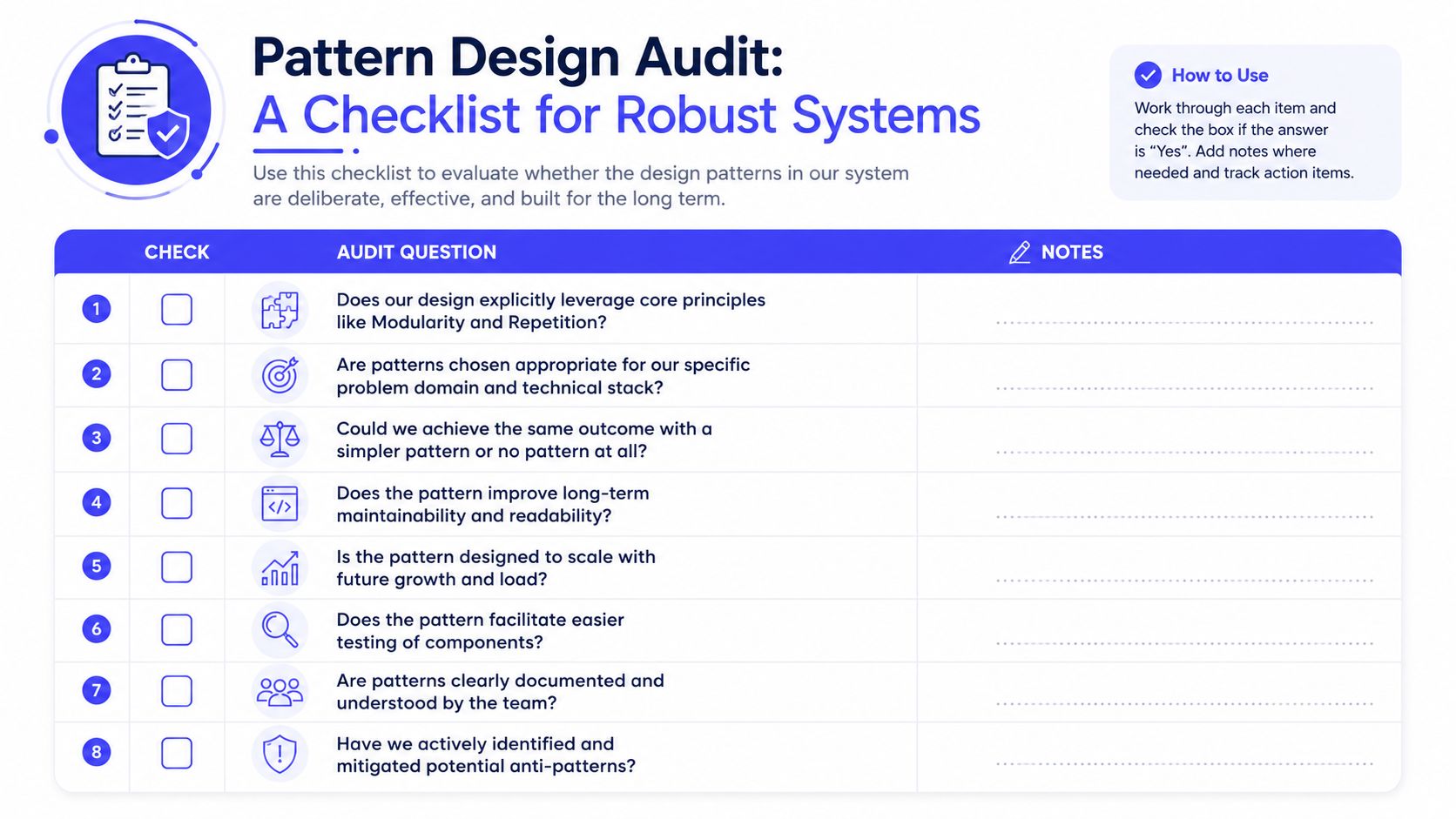
If you want to apply the principles of pattern design this quarter, start with an audit. Don't ask whether the product looks modern. Ask whether the system behaves consistently enough to scale.
Audit questions that matter
- Core principles: Do your AI features explicitly use repetition, modularity, hierarchy, balance, contrast, proximity, and alignment?
- Pattern fit: Are your patterns appropriate for the product context, or copied from a different environment?
- Simplicity: Could the team get the same result with a simpler component or contract?
- Maintainability: Does the pattern reduce review friction and support easier change over time?
- Scalability: Will it hold under more users, more models, and more workflows?
- Testability: Can you validate components independently?
- Documentation: Can a new engineer understand the pattern without shadowing three people?
- Anti-pattern risk: Have you identified where sameness could create confusion, fatigue, or rigidity?
What to do next
Start small.
- Pick one AI workflow that already exists, such as RAG answer rendering or model inference logging.
- Define the reusable motif or module and document its boundaries.
- Review upcoming roadmap items and force reuse unless there's a clear reason to diverge.
Teams that do this well don't just ship cleaner interfaces. They build cleaner organizations. Shared patterns make hiring easier, handoffs smoother, and quality more durable.
If you need engineers who can design AI systems this way, not just code features, ThirstySprout can help. We connect companies with senior AI engineers, MLOps specialists, and AI product builders who understand reusable architecture, trustworthy UX patterns, and production constraints. Start a Pilot if you need to move fast, or See Sample Profiles if you want to benchmark the kind of pattern-oriented talent your roadmap now requires.
Hire from the Top 1% Talent Network
Ready to accelerate your hiring or scale your company with our top-tier technical talent? Let's chat.