

Your app works in staging. Then a customer demo lands, traffic bunches up, one hot endpoint slows down, and suddenly every dashboard refresh feels risky. For AI products, the failure mode is worse. A single slow model pod can back up requests, burn GPU time, and make the whole system look broken even when the model itself is fine.
That's when load balancing software stops being “networking stuff” and becomes a product decision. It affects uptime, latency, cloud spend, and how much operational pain your team absorbs each week.
Your App is Slow and Your CTO is Worried
A familiar pattern shows up in high-growth teams. You launched on one app server or one Kubernetes service, response times were acceptable, and the system stayed simple. Then usage grew unevenly. One tenant started sending heavier traffic, background jobs competed with user-facing APIs, and retries made the spike worse.
For AI teams, the problem usually arrives earlier than expected. Inference traffic is bursty. Requests don't all cost the same. Some prompts complete fast, while others tie up compute for much longer. If you're also spreading workloads across multiple clouds, the operational complexity rises fast. One market analysis noted that hybrid and multi-cloud adoption is accelerating, yet 70% of enterprises report integration failures due to incompatible autoscaling with GPU clusters, and AI startups can see 40% higher deployment times when balancing across AWS, GCP, and Azure, according to StoneFly's overview of load balancing use cases.
A lot of teams first approach this as a performance tuning exercise. That's partly right. Good load balancing software is one of the most direct ways to support uptime and responsiveness, and it belongs in the same conversation as caching, query tuning, and improving application performance. But once your product handles real customer traffic, balancing stops being just optimization. It becomes risk management.
TL DR for busy CTOs
- Start managed unless you have a strong reason not to. A cloud load balancer gets you production safety faster, especially with a small platform team.
- Choose Layer 4 or Layer 7 based on request behavior, not buzzwords. AI inference, multi-tenant SaaS routing, and canary releases often need Layer 7 awareness.
- Use a selection checklist before you commit. The wrong choice usually doesn't fail immediately. It creates slow incidents, hard-to-debug routing behavior, and extra work for an already thin team.
Practical rule: If your team is still arguing about whether you need load balancing software, you probably need at least a basic form of it already.
Who should read this
This is for technical leaders making an architecture call in the next quarter, not researching for a distant roadmap.
It's especially relevant if you're in one of these situations:
- You run a fast-growing SaaS app and a single region or single ingress path has become a reliability bottleneck.
- You're shipping AI features where inference latency and uneven request cost make “just add pods” an incomplete answer.
- You have a small ops footprint and need to balance vendor convenience against long-term control.
- You expect multi-cloud or hybrid pressure later and don't want to paint the team into a corner.
Choosing Your Load Balancing Strategy A Framework
Most teams don't need a giant bake-off. They need a short, disciplined decision process that connects architecture to ownership. The practical choices usually fall into three buckets: managed cloud load balancers, self-hosted software on virtual machines, and Kubernetes-native routing.

There's a reason many organizations start in the cloud path. AWS Elastic Load Balancer holds 75.83% of estimated market share, and the broader load balancing solution market was valued at $6.26 billion in 2024 with a projection to reach $19.40 billion by 2033, driven by hybrid and multi-cloud strategies and demand from sectors like BFSI and IT and Telecom, according to GoodFirms' load balancing software analysis. Market share alone shouldn't choose your stack, but it does reflect where numerous engineering groups find the lowest-friction default.
Option one managed cloud load balancer
Choose this when speed and team focus matter more than low-level control.
This fits teams that:
- Run mostly on one cloud and want native integration with autoscaling, certificates, and security groups.
- Have a lean platform function and don't want to own proxy upgrades, failover logic, or traffic appliance maintenance.
- Need a safe default quickly for web apps, APIs, and standard internal services.
The downside is obvious. You accept some vendor coupling and less tuning flexibility. For many startups, that's a good trade.
Option two self-hosted software on VMs
This path suits teams that want precision and can support it operationally. Common names here include HAProxy and NGINX.
Use this path if:
- You need deeper control over routing logic, rate limits, connection behavior, or custom traffic policies.
- You run across mixed environments where a single vendor-managed service won't cover everything cleanly.
- Your engineers already know the tooling and can treat it like a product, not a side project.
The trap is underestimating ownership. The software may be free or inexpensive to start, but people have to run it.
Managed services usually cost more in direct spend. Self-hosted stacks usually cost more in attention.
Option three Kubernetes-native routing
If your product already lives in Kubernetes, this is often the right long-term control plane. Ingress controllers and service mesh features let teams express routing in code and evolve with the application.
This works best when:
- You already deploy on Kubernetes and your team is comfortable with cluster operations.
- You need app-aware routing such as path-based traffic splits, canaries, or service-to-service policy.
- You want GitOps-style ownership where networking rules move through the same review and deploy flow as app changes.
The five questions that decide most outcomes
| Question | If your answer is yes | Likely path |
|---|---|---|
| Is the team small and delivery speed the top priority? | You want less infrastructure to own | Managed cloud |
| Do you need custom proxy behavior or mixed-environment support? | Defaults won't be enough | Self-hosted |
| Is Kubernetes already your operating model? | Routing should live with cluster config | Kubernetes-native |
| Is avoiding vendor lock-in a hard requirement? | You need portability | Self-hosted or Kubernetes-native |
| Do AI workloads need traffic shaping by endpoint behavior? | Layer 7 control matters | Self-hosted or Kubernetes-native |
The Anatomy of a Load Balancer Layers Types and Algorithms
The simplest way to understand load balancing software is to think like a mail room.
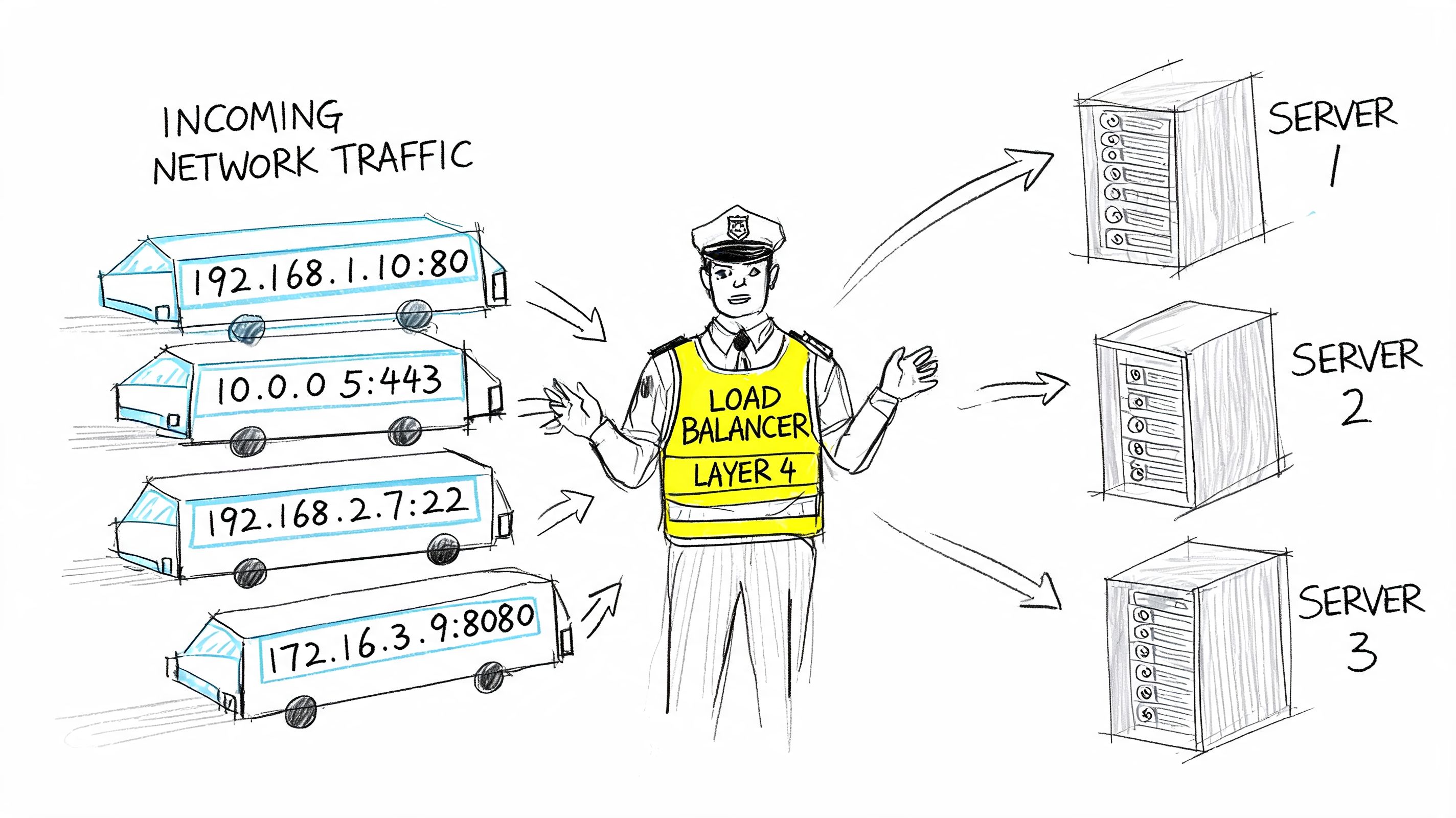
A Layer 4 load balancer routes by network information. It's like sorting mail by street address and ZIP code. It doesn't care what's inside the envelope. It sees connection details and sends traffic to a healthy backend.
A Layer 7 load balancer looks into the request. It's like reading the recipient name, department, and maybe even the type of request before deciding where it should go. That extra awareness enables path-based routing, host-based rules, header inspection, session affinity, and canary traffic.
Why Layer 4 and Layer 7 feel different in production
Layer 4 is often faster to reason about. It's a strong fit when all backends are interchangeable and the app doesn't need request-aware decisions.
Layer 7 earns its complexity when the request itself matters. That's common in modern SaaS and AI systems:
- API version routing where
/v2should hit a different service pool - Tenant-aware traffic where premium customers need a separate path
- Model canaries where a small slice of inference calls should hit a new model version
- Security filtering where you want application-level inspection before traffic reaches the service
If you're weighing distribution strategies for sticky traffic, Querio's take on hash partitioning is a useful companion read because it explains why deterministic routing can outperform naive spreading for some workloads.
The main software patterns
Load balancing software now shows up in a few forms:
| Type | What it does well | Where it struggles |
|---|---|---|
| Cloud-native load balancer | Fast setup, native integrations, low ops burden | Less portable, less customizable |
| Ingress controller | Works well for HTTP routing inside Kubernetes | Adds cluster complexity |
| Service mesh | Fine-grained service-to-service policy and observability | Heavy operational overhead for small teams |
| VM-based proxy | Strong control and portability | You own upgrades, scaling, and failure handling |
Later in the stack, this short walkthrough is worth watching before you pick a path:
Algorithms that matter more than people think
The algorithm decides how traffic spreads. That sounds basic, but it changes user experience quickly.
- Round robin works when requests are roughly similar in cost. Good default for simple web workloads.
- Least connections helps when request duration varies a lot. That's often better for inference APIs where some requests hold resources much longer.
- IP hash supports sticky behavior by sending the same client toward the same backend more consistently. Useful when session locality matters.
A bad algorithm rarely looks catastrophic in testing. It shows up later as “random” latency variance, uneven pod saturation, and confusing autoscaling behavior.
Deployment Patterns in Action From SaaS to AI Services
Theory helps, but architecture decisions get clearer when you map them to workloads.
Pattern one global SaaS with regional failover
A SaaS product serving customers across regions usually needs two balancing layers. The first chooses the right region. The second distributes traffic inside that region across healthy application nodes.
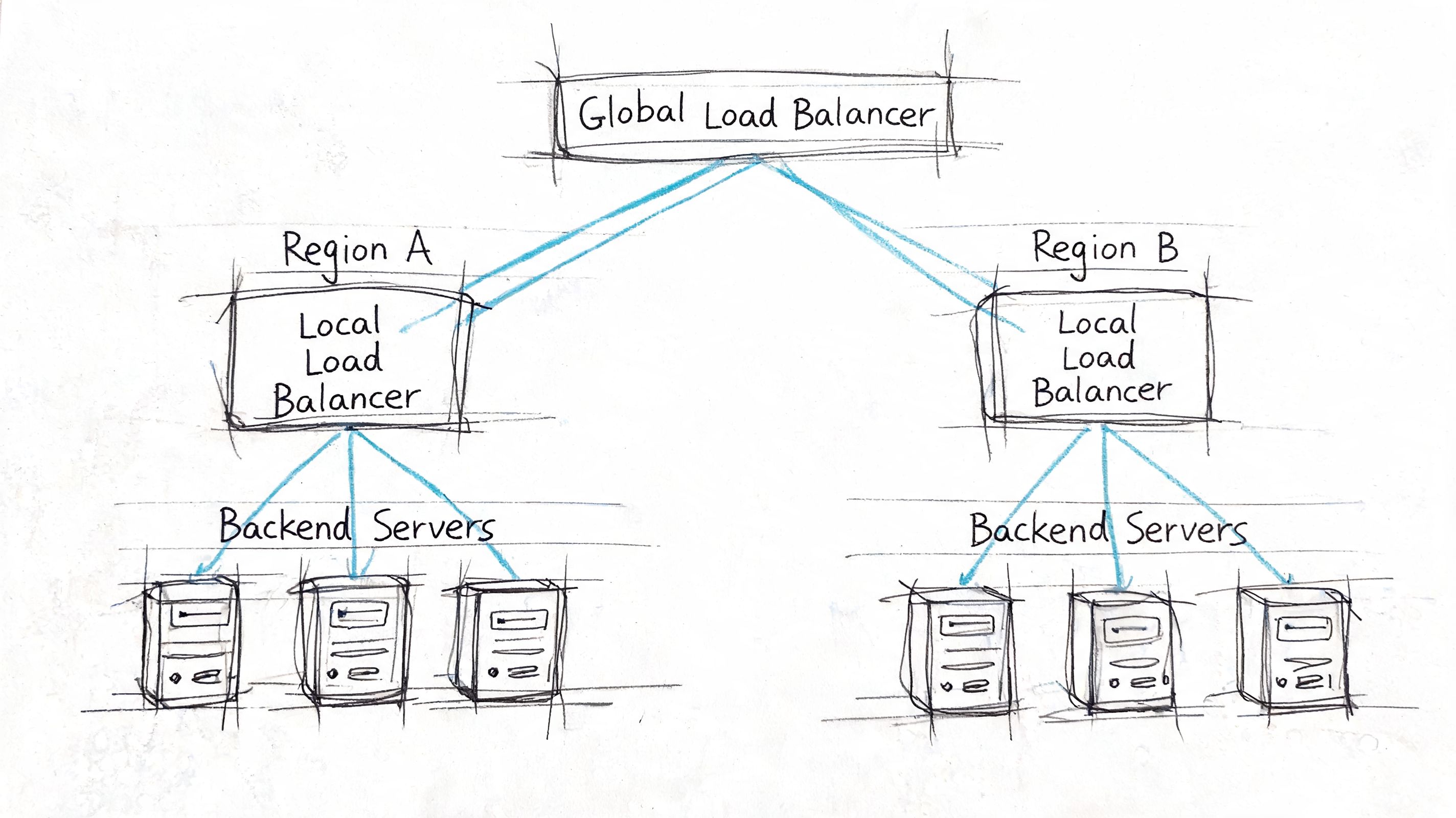
A practical version looks like this:
- Global entry point directs users toward the closest or healthiest region.
- Regional load balancer spreads traffic across app instances in that region.
- Health probes remove unhealthy services before retries create a storm.
- Session policy decides whether users can move freely or need affinity.
- Failover behavior defines what happens when a full region degrades.
This setup sounds heavy, but it often prevents a common startup mistake: relying on application retries to solve infrastructure failure. Retries can help for transient faults. They don't replace controlled traffic distribution.
Pattern two AI inference API with Kubernetes ingress
Now consider an inference service exposing /predict and /chat. The traffic is bursty, request cost is uneven, and you want to canary a new model version without sending every user there immediately.
If your team is still deciding between container orchestration approaches, this comparison of Docker Compose vs Kubernetes is useful because the answer changes how much routing intelligence belongs at the edge versus inside the cluster.
A representative ingress pattern might look like this:
apiVersion: networking.k8s.io/v1kind: Ingressmetadata:name: inference-apiannotations:nginx.ingress.kubernetes.io/proxy-read-timeout: "120"nginx.ingress.kubernetes.io/upstream-hash-by: "$request_uri"spec:ingressClassName: nginxrules:- host: api.example.aihttp:paths:- path: /chatpathType: Prefixbackend:service:name: model-v1port:number: 80- path: /predictpathType: Prefixbackend:service:name: model-v2-canaryport:number: 80That snippet is intentionally simple. In production, you'd typically pair it with health endpoints, autoscaling rules, and a deployment strategy that lets you shift traffic gradually between model versions.
What works well for AI traffic
AI inference punishes weak defaults. Not every request is equal, and not every backend has equal capacity. Software load balancers with stronger connection handling are essential in these scenarios.
HAProxy's event-driven, single-process architecture allows it to handle over 2 million concurrent connections and achieve 100,000+ requests per second with sub-millisecond latency on modest hardware, according to G2's HAProxy overview. The same source notes that this design minimizes context switching, which matters for low tail latency in AI and ML inference serving, and that production deployments at scale have shown a 40% reduction in p99 latency for LLM query fan-out.
That doesn't mean every AI startup should drop managed services and run HAProxy everywhere. It does mean you should be skeptical of generic balancer defaults when your workload has long-lived or highly variable requests.
Two mini-cases to borrow from
| Scenario | Better approach | Why |
|---|---|---|
| B2B SaaS dashboard with regional customers | Global entry plus regional L7 balancing | Better failover and tenant routing |
| Real-time inference API with model canaries | Kubernetes ingress plus app-aware routing | Lets you split traffic by endpoint and version |
Keep the first version boring. You can add mesh, custom proxy logic, and advanced policy later. Rebuilding around a fragile first choice is harder than starting with a conservative pattern.
The Load Balancing Software Selection Checklist
Most bad picks happen because teams compare features without comparing ownership. A CTO should score load balancing software the same way they'd score a datastore or messaging layer: by total cost, reliability impact, and the kind of team needed to run it.
Use this scorecard before a proof of concept
Score each category on a simple scale such as weak fit, acceptable fit, or strong fit.
| Category | Seed or Series A lens | Series C or enterprise lens |
|---|---|---|
| Cost to operate | Prefer managed defaults and low-maintenance tooling | Optimize for control, cross-team standards, and purchasing leverage |
| Performance under mixed traffic | Focus on predictable latency and simple autoscaling behavior | Demand fine-grained tuning, global policy, and advanced routing |
| Reliability model | Prioritize easy failover and clear health checks | Require multi-region patterns, formal SLO alignment, and tested runbooks |
| Observability | Must integrate with existing dashboards quickly | Needs metrics, logs, and tracing that support incident review |
| Security controls | Baseline TLS handling and rate limiting | Expect deeper policy, WAF integration, and auditability |
Performance and crypto handling
This is one area where the proxy can directly reduce backend waste. Modern load balancing software can reduce server CPU load by 70% to 80% by offloading TLS 1.3 handshakes, and encrypted traffic makes up 95%+ of internet data, according to The CTO Club's review of load balancing software. The same source notes sub-1-second failover detection via Layer 7 probes and benchmarked 99.999% availability with N+1 redundancy.
That matters because teams often blame app code for latency that comes from connection churn and crypto overhead.
A few practical questions belong in every evaluation:
- Can it terminate TLS efficiently? If not, your app tier pays for work that could have been handled once at the edge.
- How does it detect backend failure? Basic health checks are not enough if your service can accept a connection but still fail real requests.
- Does the platform expose useful metrics? If your on-call engineer can't tell whether queueing, saturation, or bad routing caused the slowdown, you haven't bought reliability. You've bought a black box.
Cost means people not just licenses
Many startup teams misread the trade-off in this situation. Free software is not free infrastructure. A self-hosted proxy might reduce direct spend, but if it adds incident load, maintenance work, and tuning burden, your real cost rises.
That's the same build-vs-buy logic you'd apply elsewhere in the stack. This guide on build vs buy software decisions is useful framing because the hidden cost is often not the tool. It's the attention you take away from product delivery.
A practical evaluation checklist
- Traffic shape: Are requests short and uniform, or long-lived and uneven like model inference calls?
- Failure mode: What happens when a backend is slow but not fully down?
- Routing needs: Do you need host, path, header, or version-aware routing?
- Deployment model: Will this live in one cloud, across clouds, or inside Kubernetes?
- Team ownership: Who patches it, tunes it, and responds when balancing itself becomes the incident?
- Compliance and audit: Do you need a strong trail for security policy and edge behavior changes?
The best load balancing software is the one your team can operate calmly at 2 a.m., not the one with the longest enterprise feature list.
Your Next Step Build the Team to Run It
By the time a company is serious about load balancing software, the technology decision is only half the problem. The harder question is who owns it after launch.
That ownership line matters more now because the infrastructure model has shifted. Software and virtual appliances captured 60.3% of the load balancer market share in 2024 as enterprises avoided expensive hardware refreshes, according to Grand View Research's load balancer market report. The same report ties that shift to programmable service layers integrated into CI and CD workflows, where platform teams manage policies as infrastructure-as-code.
Why teams stumble after the architecture choice
A good design can still fail if no one owns:
- Traffic policy changes when new services and model endpoints appear
- Capacity tuning as usage patterns change
- Observability and alerting for queueing, saturation, and retry storms
- Release safety for canaries, rollbacks, and certificate changes
This is why many CTOs eventually discover they weren't buying a load balancer. They were committing to an operating model.
Three next actions that keep this manageable
Shortlist two or three realistic options
Use the checklist above and eliminate anything your current team won't maintain confidently.Run a focused pilot with real traffic patterns Test with the request mix you expect, especially if inference workloads have long-tail latency behavior. Don't benchmark only hello-world endpoints.
Map ownership before rollout
Decide whether this belongs to platform engineering, DevOps, or an MLOps function. If no one owns the edge, incident handling gets messy fast.
Hiring is part of the architecture
For startup teams, this usually means one of two hires. You need a platform engineer who can own ingress, proxy policy, and observability, or you need an MLOps engineer who understands how inference traffic, autoscaling, and deployment safety interact.
If you're defining that scope, this perspective on recruiting niche DevOps leadership is useful because it highlights how hard it is to find people who can combine systems reliability with practical delivery. For teams ready to operationalize the role, this guide to hiring a DevOps engineer is a solid starting point for defining ownership and capabilities.
If balancing policy lives in one person's head, you don't have infrastructure. You have a future outage.
What good looks like in practice
A healthy setup usually has these traits:
| Area | Strong signal |
|---|---|
| Architecture | The team can explain why it chose managed, self-hosted, or Kubernetes-native routing |
| Ownership | One function clearly owns config, health checks, and rollout safety |
| Operations | Metrics and alerts show where traffic is queuing before customers report it |
| Delivery | Routing changes move through reviewable config, not ad hoc edits |
| Scaling | AI and SaaS services can add capacity without changing edge behavior manually |
A CTO's job here isn't to memorize every balancing algorithm. It's to choose a level of complexity the team can sustain while the business grows. If the product is still finding fit, managed cloud infrastructure is often enough. If the platform is becoming differentiated and the traffic shape is unusual, software-based control starts to pay off. The decision should match both your workload and your team.
If you need engineers who can benchmark, deploy, and own production traffic infrastructure for AI products, ThirstySprout can help you build that team quickly. You can Start a Pilot with vetted senior AI, MLOps, and platform talent, or See Sample Profiles to find engineers who've already shipped reliable inference and SaaS systems at scale.
Hire from the Top 1% Talent Network
Ready to accelerate your hiring or scale your company with our top-tier technical talent? Let's chat.