

Your AI feature shipped. Users like it. Product wants it in more workflows next quarter.
Then the operational reality shows up. Responses get slower under load. Infrastructure spend climbs faster than usage. Engineers start debating whether the fix is a bigger GPU, a smaller model, a better prompt, or a rewrite of the serving layer. That's the moment AI model optimization stops being a research topic and becomes a leadership decision.
For most CTOs, the question isn't “how do we make the model perfect?” It's “how do we make this system fast enough, accurate enough, and cheap enough to scale without tying up the team for months?” That same pressure shows up in adjacent functions too. If you're also thinking about how AI changes recruiting operations, this piece on modern talent acquisition with AI is a useful parallel, because both problems come down to measured automation, governance, and cost control.
Your AI Is Working But Your Cloud Bill Is Soaring
A common first deployment pattern looks like this. The team launches with a capable general model, generous context windows, and little caching because speed to market matters more than efficiency. That's often the right choice for version one.
But version two is where margins get exposed. Every extra token, every oversized model, and every avoidable round-trip starts to matter. If you're running across regions or weighing architecture choices, the trade-offs often overlap with broader infrastructure questions like multi-cloud vs hybrid cloud.
TL DR
- Start with baseline measurement. Track latency, memory use, quality, and cost per inference before changing anything.
- Use the lightest intervention first. Prompt engineering and fine-tuning often improve task fit before you reach for major architecture changes. IBM reports that organizations using fine-tuning or prompt engineering techniques see outputs that are approximately 25% more accurate or task-aligned than baseline unoptimized models, according to IBM's research on generative AI value.
- Match optimization to the constraint. Latency problems, accuracy problems, and infrastructure cost problems usually need different fixes.
- Treat optimization like product work. Set a quality floor and a budget ceiling. Don't let the team chase benchmark wins that don't change business outcomes.
- Know when to stop. If the team keeps tuning but the production bottleneck doesn't move, you likely need specialized MLOps or systems expertise.
Who this is for
This is for technical leaders making first-generation deployment decisions under real delivery pressure:
- CTOs and heads of engineering balancing roadmap speed with platform stability
- Founders trying to keep AI features viable without letting infra spend eat the margin
- AI and platform leads deciding whether to optimize, re-architect, or bring in specialists
Practical rule: If you can't explain your current cost, latency, and quality baseline in one slide, you're not ready to optimize yet.
A Decision Framework for Model Optimization
The wrong way to approach AI model optimization is to start with techniques. The right way is to start with the business constraint that hurts most today.
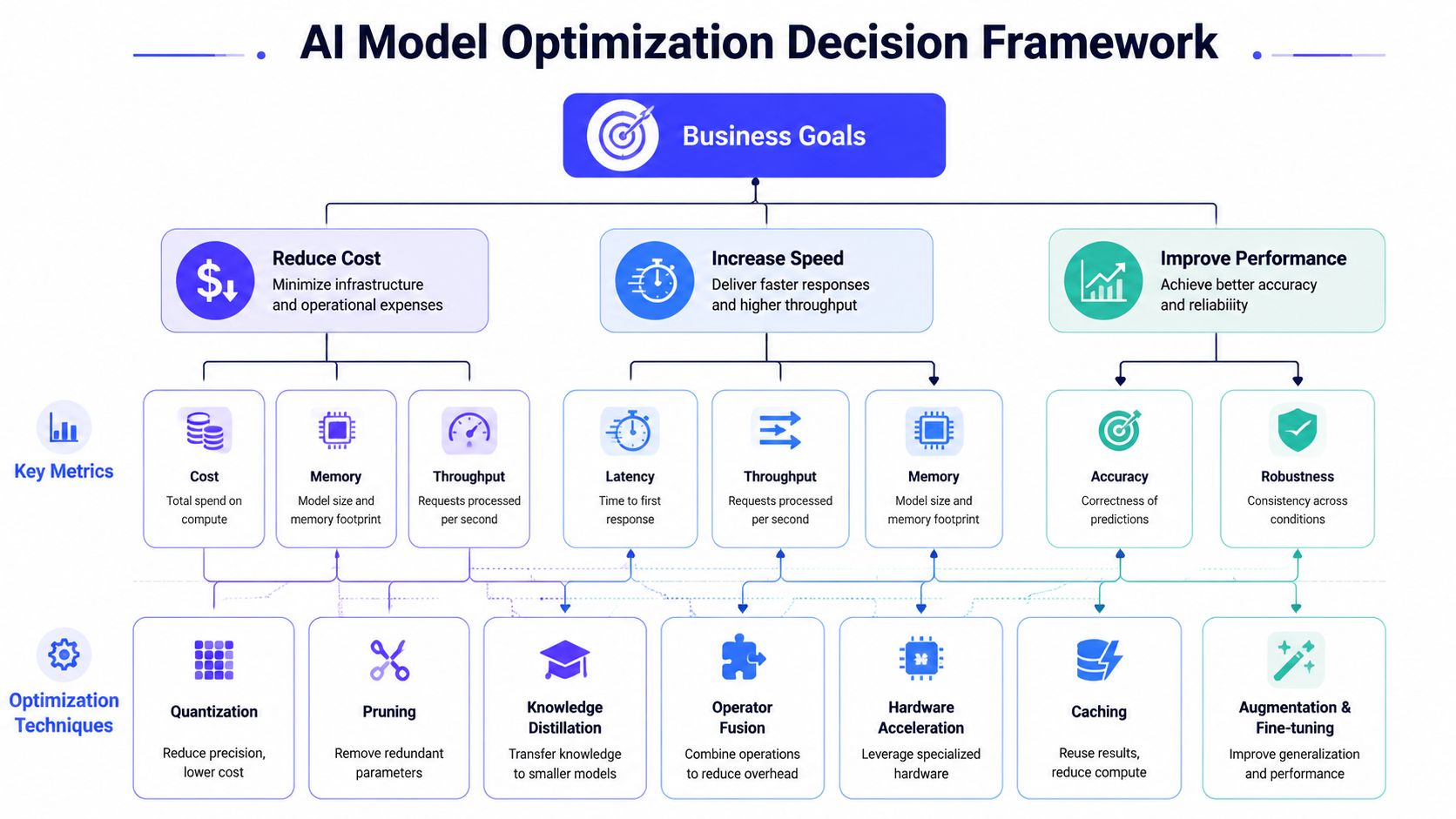
If the system is latency-bound
This is for real-time applications. Think copilots, support assistants, fraud review tools, or anything user-facing where slow responses lower adoption.
Your first moves should focus on inference speed and deployment fit:
- Profile end-to-end latency. Separate model time from retrieval, orchestration, and network overhead.
- Test lower-precision inference.
- Compile or serve for the hardware you use.
- Re-measure at realistic request sizes, not lab inputs.
In practice, latency-bound systems often benefit most from quantization and hardware-aware runtime choices. A smaller fast model that meets the service-level target often beats a larger model that wins abstract benchmark comparisons.
If the system is accuracy-bound
This path shows up in workflows where mistakes are expensive. Examples include document extraction, clinical support, policy review, and regulated decision support.
Start with quality controls before compression:
- Tighten prompts and task framing. Many quality issues come from vague instruction design, not model capacity.
- Fine-tune with representative examples. This can improve task alignment without changing the serving stack.
- Set an acceptable loss threshold. Decide in advance what quality drop is unacceptable before any optimization experiment begins.
Accuracy-bound systems usually need slower, more careful optimization. You can still optimize them, but every change needs benchmark and human review against a fixed test set.
If the system is cost-bound
This is the high-volume internal tool or broadly used customer feature. The model works, but scale makes the economics uncomfortable.
For these systems, prioritize permanent efficiency gains:
| Constraint | Best first question | Likely starting move | Primary metric |
|---|---|---|---|
| Cost pressure | Are we overpaying for model size? | Smaller task-specific model or distillation | Cost per inference |
| Throughput pressure | Is hardware underutilized? | Quantization plus better serving config | Requests per instance |
| Capacity pressure | Is memory limiting deployment density? | Quantization or pruning | Memory footprint |
The point is simple. Don't optimize for the metric you talk about in meetings. Optimize for the metric that blocks scale.
The Three Main Types of Optimization Techniques
A CTO does not need a catalog of every optimization paper. The job here is to choose the right tool for the constraint in front of you, then stop once the business case is met.
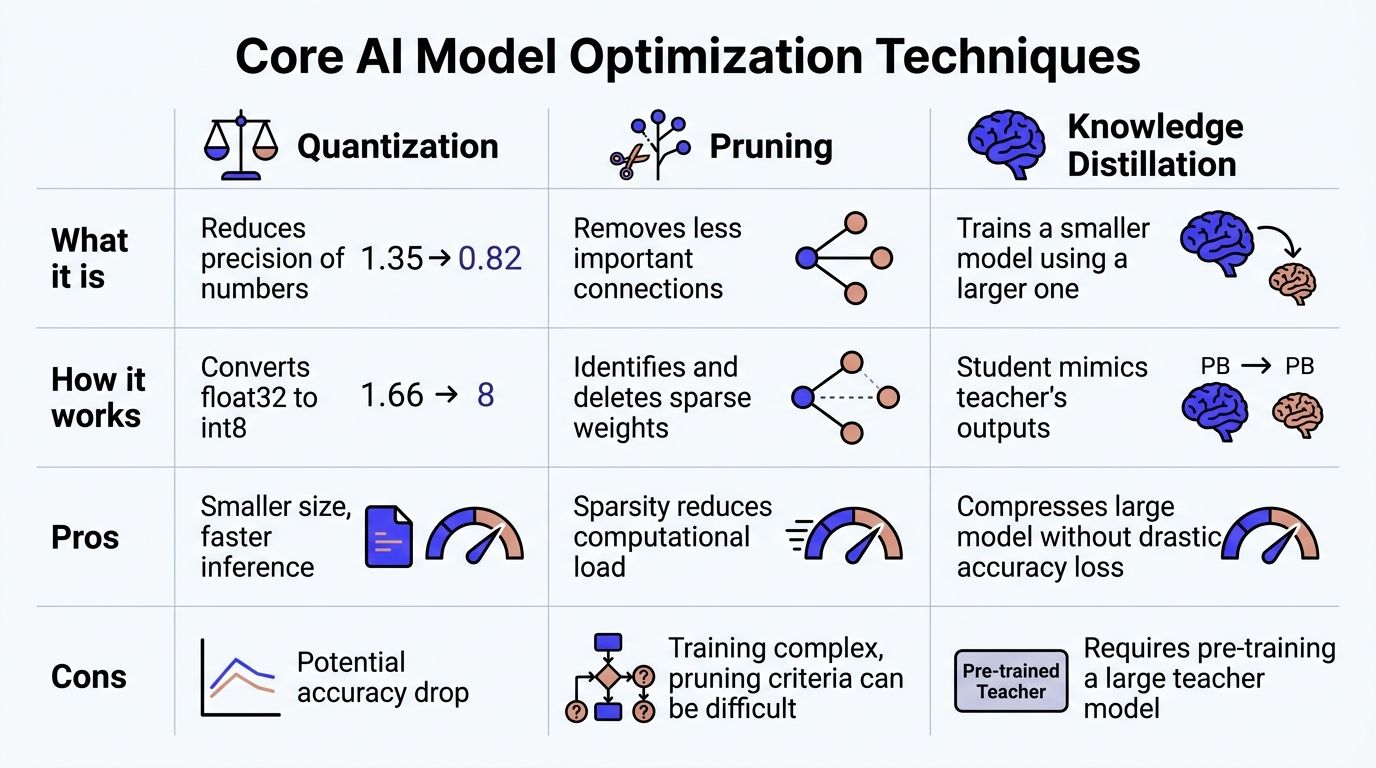
Three technique families cover most first deployments: quantization, pruning, and knowledge distillation. They solve different problems. Choosing the wrong one wastes weeks of engineering time and often misses the actual bottleneck.
Quantization
Quantization reduces the numerical precision used for weights and, in some setups, activations. The practical result is smaller memory footprint, faster inference, and better hardware efficiency.
For many teams, this is the first optimization worth testing because it changes the serving profile more than the model behavior. If the current model is already meeting quality targets and the problem is GPU cost, throughput, or deployment density, quantization is usually the shortest path to a measurable gain.
Use it when:
- the model is accurate enough and too expensive to serve
- memory limits are reducing requests per instance
- latency is driven by heavy inference rather than retrieval or application logic
Do not start here if task quality is still unstable. Compression will not fix weak prompt design, poor retrieval, or a model that was never well matched to the task. Teams working on alignment first should usually address data and tuning before compression. A practical starting point is this guide on fine-tuning LLMs for task-specific performance.
A short technical explainer helps make the trade-off visible:
Pruning
Pruning removes parts of the model that contribute little to the final result. Depending on the approach, that can mean individual weights, attention heads, channels, or larger structures.
This method can reduce compute and memory use, but it is less forgiving than quantization. Pruning changes the model more aggressively, so teams often need retraining, careful benchmarking, and a serving stack that can capitalize on the sparsity or structural changes. If your infrastructure cannot exploit the smaller graph efficiently, pruning may look good in a notebook and disappoint in production.
IBM's overview of model optimization explains pruning as a trade between efficiency and recovery work, especially when preserving output quality matters in production settings: IBM's model optimization overview.
Use pruning when the workload is stable, the team has evaluation discipline, and there is a clear reason quantization alone will not hit the cost or latency target. Skip it for a first pass if you still lack a reliable benchmark set or if the application changes every few weeks.
Knowledge distillation
Distillation trains a smaller student model to reproduce the behavior of a larger teacher model. This is often the right move when the current system proves the product value, but the long-term unit economics do not support the original model.
It takes more effort than quantization. You need training data, an evaluation loop that catches behavior drift, and enough MLOps maturity to compare the student against the teacher on real tasks. In return, you get a model designed for production constraints instead of a compressed version of a model that was never sized for the job.
This is usually the strategic option for mature, high-volume workloads. It is a weaker fit for products still changing weekly, because every product change can force more data work and another training cycle.
A smaller model that meets the service level and quality bar is usually more valuable than a larger one that looks stronger in demos but breaks the serving budget.
What to choose first
If latency and cloud spend are the problem, start with quantization.
If the baseline model is structurally too large for the business model, and the use case is stable enough to justify training work, evaluate distillation.
If you already know where redundancy sits, have a solid benchmark suite, and your infra team can realize the gains in production, pruning can be worth the extra effort.
A simple decision rule helps:
- Quantization first for fast serving wins with lower implementation risk
- Distillation next when unit economics require a smaller production model
- Pruning later when the team has mature evaluation, retraining capacity, and infrastructure support
The last point matters. There is a time to stop optimizing internally. If your team has spent two or three sprints tuning kernels, rebuilding export paths, or chasing small latency gains without changing feature margin, that is usually the point to bring in a specialist. CTOs get better outcomes by protecting engineering time, not by turning every deployment into a model systems research project.
How Optimization Works in the Real World
Abstract techniques sound tidy. Production systems don't. The work usually starts with a bottleneck map, not a theory.
Example one with a support assistant
A B2B SaaS team deploys a retrieval-augmented support assistant. Early user feedback is positive, but usage grows and the serving bill starts to dominate the feature P&L. The team also sees response time spike during peak support hours.
The fix isn't one thing. The team tightens prompt structure, trims unnecessary context, and then runs a quantized serving test against a shadow workload. They compare answer quality on real support tickets, not synthetic prompts.
Their implementation scorecard might look like this:
| Area | Before optimization | After first pass |
|---|---|---|
| Prompt design | Broad, verbose instructions | Tighter task-specific instructions |
| Context handling | Large default retrieval payload | Smaller, ranked context set |
| Serving path | Full-precision baseline | Quantized shadow deployment |
| Evaluation | Anecdotal QA review | Ticket-based regression set |
Disciplined MLOps best practices are essential. Without a repeatable eval loop, teams can't tell whether lower cost came from better optimization or hidden quality loss.
Example two with edge vision
A manufacturer wants a vision model on the factory floor for defect screening. Sending images to the cloud adds operational friction and introduces latency they can't hide in-line.
The practical path is usually different from an LLM deployment. The team prunes the model, validates on production-like images, and compiles the result for the target inference stack. The optimization target isn't “highest benchmark score.” It's “runs reliably on the chosen edge device with acceptable false decisions.”
Most edge AI failures aren't caused by weak models. They happen because the deployment target was treated as a detail instead of a design constraint.
A strong real-world example of optimization outside the usual LLM discussion comes from construction materials. Meta's open-source BOxCrete model used multi-objective Bayesian optimization to help a Minnesota data center concrete mix reach full structural strength 43% faster than the original formula while reducing cracking risk by nearly 10%, as reported by ConstructConnect's coverage of BOxCrete. Different domain, same executive lesson: optimization matters when it improves the operational outcome that the business values.
What these examples have in common
- They start with a deployment bottleneck, not an abstract model ranking
- They evaluate on production-shaped data
- They accept trade-offs explicitly
- They treat optimization as a systems problem, not just a modeling task
Navigating the Trade-Offs and Hidden Risks
A model can look healthy in a benchmark review and still become expensive in production for the wrong reasons. I have seen teams cut latency, ship the change, and then spend the next month explaining why answer quality slipped for top-value customers or why support volume jumped after a “successful” optimization pass.
That happens when optimization is treated as a technical exercise instead of a business decision.
Quality loss usually shows up after the dashboard says success
Latency, memory use, and throughput are easy to measure. Business damage is slower to surface. A smaller model may answer faster while dropping domain-specific detail, mishandling edge cases, or becoming less consistent across customer segments.
Set the floor before the team starts tuning. For a support assistant, that might mean answer accuracy on policy questions. For an internal analyst tool, it might mean preserving the fields, reasoning steps, or citation behavior users depend on. For a decision-support system, it means checking whether optimization changes the type of mistakes the model makes, not just the average score.
If leadership cannot define acceptable degradation, engineers will keep improving the metrics that are easiest to move.
Hardware mismatch burns time faster than model tuning saves it
A common mistake is leaving deployment constraints until late in the project. By then, the architecture is harder to change, operator support gaps are expensive to fix, and the team is benchmarking on hardware that does not match production.
The practical rule is simple:
- Lock the inference target early.
- Confirm framework and operator compatibility before the model design is settled.
- Measure on production hardware or the closest available equivalent.
- Treat compiler behavior, memory limits, and batch patterns as part of the design, not post-work.
This is usually where CTOs should pause and ask a harder question. Is the next month of optimization work likely to reduce cloud spend or improve latency enough to matter to revenue, retention, or margin? If the answer is unclear, stop stacking experiments. A specialist in inference systems, quantization, or hardware-specific compilation may be cheaper than having three good engineers learn those lessons from scratch.
Compression can also create governance risk
A risk that does not show up in latency dashboards is that aggressive compression can remove behavior the team did not realize it needed.
That matters more in hiring, lending, safety review, fraud screening, and customer prioritization than it does in a generic chatbot. In those workflows, a model that is cheaper to run but less consistent across groups creates legal exposure and operational risk. If your team touches employment workflows, this guide to AI hiring compliance is a useful reference for reviewing downstream impact.
The decision standard should be strict. If optimization lowers cost by 20% but introduces fairness review work, escalations, or audit risk, the savings may disappear quickly.
A faster model is not an improvement if it creates new failure modes your team now has to own.
The best teams set stop conditions in advance. If the next round of pruning, distillation, or quantization is likely to save a few more milliseconds but requires weeks of validation, custom kernels, or policy review, the optimization curve is flattening. That is usually the point to ship the gains already proven, or bring in outside help for the last mile.
Your Optimization Checklist and When to Hire Help
Monday morning, the model is live, customers are using it, and the first real problem is no longer accuracy. It is spend. Latency is drifting up under load, GPU utilization looks uneven, and every proposed fix seems to require another week of engineering time. At that point, the job is not to optimize everything. It is to decide what is worth optimizing, what is good enough, and what belongs with a specialist.
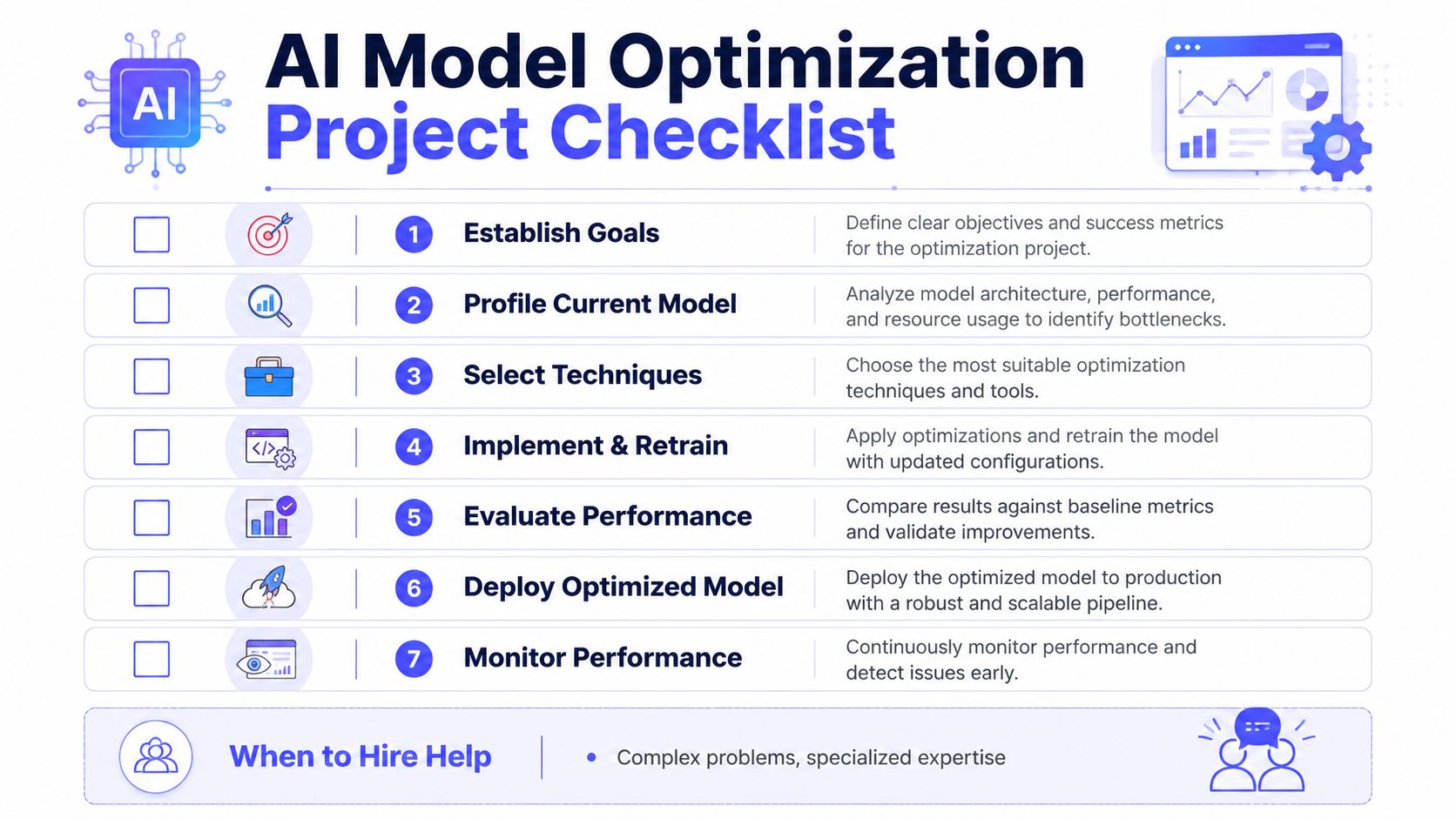
A practical optimization checklist
Use this checklist to keep the work tied to business constraints, not engineering curiosity:
- Name the business limit first. Pick one primary constraint: cost per inference, p95 latency, throughput, or output quality.
- Record the current state. Capture latency, memory use, throughput, infrastructure cost, and the quality metrics your team already trusts.
- Separate system delay from model delay. Measure inference time apart from retrieval, queuing, networking, and application logic.
- Choose one optimization path. Start with a single change such as quantization, batching, distillation, or a smaller serving model.
- Test on production-like traffic. Use the prompts, documents, and edge cases that drive support tickets and margin risk.
- Review failures by segment. Check where quality drops: long inputs, rare classes, multilingual prompts, low-confidence cases, or specific customer tiers.
- Set a stop condition before the test starts. Define what gain justifies rollout and what level of regression kills the experiment.
- Release in stages. Use shadow traffic, canaries, or a limited customer cohort before full deployment.
- Measure post-release economics. Confirm the change improved total cost and response time in production, not just in a benchmark.
One rule keeps teams out of trouble. If you cannot state the target in dollars, milliseconds, or an accepted quality threshold, the sprint is still too vague.
When internal effort stops paying off
Optimization work gets expensive fast when the team is learning tooling, hardware behavior, and evaluation design at the same time. A two-week effort can turn into six weeks without changing the unit economics enough to matter.
Bring in a specialist when you see one or more of these conditions:
- The root cause is still unclear after basic profiling. The team has metrics, but cannot explain whether the pain comes from model compute, memory pressure, orchestration, or hardware mismatch.
- The next gain requires low-level work. Kernel tuning, compiler passes, device-specific runtimes, and mixed-precision debugging are specialist tasks.
- You are optimizing for a fleet, not a single endpoint. Shared infrastructure across teams needs reproducible evaluation, release controls, rollback paths, and cost visibility.
- Regression review is consuming senior engineering time. If strong engineers are spending hours comparing outputs by hand every release, the problem is now systems design and test coverage.
- The business case is flattening. If another optimization cycle might save a little compute but adds weeks of validation and operational complexity, stop and reassess.
I use a simple threshold. If the next round needs specialized inference knowledge and the expected savings are still uncertain, hiring one experienced person is usually cheaper than burning a quarter of platform time across three engineers.
Interview prompts for the specialist you may need
Good optimization hires talk about trade-offs, rollback plans, and measurement discipline. Ask questions that force that level of specificity:
- How would you decide whether our problem is quantization, architecture choice, or serving design?
- What quality floor would you set before changing precision, pruning, or batching behavior?
- How would you benchmark our target hardware in the first week?
- What signals tell you to stop optimizing and ship the current version?
- How do you monitor for silent regressions after release, especially in edge cases?
- Where have you seen optimization save compute but increase operational risk?
Strong candidates answer with an evaluation plan, a deployment sequence, and a view on cost. Weak candidates jump straight to tools, without tying the work back to latency targets, cloud spend, or acceptable accuracy loss.
Start Your First Optimization Sprint Next Week
Don't turn this into a quarter-long architecture debate. Run a narrow sprint.
Three steps to take now
- Measure one live workflow. Pick a single endpoint or feature and capture current latency, memory use, failure cases, and cost per inference.
- Run one controlled optimization test. Often, this involves trying post-training quantization or a smaller task-specific serving option on a copy of production traffic.
- Decide whether this is a platform problem. If the result depends on better evaluation, hardware profiling, or release automation, treat it as an MLOps investment, not a side task.
The goal isn't to produce the most elegant model. It's to ship a system your team can afford to run, support, and improve.
For primary references, review IBM's perspective on generative AI value, NVIDIA's model optimization techniques, the Edge AI and Vision Alliance guidance, and the fairness analysis on optimization risk. For related reading, revisit the earlier pieces on fine-tuning, MLOps discipline, and infrastructure architecture.
If you're deciding whether to optimize in-house or bring in senior help, ThirstySprout can help you move faster with vetted AI and MLOps specialists who've shipped production systems. You can Start a Pilot, See Sample Profiles, or book a short scope call to map the right team for your model, stack, and deployment constraints.
Hire from the Top 1% Talent Network
Ready to accelerate your hiring or scale your company with our top-tier technical talent? Let's chat.