

You probably already have the rough pitch in your head.
“An ai app for iphone that helps users do X faster.”
What you don’t have yet is the operating plan. Should the model run on-device or in the cloud? Is this one iOS engineer and a prompt wrapper, or a real AI product with an MLOps backbone? How much team do you need this quarter? Those are the decisions that decide whether you ship a credible pilot or burn a few months building a demo.
Your AI App Blueprint Starts Here
TL;DR
- Start with one narrow job, not a broad assistant. The iPhone AI market is crowded, and specialized apps often win on clarity and usability.
- Choose architecture based on the user action, not hype. If the feature must be fast, private, or available offline, bias toward on-device. If it needs deeper reasoning or rich generation, use cloud or hybrid.
- Scope in 30 days before you hire heavily. Founders lose time when they hire engineers before they lock the product boundary.
- Staff the smallest serious team possible. For a first pilot, that usually means an iOS engineer, one AI engineer, and someone owning product decisions.
- Treat MLOps as part of product delivery. If you skip data validation, retraining, and monitoring, you’re building a demo, not a product.
If you’re a founder, product lead, or CTO staring at an AI feature idea and wondering how to turn it into a staffed project, you’re in the right place. The hard part usually isn’t the idea. It’s picking the first version that’s small enough to ship and valuable enough to matter.
A lot of teams get stuck between ambition and execution. They know they want to build a mobile app with AI from scratch, but they haven’t translated that into architecture, hiring, and a budget they can defend. That’s where most first projects drift.
By the end of this guide, you should be able to make four concrete calls. What your first AI feature is. Where the intelligence runs. Which roles you need in the next 30 days. And what operational setup will keep the app from collapsing after launch.
The 30-Day Product Scoping Framework
Most first AI app projects fail before engineering starts. Not because the model is bad, but because the team never made the product choices that matter.
Use this four-week sprint to get from idea to an execution-ready brief.
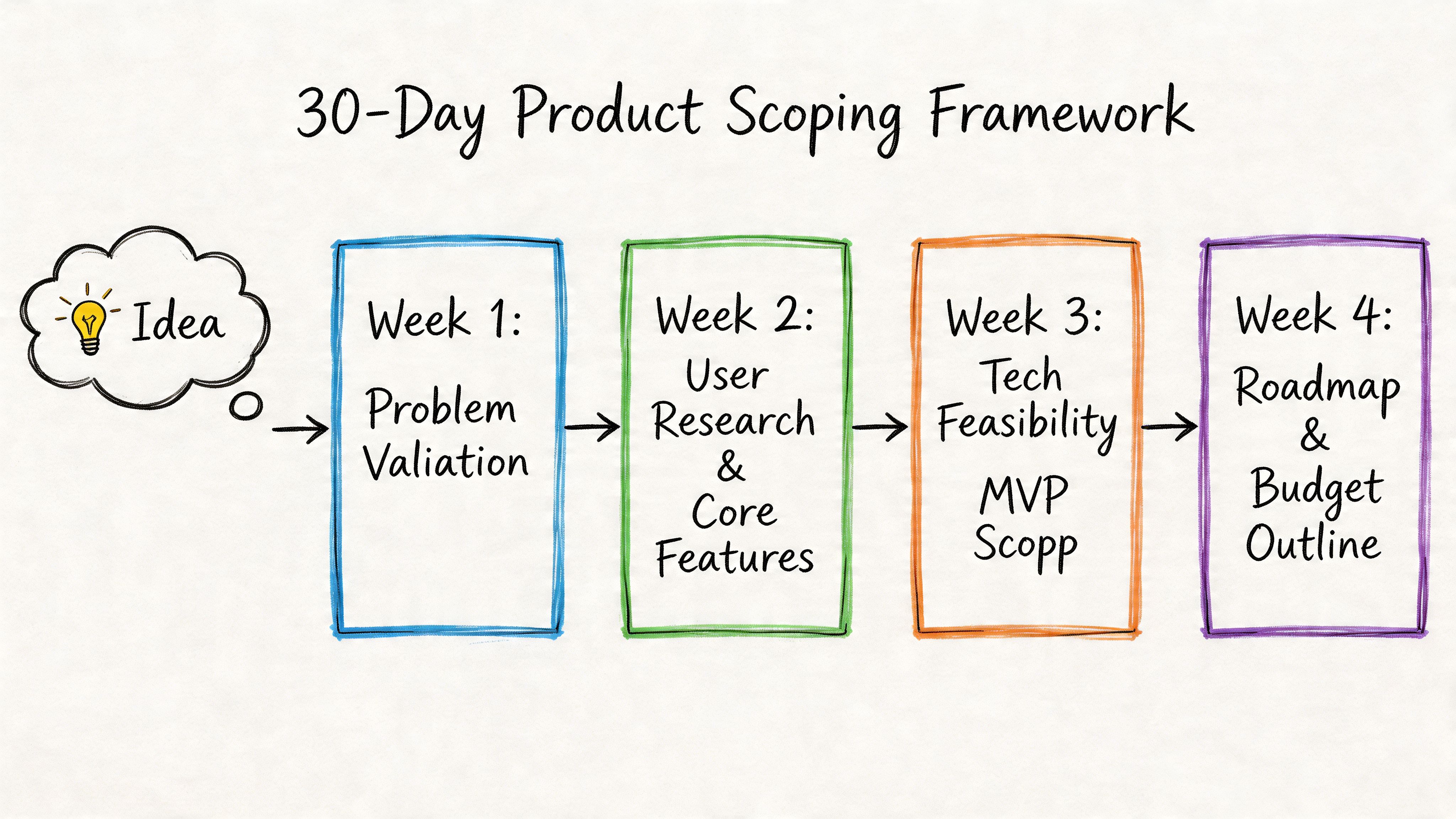
Week 1 define the painful user problem
Don’t start with “AI-powered.” Start with “what repeated task is slow, frustrating, or expensive today?”
The best early iPhone AI products are usually narrow. The market has already moved beyond generic chatbot novelty. The iPhone AI ecosystem has diversified into specialized apps, including statistics-focused tools that use photo recognition for instant problem solving, which is a useful reminder that vertical products can beat general-purpose ones on user experience, as shown by Statistics Solver and related App Store examples.
Ask these questions in week 1:
- Who feels the pain: Student, sales rep, field worker, clinician, traveler, analyst.
- What trigger starts the task: Camera capture, typed question, voice prompt, file upload, location event.
- What outcome matters: Summary, classification, recommendation, draft, extraction, explanation.
- Why iPhone: Camera, voice, notifications, mobility, offline use, context in the moment.
Practical rule: If you can’t describe the core user action in one sentence, your first release is too broad.
A bad starting point is “personal assistant for everyone.” A better one is “scan a handwritten stat problem and explain the next step” or “turn voice notes into structured follow-ups.”
Week 2 cut the feature list brutally
Founders usually over-scope because AI makes everything look possible. Don’t let possibility drive the roadmap.
Pick one critical AI action and support it with just enough surrounding product to make it usable. Everything else goes into a later backlog.
Use this scorecard:
| Feature | User value | AI complexity | iPhone fit | Keep for v1 |
|---|---|---|---|---|
| Camera input | High | Medium | Strong | Yes |
| Voice chat | Medium to high | Medium | Strong | Maybe |
| Long memory | Medium | High | Medium | No |
| Social sharing | Low | Low | Weak | No |
| Admin dashboard | Medium | Medium | Weak for app v1 | Later |
A founder mistake I see a lot is adding “chat” because it feels like an AI product should chat. That’s the wrong default. If your best user experience is scan, classify, and recommend, ship that. Don’t wrap every workflow in a conversation UI.
If you need a practical planning companion, map your sprint decisions into an AI implementation roadmap for delivery planning. It helps force sequencing decisions that teams often avoid until too late.
Week 3 define the minimum viable model
Your Minimum Viable Model is the least complex model behavior that still delivers value. Not the smartest model you can access.
For many first builds, that means one of these:
Classification first
- Tag sentiment
- Detect intent
- Categorize a captured image or note
Structured generation second
- Fill a template
- Create a checklist
- Produce a constrained recommendation
Open-ended generation last
- Multi-turn assistant
- Broad advice engine
- Deep reasoning workflow
- Primary user story: “As a user, I can do X in Y context and get Z outcome.”
- Input types: text, voice, photo, document
- Output format: labels, summary, itinerary, action items, confidence note
- Failure behavior: fallback copy, retry flow, human review, “I’m not sure”
- Success definition: operational and product-level signals your team will review weekly
- Capture story: User snaps a photo of a worksheet and receives a parsed explanation.
- Correction story: User can edit the result if the model missed context.
- Trust story: User sees whether the answer was generated on-device or from a cloud model.
- Retention story: User can reopen prior results and continue from the same task.
- Fast response on every tap: live camera assist, real-time labeling, instant suggestions
- A stronger privacy position: journaling, personal notes, health-adjacent features
- Offline support from day one: travel, field work, transit, poor connectivity
- Lower cloud spend in v1: fewer inference calls and less backend complexity
- Longer reasoning chains
- Large context windows
- Cross-device state and account history
- Frequent model swaps without waiting for App Store releases
- On-device: input cleanup, lightweight classification, local ranking, caching
- Cloud: complex planning, rich generation, account-level personalization
- Fallback behavior: if the cloud request fails, the local workflow still completes a useful task
- Frontend: SwiftUI
- Local AI stack: Core ML model for sentiment and theme tagging
- Storage: encrypted local store for entries and tags
- Optional sync: iCloud or account sync for history
- No mandatory cloud inference: local-first by default
- 1 iOS engineer: owns app shell, local storage, voice input, Core ML integration
- 1 part-time ML engineer: prepares the model, evaluates outputs, tunes tagging quality
- 1 product owner or founder: defines categories, reviews failures, owns launch scope
- Deliver a journal flow that captures entries, returns mood and theme tags, and gives a useful follow-up prompt without requiring server-side generation.
- Frontend: SwiftUI
- Backend: FastAPI service
- AI layer: cloud LLM for itinerary generation and revision
- Supporting services: persistence, authentication, prompt logging, response guardrails
- Optional local layer: cache preferences and recent trips on device
- 1 iOS engineer: app flows, state management, account and sync work
- 1 backend or AI engineer: API orchestration, prompt and response logic, logging
- 1 AI product manager: writes specs, defines acceptable output, manages evaluation reviews
- Generate a valid multi-day trip plan that users can revise conversationally and save by trip.
- iOS engineer: “What degrades gracefully if inference takes five seconds instead of one?”
- AI engineer: “How do you score output quality when there is no single right answer?”
- Product lead: “What do you cut first if users only trust one workflow in v1?”
- Backend engineer: “How do you log bad outputs and retries without storing sensitive user content?”
- People: salaries, contracts, recruiting time, founder oversight
- Inference: API costs, test runs, experimentation, fallback paths
- Tooling: logging, analytics, eval workflows, crash reporting, basic model ops
- Operations: bug fixing, prompt changes, edge-case reviews, App Store release work
- users are returning because of the AI feature, not despite it
- cloud orchestration is becoming a product advantage
- the app is turning into a platform with multiple AI workflows
- Validate incoming inputs: image type, audio quality, transcript completeness, required metadata
- Check dataset structure: labels, class balance, field names, null rates
- Version every dataset: know what changed, who changed it, and which model used it
- Gate retraining jobs: if data quality drops, stop the run instead of shipping damage
- memory use
- startup time
- battery impact
- inference latency
- fallback behavior by device class
Collect failures
- wrong outputs
- low-confidence responses
- user edits and corrections
- slow or timed-out runs
Review them every week
- model issue
- prompt issue
- retrieval issue
- app logic issue
- bad input data
Make one fix at a time
- relabel data
- adjust prompts
- tighten confidence thresholds
- add edge-case handling
- change fallback rules
Re-test before release
- compare against the previous version
- run known failure cases
- confirm latency and battery did not regress
- request routing
- timeouts and retries
- cost caps
- logging and redaction
- privacy boundaries
- service monitoring
- release rollback
- Lock the v1 job: one user problem, one primary AI action
- Document the architecture choice: on-device, cloud, or hybrid, with a reason tied to cost, latency, and privacy
- Define trust boundaries: what stays local, what leaves the phone, what gets logged
- Write failure states: what the app says when the model is wrong, slow, or unsure
- Set a post-launch tuning budget: reserve time every week for prompt changes, thresholds, and edge-case fixes
- Review battery impact: test camera, voice, and continuous inference on real devices before release
- Assign one owner for launch quality: one product or engineering lead, not a committee
This order matters because structured outputs are easier to test, monitor, and improve.
Ship the model behavior you can evaluate, not the one that sounds impressive in a pitch deck.
Week 4 write user stories and acceptance rules
By the end of week 4, you need a product brief an engineer can build from without guessing.
Include:
A simple user story set for a first ai app for iphone might look like this:
At the end of 30 days, you should have five artifacts: problem statement, v1 feature list, architecture choice, staffing plan, and an agreed launch scope. If you don’t have those, you’re still ideating, not building.
Choosing Your AI Architecture On-Device vs Cloud
A founder approves an AI iPhone app on Monday, hires one iOS engineer on Tuesday, and by Friday the team is stuck on the wrong question. They are debating model vendors before they have decided where inference should run. That mistake burns time, inflates scope, and usually adds backend work the team did not budget for.
Start with one hard product decision. Does the core user action need to work fast, privately, and without a connection, or does it need heavier reasoning than a phone can handle well? Your answer sets staffing, budget, and delivery risk for this quarter.
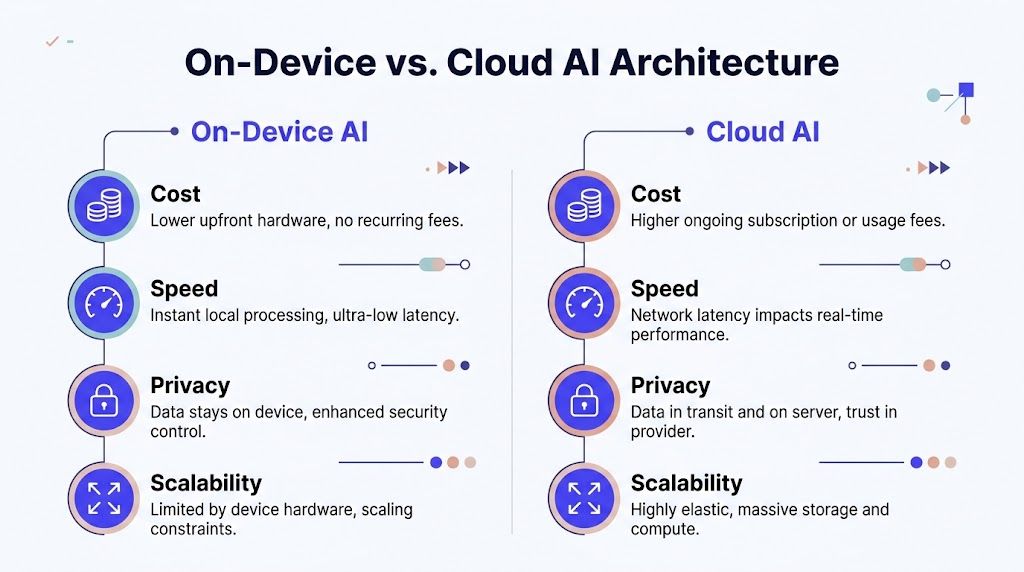
When on-device is the right call
Pick on-device AI if your app wins on speed, privacy, or offline use.
That covers camera utilities, short text classification, accessibility helpers, note tagging, and other narrow workflows where the result has to feel instant. Users do not care that you saved a server call. They care that the app responds immediately and keeps personal data on the phone.
This path also simplifies your first 90 days. You can often ship v1 with a smaller team, fewer moving parts, and lower monthly infrastructure cost. The tradeoff is model capability. You need a tightly scoped use case and testable outputs, because the phone is not the place for broad reasoning or long-form generation.
Choose on-device if your product needs:
A practical founder rule is simple. If one iOS engineer and one part-time ML engineer can own the full feature without building a serious backend, on-device is probably the right starting point.
When cloud is the better business decision
Choose cloud AI if the product promise is depth.
That includes long-form writing help, itinerary planning, document synthesis, knowledge assistants, and workflows that depend on larger context windows or frequent model upgrades. You get better reasoning and more flexibility. You also take on latency, data handling obligations, and a recurring inference bill that can surprise a first-time founder fast.
Cloud also changes your team plan. An iPhone app alone is not enough. You need someone to own API orchestration, logs, prompt and model versioning, error handling, and data policy. If that work is not staffed, the product will feel unstable no matter how polished the UI looks.
Use cloud if your app needs:
For this route, the backend is a product surface, not support plumbing. If you need a clearer view of that workload, review what sits inside modern cloud application development services for AI products.
Here is the comparison that matters during planning:
| Decision factor | On-device AI | Cloud AI |
|---|---|---|
| User-perceived speed | Strong for immediate tasks | Depends on network and service round trip |
| Privacy posture | Stronger by default | Needs explicit data policy and controls |
| Model capability | More constrained | Broader and deeper |
| Ongoing infra burden | Lower server dependency | Higher operational dependency |
| Offline support | Strong | Weak unless hybridized |
Before you lock the decision, watch a concrete walkthrough of mobile AI architecture tradeoffs:
Why hybrid is usually the right v1
For a first AI app for iPhone, hybrid is usually the smartest operating plan.
Keep the fast, predictable work on-device. Send only the expensive or complex requests to the cloud. That protects the user experience and gives you room to control cost while the product is still finding retention.
A good split looks like this:
This is the architecture I recommend for most founding teams in their first quarter. It limits backend scope, keeps the app responsive, and lets you staff the project with a small team instead of committing too early to a heavier platform build.
Two Practical AI App Blueprints
Abstract advice is cheap. Concrete blueprints force better decisions.
Below are two realistic patterns. One is narrow, useful, and local-first. The other is broader, more capable, and service-heavy.
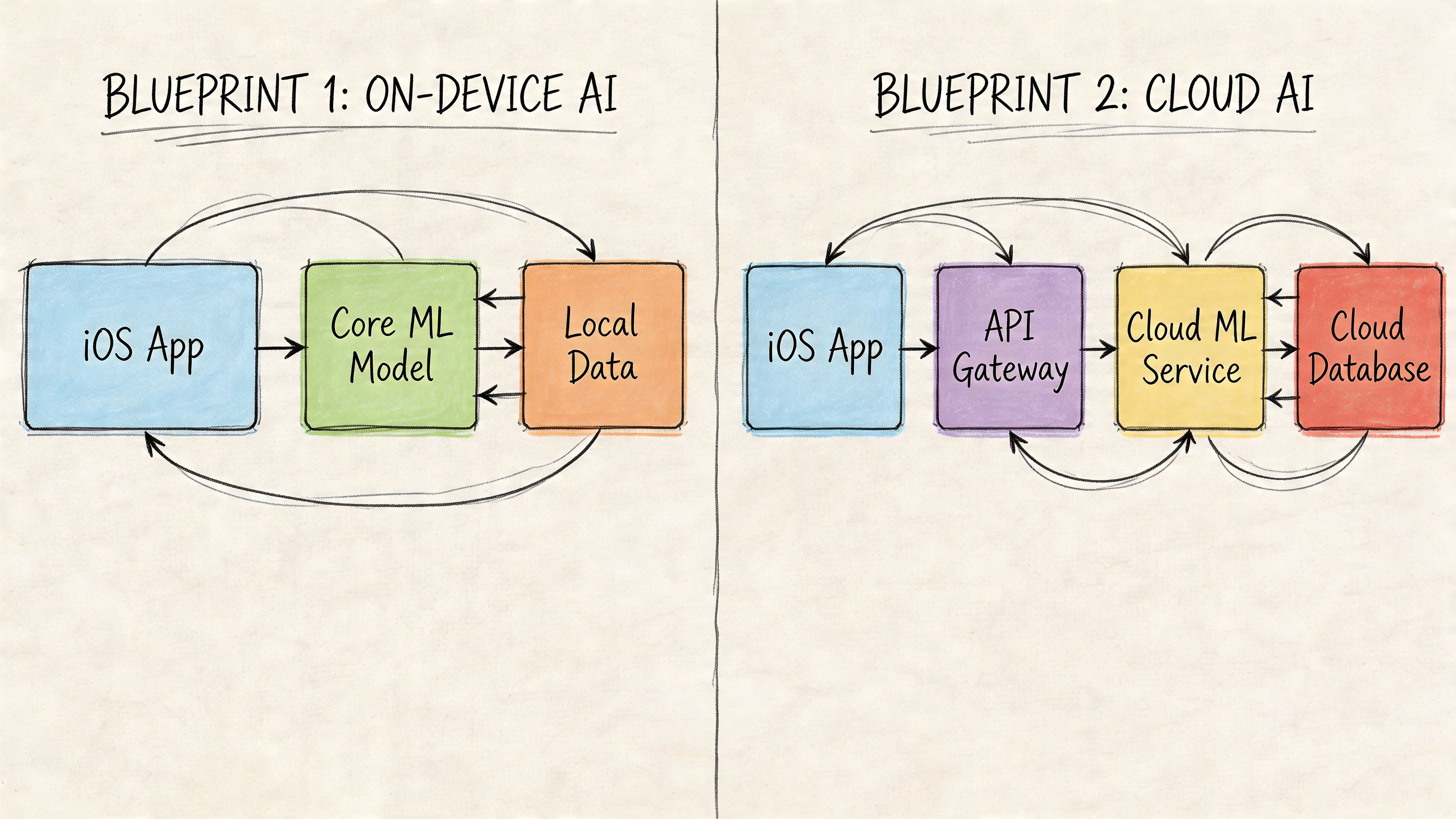
Blueprint one smart journal with on-device AI
This app helps users capture short entries by voice or text, then tags mood, themes, and follow-up prompts privately on the phone.
This is a strong first product because the user value is obvious, the workflow fits iPhone behavior, and privacy is central to adoption. You don’t need a giant model. You need a reliable one.
Architecture
Team
90-day goal
This blueprint works because the output can be structured. “Mood,” “topic,” and “prompt” are easier to evaluate than open-ended advice. That keeps your first release testable.
Blueprint two personalized itinerary planner with cloud AI
This app takes a traveler’s preferences and constraints, then generates a multi-day plan with revisions.
Now you’re in cloud territory. The user expects synthesis, reasoning, and conversation. If the app has to combine dining preferences, family needs, pacing, and local suggestions into one coherent plan, local-only AI will feel thin.
Architecture
Team
90-day goal
This is a much heavier build than the journal app. Not because the UI is harder, but because the product quality depends on backend control. You need to handle malformed outputs, contradictory user constraints, and prompt drift.
What these blueprints teach
The first blueprint is ideal if you need a credible pilot fast and want to learn from user behavior without standing up much infrastructure.
The second blueprint is right if the product itself is the reasoning engine. But don’t fool yourself. Once you build a cloud-centered assistant, you’re also building service operations, prompt governance, and support tooling.
The simplest useful app beats the smartest unstable app.
If you’re torn between these two patterns, ask one blunt question. Does the user primarily need instant assistance in the moment, or deeper synthesis across multiple inputs? The answer usually decides the architecture and team.
Assembling Your AI App Team and Budget
You approve an AI iPhone app this month. Thirty days later, the team is still arguing about who owns prompts, who owns latency, and who decides whether a broken output blocks release. That is a staffing failure, not a technical one.
For a first AI app, hire around decision rights. One person owns the iPhone experience. One person owns model behavior and evaluation. One person owns scope, release criteria, and cuts. If you blur those lines, you burn weeks and still end up with a vague v1.
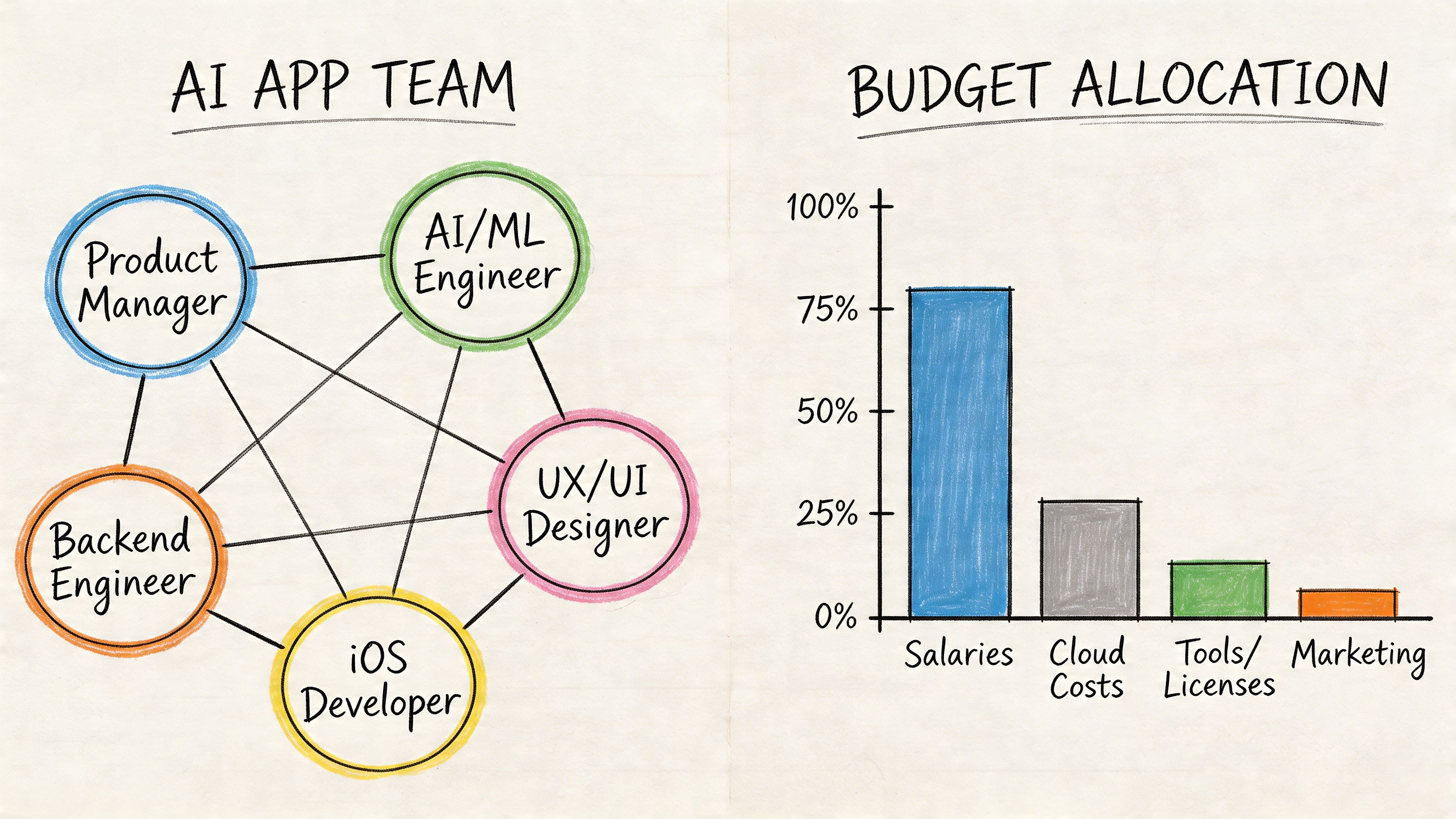
The team I would actually staff this quarter
Start with the smallest team that can ship, measure quality, and fix failures fast.
| Role | What they own | Hiring recommendation |
|---|---|---|
| iOS engineer | SwiftUI app, device permissions, app performance, local model hooks, analytics events | Full-time from day one |
| AI or ML engineer | model selection, prompt logic, evaluations, failure analysis, output quality | Full-time from day one |
| Product lead or AI PM | scope, acceptance criteria, release decisions, user workflow definition | Fractional or full-time from day one |
| Backend engineer | APIs, auth, logs, orchestration, cloud inference, queues | Add immediately for cloud or hybrid apps |
| Designer | onboarding, trust cues, error states, model response presentation | Part-time early |
Three people can get an on-device pilot out the door. A cloud or hybrid product usually needs four. Founders get into trouble when they try to save money by asking the iOS engineer to absorb backend orchestration and model QA. That shortcut creates a slow, brittle product.
What to screen for
You are not hiring for research prestige. You are hiring for shipping judgment.
Ask questions that force candidates to explain how they contain failure in production:
Good candidates answer with ownership, tradeoffs, and release rules. Weak candidates answer with tools and jargon.
Budget by month, not by role
Founders usually underestimate two line items. Evaluation time and post-launch cleanup.
Your first-quarter budget needs four buckets:
Keep the budget tied to a 30-day scoping plan and a 60 to 90-day pilot. If the app depends on AI quality, reserve time every week for review of bad outputs, slow responses, and failed user sessions. If that time is not staffed, it still exists. It just shows up later as churn and support load.
Use a simple rule. If you cannot name who reviews output quality every week, you do not have a real budget.
What this costs in practice
For a focused first app, I would plan around a small delivery team, not a department. One dedicated iOS engineer, one dedicated AI engineer, one fractional product lead, and a backend engineer if the product hits cloud services. Add design support early, then taper it.
That staffing plan gives you enough coverage to scope in 30 days and ship a real pilot in the next 60 to 90. It also gives you clear owners for product quality, which matters more than feature count in an early AI release.
If you need help setting up evaluation, logging, and release discipline, use a lightweight MLOps implementation plan for early product teams. For teams comparing tooling before they hire platform help, review Top AI Workflow Automation Tools for your MLOps pipeline.
Fractional versus full-time
My recommendation is simple. Keep product leadership fractional at first. Keep iOS dedicated. Keep AI dedicated if the core feature depends on model output. Add backend full-time earlier than you think if the app is cloud-based.
Go heavier only when one of these is true:
Do not build a large permanent AI team before the product earns it. Buy speed, clarity, and accountability first. Then add headcount after the pilot proves where the app wins.
The MLOps Pipeline You Actually Need
Week six is where first-time AI app teams usually get exposed. The demo worked. Test users liked the feature. Then a data field changes, latency spikes on older iPhones, and nobody can explain why output quality dropped. That is not a model problem. It is an operations problem.
Treat MLOps as part of the product plan from day one. If your ai app for iphone depends on models, prompts, retrieval, or hybrid inference, you need a small production loop before you need a larger model.
Step one. Set up data checks before you ship
Bad inputs will break your AI feature faster than bad UI. A missing metadata field, changed transcript format, or weak label set can gradually degrade results for weeks.
Start with four controls:
This work is not glamorous. It saves releases.
For a practical operating checklist, keep a lightweight set of MLOps best practices for production AI teams tied to your sprint plan, not buried in platform docs.
Step two. Profile the app like a product, not a research project
On-device AI fails for boring reasons. Memory pressure. Battery drain. Cold start lag. Thermal throttling on older devices.
Your team should be measuring:
If they are not profiling with Apple tooling and testing on older phones, they are guessing. Founders should ask one direct question every week: what happens on the slowest supported device after ten minutes of real use?
If local AI makes the app hot, slow, or unreliable, users will delete it before they appreciate the model quality.
If you are comparing orchestration and monitoring options while keeping the stack lean, this roundup of Top AI Workflow Automation Tools for your MLOps pipeline is a useful starting point.
Step three. Build a weekly feedback loop
Models drift. User behavior changes. Edge cases pile up. None of that is surprising. What matters is whether one person owns the review loop and turns failures into product decisions.
Your minimum loop should look like this:
Do not wait for a full retraining cycle to improve quality. Early teams get better results by tightening prompts, filters, and fallback behavior between model updates.
Step four. Run hybrid systems like two products
If part of the AI runs in the cloud, you now own an iPhone app and an AI service. Budget and staff accordingly.
The server side needs clear ownership for:
Founders often lose a quarter. They approve a hybrid design, staff it like a mobile feature, then spend the next two months fixing queueing, tracing, and runaway inference costs. Avoid that mistake. Put operating rules in place before traffic arrives.
The right MLOps pipeline for an early AI iPhone app is small and strict. Validate inputs. Profile on real devices. Review failures weekly. Put guardrails around cloud costs and privacy. That is enough to ship a pilot without creating a mess your team cannot maintain.
Your AI App Launch Checklist and Next Steps
You are 10 days from launch. The demo works. TestFlight users like the core feature. Then the real questions hit at once. What data leaves the phone, who owns model quality after release, how much cloud usage can you afford, and what happens when inference slows down on an older iPhone?
Those are launch decisions, not cleanup tasks. If you are building an ai app for iphone, treat launch as an operating plan for the next 90 days. The model is only one part of the product. Privacy, battery impact, support load, and cloud spend will decide whether v1 survives long enough to improve.
Use this checklist before you ship:
A simple reality is that free usage still has a cost. You pay in API spend, battery drain, support tickets, review risk, or engineering time. Cloud AI also changes your staffing plan. If your app sends requests off-device, you need someone accountable for service reliability and cost control in the first month, not after the first incident.
Make the next step concrete. By the end of this quarter, finish your scope, name the launch owner, and approve the first 60 days of budget for tuning and support. That is how founders get from AI prototype to shipped product without wasting a quarter.
If you want to staff this project without wasting a quarter on hiring, ThirstySprout can connect you with vetted remote AI engineers, MLOps specialists, and AI product leaders who’ve shipped production systems before. Start a pilot, get the right team in place fast, and build the app correctly the first time.
Hire from the Top 1% Talent Network
Ready to accelerate your hiring or scale your company with our top-tier technical talent? Let's chat.