

Hiring a React developer for an AI product usually breaks down in the same place. The candidate can define hooks, maybe explain props versus state, and still struggle when the UI has to stream inference results, manage long-running requests, or stay responsive under heavy data updates.
That's why I don't treat react interview questions and answers as a trivia exercise anymore. I use them as a hiring framework. The questions below are the ones I'd use to separate people who've built toy apps from people who can ship production-grade frontends for model monitoring, prompt tooling, annotation workflows, and internal AI ops dashboards.
React's reach is a big reason this format has become so standardized. According to the 2024 Stack Overflow Developer Survey summary cited in a major React interview repository, React was used by 39.5% of all respondents and 42.6% of professional developers, and one public repository alone lists 500 ReactJS interview questions and answers, which shows how formalized React screening has become in hiring the React interview repository on GitHub. For a team that needs to hire well, that means the process needs structure too.
Use these 10 questions with model answers, follow-up prompts, and a 4-point rubric. If you want to tighten the practical side of the loop, pair this with e2eAgent.io on frontend testing. Good React hires don't just write components. They ship stable interfaces that survive real users, flaky networks, and product change.
1. What is React and What are its Key Features?
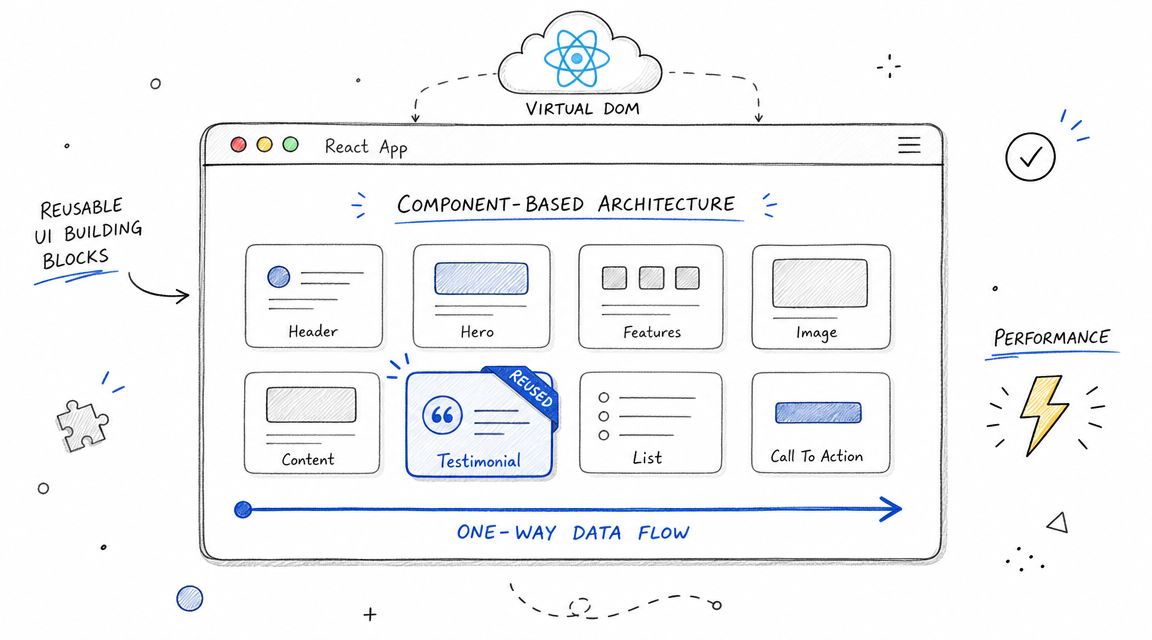
A strong candidate should answer plainly. React is a JavaScript library for building user interfaces with reusable components. The useful part isn't the definition. It's whether they can connect React's model to maintainable product work.
The best answers mention component-based architecture, declarative rendering, one-way data flow, and the virtual DOM. In hiring, I want to hear why those matter. If someone says component reuse helps keep a model-monitoring dashboard consistent across charts, filters, and status widgets, they're thinking like an engineer who has lived in a large codebase.
Model answer
React lets teams break a UI into small, reusable components that each manage rendering for a specific piece of the interface. Its main features are declarative UI updates, one-way data flow, reusable composition, and efficient updates through the virtual DOM and reconciliation.
For AI products, that matters because the frontend usually isn't a single screen. You have model lists, inference logs, prompt editors, job status views, permissions, and charts. React makes it easier to compose those into a consistent system instead of building every page as a one-off.
A practical example is an annotation tool. A candidate should be able to explain why shared components for task cards, reviewer comments, and quality flags reduce bugs and speed up feature delivery. That's the same kind of engineering discipline you'd expect in broader software engineering roles and hiring paths.
Follow-up prompts
- What does one-way data flow prevent in a large app?
- Why is component composition better than copy-paste reuse?
- Where does React help, and where does it not help?
Practical rule: If a candidate can only recite features but can't map them to a real product UI, I score them low even if the wording is technically correct.
4-point rubric
- 1 Novice: Defines React vaguely as a framework or “frontend tool.”
- 2 Basic: Mentions components and state, but stays theoretical.
- 3 Strong: Explains features and ties them to maintainability or scale.
- 4 Expert: Connects React's design to real UI architecture, trade-offs, and business delivery speed.
2. Explain the Difference Between State and Props in React
This question sounds basic. It isn't. A lot of frontend bugs come from people who don't have a clean mental model for ownership of data.
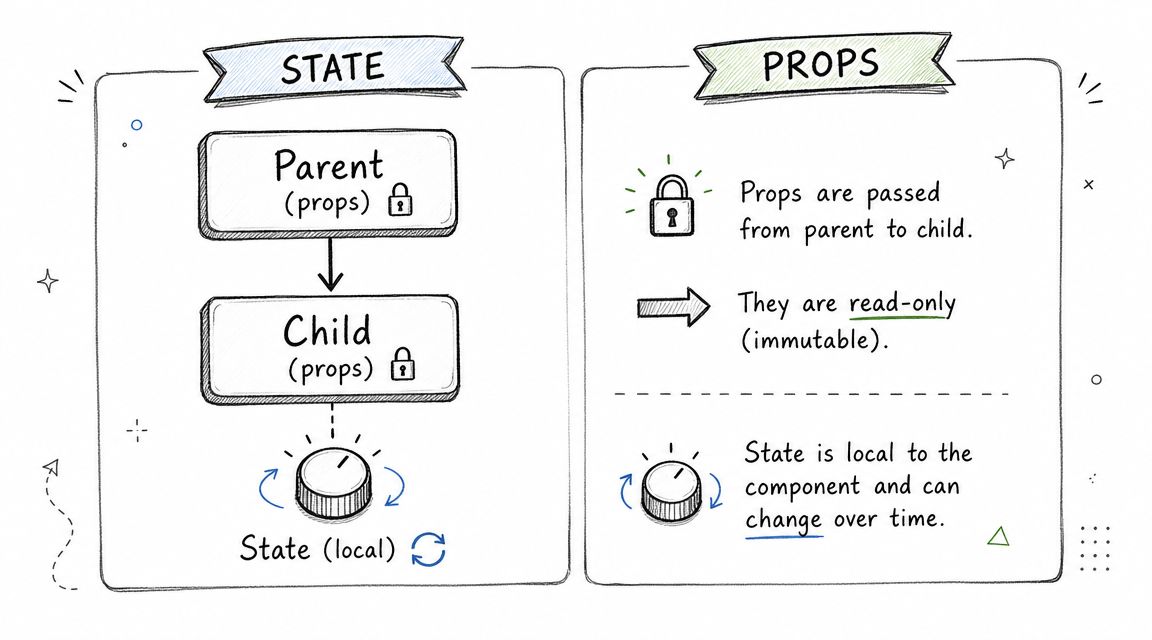
The simple answer is that props are inputs passed into a component, while state is data managed by the component itself. But the useful answer goes further. It explains who owns the data, who can change it, and when state should be lifted up.
What a good answer sounds like
Props are read-only values that a parent passes to a child. State is mutable data managed inside a component or through a state container. Props configure behavior and display. State tracks things that change because of user interaction, async updates, or UI flow.
In an AI dashboard, you might pass model metrics into a chart as props. But the selected date range, active tab, or loading spinner for an inference request would usually live in state. If multiple sibling components need the same selected model, lift that state to the nearest common parent.
Where candidates usually get stuck
They often say “state is local and props are from the parent” and stop there. That's not enough for a senior hire. I want to hear whether they know when too much local state creates drift, and when a parent should become the source of truth.
Mini example
- Props example:
accuracy,latency, anderrorRatepassed into a metrics card. - State example:
isRefreshing,selectedModelId, anddateRangeinside the dashboard shell.
Follow-up prompts
- What's prop drilling, and when is it acceptable?
- When would you lift state up?
- When would you avoid putting something in React state at all?
4-point rubric
- 1 Novice: Knows the words but confuses mutability and ownership.
- 2 Basic: Gives the textbook definition with no real implications.
- 3 Strong: Explains data flow and lifting state up correctly.
- 4 Expert: Discusses ownership, synchronization bugs, and when state belongs in context or an external store instead.
3. What are React Hooks and Explain the Purpose of useState and useEffect?
Modern React interviews changed after Hooks arrived. React 16.8 introduced Hooks in 2019, which shifted interview focus away from class components alone and toward stateful functional components, effects, memoization, and custom hooks, as summarized in a React interview timeline from Edureka the React interview timeline summary. If a candidate still answers this like it's 2018, that shows up fast.
Model answer
Hooks let function components use state and lifecycle-related behavior without class components. useState stores component state. useEffect runs side effects after render, such as fetching data, subscribing to a stream, or cleaning up listeners.
For an AI product, useState might hold the current inference result or selected experiment. useEffect might fetch evaluation metrics when a model ID changes, or open and clean up a WebSocket subscription for live training logs.
A practical example
function ModelPanel({ modelId }) {const [metrics, setMetrics] = React.useState(null);const [loading, setLoading] = React.useState(false);React.useEffect(() => {let cancelled = false;setLoading(true);fetch(`/api/models/${modelId}/metrics`).then((r) => r.json()).then((data) => {if (!cancelled) setMetrics(data);}).finally(() => {if (!cancelled) setLoading(false);});return () => {cancelled = true;};}, [modelId]);if (loading) return <p>Loading...</p>;return <pre>{JSON.stringify(metrics, null, 2)}</pre>;}This snippet is simple, but it reveals whether the candidate understands dependency arrays, cleanup, and stale async work.
A weak answer describes
useEffectas “componentDidMount for function components.” A strong answer explains dependencies, cleanup, and why effects shouldn't be used to derive state that can be computed during render.
Follow-up prompts
- What goes wrong when the dependency array is wrong?
- When should logic become a custom hook?
- What side effects don't belong in
useEffect?
4-point rubric
- 1 Novice: Can name Hooks but misuses
useEffect. - 2 Basic: Knows
useStateanduseEffectat a surface level. - 3 Strong: Handles dependencies and cleanup correctly.
- 4 Expert: Understands effects, derived state traps, and custom hook design for reusable async workflows.
4. What is the Virtual DOM and How Does React Use It for Performance Optimization?
A lot of candidates memorize “virtual DOM is faster” and leave it there. That answer is too sloppy for a production hire.

React uses an in-memory representation of the UI, compares the new tree to the previous one, and updates only the necessary parts of the actual DOM. That process is reconciliation. The key signal in an interview is whether the candidate understands that React doesn't magically make every app fast. It gives you a model for efficient updates, but poor component boundaries and unstable props can still create waste.
What I want to hear
In a real-time ML monitoring screen, metrics might update frequently. React can compare the changed virtual DOM output and patch only the necessary DOM nodes instead of rebuilding the entire page. That reduces unnecessary browser work and helps keep the UI responsive.
But I also want candidates to say the quiet part out loud. The virtual DOM itself has overhead. If you push massive re-renders through the tree, React still has work to do. Performance comes from good architecture, not from the phrase “virtual DOM.”
For hiring calibration, this is one of the better questions in broader technical interview frameworks for engineers because it reveals whether someone can reason about runtime behavior.
Follow-up prompts
- Why do unstable keys or inline objects cause extra work?
- When would virtualization matter in a large list?
- What would you profile first in a sluggish dashboard?
A quick refresher video can help align interviewers before the loop starts.
4-point rubric
- 1 Novice: Says “virtual DOM makes React fast” with no mechanism.
- 2 Basic: Mentions diffing and updates, but vaguely.
- 3 Strong: Explains reconciliation and practical rendering impact.
- 4 Expert: Connects virtual DOM behavior to component boundaries, profiling, and high-frequency UI updates.
5. Explain React Component Lifecycle (Class Components) and Hooks Equivalent (Functional Components)
You still want this question in the loop because older codebases exist, and lifecycle thinking is really resource-management thinking.
Model answer
Class components have mounting, updating, and unmounting phases. componentDidMount runs after first render, componentDidUpdate runs after updates, and componentWillUnmount handles cleanup. In modern React, function components usually express the same behavior with useEffect.
A candidate should be able to translate old lifecycle code into Hooks. Example. Fetch model metadata on mount, refetch when modelId changes, and close the subscription when the component unmounts.
What matters in production
This is less about nostalgia and more about cleanup discipline. In AI interfaces, you often deal with polling, streams, timers, and long-running requests. Engineers who forget cleanup create memory leaks, duplicate subscriptions, and phantom updates after navigation.
Mini case
A prompt-testing UI opens a live token stream when the user runs an experiment.
- On mount, create the stream.
- On update, reconnect if the prompt session changes.
- On unmount, close the stream and abort pending requests.
If the candidate misses the cleanup step, that's a red flag.
Cleanup isn't a React trivia point. It's the difference between a stable product and a browser tab that gets slower all afternoon.
Follow-up prompts
- How would you mimic
componentDidMountwith Hooks? - What's the mistake in writing one huge
useEffectfor unrelated concerns? - When would you split effects?
4-point rubric
- 1 Novice: Knows lifecycle names but not behavior.
- 2 Basic: Can map basic lifecycle methods to
useEffect. - 3 Strong: Understands mount, update, unmount, and cleanup.
- 4 Expert: Explains effect separation, abort patterns, and migration from legacy class code cleanly.
6. What is Context API and How Does It Compare to Redux for State Management?
This is one of the most commonly weakly answered React interview questions and answers categories in senior loops. Public interview material often gives the shallow version. Use local state for local UI, context for shared state, Redux for complex apps. That's not wrong. It's just not enough.
A more nuanced interview perspective from GreatFrontEnd highlights the core issue. Context performance improves when teams memoize provider values, split contexts, and use selectors so only the necessary consumers re-render the state management trade-off guide from ex-interviewers. That's the level of reasoning worth hiring for.
Practical answer
Context is built into React and works well for relatively stable shared values such as theme, auth, locale, or a selected workspace. Redux is an external state manager with a more explicit update model and better tooling for large, complex state transitions.
In an AI product, I'd be comfortable using Context for authenticated user info and feature flags. I'd get more careful with something like a multi-step model configuration flow, where many components need coordinated updates, undoable actions, and predictable transitions. That's where an external store can be easier to reason about.
What not to accept
Don't accept “Context replaces Redux” as a senior answer. It ignores re-render behavior, debugging needs, and the fact that modern apps often also have server state, which may belong in a cache layer rather than in Context or Redux.
Follow-up prompts
- When does Context become a performance liability?
- How would you reduce re-renders in a provider tree?
- Which state belongs on the client, and which belongs in a server cache?
4-point rubric
- 1 Novice: Treats Context and Redux as interchangeable buzzwords.
- 2 Basic: Knows the standard use-cases but not the trade-offs.
- 3 Strong: Discusses render behavior and complexity objectively.
- 4 Expert: Distinguishes local UI state, shared client state, and server state, and can justify boundaries.
7. What are Higher-Order Components (HOC) and Render Props? When Would You Use Each?
This one is useful because it shows whether a candidate can work in a mixed-age codebase. New React code tends to prefer custom hooks, but HOCs and render props still show up in production systems and libraries.
Model answer
A higher-order component is a function that takes a component and returns an enhanced component. It's useful for cross-cutting behavior such as auth guards, error handling, or injected data. Render props use a function prop to let a component share logic while the consumer controls rendering.
In older React code, you might see a withPermissions HOC that injects user capabilities into a feature panel. You might also see a render-prop data provider that fetches model metrics and hands them to a child render function.
The trade-off that matters
For new code, I usually prefer custom hooks because they compose more naturally and avoid wrapper nesting. But I still want candidates to understand HOCs and render props because production teams inherit code. The person who can maintain old patterns without spreading them into new code is usually more useful than the person who dismisses them outright.
Mini example
- HOC use-case:
withErrorBoundary(ModelComparisonPage) - Render prop use-case:
<InferenceData render={(data) => <Chart data={data} />} />
Older patterns aren't automatically bad. They're bad when candidates can't explain their cost and keep reaching for them by habit.
Follow-up prompts
- Why do hooks usually replace these patterns now?
- What problems do HOCs create in DevTools or prop tracing?
- When is a render prop still the cleanest option?
4-point rubric
- 1 Novice: Can't define either pattern clearly.
- 2 Basic: Defines them but can't compare them.
- 3 Strong: Understands reuse trade-offs and legacy relevance.
- 4 Expert: Knows when to maintain old abstractions and when to replace them with hooks.
8. How Does React Handle Events and What are Synthetic Events?
This question is less about memorization and more about whether the candidate understands the React programming model around interactions.
A clean answer
React wraps browser events in a cross-browser abstraction called SyntheticEvent. You still use familiar methods like preventDefault() and stopPropagation(), but React gives you a consistent API across browsers and manages event handling through its own event system.
In product work, that matters when you have a lot of interactions happening quickly. Think about a labeling tool with click targets, keyboard shortcuts, scrolling, and bulk actions. Engineers who understand event flow write fewer weird interaction bugs.
Practical example
In a prompt-evaluation UI:
onChangeupdates the draft prompt inputonSubmitsends the evaluation requestonClicktriggers a retry for a failed runonScrollloads additional historical results
A senior candidate should also mention that event handling in React is usually declarative. You attach handlers in JSX instead of imperatively wiring DOM listeners all over the place.
Follow-up prompts
- What's the difference between passing a handler and calling one during render?
- When should you stop propagation, and when shouldn't you?
- How would you handle a heavy interaction without freezing the UI?
4-point rubric
- 1 Novice: Knows event names but not React's event model.
- 2 Basic: Can explain
onClickandpreventDefault. - 3 Strong: Understands synthetic events and practical form handling.
- 4 Expert: Can reason about event flow, delegation behavior, and interaction design in complex UIs.
9. Explain the Concept of Controlled vs Uncontrolled Components. When Would You Use Each?
This question gets practical fast because forms in AI products are rarely simple. You may have hyperparameter tuning, batch upload, validation-heavy config forms, or third-party widgets that don't fit React's model cleanly.
Model answer
A controlled component stores form values in React state and updates them through handlers. An uncontrolled component lets the DOM hold the current value, usually accessed through refs or form submission APIs.
Use controlled components when you need validation, conditional UI, formatting, or live feedback. Use uncontrolled components when the form is simple, you want less React wiring, or you're integrating with browser-native or third-party form behavior.
Real-world examples
A hyperparameter settings panel is usually controlled. You want validation, dependency rules, and live previews of what changed.
A file upload for training data is often a good uncontrolled candidate. The browser already manages file input behavior, and over-controlling it usually adds friction instead of value.
What works and what doesn't
Controlled inputs are easier to test and reason about when the form drives product logic. But candidates should admit the trade-off. Large controlled forms can get noisy if every field rerenders too much or state is structured poorly.
Follow-up prompts
- Why are file inputs usually treated differently?
- When does a controlled form become cumbersome?
- How would you structure validation in a multi-step workflow?
4-point rubric
- 1 Novice: Can't distinguish the two.
- 2 Basic: Gives the textbook difference.
- 3 Strong: Picks the right pattern for common form scenarios.
- 4 Expert: Explains validation, third-party integration, and performance trade-offs in form-heavy apps.
10. What are Key Props in React Lists and Why are They Important?
I like ending the fundamentals section here because keys seem simple, but sloppy key usage causes real production bugs.
Model answer
Keys help React identify which items in a list correspond to which previous items during reconciliation. Stable keys let React preserve component identity, avoid unnecessary remounts, and update the correct items when order changes.
In an AI app, think about a list of training jobs, annotation tasks, or inference results. If you use an array index as the key and the list changes order, React may preserve the wrong internal state for the wrong row. That's how you get checkboxes flipping, expanded panels moving, or form inputs sticking to the wrong item.
A practical mini-case
You render a queue of evaluation jobs:
{jobs.map((job) => (<JobRow key={job.id} job={job} />))}That's good if job.id is stable.
This is risky:
{jobs.map((job, index) => (<JobRow key={index} job={job} />))}If a new job is inserted at the top, every following row can get mismatched identity. That problem often shows up in interviews because it's easy to wave away until you've debugged it in production.
This also pairs well with broader behavioral interview questions for software engineers, because candidates who've fixed key-related bugs usually tell a much sharper story about debugging discipline.
Follow-up prompts
- When is using the index acceptable?
- What user-facing bug can bad keys cause?
- How do keys affect preservation of local component state?
4-point rubric
- 1 Novice: Knows keys are required but not why.
- 2 Basic: Says keys help performance.
- 3 Strong: Explains identity and reconciliation clearly.
- 4 Expert: Ties stable keys to state preservation, reorder bugs, and list architecture.
React Interview Topics, 10-Point Comparison
| Item | 🔄 Implementation complexity | ⚡ Resources / Overhead | 📊 Expected outcomes | Ideal use cases | ⭐ Key advantages |
|---|---|---|---|---|---|
| What is React and What are its Key Features? | Moderate, requires framework setup and JSX familiarity | Moderate, bundler/tooling, optional SSR increases overhead | Interactive, componentized UIs with optimized rendering | Scalable AI dashboards, model monitoring, data visualization | Virtual DOM, reusable components, large ecosystem |
| Explain the Difference Between State and Props in React | Low, core conceptual distinction, watch for prop drilling | Low, built-in concepts; may need state libs at scale | Predictable data flow; fewer sync bugs | Component communication, dashboard widgets, forms | Clear mutable (state) vs immutable (props) separation for reuse and testability |
| What are React Hooks and Explain useState & useEffect | Moderate, new mental model, dependency arrays to manage | Low, built-in API; custom hooks reduce duplication | Cleaner functional components, reusable logic via hooks | Async model predictions, API calls, realtime updates | Simplifies lifecycle/state in functions; enables custom hooks |
| What is the Virtual DOM and How React Uses It | Low–Moderate, conceptual understanding of reconciliation needed | Moderate, memory overhead for large trees, but less DOM work | Minimal DOM updates, smoother high-frequency UIs | Real-time metrics dashboards, rapid list updates, streaming UIs | Efficient diffing/reconciliation and batched updates |
| React Component Lifecycle (Class) and Hooks Equivalent | Moderate, map class methods to hooks; manage phases and cleanup | Low, uses built-in lifecycle/hooks; classes add verbosity | Predictable side-effect timing and resource cleanup | Subscriptions, WebSockets, data fetching in AI apps | Fine-grained control; hooks give cleaner, reusable patterns |
| Context API vs Redux for State Management | Varies, Context is simple; Redux is more complex (architecture) | Context: Low; Redux: Higher (boilerplate, middleware) | Context: scoped global values; Redux: predictable, debuggable global state | Context: auth/theme/model selection; Redux: complex ML pipelines, large teams | Context: zero-deps and easy setup; Redux: middleware, DevTools, predictable mutations |
| Higher-Order Components (HOC) and Render Props | High, advanced patterns, can cause nesting and indirection | Moderate, wrapper/prop-passing overhead; hooks are simpler now | Reuse logic but may increase component indirection | Legacy codebases, cross-cutting concerns, reusable libraries | HOC: inject behavior across components; Render props: explicit render control |
| How React Handles Events and Synthetic Events | Low, unified API, some differences vs native events | Low, event delegation reduces per-element listeners | Cross-browser consistent events and efficient delegation | Complex UI interactions: training controls, annotation tools | Normalized event API and centralized delegation for performance |
| Controlled vs Uncontrolled Components | Moderate, controlled forms add boilerplate; uncontrolled are simpler | Controlled: higher re-renders; Uncontrolled: lower overhead | Controlled: predictable validation and state; Uncontrolled: simplicity | Controlled: hyperparameter UIs, live validation; Uncontrolled: file uploads, simple forms | Controlled: real-time validation and sync; Uncontrolled: minimal code and fewer renders |
| Key Props in React Lists and Why They Matter | Low, simple rule but crucial to apply consistently | Low, no extra libs; stable IDs required from data source | Preserved component state, correct reconciliation, fewer remounts | Dynamic lists: model lists, job queues, inference results | Stable keys preserve state, improve performance, prevent UI bugs |
Turn Insights into Hires Your Action Plan
If you use these react interview questions and answers as a script, you'll get average results. If you use them as a scoring system, you'll get signal.
The main pattern to look for is simple. Strong React candidates don't just define concepts. They explain ownership, rendering behavior, cleanup, state boundaries, and trade-offs in ways that map to real product work. For AI teams, that usually means they can reason about live data, long-running requests, fast-moving UI state, and complex operator workflows without turning the frontend into a fragile mess.
I'd run this interview loop in three layers.
First, use the 10 questions above in a structured screen. Ask the base question, then use one or two follow-up prompts when the answer sounds polished but shallow. Score each answer on the 4-point rubric immediately after the response. Don't wait until the end. Memory gets fuzzy, and fuzzy scoring leads to inconsistent hiring.
Second, add a short live-coding task that mirrors the job. Keep it grounded. A good prompt is: build a small model-runs panel that fetches runs, shows loading and error states, lets the user filter by status, and preserves stable row identity. That single task surfaces state design, effect hygiene, list keys, event handling, and component decomposition. It also shows whether the candidate can turn react interview questions and answers into working code.
Third, add one architecture discussion specific to your product. For example: “We're building an internal prompt evaluation tool with large result lists, optimistic updates, and role-based access. How would you structure client state, server state, and shared UI state?” Senior candidates should talk through boundaries, not just libraries.
Here's the live-coding scorecard I'd use:
- Correctness: Does the feature work end to end?
- State ownership: Is state kept in the right place?
- Effects and cleanup: Are async calls and subscriptions handled safely?
- Performance awareness: Are keys stable? Is rerender risk discussed?
- Maintainability: Are components and naming clean enough for a team codebase?
There's also an important market shift worth keeping in view. Public React interview prep has become highly standardized, with collections ranging from 50 essential questions to 500-plus repositories, and newer interview coverage is now adding React 19 topics such as Server Components, the React Compiler, and Actions, while many guides still overweight older fundamentals the 50-question hiring benchmark from GreatFrontEnd and the React 19 interview topic guide for 2025. In practice, that means your hiring loop should cover both foundations and newer rendering models if your team is building modern React apps.
If you're hiring for production AI frontends, don't stop at “Can they code in React?” Ask whether they can ship interfaces that stay usable under product pressure. That's the threshold that matters.
If you want to formalize the process, create a reusable React interview scorecard, standardize the live exercise, and calibrate interviewers on what strong answers sound like. If you need hiring help, ThirstySprout is one option for teams looking to connect with senior engineers who work on AI applications and modern frontend systems.
If you're building an AI product and need React engineers who can handle production-grade frontend work, ThirstySprout can help you meet vetted senior talent quickly. You can start with a focused hiring brief, align on the interview scorecard above, and use that process to evaluate candidates with less guesswork.
Hire from the Top 1% Talent Network
Ready to accelerate your hiring or scale your company with our top-tier technical talent? Let's chat.